JavaScript is disabled. For a better experience, please enable JavaScript in your browser before proceeding.
You are using an out of date browser. It may not display this or other websites correctly.
You should upgrade or use an
alternative browser .
Need help, display brightness
Hi im new to these forums
and need some advice with my display brightness, i have an acer aspire 5935g and upgraded to windows 7, i upgraded to all new windows 7 drivers but the only downside was the display was sooooo bright
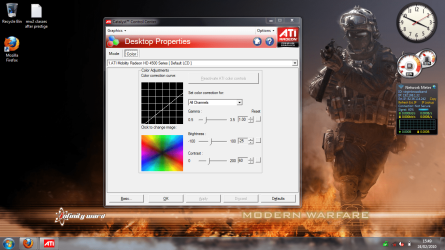
, i have put the brightness low so it dont burn my eyes for now, but i need help with what the Default brightness,gamma and contrast should be for an acer aspire 5935g in ati catalyst control...
i currently have it as gamma: 1.00
Brightness: 0.25
contrast: 60
any help apreiciated, these acer laptop screens are so bright.
i have added an attachtment.
Untitled.png
1.1 MB
· Views: 230
Computer Manufacturer/Model Number Acer Aspire 5935G OS Windows 7 Ultimate 32 Bit and 64 bit CPU intel core 2 duo Memory 3.00GB Graphics Card(s) Intel powersaving gpu, ATI RADEON HD 4570 Screen Resolution 15.6" HD LED LCD Hard Drives 320 GB
Best anyone can say for those settings is whatever is the most comfortable and looks best to you. No two monitors will look the same, and what someone else uses can and will in most cases be totally inappropriate for you.
You can make the adjustments using the settings in the CCC, or you can uses the controls built in to the monitor and run through Windows display calibration wizard,
http://www.sevenforums.com/tutorials/5823-display-color-calibration.html
Computer type PC/Desktop Computer Manufacturer/Model Number Me OS Win 7 Ultimate x64 CPU FX-8350 @ 4.6 GHz so far Motherboard Asus M5A97 EVO Memory ADATA XPG V1 Series Black 8GB DDR3 1600 Graphics Card(s) Sapphire R9 270x Dual-X Sound Card Xonar DGX w/ Corsair Vengence 1300 Monitor(s) Displays Acer S232HL Abid Screen Resolution 1920x1080 Hard Drives 120 GB OCZ Vertex 3 PSU Antec Earthwatts 650W Green Case Antec Three Hundred Cooling Cooler Master 212 EVO Keyboard Logitech G510 Mouse Logitech G500s Internet Speed 35000/3000
kk but i cant get it perfect for my eyes
Computer Manufacturer/Model Number Acer Aspire 5935G OS Windows 7 Ultimate 32 Bit and 64 bit CPU intel core 2 duo Memory 3.00GB Graphics Card(s) Intel powersaving gpu, ATI RADEON HD 4570 Screen Resolution 15.6" HD LED LCD Hard Drives 320 GB
The Contemplator, (1963-2013)
Guru
Have you used the keyboard shortcuts to adjust the brightness?
Computer type PC/Desktop Computer Manufacturer/Model Number Dwarf Dwf/11/2012 r09/2013 OS Windows 8.1 Pro RTM x64 CPU Intel Core-i5-3570K 4-core @ 3.4GHz (Ivy Bridge) (OC 4.4GHz) Motherboard ASRock Z77 Extreme4-M Memory 4 x 4GB DDR3-1600 Corsair Vengeance CMZ8GX3M2A1600C9B (16GB) Graphics Card(s) MSI GeForce GTX770 Gaming OC 2GB Sound Card Realtek High Definition on board solution (ALC 898) Monitor(s) Displays ViewSonic VA1912w Widescreen (VGA) Screen Resolution 1440x900 Hard Drives OCZ Agility 3 SSD 120GB SATA III x2 (RAID 0) PSU XFX Pro Series 850W Semi-Modular Case Gigabyte IF233 Cooling 1 x 120mm Front Inlet 1 x 120mm Rear Exhaust Keyboard Microsoft Comfort Curve Keyboard 3000 (USB) Mouse Microsoft Comfort Mouse 3000 for Business (USB) Internet Speed NetGear DG834Gv3 ADSL Modem/Router (Ethernet) ~4.0 Mb/s (O2) Antivirus Avast! 8.0.1497 Browser IE 11 Other Info Optical Drive: HL-DT-ST BD-RE BH10LS30 SATA Bluray
Computer Manufacturer/Model Number Acer Aspire 5935G OS Windows 7 Ultimate 32 Bit and 64 bit CPU intel core 2 duo Memory 3.00GB Graphics Card(s) Intel powersaving gpu, ATI RADEON HD 4570 Screen Resolution 15.6" HD LED LCD Hard Drives 320 GB
Then what do you need help with? If the screen is too bright, "Win key + X key" and lower the brightness.
Computer Manufacturer/Model Number Sony Vaio FZ21Z OS Windows 7 Ultimate x64 ®™ CPU Intel Core 2 Duo (2.2 GHz) Motherboard Sony (Intel Chipset) Memory 2x 2GB Corsair (667 MHz) Graphics Card(s) NVIDIA 8600M GS (256MB) Sound Card Sigmatel Monitor(s) Displays 15.4" TFT X-Black Screen Resolution 1280x800 Hard Drives Western Digital 300GB Scorpio Black (7200rpm) Mouse Logitech Anywhere MX Internet Speed Sky 5MB
Former Indy-Bostonian
Guru
VIP
Found something for you-
---------------------
Posted on Notebookreview forums:
ATI LCD color adjustment tips...
These are the settings i now use (gamma, brightness, contrast in that order):
Red: 1.00, 0, 100
Green: 1.10, 0, 80
Blue: 1.00, 5, 36
---------------------
hope that helps
Computer type Laptop Computer Manufacturer/Model Number ASUS G60-RBBX05 OS Win7 Home Premium 64x CPU Intel Core 2 Duo P7450 / 2.13 GHz (2.29 with Extreme Turbo) Memory 4 GB PC-6400 Hyundai (2X2) at 800Mhz Graphics Card(s) NVIDIA GeForce GTX 260M 1GB DDR3 VRAM Monitor(s) Displays 16" LED Backlit Screen Resolution 1366 x 768 on laptop 1600x1050 max res on 22" external mon Hard Drives OCZ Agility 3 60GB SSD / 320 GB - Serial ATA-150 - 7200 rpm PSU 6-cell Lithium ion { lasts 1.5 hours } Case ASUS G60 Laptop Keyboard Chicklet type back-lit (white light) keyboard Mouse Logitech G9 Laser Mouse 3200dpi and 1000 reports per minute Internet Speed Comcast 8.60mb/s up - 3.11mb/s down Antivirus MSE Browser Firefox Other Info General mid-budget gaming Comp. Low batterylife - High FrameRates - currently overheating problems :(
Found something for you-
---------------------
Posted on Notebookreview forums:
ATI LCD color adjustment tips...
These are the settings i now use (gamma, brightness, contrast in that order):
Red: 1.00, 0, 100
Green: 1.10, 0, 80
Blue: 1.00, 5, 36
---------------------
hope that helps
thanks mate
Computer Manufacturer/Model Number Acer Aspire 5935G OS Windows 7 Ultimate 32 Bit and 64 bit CPU intel core 2 duo Memory 3.00GB Graphics Card(s) Intel powersaving gpu, ATI RADEON HD 4570 Screen Resolution 15.6" HD LED LCD Hard Drives 320 GB
Former Indy-Bostonian
Guru
VIP
No problem I had issues with my laptop LCD as well, It was a little blue, wasn't too bright though I have mine set in the middle brightness-wise
Computer type Laptop Computer Manufacturer/Model Number ASUS G60-RBBX05 OS Win7 Home Premium 64x CPU Intel Core 2 Duo P7450 / 2.13 GHz (2.29 with Extreme Turbo) Memory 4 GB PC-6400 Hyundai (2X2) at 800Mhz Graphics Card(s) NVIDIA GeForce GTX 260M 1GB DDR3 VRAM Monitor(s) Displays 16" LED Backlit Screen Resolution 1366 x 768 on laptop 1600x1050 max res on 22" external mon Hard Drives OCZ Agility 3 60GB SSD / 320 GB - Serial ATA-150 - 7200 rpm PSU 6-cell Lithium ion { lasts 1.5 hours } Case ASUS G60 Laptop Keyboard Chicklet type back-lit (white light) keyboard Mouse Logitech G9 Laser Mouse 3200dpi and 1000 reports per minute Internet Speed Comcast 8.60mb/s up - 3.11mb/s down Antivirus MSE Browser Firefox Other Info General mid-budget gaming Comp. Low batterylife - High FrameRates - currently overheating problems :(
No problem I had issues with my laptop LCD as well, It was a little blue, wasn't too bright though I have mine set in the middle brightness-wise
ye mine just looks to grey but ill sort it
Computer Manufacturer/Model Number Acer Aspire 5935G OS Windows 7 Ultimate 32 Bit and 64 bit CPU intel core 2 duo Memory 3.00GB Graphics Card(s) Intel powersaving gpu, ATI RADEON HD 4570 Screen Resolution 15.6" HD LED LCD Hard Drives 320 GB
Former Indy-Bostonian
Guru
VIP
Another thing to look at is the Power Options to see if you are set for performance. This might change how your comp runs the lighting and greyness look. Mine looks real vibrant when it is in performance mode, but looks greyish when it is in Office mode (which for me is Battery life extension)
Computer type Laptop Computer Manufacturer/Model Number ASUS G60-RBBX05 OS Win7 Home Premium 64x CPU Intel Core 2 Duo P7450 / 2.13 GHz (2.29 with Extreme Turbo) Memory 4 GB PC-6400 Hyundai (2X2) at 800Mhz Graphics Card(s) NVIDIA GeForce GTX 260M 1GB DDR3 VRAM Monitor(s) Displays 16" LED Backlit Screen Resolution 1366 x 768 on laptop 1600x1050 max res on 22" external mon Hard Drives OCZ Agility 3 60GB SSD / 320 GB - Serial ATA-150 - 7200 rpm PSU 6-cell Lithium ion { lasts 1.5 hours } Case ASUS G60 Laptop Keyboard Chicklet type back-lit (white light) keyboard Mouse Logitech G9 Laser Mouse 3200dpi and 1000 reports per minute Internet Speed Comcast 8.60mb/s up - 3.11mb/s down Antivirus MSE Browser Firefox Other Info General mid-budget gaming Comp. Low batterylife - High FrameRates - currently overheating problems :(
i have mine in performance mode
Computer Manufacturer/Model Number Acer Aspire 5935G OS Windows 7 Ultimate 32 Bit and 64 bit CPU intel core 2 duo Memory 3.00GB Graphics Card(s) Intel powersaving gpu, ATI RADEON HD 4570 Screen Resolution 15.6" HD LED LCD Hard Drives 320 GB
Brightness, contrast ETC
Computer Manufacturer/Model Number Acer Aspire 5935G OS Windows 7 Ultimate 32 Bit and 64 bit CPU intel core 2 duo Memory 3.00GB Graphics Card(s) Intel powersaving gpu, ATI RADEON HD 4570 Screen Resolution 15.6" HD LED LCD Hard Drives 320 GB
I'm assuming that you are referring to settings in the graphics card control panel. It is a matter of taste, only you can decide that. Use the default, then experiment with others. You may need different settings depending on what you are currently doing, but that can often be done via monitor adjustments easier.
Computer Manufacturer/Model Number DIY OS W7x64 Pro, SuSe 12.1/** W7 x64 Pro, XP MCE CPU Phenom II 1090T w/Noctua NH-D14 /**4400+ X2 w/CM Hyper TX 3 Motherboard ASRock 890FX Deluxe 4/**A8N-SLI Memory 2 x 2GB Patriot PGS34g1600LLKA/**4x1GB Corsair VS Graphics Card(s) EVGA GTX460 SC/**EVGA 8800GTS Sound Card Asus Xonar D2X/**Xonar D1 Monitor(s) Displays Acer X233H, Dell E152FPc /**LG M237-WD Screen Resolution 1920x1080 & 1024x768/**1980x1080 Hard Drives WDC 2TB, 1.5TB, 1TB, 500GB,Seagate 500GB , Maxtor 80GB /**500GB Seagate & WDC 1TB Black PSU CM RS600 w/ APC BX1000G/**Antec 500 TP w/ APC BX1000 Case HAF922/**Antec 1040IIB Cooling 3x200mm, 1x140 and 1x120mm/**5x80mm fans Keyboard Logitech Media USB/**Saitek Eclipse Mouse Cordless Trackman Wheel/**Ditto Internet Speed 3.3Mbps Other Info SB 560 5.1 w/ Sennheiser RS140/**Creative T20 speakers, Dvico FusionHDTV7 Gold RT, Cisco E3000, HP 5510V AIO, Linksys E3000, Belkin F5U237 hub and **F5D8055 adapter
Computer Manufacturer/Model Number Acer Aspire 5935G OS Windows 7 Ultimate 32 Bit and 64 bit CPU intel core 2 duo Memory 3.00GB Graphics Card(s) Intel powersaving gpu, ATI RADEON HD 4570 Screen Resolution 15.6" HD LED LCD Hard Drives 320 GB
Use the default settings with the Graphics unless you have a GOOD , i mean excellent Graphics Driver
Computer Manufacturer/Model Number Microsoft OS Windows 7 and MAC Graphics Card(s) NVIDIA 9200 GT Sound Card NvIdiA
Use the default settings with the Graphics unless you have a GOOD , i mean excellent Graphics Driver
i have ati radeom hd 4570
Computer Manufacturer/Model Number Acer Aspire 5935G OS Windows 7 Ultimate 32 Bit and 64 bit CPU intel core 2 duo Memory 3.00GB Graphics Card(s) Intel powersaving gpu, ATI RADEON HD 4570 Screen Resolution 15.6" HD LED LCD Hard Drives 320 GB
From what I understand, that card is good, but ATI drivers sometimes leaves something to be desired. However, it still boils down to a matter of taste.
Computer Manufacturer/Model Number DIY OS W7x64 Pro, SuSe 12.1/** W7 x64 Pro, XP MCE CPU Phenom II 1090T w/Noctua NH-D14 /**4400+ X2 w/CM Hyper TX 3 Motherboard ASRock 890FX Deluxe 4/**A8N-SLI Memory 2 x 2GB Patriot PGS34g1600LLKA/**4x1GB Corsair VS Graphics Card(s) EVGA GTX460 SC/**EVGA 8800GTS Sound Card Asus Xonar D2X/**Xonar D1 Monitor(s) Displays Acer X233H, Dell E152FPc /**LG M237-WD Screen Resolution 1920x1080 & 1024x768/**1980x1080 Hard Drives WDC 2TB, 1.5TB, 1TB, 500GB,Seagate 500GB , Maxtor 80GB /**500GB Seagate & WDC 1TB Black PSU CM RS600 w/ APC BX1000G/**Antec 500 TP w/ APC BX1000 Case HAF922/**Antec 1040IIB Cooling 3x200mm, 1x140 and 1x120mm/**5x80mm fans Keyboard Logitech Media USB/**Saitek Eclipse Mouse Cordless Trackman Wheel/**Ditto Internet Speed 3.3Mbps Other Info SB 560 5.1 w/ Sennheiser RS140/**Creative T20 speakers, Dvico FusionHDTV7 Gold RT, Cisco E3000, HP 5510V AIO, Linksys E3000, Belkin F5U237 hub and **F5D8055 adapter
k i have a secondary card aswell intell core 2
Computer Manufacturer/Model Number Acer Aspire 5935G OS Windows 7 Ultimate 32 Bit and 64 bit CPU intel core 2 duo Memory 3.00GB Graphics Card(s) Intel powersaving gpu, ATI RADEON HD 4570 Screen Resolution 15.6" HD LED LCD Hard Drives 320 GB
Is that actually a card, or onboard graphics chip? The same would apply either way, regarding taste, but I suspect that you would get better performance with the ATI, if that is an onboard chip.
Computer Manufacturer/Model Number DIY OS W7x64 Pro, SuSe 12.1/** W7 x64 Pro, XP MCE CPU Phenom II 1090T w/Noctua NH-D14 /**4400+ X2 w/CM Hyper TX 3 Motherboard ASRock 890FX Deluxe 4/**A8N-SLI Memory 2 x 2GB Patriot PGS34g1600LLKA/**4x1GB Corsair VS Graphics Card(s) EVGA GTX460 SC/**EVGA 8800GTS Sound Card Asus Xonar D2X/**Xonar D1 Monitor(s) Displays Acer X233H, Dell E152FPc /**LG M237-WD Screen Resolution 1920x1080 & 1024x768/**1980x1080 Hard Drives WDC 2TB, 1.5TB, 1TB, 500GB,Seagate 500GB , Maxtor 80GB /**500GB Seagate & WDC 1TB Black PSU CM RS600 w/ APC BX1000G/**Antec 500 TP w/ APC BX1000 Case HAF922/**Antec 1040IIB Cooling 3x200mm, 1x140 and 1x120mm/**5x80mm fans Keyboard Logitech Media USB/**Saitek Eclipse Mouse Cordless Trackman Wheel/**Ditto Internet Speed 3.3Mbps Other Info SB 560 5.1 w/ Sennheiser RS140/**Creative T20 speakers, Dvico FusionHDTV7 Gold RT, Cisco E3000, HP 5510V AIO, Linksys E3000, Belkin F5U237 hub and **F5D8055 adapter


 and need some advice with my display brightness, i have an acer aspire 5935g and upgraded to windows 7, i upgraded to all new windows 7 drivers but the only downside was the display was sooooo bright
 , i have put the brightness low so it dont burn my eyes for now, but i need help with what the Default brightness,gamma and contrast should be for an acer aspire 5935g in ati catalyst control...