Need help, display brightness

ye i think its onboard
 

My Computer

Computer Manufacturer/Model Number
Acer Aspire 5935G
OS
Windows 7 Ultimate 32 Bit and 64 bit
CPU
intel core 2 duo
Memory
3.00GB
Graphics Card(s)
Intel powersaving gpu, ATI RADEON HD 4570
Screen Resolution
15.6" HD LED LCD
Hard Drives
320 GB
Thats why i said, its not mandatory that you will have good Graphics Card having all the features, there is something missing as per technical terms
 

My Computer

Computer Manufacturer/Model Number
Microsoft
OS
Windows 7 and MAC
Graphics Card(s)
NVIDIA 9200 GT
Sound Card
NvIdiA
Brightness issue again

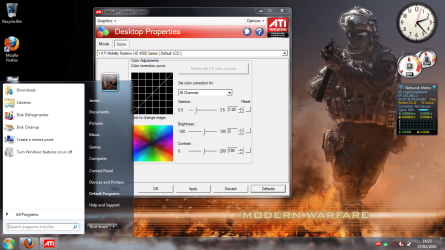
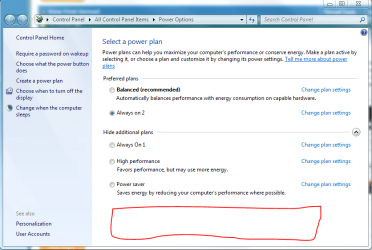
i have posted quit alot recently, but this is annoying me, my brightness and contrast is just to bright, i have turned it all the way down using keyboard shortcuts, i have used windows calibrater but that turn the white colors into yellow lol, i just need to know how to get it smooth i have treid everything but cant seem to get it right, ino its basicaly what suits my eyes but i realy cant get it any good. my notebook is an acer aspire 5935g, if that helps thanks
 

Attachments

  • Untitled8.png
    Untitled8.png
    252.5 KB · Views: 28
  • Untitled.jpg
    Untitled.jpg
    109.5 KB · Views: 26

My Computer

Computer Manufacturer/Model Number
Acer Aspire 5935G
OS
Windows 7 Ultimate 32 Bit and 64 bit
CPU
intel core 2 duo
Memory
3.00GB
Graphics Card(s)
Intel powersaving gpu, ATI RADEON HD 4570
Screen Resolution
15.6" HD LED LCD
Hard Drives
320 GB
Hello,

There should be an option in Power Option for the screen brightness. I do not have a laptop, so I don't have the setting, but this is where the slider will be on a notebook.

Capture.PNG
 

My Computer

Computer Manufacturer/Model Number
Custom
OS
Windows 7 Professional x64
CPU
Intel i7 2600K OC'd @ 4620 MHz
Motherboard
Asus P8Z68-V Pro
Memory
16GB GSkill Sniper 2133 Mhz (4x4GB)
Graphics Card(s)
EVGA GeForce GTX 480 SuperClocked+
Sound Card
Realtek High Definition Audio
Monitor(s) Displays
2x Acer S273HLbmii 27"
Screen Resolution
2 x 1920x1080
Hard Drives
64GB Crucial M4 SSD

Storage: Hitachi 1TB 5400RPM, Samsung 1.5TB 5400RPM
PSU
Corsair HW Series 750w (modular)
Case
Cooler Master HAF 932 Advanced Blue Edition
Cooling
CM Hyper 212+ CPU cooler, 3x 230mm + 1x 140mm case fans
Keyboard
Logitech MK320 (wireless)
Mouse
Logitech MK320 (wireless)
Internet Speed
30 Mb/s : 2 Mb/s

Attachments

  • Untitled.png
    Untitled.png
    5.5 KB · Views: 18

My Computer

Computer Manufacturer/Model Number
Acer Aspire 5935G
OS
Windows 7 Ultimate 32 Bit and 64 bit
CPU
intel core 2 duo
Memory
3.00GB
Graphics Card(s)
Intel powersaving gpu, ATI RADEON HD 4570
Screen Resolution
15.6" HD LED LCD
Hard Drives
320 GB
It is still too bright? There's not much more you can do, unfortunately.
 

My Computer

Computer Manufacturer/Model Number
Custom
OS
Windows 7 Professional x64
CPU
Intel i7 2600K OC'd @ 4620 MHz
Motherboard
Asus P8Z68-V Pro
Memory
16GB GSkill Sniper 2133 Mhz (4x4GB)
Graphics Card(s)
EVGA GeForce GTX 480 SuperClocked+
Sound Card
Realtek High Definition Audio
Monitor(s) Displays
2x Acer S273HLbmii 27"
Screen Resolution
2 x 1920x1080
Hard Drives
64GB Crucial M4 SSD

Storage: Hitachi 1TB 5400RPM, Samsung 1.5TB 5400RPM
PSU
Corsair HW Series 750w (modular)
Case
Cooler Master HAF 932 Advanced Blue Edition
Cooling
CM Hyper 212+ CPU cooler, 3x 230mm + 1x 140mm case fans
Keyboard
Logitech MK320 (wireless)
Mouse
Logitech MK320 (wireless)
Internet Speed
30 Mb/s : 2 Mb/s
dang well ok, and thanks for trying to help
 

My Computer

Computer Manufacturer/Model Number
Acer Aspire 5935G
OS
Windows 7 Ultimate 32 Bit and 64 bit
CPU
intel core 2 duo
Memory
3.00GB
Graphics Card(s)
Intel powersaving gpu, ATI RADEON HD 4570
Screen Resolution
15.6" HD LED LCD
Hard Drives
320 GB
Let me ask, does the slider work? Does it get brighter if you move it up?
 

My Computer

Computer Manufacturer/Model Number
Custom
OS
Windows 7 Professional x64
CPU
Intel i7 2600K OC'd @ 4620 MHz
Motherboard
Asus P8Z68-V Pro
Memory
16GB GSkill Sniper 2133 Mhz (4x4GB)
Graphics Card(s)
EVGA GeForce GTX 480 SuperClocked+
Sound Card
Realtek High Definition Audio
Monitor(s) Displays
2x Acer S273HLbmii 27"
Screen Resolution
2 x 1920x1080
Hard Drives
64GB Crucial M4 SSD

Storage: Hitachi 1TB 5400RPM, Samsung 1.5TB 5400RPM
PSU
Corsair HW Series 750w (modular)
Case
Cooler Master HAF 932 Advanced Blue Edition
Cooling
CM Hyper 212+ CPU cooler, 3x 230mm + 1x 140mm case fans
Keyboard
Logitech MK320 (wireless)
Mouse
Logitech MK320 (wireless)
Internet Speed
30 Mb/s : 2 Mb/s
Let me ask, does the slider work? Does it get brighter if you move it up?
yes it all works its just i think the way acer makes there screens there bright but it never happend untill i upgraded to win7 and installed latest drivers...


this is one of the brightest screens i have ever seen.
 

My Computer

Computer Manufacturer/Model Number
Acer Aspire 5935G
OS
Windows 7 Ultimate 32 Bit and 64 bit
CPU
intel core 2 duo
Memory
3.00GB
Graphics Card(s)
Intel powersaving gpu, ATI RADEON HD 4570
Screen Resolution
15.6" HD LED LCD
Hard Drives
320 GB
Back
Top