Need help dual booting xp and 7

jay15180

New member
Local time
7:57 AM
Messages
4
Hi, today I attempted to dual boot windows xp on my windows 7 laptop using a tutorial on this site however, when the setup finishes loading the drivers it sends me straight to a BSoD. The version of windows xp that I'm trying to load is professional with sp3. also I've heard that sata drives can cause problems during the install process mine is an esata should I be doing something special to make it work?
 

My Computer My Computer

OS
Windows 7
CPU
Intel i3
Memory
4gb DDR3
Graphics Card(s)
Intel GMA
Hard Drives
500gb eSATA
Hello jay15180, welcome to Seven Forums!


This would be the best, first thing to do.

If you can still get into Windows 7 will you please post a snip/screen-shot of the entire disk management drive map with a full description as to which drive/partition is which, so we can see what you have going.

In the Windows start menu right click computer and click manage, in the left pane of the "Computer Management" window that opens click disk management and post a snip of that.


Be sure to post back with any further questions you may have and to keep us informed.


How to Upload and Post a Screenshot and File in Seven Forums
 

My Computer My Computer

Computer Manufacturer/Model Number
* BFK Customs *
OS
W 7 64-bit Ultimate
CPU
Intel Q9550 Yorkfield
Motherboard
ASUS P5Q Pro
Memory
8GB Dominator 8500C5D
Graphics Card(s)
ATI : XFX 5870
Sound Card
Realtek HD Audio 7-1
Monitor(s) Displays
1x 47" LCD HDMI & 3x 26" LCD HDMI
Screen Resolution
1920x1080P & 1920x1200
Hard Drives
1x 80GB Intel X25-M G2 SSD : 1x 500GB & 1x 640GB WD Caviar Black(s)
PSU
Corsair 620HX
Case
Cooler Master RC-690
Cooling
Tuniq Tower 120, 2x 140mm and 3x 120mm case fans
Keyboard
Microsoft 500
Mouse
Razer Diamondback 3G
Internet Speed
14 Mb/s
Other Info
1x Koutech 3Gb/s SATA HDD Hot Swap Rack
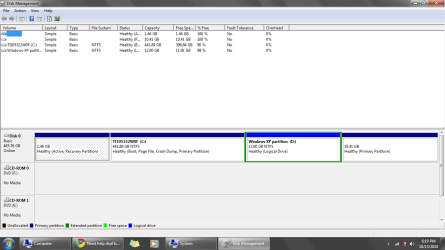
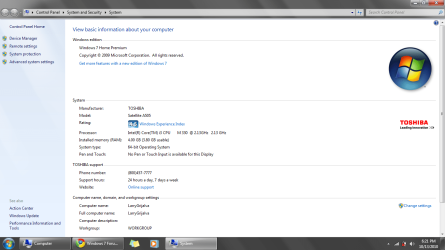
Ok I attached a printscreen of both the disk management screen and my system info which I thought might be helpful. with regards to the disk management screen C is my main partition where windows 7 is stored and D is a 12gb partition I made for windows xp. The partition to the left of C is my recovery and the last one is probably just space set aside by toshiba.
 

Attachments

  • dsk.png
    dsk.png
    31.4 KB · Views: 16
  • info.png
    info.png
    60.3 KB · Views: 7

My Computer My Computer

OS
Windows 7
CPU
Intel i3
Memory
4gb DDR3
Graphics Card(s)
Intel GMA
Hard Drives
500gb eSATA
Have a look at Option Four in this tutorial at the link below to see an out-line on how to convert the D:/logical partition to a primary partition, that may help and would be the first thing I would try.

Then I would do a wipe "secure erase" Option Three in the same tutorial, to the same D: partition so that you'll have a better space to try the install to.

Partition Wizard : Use the Bootable CD


If the XP install disk is one you burned yourself it may be a bad burn and needs to be done again, if so this would be the first thing to try.

Use the free ISO burner at the link below to burn another at a speed of now more than 4x and select to let the program to verify the disk before it finishes.

ImgBurn Free ISO Burner
 

My Computer My Computer

Computer Manufacturer/Model Number
* BFK Customs *
OS
W 7 64-bit Ultimate
CPU
Intel Q9550 Yorkfield
Motherboard
ASUS P5Q Pro
Memory
8GB Dominator 8500C5D
Graphics Card(s)
ATI : XFX 5870
Sound Card
Realtek HD Audio 7-1
Monitor(s) Displays
1x 47" LCD HDMI & 3x 26" LCD HDMI
Screen Resolution
1920x1080P & 1920x1200
Hard Drives
1x 80GB Intel X25-M G2 SSD : 1x 500GB & 1x 640GB WD Caviar Black(s)
PSU
Corsair 620HX
Case
Cooler Master RC-690
Cooling
Tuniq Tower 120, 2x 140mm and 3x 120mm case fans
Keyboard
Microsoft 500
Mouse
Razer Diamondback 3G
Internet Speed
14 Mb/s
Other Info
1x Koutech 3Gb/s SATA HDD Hot Swap Rack
After converting to Primary and wiping the partition with PW CD, use the XP CD to create and format your partition. The partition table is slightly different with XP.
 
Hey guys, I tried all the things you told me to try but none of them worked, however I did manage to get the install working. I found out that the problem was that winxp does not include drivers for sata hdd's which most modern computers use. Then I found out that the only way to add the drivers before the install was using a floppy disk which no modern computers use. SO I added the drivers to the install disk so that they would be be loaded along with the other drivers before the install.
 

My Computer My Computer

OS
Windows 7
CPU
Intel i3
Memory
4gb DDR3
Graphics Card(s)
Intel GMA
Hard Drives
500gb eSATA
Good to see you found a solution and thanks for the update.
 

My Computer My Computer

Computer Manufacturer/Model Number
* BFK Customs *
OS
W 7 64-bit Ultimate
CPU
Intel Q9550 Yorkfield
Motherboard
ASUS P5Q Pro
Memory
8GB Dominator 8500C5D
Graphics Card(s)
ATI : XFX 5870
Sound Card
Realtek HD Audio 7-1
Monitor(s) Displays
1x 47" LCD HDMI & 3x 26" LCD HDMI
Screen Resolution
1920x1080P & 1920x1200
Hard Drives
1x 80GB Intel X25-M G2 SSD : 1x 500GB & 1x 640GB WD Caviar Black(s)
PSU
Corsair 620HX
Case
Cooler Master RC-690
Cooling
Tuniq Tower 120, 2x 140mm and 3x 120mm case fans
Keyboard
Microsoft 500
Mouse
Razer Diamondback 3G
Internet Speed
14 Mb/s
Other Info
1x Koutech 3Gb/s SATA HDD Hot Swap Rack
Hi Jay -

Congrats on figuring that out for yourself and learning a lot with the slipstreaming operation! That is advanced stuff. :geek:

Was waiting to hear back from you whether converting to Logical worked before laying that on you because it scares a lot of XP dual booters off. But nowadays almost all SATA drivers are missing from XP CD so it should be one of the first steps given from now on.
 
Back
Top