Need help formatting a drive for W7

futurejp

New member
Local time
2:08 AM
Messages
8
Hi,

I'm currently dual-booting Vista and 7, and I want to get rid of Vista, but I'd like a couple people to just confirm for me that I'd be doing it correctly because I don't want to mess up my MBR or anything like that.

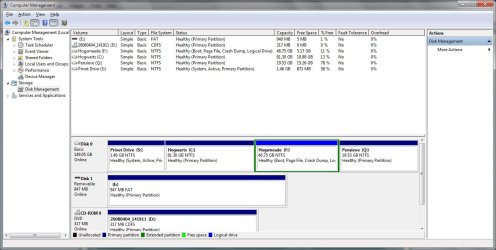
I currently have Vista on my C drive and 7 on my F drive. If I go to Computer Management and then Disk Management, this is what I see:

First, because I have a ThinkPad, I have Q and S drives. But I believe they're irrelevant to this question.

My C drive, with Vista, says it's an NTFS drive, "Healthy (Primary Partition)".

My F drive, with 7, says it's an NTFS drive, "Healthy (Boot, Page File, Crash Dump, Logical Drive)".

If I were to just flat-out right click on the C drive with Vista and click format, and then restart, would I be screwed? Or would it load 7 because it would be my only OS? And if this would be a problem, how should I go about removing Vista?

Thanks
 

My Computer

OS
XP/7
Hello FutureJP,

Since it shows Windows 7 as your boot drive, you should be ok to boot into Windows 7 and format the Vista drive. If for some reason Windows 7 will not boot afterwards, then you can run a startup repair with the Windows 7 installation DVD to fix it.
 

My Computer

Computer type
PC/Desktop
Computer Manufacturer/Model Number
Self built custom
OS
64-bit Windows 11 Pro for Workstations
CPU
Intel i7-8700K OC'd to 5 GHz
Motherboard
ASUS ROG Maximus XI Formula Z390
Memory
64 GB (4x16GB) G.SKILL TridentZ RGB DDR4 3600 MHz
Graphics Card(s)
ASUS ROG-STRIX-GTX1080TI-O11G-GAMING
Sound Card
Integrated
Monitor(s) Displays
2 x Samsung Odyssey G7 27"
Screen Resolution
2560x1440
Hard Drives
1TB Samsung 990 PRO M.2,
4TB Samsung 990 PRO PRO M.2,
TerraMaster F8 SSD Plus NAS
PSU
Seasonic Prime Titanium 850W
Case
Thermaltake Core P3
Cooling
Corsair Hydro H115i
Keyboard
Logitech wireless K800
Mouse
Logitech MX Master 4
Internet Speed
2 Gb/s Download and 100 Mb/s Upload
Antivirus
Malwarebyte Anti-Malware Premium
Browser
Google Chrome
Other Info
Logitech Z625 speaker system,
Logitech BRIO 4K Pro webcam,
HP Color LaserJet Pro MFP M477fdn,
APC SMART-UPS RT 1000 XL - SURT1000XLI,
Galaxy S23 Plus phone
Hi futurejp,

Are they separate drives or partitions?

Which is listed as System, Active ?
 

My Computers

System One System Two

  • Computer type
    PC/Desktop
    OS
    7 X64
    CPU
    i5 8400
    Motherboard
    gigabyte b365m ds3h
    Memory
    2x8gb 3200mhz
    Hard Drives
    various
    PSU
    pure power 11 400w cm
    Case
    Coolermaster
    Cooling
    cryorig m9i
  • Computer type
    PC/Desktop
    OS
    7x64
    CPU
    g5400
    Motherboard
    ga b365m ds3h
    Memory
    8gb ddr4 2400
    PSU
    xfx pro 450w
The only issue I can see would possibly be having a remnant in the boot loader for the Vista install that would lead to dead space. If that does happen just run EasyBCD or check around online for the right command lines to remove it :)
 

My Computer

Computer Manufacturer/Model Number
Self built
OS
Windows 7 Professional x64 (MSDN)
CPU
AMD 955be @ 4.4ghz
Motherboard
DFI DK 790FXB-M3H5 (AM3)
Memory
4(2x2)GB DDR3 Crucial Ballistix @ 1333MHZ 6-6-6-20
Graphics Card(s)
eVGA 8800GT SSC
Sound Card
(Integrated for now)
Monitor(s) Displays
ASUS VH236H Black 23"
Screen Resolution
1920x1080@60hz
Hard Drives
1xSeagate 640GB
2xSeagate 80GB
PSU
750W CORSAIR CMPSU-750TX
Case
CM650
Cooling
CPU@XIGMATEK HDT-SD964 92mm Rifle, GPU@AC Accelero S1
Keyboard
Microsoft Multimedia
Mouse
Logitech G5
Internet Speed
6.4/.256 rated, 50+/20+ tested
Other Info
The real OC starts once my new HS shows up.
Hi guys,

They're partitions of the same drive. I originally had XP and wanted to dual-boot with 7, but I had a bad experience partitioning. So I switched to Vista, which I had disks for, and once in Vista, I used the built-in partition tool to create the partition I told you about and then installed 7 on it.

I hardly ever go into Vista for anything right now anyway. Right now, as I'm sure you know, when I boot up my machine it asksme if I want to load 7 or Vista. I just go up/down to the one I want and hit enter. So surely that's what Snives is talking about. Is that a fix I can do right now within 7 beforehand? I can just edit the boot properties somewhere to not even give me the option of going into Vista, and then just format the Vista drive.

I guess my concerns were because I don't know the difference between a standard partition and a Logical Drive, so I want to make sure that if all my computer has is 7 on a logical drive, it will still run fine.

Also, a question about combining partitions. My linear partition breakdown looks like this:

S: 1.5GB - C: (Vista) 81.5GB - F: (W7) 47GB - Q: 20GB

If I format C: into an empty NTFS drive, can I extend my F drive into all that newly unallocated 81.5GB behind it?
 

My Computer

OS
XP/7
Which partition is listed as "System " in Disk management?

Sounds like it is the Vista partition if so, Disk management won't let you delete it.

It is possible to make the 7 partition into the "system" partition - first delete Vista with bootable partion manager, copy 7 partition into new unallocated space, run startup repair to make new 7 partition "system".

It's a lot of steps.

You may prefer to reinstall 7 clean - during the install select Drive Options (advanced) - delete the existing Vista and 7 partitions , and create a new Primary of your chosen size to install 7 onto.
 

My Computers

System One System Two

  • Computer type
    PC/Desktop
    OS
    7 X64
    CPU
    i5 8400
    Motherboard
    gigabyte b365m ds3h
    Memory
    2x8gb 3200mhz
    Hard Drives
    various
    PSU
    pure power 11 400w cm
    Case
    Coolermaster
    Cooling
    cryorig m9i
  • Computer type
    PC/Desktop
    OS
    7x64
    CPU
    g5400
    Motherboard
    ga b365m ds3h
    Memory
    8gb ddr4 2400
    PSU
    xfx pro 450w
If S is the system partition - you can delete Vista and remove it from boot menu - go to msconfig boot tab and delete it there.

Unfortunately, you can't extend a logical drive to incorporate a Primary partition, or merge them.

Also, you can't mark a logical drive Active - therefore it can't be the "System" partition - tho. it can be a boot partition.

Would help if you post a screenshot of Disk Management :

http://www.sevenforums.com/tutorials/9733-how-post-screenshot-seven-forums.html
 

My Computers

System One System Two

  • Computer type
    PC/Desktop
    OS
    7 X64
    CPU
    i5 8400
    Motherboard
    gigabyte b365m ds3h
    Memory
    2x8gb 3200mhz
    Hard Drives
    various
    PSU
    pure power 11 400w cm
    Case
    Coolermaster
    Cooling
    cryorig m9i
  • Computer type
    PC/Desktop
    OS
    7x64
    CPU
    g5400
    Motherboard
    ga b365m ds3h
    Memory
    8gb ddr4 2400
    PSU
    xfx pro 450w
Here ya go:
 

Attachments

  • DM.jpg
    DM.jpg
    104.9 KB · Views: 203

My Computer

OS
XP/7
There are a number of ways to do it - assuming you don't want to reinstall 7.

I would delete C, then use the "copy partition" on Paragon hard Disk Manager to copy F into the newly created unallocated space.

You would then be able to boot into either the new C or F.

Make the new C the default in msconfig under the Boot tab, and delete the other entries.

Then delete F logical drive and the extended partition containing it.

Expand the new C to include the unallocated space that was F.
 

My Computers

System One System Two

  • Computer type
    PC/Desktop
    OS
    7 X64
    CPU
    i5 8400
    Motherboard
    gigabyte b365m ds3h
    Memory
    2x8gb 3200mhz
    Hard Drives
    various
    PSU
    pure power 11 400w cm
    Case
    Coolermaster
    Cooling
    cryorig m9i
  • Computer type
    PC/Desktop
    OS
    7x64
    CPU
    g5400
    Motherboard
    ga b365m ds3h
    Memory
    8gb ddr4 2400
    PSU
    xfx pro 450w
By 'delete C,' you just mean formatting the space into a now blank partition, correct? Also, Paragon HD Manager has limited trial functionality, so will it do what I want it to do?
 

My Computer

OS
XP/7
I meant delete it - to create unallocated space.

If you are going to copy the 7 partition into it - it needs to be unallocated.

Not sure the Paragon trial version is going to do the job.

Are you using 32 or 64 bit o/s ?
 

My Computers

System One System Two

  • Computer type
    PC/Desktop
    OS
    7 X64
    CPU
    i5 8400
    Motherboard
    gigabyte b365m ds3h
    Memory
    2x8gb 3200mhz
    Hard Drives
    various
    PSU
    pure power 11 400w cm
    Case
    Coolermaster
    Cooling
    cryorig m9i
  • Computer type
    PC/Desktop
    OS
    7x64
    CPU
    g5400
    Motherboard
    ga b365m ds3h
    Memory
    8gb ddr4 2400
    PSU
    xfx pro 450w
32. I mean I could go the re-install 7 route if I had to, but I'd obviously prefer not to.
 

My Computer

OS
XP/7
Back
Top