Need help: game, music, etc sounds going through microphone.

lolkek

New member
Local time
7:57 PM
Messages
8
Hello.

I am having this problem when i play a game or listen to music on my PC and talk on ventrilo or skype with someone else they hear both my voice and all the sounds generated by my PC.

For example i play a game online or listen to music and my friends on skype or ventrilo can hear the sound effects or the music coming from the game as well.

I am using the latest Realtek HD driver and Windows 7.
 
Last edited:

My Computer My Computer

At a glance

Windows 7
OS
Windows 7

My Computer My Computer

At a glance

Windows 7 x64Intel i7 2600kG.skill Ripjaw 16gigs @ 1866Nvidia gtx580 (evga)
Computer Manufacturer/Model Number
Insane hobo technologies. ;-)
OS
Windows 7 x64
CPU
Intel i7 2600k
Motherboard
Asrock z68 extreme 4 gen 3
Memory
G.skill Ripjaw 16gigs @ 1866
Graphics Card(s)
Nvidia gtx580 (evga)
Sound Card
Integrated HD audio + hdmi
Monitor(s) Displays
24" ASUS widescreen + 42" insignia
Screen Resolution
1080p (1920x1080)
Hard Drives
128 Samsung 830
256 Samsung 840
3 x 1tb storage drive (various)
1 western digital 1tb (eSATA)
1 Seagate 1tb (eSATA)
PSU
1 kilowatt SLI/Crossfire rated Silverstone modular
Case
NZXT Phantom + additional 220 fan
Cooling
Zalmann
Keyboard
Microsoft wireless 3000 (v2)
Mouse
MS - wireless 5000 (bluetrack)
Internet Speed
depends on if you ask me or my provider.
Other Info
The above information is provided as is, and the author assumes no responsibility for issues it may cause with your sanity or fanboyism.
I will provide any needed information just to get rid of this mess, i've been searching for a solution on the internet for the past 3 hours without any results.

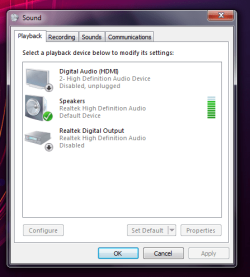
The logic thing it would be for this to happen when stereomix is enabled but as you can see its disabled and the microphone still outputs all the sounds active on the PC.

playback.pngrec.png
 

My Computer My Computer

At a glance

Windows 7
OS
Windows 7
well I see you've already disabled all the extra ones. So that's it for that possible conflict there.

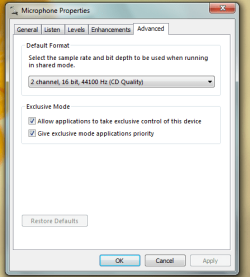
do your mic properties match these?
 

Attachments

  • Untitled.png
    Untitled.png
    13.6 KB · Views: 46

My Computer My Computer

At a glance

Windows 7 x64Intel i7 2600kG.skill Ripjaw 16gigs @ 1866Nvidia gtx580 (evga)
Computer Manufacturer/Model Number
Insane hobo technologies. ;-)
OS
Windows 7 x64
CPU
Intel i7 2600k
Motherboard
Asrock z68 extreme 4 gen 3
Memory
G.skill Ripjaw 16gigs @ 1866
Graphics Card(s)
Nvidia gtx580 (evga)
Sound Card
Integrated HD audio + hdmi
Monitor(s) Displays
24" ASUS widescreen + 42" insignia
Screen Resolution
1080p (1920x1080)
Hard Drives
128 Samsung 830
256 Samsung 840
3 x 1tb storage drive (various)
1 western digital 1tb (eSATA)
1 Seagate 1tb (eSATA)
PSU
1 kilowatt SLI/Crossfire rated Silverstone modular
Case
NZXT Phantom + additional 220 fan
Cooling
Zalmann
Keyboard
Microsoft wireless 3000 (v2)
Mouse
MS - wireless 5000 (bluetrack)
Internet Speed
depends on if you ask me or my provider.
Other Info
The above information is provided as is, and the author assumes no responsibility for issues it may cause with your sanity or fanboyism.
My mic settings.

Also, i have tried using 3 different headphones(with mic) and different voicechat software Skype , Ventrilo , Yahoo messenger in order to test this problem , also i have tried plugging in the headphones on the front panel, the problem persists on all setups.

mic.png
 

My Computer My Computer

At a glance

Windows 7
OS
Windows 7
yeah we're going to have to look at the drivers for your audio.
Could you give me a more detailed system spec?
If it's bought just a make and model
If it was home built I'll at least need to know the motherboard.

Since it's realtek it's possible you're running the vista drivers, happens all the time.
 

My Computer My Computer

At a glance

Windows 7 x64Intel i7 2600kG.skill Ripjaw 16gigs @ 1866Nvidia gtx580 (evga)
Computer Manufacturer/Model Number
Insane hobo technologies. ;-)
OS
Windows 7 x64
CPU
Intel i7 2600k
Motherboard
Asrock z68 extreme 4 gen 3
Memory
G.skill Ripjaw 16gigs @ 1866
Graphics Card(s)
Nvidia gtx580 (evga)
Sound Card
Integrated HD audio + hdmi
Monitor(s) Displays
24" ASUS widescreen + 42" insignia
Screen Resolution
1080p (1920x1080)
Hard Drives
128 Samsung 830
256 Samsung 840
3 x 1tb storage drive (various)
1 western digital 1tb (eSATA)
1 Seagate 1tb (eSATA)
PSU
1 kilowatt SLI/Crossfire rated Silverstone modular
Case
NZXT Phantom + additional 220 fan
Cooling
Zalmann
Keyboard
Microsoft wireless 3000 (v2)
Mouse
MS - wireless 5000 (bluetrack)
Internet Speed
depends on if you ask me or my provider.
Other Info
The above information is provided as is, and the author assumes no responsibility for issues it may cause with your sanity or fanboyism.
Home built system.

Windows 7 x64

CPU: Intel Core2Duo E6600
Motherboard: Gigabyte GA-965P-DS3
RAM : 4GB Corsair
Videocard: Sapphire Radeon HD 5770

all drivers are up to date.

Soundcard driver Realtek HD 2.62 Win7 version.


My Computer My Computer

At a glance

Windows 7
OS
Windows 7
oh yeah for use in gaming this sounds odd but you actually want to turn off 'listen to this device' in the mic settings.
 

My Computer My Computer

At a glance

Windows 7 x64Intel i7 2600kG.skill Ripjaw 16gigs @ 1866Nvidia gtx580 (evga)
Computer Manufacturer/Model Number
Insane hobo technologies. ;-)
OS
Windows 7 x64
CPU
Intel i7 2600k
Motherboard
Asrock z68 extreme 4 gen 3
Memory
G.skill Ripjaw 16gigs @ 1866
Graphics Card(s)
Nvidia gtx580 (evga)
Sound Card
Integrated HD audio + hdmi
Monitor(s) Displays
24" ASUS widescreen + 42" insignia
Screen Resolution
1080p (1920x1080)
Hard Drives
128 Samsung 830
256 Samsung 840
3 x 1tb storage drive (various)
1 western digital 1tb (eSATA)
1 Seagate 1tb (eSATA)
PSU
1 kilowatt SLI/Crossfire rated Silverstone modular
Case
NZXT Phantom + additional 220 fan
Cooling
Zalmann
Keyboard
Microsoft wireless 3000 (v2)
Mouse
MS - wireless 5000 (bluetrack)
Internet Speed
depends on if you ask me or my provider.
Other Info
The above information is provided as is, and the author assumes no responsibility for issues it may cause with your sanity or fanboyism.
Its off, problem still happening.
 

My Computer My Computer

At a glance

Windows 7
OS
Windows 7
Well that basically covers the brief list of things I know to cause this problem.

The only other thing that comes to mind is to let the system re-register the device.

That just involves uninstalling the audio device then rebooting and letting the system auto detect it again.

Also if that audio involves a tray panel you can try removing it from startup using msconfig. (all those effects and settings those little panels have cause more problems than they are worth)

That's sadly about all I have left on this one. If that doesn't work it could possibly be a codec problem.
If you've installed multiple codec packs on the machine it's possible there is a conflict there.
Seems unlikely though.
 

My Computer My Computer

At a glance

Windows 7 x64Intel i7 2600kG.skill Ripjaw 16gigs @ 1866Nvidia gtx580 (evga)
Computer Manufacturer/Model Number
Insane hobo technologies. ;-)
OS
Windows 7 x64
CPU
Intel i7 2600k
Motherboard
Asrock z68 extreme 4 gen 3
Memory
G.skill Ripjaw 16gigs @ 1866
Graphics Card(s)
Nvidia gtx580 (evga)
Sound Card
Integrated HD audio + hdmi
Monitor(s) Displays
24" ASUS widescreen + 42" insignia
Screen Resolution
1080p (1920x1080)
Hard Drives
128 Samsung 830
256 Samsung 840
3 x 1tb storage drive (various)
1 western digital 1tb (eSATA)
1 Seagate 1tb (eSATA)
PSU
1 kilowatt SLI/Crossfire rated Silverstone modular
Case
NZXT Phantom + additional 220 fan
Cooling
Zalmann
Keyboard
Microsoft wireless 3000 (v2)
Mouse
MS - wireless 5000 (bluetrack)
Internet Speed
depends on if you ask me or my provider.
Other Info
The above information is provided as is, and the author assumes no responsibility for issues it may cause with your sanity or fanboyism.
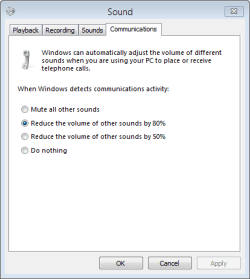
Right-click the speaker icon and select Playback devices or Recording devices or Sounds (it doesn't matter which). Click on the Communications tab. What does yours show?

Capture.png

Try setting the option to Mute all other sounds to see if that makes any difference. Don't forget to click OK to apply any changes.
 

My Computer My Computer

At a glance

Windows 8.1 Pro RTM x64Intel Core-i5-3570K 4-core @ 3.4GHz (Ivy Brid...4 x 4GB DDR3-1600 Corsair Vengeance CMZ8GX3M2...MSI GeForce GTX770 Gaming OC 2GB
Computer type
PC/Desktop
Computer Manufacturer/Model Number
Dwarf Dwf/11/2012 r09/2013
OS
Windows 8.1 Pro RTM x64
CPU
Intel Core-i5-3570K 4-core @ 3.4GHz (Ivy Bridge) (OC 4.4GHz)
Motherboard
ASRock Z77 Extreme4-M
Memory
4 x 4GB DDR3-1600 Corsair Vengeance CMZ8GX3M2A1600C9B (16GB)
Graphics Card(s)
MSI GeForce GTX770 Gaming OC 2GB
Sound Card
Realtek High Definition on board solution (ALC 898)
Monitor(s) Displays
ViewSonic VA1912w Widescreen (VGA)
Screen Resolution
1440x900
Hard Drives
OCZ Agility 3 SSD 120GB SATA III x2 (RAID 0)
Samsung HD501LJ 500GB SATA II x2
Hitachi HDS721010CLA332 1TB SATA II
Iomega 1.5TB Ext USB 2.0
WD 2.0TB Ext USB 3.0
PSU
XFX Pro Series 850W Semi-Modular
Case
Gigabyte IF233
Cooling
1 x 120mm Front Inlet 1 x 120mm Rear Exhaust
Keyboard
Microsoft Comfort Curve Keyboard 3000 (USB)
Mouse
Microsoft Comfort Mouse 3000 for Business (USB)
Internet Speed
NetGear DG834Gv3 ADSL Modem/Router (Ethernet) ~4.0 Mb/s (O2)
Antivirus
Avast! 8.0.1497
Browser
IE 11
Other Info
Optical Drive: HL-DT-ST BD-RE BH10LS30 SATA Bluray
Lexmark S305 Printer/Scanner/Copier (USB)
WEI Score: 8.1/8.1/8.5/8.5/8.25
Asus Eee PC 1011PX Netbook (Windows 7 x86 Starter)
Tried all 4 options and the problem still persists.

Its like my sound output goes directly into input, the other people on skype / ventrilo can hear perfectly what music i am playing in winamp / media player or any other application. I dont have any codecs installed.

Ive tried uninstalling the realtek drivers and removing all registry entries of realtek and using the default windows drivers, the problem still persists. Also re-installing the latest realtek drivers, problem still there.
 

My Computer My Computer

At a glance

Windows 7
OS
Windows 7
Experiencing the same issue, would be nice to get some help.
 

My Computer My Computer

At a glance

Win7 Ultimate x64Intel Core i7 2600K 3,4GHzCorsair 8GB (2x4096MB) CL9 1600Mhz XMS3GK PCIe EVGA GF GTX 670 FTW
OS
Win7 Ultimate x64
CPU
Intel Core i7 2600K 3,4GHz
Motherboard
Asus P8Z68-V Pro
Memory
Corsair 8GB (2x4096MB) CL9 1600Mhz XMS3
Graphics Card(s)
GK PCIe EVGA GF GTX 670 FTW
Monitor(s) Displays
Philips PHI32PFL3614
Screen Resolution
1920 x 1080
Hard Drives
Corsair SSD Force 3 Series 120GB
1TB Western Digital Caviar Black
PSU
XFX XXX Edition 750W
Case
Corsair Graphite 600T Svart
Cooling
Arctic Cooling Freezer 7 Pro rev.2
Internet Speed
100MB
Does it make any difference if you mute your speakers? What I am thinking is if you are still listening to your music and other sounds from your PC whilst trying to communicate on Ventrillo/Skype, then the microphone is picking up your voice (as it should), but also the audio output from your speakers.
 

My Computer My Computer

At a glance

Windows 8.1 Pro RTM x64Intel Core-i5-3570K 4-core @ 3.4GHz (Ivy Brid...4 x 4GB DDR3-1600 Corsair Vengeance CMZ8GX3M2...MSI GeForce GTX770 Gaming OC 2GB
Computer type
PC/Desktop
Computer Manufacturer/Model Number
Dwarf Dwf/11/2012 r09/2013
OS
Windows 8.1 Pro RTM x64
CPU
Intel Core-i5-3570K 4-core @ 3.4GHz (Ivy Bridge) (OC 4.4GHz)
Motherboard
ASRock Z77 Extreme4-M
Memory
4 x 4GB DDR3-1600 Corsair Vengeance CMZ8GX3M2A1600C9B (16GB)
Graphics Card(s)
MSI GeForce GTX770 Gaming OC 2GB
Sound Card
Realtek High Definition on board solution (ALC 898)
Monitor(s) Displays
ViewSonic VA1912w Widescreen (VGA)
Screen Resolution
1440x900
Hard Drives
OCZ Agility 3 SSD 120GB SATA III x2 (RAID 0)
Samsung HD501LJ 500GB SATA II x2
Hitachi HDS721010CLA332 1TB SATA II
Iomega 1.5TB Ext USB 2.0
WD 2.0TB Ext USB 3.0
PSU
XFX Pro Series 850W Semi-Modular
Case
Gigabyte IF233
Cooling
1 x 120mm Front Inlet 1 x 120mm Rear Exhaust
Keyboard
Microsoft Comfort Curve Keyboard 3000 (USB)
Mouse
Microsoft Comfort Mouse 3000 for Business (USB)
Internet Speed
NetGear DG834Gv3 ADSL Modem/Router (Ethernet) ~4.0 Mb/s (O2)
Antivirus
Avast! 8.0.1497
Browser
IE 11
Other Info
Optical Drive: HL-DT-ST BD-RE BH10LS30 SATA Bluray
Lexmark S305 Printer/Scanner/Copier (USB)
WEI Score: 8.1/8.1/8.5/8.5/8.25
Asus Eee PC 1011PX Netbook (Windows 7 x86 Starter)
The speakers are unplugged , they can still hear everything.
 

My Computer My Computer

At a glance

Windows 7
OS
Windows 7
I know this post is old, but I am having the same problem, and have tried everything the original poster did. Does anyone know of a solution? My Realtek HD driver is from 12/16/11. Thanks for any help.

(When I had this problem in previous versions of Windows, I could open my volume control, select my mic and check a Mute box below the slider, and it would stop sending out whatever I was listening to, and just broadcast my speaking. I cannot find where/if this is an option in Windows 7)
 

My Computer My Computer

At a glance

Windows 7 Home Premium 64-bit
OS
Windows 7 Home Premium 64-bit
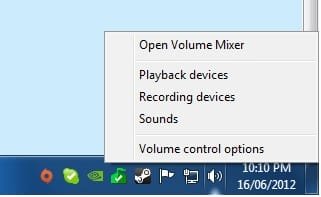
Now I was having this problem, just then i accidentally opened the volume control options and discovered that 1 of the boxes that was ticked said "All devices currently playing sound" un-tick this it should work then.
 

Attachments

  • Volume Control options.jpg
    Volume Control options.jpg
    8.7 KB · Views: 398
  • Volume Control options box.png
    Volume Control options box.png
    15.6 KB · Views: 24

My Computer My Computer

At a glance

Windows 7 Pro 64 bit
OS
Windows 7 Pro 64 bit
Back
Top