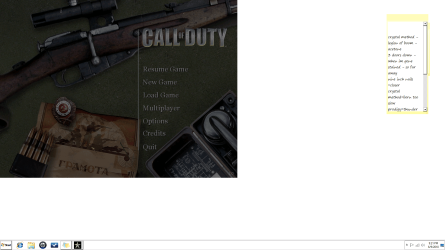
need help games not fitting screen

VikingEric

New member
Local time
7:00 PM
Messages
6
Ok so i installed a bunch of older first person shooters (IE) call of duty and medal of honor, they all installed fine and played just fine then one day some of them started not going to full screen i didnt change anything and my other games go full screen just fine im so lost tried updating drivers and reinstalling nothing works ive included a screenshot of what my games do to assist in the discription.

thanks to anyone who can help

eric
 
Last edited:

My Computer

Computer Manufacturer/Model Number
hp
OS
windows 7 64 premium
CPU
amd phenom II x4 processor 2.80 ghz
Memory
8 gig
Graphics Card(s)
ati radeon hd 4350
Sound Card
ati hd audio device
Monitor(s) Displays
acer 22" h233h
ok here are some more screen shots
 

Attachments

  • Untitled2.png
    Untitled2.png
    454.9 KB · Views: 21
  • Untitled3.png
    Untitled3.png
    326.2 KB · Views: 14

My Computer

Computer Manufacturer/Model Number
hp
OS
windows 7 64 premium
CPU
amd phenom II x4 processor 2.80 ghz
Memory
8 gig
Graphics Card(s)
ati radeon hd 4350
Sound Card
ati hd audio device
Monitor(s) Displays
acer 22" h233h
ok here are some more screen shots

can you provide about your resolution you're using?
try to change your resolution of graphics card lower. and restart your computer than try the game.
 

My Computer

Computer Manufacturer/Model Number
built up
OS
windows 7
CPU
Phenom II AMD Dragon 3.5Ghz
Memory
DDR3 4GB
Graphics Card(s)
ATI Radeon 512Mb
Monitor(s) Displays
HP L1506
Screen Resolution
1152 x 864
Hard Drives
WDC 1 TB SATA-II Green Power
Keyboard
HP wireless keyboard
Mouse
HP Optic
Internet Speed
1GB
current res is 1920x1080 ive tried ccc and changed it four different times but nothing fits screen right and as i said they all worked fine for awhile then stopped nothing was changed ive run norton no virus could be doing it i dont think unless norton doesnt have the definition
 

My Computer

Computer Manufacturer/Model Number
hp
OS
windows 7 64 premium
CPU
amd phenom II x4 processor 2.80 ghz
Memory
8 gig
Graphics Card(s)
ati radeon hd 4350
Sound Card
ati hd audio device
Monitor(s) Displays
acer 22" h233h
did you make sure the option of your game is full screen??
 

My Computer

Computer Manufacturer/Model Number
built up
OS
windows 7
CPU
Phenom II AMD Dragon 3.5Ghz
Memory
DDR3 4GB
Graphics Card(s)
ATI Radeon 512Mb
Monitor(s) Displays
HP L1506
Screen Resolution
1152 x 864
Hard Drives
WDC 1 TB SATA-II Green Power
Keyboard
HP wireless keyboard
Mouse
HP Optic
Internet Speed
1GB
yeah thanks, tried switching it from that and back nothing works
 

My Computer

Computer Manufacturer/Model Number
hp
OS
windows 7 64 premium
CPU
amd phenom II x4 processor 2.80 ghz
Memory
8 gig
Graphics Card(s)
ati radeon hd 4350
Sound Card
ati hd audio device
Monitor(s) Displays
acer 22" h233h

My Computer

Computer Manufacturer/Model Number
built up
OS
windows 7
CPU
Phenom II AMD Dragon 3.5Ghz
Memory
DDR3 4GB
Graphics Card(s)
ATI Radeon 512Mb
Monitor(s) Displays
HP L1506
Screen Resolution
1152 x 864
Hard Drives
WDC 1 TB SATA-II Green Power
Keyboard
HP wireless keyboard
Mouse
HP Optic
Internet Speed
1GB
I have a similar problem with my CS: Source. Half Life 2 is fine though it fits the whole screen, but for CS I checked its full screen,aspect ratio is widescreen 16:10 and it still does not cover my entire screen for some reason
 

My Computer

Computer Manufacturer/Model Number
ASUSTeK Computer Inc. A42JV
OS
Windows 7 Home Premium x64
CPU
Intel i5 2.4GHz
Memory
4GB DDR3
Graphics Card(s)
NVIDIA Geforce GT 335M
Sound Card
Realtek High Definition Audio
Screen Resolution
1366x768x59hertz
aero peek didnt do anything for me, but again it used to fit the screen and i never changed a thing
 

My Computer

Computer Manufacturer/Model Number
hp
OS
windows 7 64 premium
CPU
amd phenom II x4 processor 2.80 ghz
Memory
8 gig
Graphics Card(s)
ati radeon hd 4350
Sound Card
ati hd audio device
Monitor(s) Displays
acer 22" h233h
installed another game that goes totally full screen and when i tried call of duty again it said system settings have been changed since last time running game do you want to optimize by switching i clicked yes and it was back to where it was fine and then i tried running it again it asked the same question i clicked yes and it changed it back, so i re ran the new game went back to call of duty it asked the question again i said yes re opend call of duty and said no the second time and now it runs fine not full screen but at least it not doing what it was, so long story short what must have happened is by installing on of my games it must have changed the settings some where and thats what screwed up my display thanks for all your help though
 

My Computer

Computer Manufacturer/Model Number
hp
OS
windows 7 64 premium
CPU
amd phenom II x4 processor 2.80 ghz
Memory
8 gig
Graphics Card(s)
ati radeon hd 4350
Sound Card
ati hd audio device
Monitor(s) Displays
acer 22" h233h
installed another game that goes totally full screen and when i tried call of duty again it said system settings have been changed since last time running game do you want to optimize by switching i clicked yes and it was back to where it was fine and then i tried running it again it asked the same question i clicked yes and it changed it back, so i re ran the new game went back to call of duty it asked the question again i said yes re opend call of duty and said no the second time and now it runs fine not full screen but at least it not doing what it was, so long story short what must have happened is by installing on of my games it must have changed the settings some where and thats what screwed up my display thanks for all your help though

glad hear you solved it. :party::party::party:
 

My Computer

Computer Manufacturer/Model Number
built up
OS
windows 7
CPU
Phenom II AMD Dragon 3.5Ghz
Memory
DDR3 4GB
Graphics Card(s)
ATI Radeon 512Mb
Monitor(s) Displays
HP L1506
Screen Resolution
1152 x 864
Hard Drives
WDC 1 TB SATA-II Green Power
Keyboard
HP wireless keyboard
Mouse
HP Optic
Internet Speed
1GB
Back
Top