Solved Need help getting back my once great but now LOST internet! asap

Noe766

New member
Local time
11:59 PM
Messages
27
Recently I was browsing on my desktop that I have had for a good month now (built it myself) and my wifi starts to slow down. I check the network and someone else was using it who I knew so since we were both using the bandwidth I figured it would be slow for a while. Out of nowhere when I start buffering a video my internet cuts out. This happens sometimes so I let it be and waited for it to come back, but it didn't.

I am using a "Rosewill Wireless N PCI-e adapter RNX-N250PCe"

It has been working fine and it still is but my internet just won't work. I have also tried almost everything and I am this close to throwing my desktop out my window... I have tried disabling firewall, entering ip settings manually, setting back defaults, restoring and so much more but no matter what I do it always goes back to "Wireless adapter does not have a valid ip address" or "could not obtain ip address" or "unidentified network (no internet access)". sometimes it finally does work but only for a couple seconds and then I'm back to no internet connection again. *NOTE* The internet problem I am having is only for this one desktop in my household. every other computer can connect to the router just fine such as the computer i'm writing this thread on so it is not the routers fault *NOTE* If you have any assistance you can give me anything will be appreciated. and if you need more info from me DO NOT hesitate to ask and I will get right on it to reply to you. ***I really need my wifi back as soon as possible, thanks in advance***
 

My Computer My Computer

At a glance

Windows 7 Professional 64bit
OS
Windows 7 Professional 64bit
Can you post your ipconfig/all output?
 

My Computer My Computer

At a glance

Windows 7 Ultimate x64
OS
Windows 7 Ultimate x64
There You Go!
 

Attachments

  • CMD REPORT.png
    CMD REPORT.png
    24.8 KB · Views: 23

My Computer My Computer

At a glance

Windows 7 Professional 64bit
OS
Windows 7 Professional 64bit
It looks like you're set to establish and IP address automatically from your router, but you're not getting one (that 169.254.x.x indicates you're not getting a usable one).

Go to Control Panel -> All Control Panel Items -> Network and Sharing Center and click on "Change Adapter Settings". Right click on "Wireless Network Connection" and select properties. Left click "Internet Protocol Version 4 (TCP/IPv4)" and click properties. Are the two radio buttons "Obtain ... automatically" selected? Both should be, unless you're trying to do something special for this one machine, different from your others. Also do the same for "Internet Protocol Version 6 (TCP/IPv6)".
 

My Computer My Computer

At a glance

Windows 7 Ultimate x64
OS
Windows 7 Ultimate x64
Also, is it safe to assume you have a strong wireless signal for this desktop?
 

My Computer My Computer

At a glance

Windows 7 Ultimate x64
OS
Windows 7 Ultimate x64
Ok so yes I do have a 5 bar (and ocassional 3 bar) WiFi connection. Now I only just left my computer on for a while and now my internet works... yeah it works alright. At 1mbps (with the quick sudden jumps up to 16 and 26mbps) No one else is connected to the network except me so any ideas on how to get my internet to go faster? (on this laptop i get 130 mbps) ***I repeat MY INTERNET IS FUNCTIONING FOR THE TIME BEING*** So any thoughts on why I would get 130mbps on my laptop and 1 mbps on my desktop? ***Both computers have 5 bar connections*** anyways just hope the internet here to stay. *crosses fingers*
 

My Computer My Computer

At a glance

Windows 7 Professional 64bit
OS
Windows 7 Professional 64bit
Post your ipconfig/all again. It had to have changed, because you shouldn't have an internet connection with the ip addresses you had when you posted it previously.

Then try this:

Copy and paste these lines in Notepad:

@Echo on
pushd\windows\system32\drivers\etc
attrib -h -s -r hosts
echo 127.0.0.1 localhost>HOSTS
attrib +r +h +s hosts
popd
ipconfig /release
ipconfig /renew
ipconfig /flushdns
netsh winsock reset all
netsh int ip reset all
shutdown -r -t 1
del %0

Save as flush.bat to your desktop. Right click on the flush.bat file to run it as Administrator.

Your computer will reboot itself.
 

My Computer My Computer

At a glance

Windows 7 Ultimate x64
OS
Windows 7 Ultimate x64
Theres one extra line I couldnt fit in the pic... "Windows ip configuration DNS suffix search list : va.shawcable.net" and that wasnt there before. anyways please tell me if you know what my problem was or what is different.
 

Attachments

  • CMD 2.png
    CMD 2.png
    26.1 KB · Views: 9

My Computer My Computer

At a glance

Windows 7 Professional 64bit
OS
Windows 7 Professional 64bit
I just used the flush.bat you suggested and everything is still as it was along with the horrible speeds. any other suggestions? Is it possible that this could be a failure of the network card? because my Wifi still works great on my laptop but still not on my desktop...
 
Last edited:

My Computer My Computer

At a glance

Windows 7 Professional 64bit
OS
Windows 7 Professional 64bit

My Computer My Computer

At a glance

Win7 & Win8 64bitIntel i5
Computer Manufacturer/Model Number
Lenovo Desktop/Samsung Laptop
OS
Win7 & Win8 64bit
CPU
Intel i5
Internet Speed
Charter-20 Mbps
Antivirus
Avast
Browser
FF, IE9 and Chrome
1. I have already tried restoring a couple time - NO LUCK
2. Troubleshooter just comes up with "not a valid ip config" or "couldn't aquire ip address" when my internet DOES work though it is slow as hell - NO LUCK
3. I am using WEBROOT PC SECURITY - possibly the problem...

but would a virus protection program slow down your internet?

And like I asked in the last post, would it be possible that the problem lies within my network card? Because I can connect just right as rain on the laptop im using right now with 130mbps, but when i use my desktop i get 1-6.5mbps. *NOTE* I am connecting both from the same place *NOTE*
 

My Computer My Computer

At a glance

Windows 7 Professional 64bit
OS
Windows 7 Professional 64bit
At this point, it could be possible since you don't have any valid IPs.
3. I am using WEBROOT PC SECURITY - possibly the problem...
I would recommend for you to uninstall Webroot, you may consider reinstalling it back if you wish when your issue has been resolved.
 

My Computer My Computer

At a glance

Win7 & Win8 64bitIntel i5
Computer Manufacturer/Model Number
Lenovo Desktop/Samsung Laptop
OS
Win7 & Win8 64bit
CPU
Intel i5
Internet Speed
Charter-20 Mbps
Antivirus
Avast
Browser
FF, IE9 and Chrome
At this point, it could be possible since you don't have any valid IPs.
3. I am using WEBROOT PC SECURITY - possibly the problem...
I would recommend for you to uninstall Webroot, you may consider reinstalling it back if you wish when your issue has been resolved.

But I AM connected to the internet and it IS working (with the occasional disconnects) But why is this network incredibly slow unlike when I used it a couple days ago? Even with nobody else connected and I am still using the same network card... I don't believe it could be my security program since I have internet now... and it never slowed it down before.

Any other ideas? :) ~MY CONNECTION ON THE DESKTOP IS 5 BARS BUT 1mbps!~
 

My Computer My Computer

At a glance

Windows 7 Professional 64bit
OS
Windows 7 Professional 64bit
Update

One more thing is that web browsing works and is okay but when I try to buffer a video on youtube for example. I get nowhere even at 240p, and I watch A LOT of web videos!

P.S. I'm so sorry for bothering you all with my problems.
 

My Computer My Computer

At a glance

Windows 7 Professional 64bit
OS
Windows 7 Professional 64bit
I have suggested Webroot to be uninstalled because I have seen Webroot causing issues, in some cases it is worth uninstalling it if it will resolve the issue, again you may always reinstall it back.

Have you tried scanning with Free Malwarebytes for possible infections?

Edit: Try logging on to Safe Mode with Networking by restarting your computer then tap F8 and select this option. Try to replicate the issue.

Please post your speedtest results. Have you tried a wired connection?
 

My Computer My Computer

At a glance

Win7 & Win8 64bitIntel i5
Computer Manufacturer/Model Number
Lenovo Desktop/Samsung Laptop
OS
Win7 & Win8 64bit
CPU
Intel i5
Internet Speed
Charter-20 Mbps
Antivirus
Avast
Browser
FF, IE9 and Chrome
2xg, note that his ip address did change to something reasonable in his second screenshot (from a 169... to 192...). But I see no real DNS servers, it specifies his gateway. Like when you do double routing...

Also teredo tunnelling now appears "connected".
 

My Computer My Computer

At a glance

Windows 7 Ultimate x64
OS
Windows 7 Ultimate x64
Noe766, you've got two machines connected wirelessly, right? One works well, the other is sick, right? Before you blame a faulty card....

Do ipconfig on each for comparison, you should show the same dns addresses for both.
 
Last edited:

My Computer My Computer

At a glance

Windows 7 Ultimate x64
OS
Windows 7 Ultimate x64
Thanks for the speedtest results, and they don't look good at all.
Is this your signed up speed from your ISP? or others are utilizing the bandwidth heavily as well?
Having this low bandwidth might be an issue.

Speedtest results:

http://www.speedtest.net/result/1893382630.png ------ SAFE MODE

http://www.speedtest.net/result/1893389467.png ------ NORMAL

My wifi did function a small bit better overall on safe mode...

and I will post my ipconfigs in a sec I just gotta screen cap em'!
 

My Computer My Computer

At a glance

Win7 & Win8 64bitIntel i5
Computer Manufacturer/Model Number
Lenovo Desktop/Samsung Laptop
OS
Win7 & Win8 64bit
CPU
Intel i5
Internet Speed
Charter-20 Mbps
Antivirus
Avast
Browser
FF, IE9 and Chrome
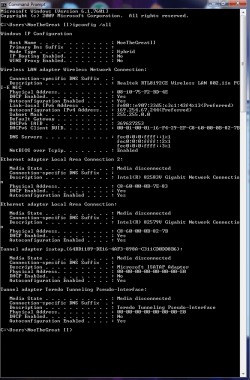
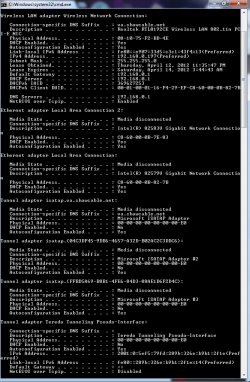
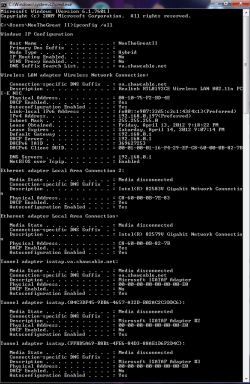
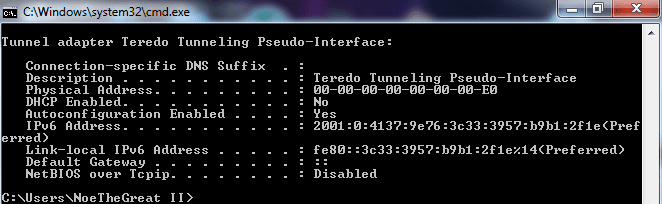
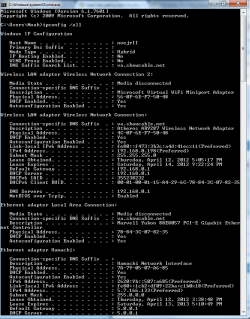
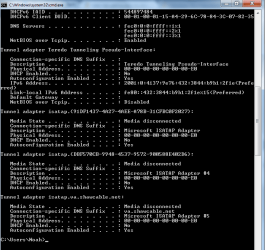
Ipconfigs:

Laptop pictures 1 and 2 are the 130mbps (FIRST TWO)

Desktop pictures 1 and 2 are the 1-6.5-26-56mbps (It fluctuates A LOT but mostly stays at 1mbps)
(LAST TWO)


Please reply any feedback that you can get from these screen caps. Thanks a bunch!

P.S. I do have a ethernet cable but it doesn't work for some reason, it worked once but one day it was just dead. :) otherwise I probibly wouldn't have these problem's
 

Attachments

  • CMD LAPTOP 1.png
    CMD LAPTOP 1.png
    25.4 KB · Views: 8
  • CMD LAPTOP 2.png
    CMD LAPTOP 2.png
    17.2 KB · Views: 3
  • CMD DESKTOP 1.png
    CMD DESKTOP 1.png
    24.9 KB · Views: 3
  • CMD DESKTOP 2.png
    CMD DESKTOP 2.png
    9.5 KB · Views: 3

My Computer My Computer

At a glance

Windows 7 Professional 64bit
OS
Windows 7 Professional 64bit
Back
Top