Need help installing 7...

Nano3

New member
Local time
6:11 PM
Messages
138
Location
Chicago IL / Springfield MA
Compaq Presario PC SR525ONX

I bought the machine yesterday... The kid that i bought the machine from had Windows 7 on it... but the Vista recovery partition was not deleted... that bothered me... So now i'm trying to install a fresh copy of 7. I already formatted NTFS

Tried both of my Windows 7 copies...
Originally came with Vista
Was able to install XP
 

Attachments
  • IMAG0209.jpg
    IMAG0209.jpg
    392.3 KB · Views: 15
  • IMAG0211.jpg
    IMAG0211.jpg
    329.1 KB · Views: 15

My Computer

Computer Manufacturer/Model Number
HP Pavilion dv4-1275mx Entertainment Notebook PC
OS
7
CPU
2.1 GHz AMD Turion Ultra ZM-80 Processor
Memory
4GB
Graphics Card(s)
ATI Radeon HD 3200 GPU

My Computer

Computer Manufacturer/Model Number
Custom
OS
Windows 7 Professional x64
CPU
Intel i7 2600K OC'd @ 4620 MHz
Motherboard
Asus P8Z68-V Pro
Memory
16GB GSkill Sniper 2133 Mhz (4x4GB)
Graphics Card(s)
EVGA GeForce GTX 480 SuperClocked+
Sound Card
Realtek High Definition Audio
Monitor(s) Displays
2x Acer S273HLbmii 27"
Screen Resolution
2 x 1920x1080
Hard Drives
64GB Crucial M4 SSD

Storage: Hitachi 1TB 5400RPM, Samsung 1.5TB 5400RPM
PSU
Corsair HW Series 750w (modular)
Case
Cooler Master HAF 932 Advanced Blue Edition
Cooling
CM Hyper 212+ CPU cooler, 3x 230mm + 1x 140mm case fans
Keyboard
Logitech MK320 (wireless)
Mouse
Logitech MK320 (wireless)
Internet Speed
30 Mb/s : 2 Mb/s
So what's the problem? Is it stalling on "Expanding Windows files (0%)"?

Walker
Windows Outreach Team
 

My Computer

Computer Manufacturer/Model Number
HP Pavilion dm3 (netbook) *** 27" iMac (Dual-Boot)
OS
Windows 7 Home Premium (64-bit) *** Windows XP SP3 (32-bit), OSX 10.6
CPU
AMD Athlon Neo X2 1.6GHz *** Intel Core i7 Quad Core 2.8GHz
Memory
4.00 GB *** 4.00 GB
Graphics Card(s)
ATI Radeon HD 3200, 384MB *** ATI Radeon HD 4850, 1GB
Sound Card
ATI High Definition Audio *** ATI High Definition Audio
Monitor(s) Displays
LG Flatron W2053TX
Screen Resolution
1600 x 900 (monitor), 1266 x 768 (laptop) *** 2560 x 1440
Hard Drives
300 GB SATA (internal), 500 GB HP SimpleSave (external) *** 1 TB SATA (internal), 160 GB LaCie (external)
Mouse
Logitech Cordless Optical Mouse for Notebooks
Internet Speed
Broadband
Now it's stalling on "Expanding windows files (0%)"
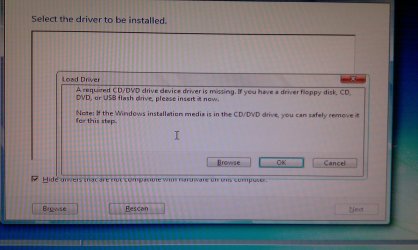
Before the problem was that it was not recognizing the drivers but after i went to the BIOS and reset everything to default, it seemed to fix the problem...

Problem: Missing CD/DVD Drivers...

What to try:
Change the BIOS setting from IDE to AHCI or RAID (if your planning to use RAID).


^^^ What tab is this setting on?
 

My Computer

Computer Manufacturer/Model Number
HP Pavilion dv4-1275mx Entertainment Notebook PC
OS
7
CPU
2.1 GHz AMD Turion Ultra ZM-80 Processor
Memory
4GB
Graphics Card(s)
ATI Radeon HD 3200 GPU
It will depend on your BIOS. Each setup screen is a bit different.

Try the Advanced tab. Other than that, just look around for SATA settings.
 

My Computer

Computer Manufacturer/Model Number
Custom
OS
Windows 7 Professional x64
CPU
Intel i7 2600K OC'd @ 4620 MHz
Motherboard
Asus P8Z68-V Pro
Memory
16GB GSkill Sniper 2133 Mhz (4x4GB)
Graphics Card(s)
EVGA GeForce GTX 480 SuperClocked+
Sound Card
Realtek High Definition Audio
Monitor(s) Displays
2x Acer S273HLbmii 27"
Screen Resolution
2 x 1920x1080
Hard Drives
64GB Crucial M4 SSD

Storage: Hitachi 1TB 5400RPM, Samsung 1.5TB 5400RPM
PSU
Corsair HW Series 750w (modular)
Case
Cooler Master HAF 932 Advanced Blue Edition
Cooling
CM Hyper 212+ CPU cooler, 3x 230mm + 1x 140mm case fans
Keyboard
Logitech MK320 (wireless)
Mouse
Logitech MK320 (wireless)
Internet Speed
30 Mb/s : 2 Mb/s
Where did you get your Win7 installer? Did you burn it yourself and has it worked previously?

Check your HD using maker's full diag/repair CD scan: Hard Drive Diagnostics Tools and Utilities (Storage) - TACKtech Corp.

Test your Memory using memtest86 for 5-6 passes.

Did you wipe the HD or just delete using installer? Try zeroing the HD using Diskpart "clean all":

Boot DVD, press Shift F10 to open Command Line, type:
DISKPART
LIST DISK
SELECT DISK # (for Windows 7 disk)
clean all
create partition primary
select partition 1
assign letter=c:
active
format
exit
 
On my slower machines it will sit there on expanding files for seems like forever but I found out it can take 20 minutes or more to get past that expanding files part... long wait. The slowest one was my old compaq 5330US.

:sleepy:
 

My Computer

Computer type
PC/Desktop
Computer Manufacturer/Model Number
Home built
OS
Windows 7 Ult, Windows 8.1 Pro,
CPU
Q9650-4.275GHz, E8600 4.5GHz, E6750-3.8GHz
Motherboard
Evga 780i FTW
Memory
G.Skill PC2 9600 1200Mhz 5 5 5 15 2T
Graphics Card(s)
GTX480
Sound Card
Asus Xonar D2
Monitor(s) Displays
HannsG
Screen Resolution
1680X1050
Hard Drives
GSkill Phoenix Pro 120GB SSD
PSU
ThermalTake Toughpower 1000Watt modular
Case
ThermalTake XaserV
Cooling
Xigmatek S1283
Keyboard
Logitech G15
Mouse
Logitech G9
Internet Speed
T1
On my slower machines it will sit there on expanding files for seems like forever but I found out it can take 20 minutes or more to get past that expanding files part... long wait. The slowest one was my old compaq 5330US.

:sleepy:

+1

It took forever on an old HP 510 business notebook for several installs during beta, but sped up to normal when I used my retail DVD on it. So the prob may be an interaction between the media, burn and/or OD rather than just the older hardware.
 
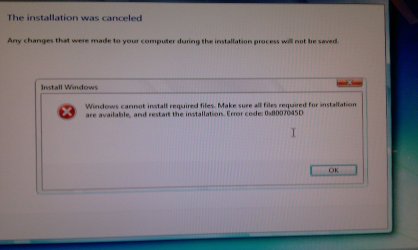
I Diskparted my hdd... ran it overnight... continued to instal... got this error message...
 

Attachments

  • IMAG0218.jpg
    IMAG0218.jpg
    301.6 KB · Views: 3

My Computer

Computer Manufacturer/Model Number
HP Pavilion dv4-1275mx Entertainment Notebook PC
OS
7
CPU
2.1 GHz AMD Turion Ultra ZM-80 Processor
Memory
4GB
Graphics Card(s)
ATI Radeon HD 3200 GPU

My Computer

Computer Manufacturer/Model Number
Custom
OS
Windows 7 Professional x64
CPU
Intel i7 2600K OC'd @ 4620 MHz
Motherboard
Asus P8Z68-V Pro
Memory
16GB GSkill Sniper 2133 Mhz (4x4GB)
Graphics Card(s)
EVGA GeForce GTX 480 SuperClocked+
Sound Card
Realtek High Definition Audio
Monitor(s) Displays
2x Acer S273HLbmii 27"
Screen Resolution
2 x 1920x1080
Hard Drives
64GB Crucial M4 SSD

Storage: Hitachi 1TB 5400RPM, Samsung 1.5TB 5400RPM
PSU
Corsair HW Series 750w (modular)
Case
Cooler Master HAF 932 Advanced Blue Edition
Cooling
CM Hyper 212+ CPU cooler, 3x 230mm + 1x 140mm case fans
Keyboard
Logitech MK320 (wireless)
Mouse
Logitech MK320 (wireless)
Internet Speed
30 Mb/s : 2 Mb/s
Do you have the latest BIOS version update from your Computer or Mobo manufacturer's Support Downloads webpage?

While in BIOS, check SATA controller. Try AHCI first, then IDE if fail.

Have you removed all but 2gb of RAM, reseat memory, swap sticks? Test your memory using memtest86 bootable CD.

Test your HD with maker's full diagnostics/repair bootable CD scan: Hard Drive Diagnostics Tools and Utilities (Storage) - TACKtech Corp.
 
Back
Top