
Need Help Installing Win7 from bootable USB

TJGOA

New member
Local time
2:49 PM
Messages
93
Windows Setup finishes 'windows loading files' then starting windows screen comes up but there is no other screens that follows, simple a mouse cursor. I loaded win 7 ultimate iso in poweriso to create bootable usb. Just two days ago I was able to complete the installation but now I am unable tok since then i added some files on flash drive but deleted them before i made the bootable usb in poweriso. Some help would be much appreciated?
 

My Computer

Computer type
PC/Desktop
Computer Manufacturer/Model Number
custom build
OS
Windows 7 Home Premium 64-bit SP1
CPU
6.00GB Dual-Channel DDR3 @ 666MHz (9-9-9-24)
Motherboard
Dell Inc. 0DPRF9 (CPU 1)
Memory
2 gig
Graphics Card(s)
NSPIRON ONE (1280x768@60Hz) ATI Mobility Radeon HD 4200 (Del
Hard Drives
System 500gb
Primary 500GB
I'd redo the flash drive one more time.
 

My Computer

Computer type
PC/Desktop
Computer Manufacturer/Model Number
Lenovo IdeaCenter 450
OS
Windows 10 Pro X64
CPU
Intel Quad Core i7-4770 @ 3.4Ghz
Memory
16.0GB PC3-12800 DDR3 SDRAM 1600 MHz
Graphics Card(s)
Intel Integrated HD Graphics
Sound Card
Realtek HD Audio
Monitor(s) Displays
HP 22" LCD
Screen Resolution
1680 x 1050
Hard Drives
250GB Samsung EVO SATA-3 SSD
2TB Seagate ST2000DM001 SATA-2
1.5TB Seagate ST3150041AS SATA
Keyboard
Dell USB
Mouse
Lenovo USB
Internet Speed
Cable via Road Runner 3MB Upload, 30MB Download
Antivirus
Windows Defender, MBAM Pro, MBAE
Browser
Seamonkey
Other Info
UEFI/GPT
PLDS DVD-RW DH16AERSH

My Computer

Computer type
PC/Desktop
Computer Manufacturer/Model Number
Skylake Special #666
OS
Windows 10 Pro x64
CPU
Intel Core i7 6700K
Motherboard
Asus Sabertooth Z170 Mark 1
Memory
GSkill TridentZ RGB 16GB 3600 16-16-16-36
Graphics Card(s)
EVGA GTX 980 Ti SC x2
Sound Card
Realtek High Definition
Monitor(s) Displays
AOC G2460PG
Screen Resolution
1920 x 1080 144Hz
Hard Drives
Samsung 860 Pro 256GB, Seagate Barracuda 4TB x2
PSU
EVGA 1000 P2, EVGA White Custom Braided Cables
Case
Corsair Vengeance C70 Gunmetal Black
Cooling
Corsair H100i v2, Corsair ML120 x2, Thermal Grizzly Kryonaut
Keyboard
Logitech G910 Orion Spectrum
Mouse
Logitech G700s
Internet Speed
Verizon Fios Quantum Gateway 75/75
Antivirus
Windows Defender, Malwarebytes Free 3.8.3
Browser
Chrome
Other Info
Corsair SP120 x4, LG Blu-ray Drive, Durabrand HT-395 100 Watt Dolby Digital Amp, Corsair H2100 Wireless 7.1 Headset
Also i may have messed up labeling the primary partition as active, i was able to unactivate it in disk part in cmd, but I never loaded up disk manager afterwards to label the system partitions as active, could this be the reason why, I am unable to login to windows now, just the starting windows appears and stays there or goes to black screen with just mouse cursor, im trying load system repair tools on usb to inter cmd to make system partition active in case it isn't but still having same issue, windows loads the files then starting windows then black screen with cursor, or sometimes just yelllow loading bar after windows loading then black screen....:confused:
 

My Computer

Computer type
PC/Desktop
Computer Manufacturer/Model Number
custom build
OS
Windows 7 Home Premium 64-bit SP1
CPU
6.00GB Dual-Channel DDR3 @ 666MHz (9-9-9-24)
Motherboard
Dell Inc. 0DPRF9 (CPU 1)
Memory
2 gig
Graphics Card(s)
NSPIRON ONE (1280x768@60Hz) ATI Mobility Radeon HD 4200 (Del
Hard Drives
System 500gb
Primary 500GB

My Computer

Computer type
PC/Desktop
Computer Manufacturer/Model Number
Skylake Special #666
OS
Windows 10 Pro x64
CPU
Intel Core i7 6700K
Motherboard
Asus Sabertooth Z170 Mark 1
Memory
GSkill TridentZ RGB 16GB 3600 16-16-16-36
Graphics Card(s)
EVGA GTX 980 Ti SC x2
Sound Card
Realtek High Definition
Monitor(s) Displays
AOC G2460PG
Screen Resolution
1920 x 1080 144Hz
Hard Drives
Samsung 860 Pro 256GB, Seagate Barracuda 4TB x2
PSU
EVGA 1000 P2, EVGA White Custom Braided Cables
Case
Corsair Vengeance C70 Gunmetal Black
Cooling
Corsair H100i v2, Corsair ML120 x2, Thermal Grizzly Kryonaut
Keyboard
Logitech G910 Orion Spectrum
Mouse
Logitech G700s
Internet Speed
Verizon Fios Quantum Gateway 75/75
Antivirus
Windows Defender, Malwarebytes Free 3.8.3
Browser
Chrome
Other Info
Corsair SP120 x4, LG Blu-ray Drive, Durabrand HT-395 100 Watt Dolby Digital Amp, Corsair H2100 Wireless 7.1 Headset
Was able to logon to win7 :D now just have to try and install it to different partition
 

My Computer

Computer type
PC/Desktop
Computer Manufacturer/Model Number
custom build
OS
Windows 7 Home Premium 64-bit SP1
CPU
6.00GB Dual-Channel DDR3 @ 666MHz (9-9-9-24)
Motherboard
Dell Inc. 0DPRF9 (CPU 1)
Memory
2 gig
Graphics Card(s)
NSPIRON ONE (1280x768@60Hz) ATI Mobility Radeon HD 4200 (Del
Hard Drives
System 500gb
Primary 500GB

My Computer

Computer type
PC/Desktop
Computer Manufacturer/Model Number
Skylake Special #666
OS
Windows 10 Pro x64
CPU
Intel Core i7 6700K
Motherboard
Asus Sabertooth Z170 Mark 1
Memory
GSkill TridentZ RGB 16GB 3600 16-16-16-36
Graphics Card(s)
EVGA GTX 980 Ti SC x2
Sound Card
Realtek High Definition
Monitor(s) Displays
AOC G2460PG
Screen Resolution
1920 x 1080 144Hz
Hard Drives
Samsung 860 Pro 256GB, Seagate Barracuda 4TB x2
PSU
EVGA 1000 P2, EVGA White Custom Braided Cables
Case
Corsair Vengeance C70 Gunmetal Black
Cooling
Corsair H100i v2, Corsair ML120 x2, Thermal Grizzly Kryonaut
Keyboard
Logitech G910 Orion Spectrum
Mouse
Logitech G700s
Internet Speed
Verizon Fios Quantum Gateway 75/75
Antivirus
Windows Defender, Malwarebytes Free 3.8.3
Browser
Chrome
Other Info
Corsair SP120 x4, LG Blu-ray Drive, Durabrand HT-395 100 Watt Dolby Digital Amp, Corsair H2100 Wireless 7.1 Headset
Why are you making a partition active ? Windows will do that on it`s own. I would re install. You`ll be done in 15 minutes.

http://www.sevenforums.com/tutorials/1649-clean-install-windows-7-a.html

i don't have a working dvd so i have to use a usb, and as of yet i can't get windows 7 to get to the install page with the 'select language' screen where i would hit shift then f10 to get to cmd screen to clean partition and format for clean install, is there another way to do this... So far I have tried 3 attempts at poweriso, the first time it worked i used poweriso on different computer so maybe that might have something to do with it, i will try again and see what happens. but atleast i can login now and that gives me more options.
 

My Computer

Computer type
PC/Desktop
Computer Manufacturer/Model Number
custom build
OS
Windows 7 Home Premium 64-bit SP1
CPU
6.00GB Dual-Channel DDR3 @ 666MHz (9-9-9-24)
Motherboard
Dell Inc. 0DPRF9 (CPU 1)
Memory
2 gig
Graphics Card(s)
NSPIRON ONE (1280x768@60Hz) ATI Mobility Radeon HD 4200 (Del
Hard Drives
System 500gb
Primary 500GB
You don`t need to clean the partition, just format it.

Please read the tutorial I gave for a clean install.

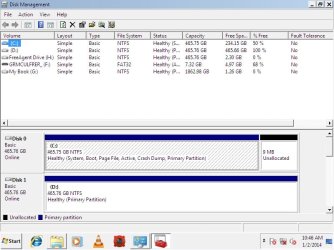
Could you please post a shot of disk management before you proceed.
 

My Computer

Computer type
PC/Desktop
Computer Manufacturer/Model Number
Skylake Special #666
OS
Windows 10 Pro x64
CPU
Intel Core i7 6700K
Motherboard
Asus Sabertooth Z170 Mark 1
Memory
GSkill TridentZ RGB 16GB 3600 16-16-16-36
Graphics Card(s)
EVGA GTX 980 Ti SC x2
Sound Card
Realtek High Definition
Monitor(s) Displays
AOC G2460PG
Screen Resolution
1920 x 1080 144Hz
Hard Drives
Samsung 860 Pro 256GB, Seagate Barracuda 4TB x2
PSU
EVGA 1000 P2, EVGA White Custom Braided Cables
Case
Corsair Vengeance C70 Gunmetal Black
Cooling
Corsair H100i v2, Corsair ML120 x2, Thermal Grizzly Kryonaut
Keyboard
Logitech G910 Orion Spectrum
Mouse
Logitech G700s
Internet Speed
Verizon Fios Quantum Gateway 75/75
Antivirus
Windows Defender, Malwarebytes Free 3.8.3
Browser
Chrome
Other Info
Corsair SP120 x4, LG Blu-ray Drive, Durabrand HT-395 100 Watt Dolby Digital Amp, Corsair H2100 Wireless 7.1 Headset
i have two hardrives with one partition each i want to install on unused hd partition to create something like a dual boot system but with two windows 7 if possible

Untitled.jpg
 
Last edited:

My Computer

Computer type
PC/Desktop
Computer Manufacturer/Model Number
custom build
OS
Windows 7 Home Premium 64-bit SP1
CPU
6.00GB Dual-Channel DDR3 @ 666MHz (9-9-9-24)
Motherboard
Dell Inc. 0DPRF9 (CPU 1)
Memory
2 gig
Graphics Card(s)
NSPIRON ONE (1280x768@60Hz) ATI Mobility Radeon HD 4200 (Del
Hard Drives
System 500gb
Primary 500GB
Then you should only have 1 hard drive plugged in at a time, and control which one you want to boot from, from the bios.

Do you have another key to activate windows ?

You should be using the 2nd drive for storage, not for another install of W7.
 

My Computer

Computer type
PC/Desktop
Computer Manufacturer/Model Number
Skylake Special #666
OS
Windows 10 Pro x64
CPU
Intel Core i7 6700K
Motherboard
Asus Sabertooth Z170 Mark 1
Memory
GSkill TridentZ RGB 16GB 3600 16-16-16-36
Graphics Card(s)
EVGA GTX 980 Ti SC x2
Sound Card
Realtek High Definition
Monitor(s) Displays
AOC G2460PG
Screen Resolution
1920 x 1080 144Hz
Hard Drives
Samsung 860 Pro 256GB, Seagate Barracuda 4TB x2
PSU
EVGA 1000 P2, EVGA White Custom Braided Cables
Case
Corsair Vengeance C70 Gunmetal Black
Cooling
Corsair H100i v2, Corsair ML120 x2, Thermal Grizzly Kryonaut
Keyboard
Logitech G910 Orion Spectrum
Mouse
Logitech G700s
Internet Speed
Verizon Fios Quantum Gateway 75/75
Antivirus
Windows Defender, Malwarebytes Free 3.8.3
Browser
Chrome
Other Info
Corsair SP120 x4, LG Blu-ray Drive, Durabrand HT-395 100 Watt Dolby Digital Amp, Corsair H2100 Wireless 7.1 Headset
Use a fresh ISO for your licensed version and the tool to write to flash stick in Steps 1 and 2 of Clean Reinstall - Factory OEM Windows 7. Look over the other steps which will help you get and keep a perfect install.

Why do you want two Win7 installs? If you insist then I'd unplug the existing OS's HD, boot the installer, delete D partition during install, create a new 100gb OS partition and then partiiton the rest for storage. To do this partitioning during install use the Drive Options pictured in Steps 7 and 8 of Clean Install Windows 7
 
Back
Top