need help installing windows

AussieGuy92

i am Awesome
Pro User
Local time
12:55 PM
Messages
422
Location
Commonweath of Australia
hi i know there proberly a lot of threads on this but bare with me and please help me i have installed windows 7 64 bit i orginally wanted 32 bit so i downloaded the iso file burned it at a slow speed tryed 6 different disks and other tings it gets to about 5% then is says "error windows can find the installation files make sure they are there then rebot"

can some one please help me i dont want to have to buy another copy when i can use the key to activate the 32 bit version.

buy the way 64 bit is insatalled with no problems 32 bit will run better with my system.

thanks in advanced.
 

My Computer

Computer Manufacturer/Model Number
HP Pavilion p6795a
OS
windows 7 64 bit
CPU
intel core i5 3.30GHz Quad Core
Motherboard
HP
Memory
6gb
Graphics Card(s)
AMD RADEON HD 6450 1GB Dedicated
Sound Card
ATI HIGH DEFINITION SOUND
Monitor(s) Displays
LG
Screen Resolution
16:9 Hd
Hard Drives
1TB
Cooling
Fan
Keyboard
Wireless
Mouse
HP wireless keyboard and mouse
Internet Speed
fast enough
Other Info
Beast Of A Machine!
A couple of things come to mind. where are you downloading the iso file from and did you reformat your drive before trying the install?

Ken
 

My Computer

Computer Manufacturer/Model Number
Dell Optiplex 980
OS
Win7 x64 Ultimate SP1
CPU
Intel i7-2600
Memory
8 Gig
Graphics Card(s)
Geforce gt 520
Monitor(s) Displays
LG & Acer
Screen Resolution
1920x1080
Internet Speed
Fios 45/35
Other Info
Windows Home Server
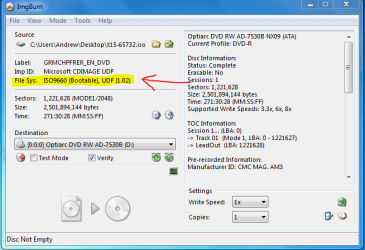
Verify the DVD against ISO using ImgBurn:

Load ISO using file icon, make sure it says Bootable in text at left. Then insert DVD to Verify it against ISO.

If necessary, burn at 4x using ImgBurn with Verify ticked - it never fails.

Next check the official HASH of your version ISO against the one for your download using HashTab.

Next try installing using a bootable flashstick: http://www.sevenforums.com/tutorials/2432-usb-windows-7-installation-key-drive-create.html It may show up in one-time Boot menu as a hard drive.

Did anything major change with your hardware or settings since you installed 64 bit?
 
nothing has changed since the only thing i can do to this system is upgrade the ram which is only 3 gb and i did try a clean install of 32 bit the other day and it failed so i am trying it on a second partition of my hard drive to make sure the copy works and i downloaded it from a website is there another place i can download the iso file from that will work?
 
Last edited:

My Computer

Computer Manufacturer/Model Number
HP Pavilion p6795a
OS
windows 7 64 bit
CPU
intel core i5 3.30GHz Quad Core
Motherboard
HP
Memory
6gb
Graphics Card(s)
AMD RADEON HD 6450 1GB Dedicated
Sound Card
ATI HIGH DEFINITION SOUND
Monitor(s) Displays
LG
Screen Resolution
16:9 Hd
Hard Drives
1TB
Cooling
Fan
Keyboard
Wireless
Mouse
HP wireless keyboard and mouse
Internet Speed
fast enough
Other Info
Beast Of A Machine!
it got further this time but then the same error i might need to try at the slowest speed possible. i will report back when succsessful i am going though so many disks trying to get this to work.

i hope it don't get to this i might need to make a second purchase.
 

My Computer

Computer Manufacturer/Model Number
HP Pavilion p6795a
OS
windows 7 64 bit
CPU
intel core i5 3.30GHz Quad Core
Motherboard
HP
Memory
6gb
Graphics Card(s)
AMD RADEON HD 6450 1GB Dedicated
Sound Card
ATI HIGH DEFINITION SOUND
Monitor(s) Displays
LG
Screen Resolution
16:9 Hd
Hard Drives
1TB
Cooling
Fan
Keyboard
Wireless
Mouse
HP wireless keyboard and mouse
Internet Speed
fast enough
Other Info
Beast Of A Machine!
Did you Verify the ISO and DVD?

If they verify then the issue is not the download or DVD burn and we can move to other steps.
 
ok i download it again and i burned it to a dvd and it got further this time will try at the slowst speed that is times 1 going to try it now.
 

My Computer

Computer Manufacturer/Model Number
HP Pavilion p6795a
OS
windows 7 64 bit
CPU
intel core i5 3.30GHz Quad Core
Motherboard
HP
Memory
6gb
Graphics Card(s)
AMD RADEON HD 6450 1GB Dedicated
Sound Card
ATI HIGH DEFINITION SOUND
Monitor(s) Displays
LG
Screen Resolution
16:9 Hd
Hard Drives
1TB
Cooling
Fan
Keyboard
Wireless
Mouse
HP wireless keyboard and mouse
Internet Speed
fast enough
Other Info
Beast Of A Machine!
ok i did what you said and i did not no what to look for so if something was wrong than i think it would of said so. ok so i might try burning the file on the another computer. so is there any other options that i can try?

thanks for replying and helping me.
 

My Computer

Computer Manufacturer/Model Number
HP Pavilion p6795a
OS
windows 7 64 bit
CPU
intel core i5 3.30GHz Quad Core
Motherboard
HP
Memory
6gb
Graphics Card(s)
AMD RADEON HD 6450 1GB Dedicated
Sound Card
ATI HIGH DEFINITION SOUND
Monitor(s) Displays
LG
Screen Resolution
16:9 Hd
Hard Drives
1TB
Cooling
Fan
Keyboard
Wireless
Mouse
HP wireless keyboard and mouse
Internet Speed
fast enough
Other Info
Beast Of A Machine!
Verify the DVD against ISO using ImgBurn:

Load ISO using file icon, make sure it says Bootable in text at left. Then insert DVD to Verify it against ISO.

If necessary, burn at 4x using ImgBurn with Verify ticked - it never fails.

Next check the official HASH of your version ISO against the one for your download using HashTab.

Next try installing using a bootable flashstick: http://www.sevenforums.com/tutorials/2432-usb-windows-7-installation-key-drive-create.html It may show up in one-time Boot menu as a hard drive.

Did anything major change with your hardware or settings since you installed 64 bit?

You say you didnt' know what to look for, but the steps above are quite specific if you would follow them.
 
in the picture is that what you ment?
 

Attachments

  • Capture.PNG
    Capture.PNG
    25.7 KB · Views: 16

My Computer

Computer Manufacturer/Model Number
HP Pavilion p6795a
OS
windows 7 64 bit
CPU
intel core i5 3.30GHz Quad Core
Motherboard
HP
Memory
6gb
Graphics Card(s)
AMD RADEON HD 6450 1GB Dedicated
Sound Card
ATI HIGH DEFINITION SOUND
Monitor(s) Displays
LG
Screen Resolution
16:9 Hd
Hard Drives
1TB
Cooling
Fan
Keyboard
Wireless
Mouse
HP wireless keyboard and mouse
Internet Speed
fast enough
Other Info
Beast Of A Machine!
Yes, that assures the ISO is bootable, but does not assure its overall integrity as checking it's HASH does.

You need to start by clicking Verify Disk after opening the program, then load the ISO to verify bootable, then the DVD to run the Verify scan. This checks the DVD against the ISO.

Once the ISO HASH is confirmed, ISO bootability is confirmed, then DVD burn is confirmed, you know it is not one of those.
 
i have done that i assume that if the iso on the disk is not write as the one on my hard drive it would tell me? am i correct?
 

My Computer

Computer Manufacturer/Model Number
HP Pavilion p6795a
OS
windows 7 64 bit
CPU
intel core i5 3.30GHz Quad Core
Motherboard
HP
Memory
6gb
Graphics Card(s)
AMD RADEON HD 6450 1GB Dedicated
Sound Card
ATI HIGH DEFINITION SOUND
Monitor(s) Displays
LG
Screen Resolution
16:9 Hd
Hard Drives
1TB
Cooling
Fan
Keyboard
Wireless
Mouse
HP wireless keyboard and mouse
Internet Speed
fast enough
Other Info
Beast Of A Machine!
Imgburn checks the bootability of the ISO and the accuracy of the DVD burn.

You need to HASHcheck the ISO to be sure it is correct in the first place. It might have been a corrupt download.
 
i have downloaded the iso file three times from various sources and webites (legally) and i have tried different types of disks different brands and types i am at my witts end with this i think i checked the hash but i was not sure if i was doing right though.
 

My Computer

Computer Manufacturer/Model Number
HP Pavilion p6795a
OS
windows 7 64 bit
CPU
intel core i5 3.30GHz Quad Core
Motherboard
HP
Memory
6gb
Graphics Card(s)
AMD RADEON HD 6450 1GB Dedicated
Sound Card
ATI HIGH DEFINITION SOUND
Monitor(s) Displays
LG
Screen Resolution
16:9 Hd
Hard Drives
1TB
Cooling
Fan
Keyboard
Wireless
Mouse
HP wireless keyboard and mouse
Internet Speed
fast enough
Other Info
Beast Of A Machine!
you could try to install from a flash drive instead of DVD media
 

My Computer

Computer Manufacturer/Model Number
Custom Built
OS
Windows 7 Ultimate 32 bit
CPU
AMD Athlon 64 X2 4200+ Overclocked to 3.0Ghz
Motherboard
Biostar TF560 A2+
Memory
2 Gigs of G.Skill DDR2 800
Graphics Card(s)
HIS ATI Radeon HD 2600 Pro With IceQ cooler
Sound Card
6.1 Channel Sound Blaster Live 24 Bit
Monitor(s) Displays
Dual 20.5 " LG Flatrons W2052TO
Screen Resolution
1152x864
Hard Drives
Dual 36 Gig 10,000 RPM Raptors
PSU
430 watt Seasonic 80%+ Dual 12v Rails 2x80mm fans
Case
CHIEFMAX YA-5X
Cooling
4-80mm case fans 1-140mm case fan freezer 64 Pro CPU cooler
Keyboard
Saitek Eclipse II
Mouse
A4Tech wireless battery free optical scroll mouse
Internet Speed
1.5 meg down 384 up
Other Info
Logisys LED fan/light controller and dual 16" LED sticks mounted inside top of case all fans are LED all lighting is blue
DVD RW and CD RW both and Memory card reader
Verify the DVD against ISO using ImgBurn:

Load ISO using file icon, make sure it says Bootable in text at left. Then insert DVD to Verify it against ISO.

If necessary, burn at 4x using ImgBurn with Verify ticked - it never fails.

Next check the official HASH of your version ISO against the one for your download using HashTab.

Next try installing using a bootable flashstick: http://www.sevenforums.com/tutorials/2432-usb-windows-7-installation-key-drive-create.html It may show up in one-time Boot menu as a hard drive.

Did anything major change with your hardware or settings since you installed 64 bit?

Flash stick install was the next item in the list I posted up a half day ago and have re-posted twice now.

Is there some reason why you cannot work through the steps given?
 
i have a flash drive that is 4gb but it has stuff on it which i can move to my external does it wreck the flash drive or can i remove it after or do i have to go out and buy another 4gb flash drive?
 

My Computer

Computer Manufacturer/Model Number
HP Pavilion p6795a
OS
windows 7 64 bit
CPU
intel core i5 3.30GHz Quad Core
Motherboard
HP
Memory
6gb
Graphics Card(s)
AMD RADEON HD 6450 1GB Dedicated
Sound Card
ATI HIGH DEFINITION SOUND
Monitor(s) Displays
LG
Screen Resolution
16:9 Hd
Hard Drives
1TB
Cooling
Fan
Keyboard
Wireless
Mouse
HP wireless keyboard and mouse
Internet Speed
fast enough
Other Info
Beast Of A Machine!
You can move your stuff to the Ext HD, temporarily. Then when done with using the fash drive as the win7 install media, you can re-format the flash drive back to a regular flash drive & move
your stuff back on it.
 

My Computer

Computer type
PC/Desktop
Computer Manufacturer/Model Number
Built them myself, Science Experiments !
OS
Win7 Enterprise, Win7 x86 (Ult 7600), Win7 x64 Ult 7600, TechNet RTM on AMD x64 (2.8Ghz)
CPU
AMD fx8350 4ghz, AMD-32 2400mhz, AMD-64 3200mhz, AMDx64 2.8G
Motherboard
SIS 755, ECS-K8M890M-M (Ult 7600), GigaByte & others
Memory
2gb, 4gb on the Ult 7600, 4gb on Technet RTM, 32gb on FX8350
Graphics Card(s)
Draw my own Graphics, several nVidia cards
Sound Card
on motherboard
Monitor(s) Displays
19" flat scr, 28" I-Inc widescr,22" Emprex Widescr, 23" Acer
Screen Resolution
1280 x 1024, 1440 x 900, 1920 x 1080
Hard Drives
6 pata Ide HD's & 2 Sata HD's
added 80gb external on Ult 7600 computer,
numerous extra 1tb, 2TB, 3Tb SATA HD's
A collection of ext HD Docks w/ HDs
PSU
430w, 550w, 600w, 700, 800, etc
Case
All Generic Full Towers
Cooling
Open Air & a few fans, some w/ colored LEDs
Keyboard
Compaq & Dell recycled from GoodWill
Mouse
Made in China Optical Wired Mouse
Internet Speed
Fast Cable InterNet
Antivirus
AVG Free on 24 different Desktops, NO Problems!
Browser
IE 8 is preferred, but use FireFox sometimes
Other Info
Linksys Routers, switches, & Hubs
Too Many USB Flash Drives to count, Biggest is 64GB !
Eight computers in my home network.
Sixteen computers at my business network.
Linked via TeamViewer !
Lots of old used spare computer parts everywhere!
To the OP....

Why do you feel you need to downgrade from 64 bit to 32 bit? If you have 3 GB of memory and 64 bit processor, you SHOULD be using the 64 bit version.
 

My Computer

Computer Manufacturer/Model Number
Custom
OS
Windows 7 Ultimate RTM (Technet)
CPU
3.00 gigahertz Intel Core2 Duo E8400
Motherboard
ASUSTeK Computer INC. P5K/EPU Rev 1.xx
Memory
4GB
Graphics Card(s)
ATI Radeon X1950 Pro
Sound Card
Built in HD Audio
Monitor(s) Displays
22" Gateway LCD
Screen Resolution
1920 x 1200
Hard Drives
ST3160023A [Hard drive] (160.04 GB) -- drive 0, rev 8.01, ST3500630AS [Hard drive] (500.11 GB) -- drive 2, rev 3.AAK
ST3500630AS [Hard drive] (500.11 GB) -- drive 1, rev 3.AAK
Keyboard
Logitech G11
Mouse
Microsoft Wireless Laser Mouse 5000
Internet Speed
13.44 Mbps
i guess but with a intel celeron proccessor with an 80 gb hard drive i thought it would be better to use 32 bit? i hve read that with my laptop it can only take 2gb ram but it took 3gb. so which is better to use 32 bit or 64 bit?
 

My Computer

Computer Manufacturer/Model Number
HP Pavilion p6795a
OS
windows 7 64 bit
CPU
intel core i5 3.30GHz Quad Core
Motherboard
HP
Memory
6gb
Graphics Card(s)
AMD RADEON HD 6450 1GB Dedicated
Sound Card
ATI HIGH DEFINITION SOUND
Monitor(s) Displays
LG
Screen Resolution
16:9 Hd
Hard Drives
1TB
Cooling
Fan
Keyboard
Wireless
Mouse
HP wireless keyboard and mouse
Internet Speed
fast enough
Other Info
Beast Of A Machine!
Back
Top