
Need help moving active partition

gundamx

New member
Local time
12:55 AM
Messages
5
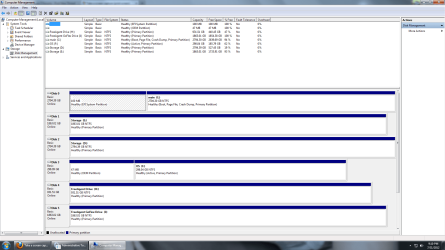
As shown in the screenshot, I have an active partition on Disk 3 (MBR) that I'd like to move to Disk 0 (GPT), but have not been able to do so. None of the partition managers I've found have been able to do anything other mark the partition on Disk 3 as inactive.

I'm trying to do this so I can format Disk 3 and use it as storage. Any help would be greatly appreciated.
 

Attachments
  • Disk management screenshot.png
    Disk management screenshot.png
    68.7 KB · Views: 17

My Computer

OS
Windows 7 Home Premium 64 bit
You need a drive imaging program do move partitions between drives. You can't use a partition manager to do it. Are you looking to buy a product to do it, or do you need a freeware solution?
 

My Computer

Computer Manufacturer/Model Number
Dell XPS 15 L502x
OS
Windows 7 Ultimate x64 SP1
CPU
Core i7-2670QM
Memory
8GB DDR3 PC3-10600
Graphics Card(s)
Intel HD Graphics 3000 + GeForce GT 540M
Screen Resolution
1920x1080
Hard Drives
1TB 5400RPM Seagate
Maybe a little more background will help.

I got tired of having such a small C: drive, so I did a clean install (raw and everything) to Disk 0. Windows installed fine, but now I'm stuck with having to select which HDD to boot from at startup. I'd rather it just went straight into the Windows 7 installation on disk 0, but that requires moving the active partition, which seems to currently be impossible.

Would I better off wiping Disk 0, disconnecting both the Sata and power connections to Disk 3 and then doing a clean windows installs on Disk 0?
 

My Computer

OS
Windows 7 Home Premium 64 bit
When you boot, are you offered two Windows 7 installations to start?
 

My Computer

Computer Manufacturer/Model Number
Dell XPS 15 L502x
OS
Windows 7 Ultimate x64 SP1
CPU
Core i7-2670QM
Memory
8GB DDR3 PC3-10600
Graphics Card(s)
Intel HD Graphics 3000 + GeForce GT 540M
Screen Resolution
1920x1080
Hard Drives
1TB 5400RPM Seagate
Yep.

It shows both versions of Windows 7 that I have installed.
 

My Computer

OS
Windows 7 Home Premium 64 bit
Both OS's appear to be booted by the EFI System partition. Unplug Disk3 to see if the OS on Disk0 boots correctly. If so you can delete and format Disk3 after marking it Inactive or wipe with Diskpart Clean Command.

Or did you want to do something else with the Disk3 OS? You will need two licenses.
 

My Computer

Computer Manufacturer/Model Number
Dell XPS 15 L502x
OS
Windows 7 Ultimate x64 SP1
CPU
Core i7-2670QM
Memory
8GB DDR3 PC3-10600
Graphics Card(s)
Intel HD Graphics 3000 + GeForce GT 540M
Screen Resolution
1920x1080
Hard Drives
1TB 5400RPM Seagate
I deleted the bootmgr entry to the Windows installation on Disk 3 and the machine booted fine. Does that mean that I'm ok to mark the Disk 3 partition as inactive and format it if I like?
 

My Computer

OS
Windows 7 Home Premium 64 bit
Yes. I'd start by making it inactive and rebooting, just to make sure nothing goes horribly awry. Then you can delete it when you are positive nothing bad has happened.
 

My Computer

Computer Manufacturer/Model Number
Dell XPS 15 L502x
OS
Windows 7 Ultimate x64 SP1
CPU
Core i7-2670QM
Memory
8GB DDR3 PC3-10600
Graphics Card(s)
Intel HD Graphics 3000 + GeForce GT 540M
Screen Resolution
1920x1080
Hard Drives
1TB 5400RPM Seagate
Alright. Thanks much to you, keg, and Greg for the assistance. Finally done with this headache of a process.
 

My Computer

OS
Windows 7 Home Premium 64 bit
UEFI does not use an active partition. If you deleted Disk 3, it looks like you might have deleted your system restore partition, but I have very little experience with OEM installs.
 

My Computer

Computer Manufacturer/Model Number
Homebuilt
OS
Windows 7 x64
CPU
i7-2600K
Motherboard
Asus P8Z77-v Pro
Memory
8 G
Graphics Card(s)
GTX 480
Sound Card
Onboard
Monitor(s) Displays
LG W2753V
Screen Resolution
1920x1080
Hard Drives
Crucial M4 128 G SSD
Back
Top