
Solved Need help regarding Converting My HDD from Basic to Dynamic

Gro Max

New member
Local time
10:51 PM
Messages
13
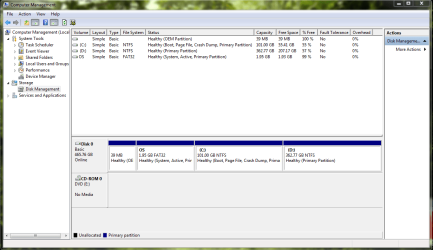
I was Triying to Make a backup on my D: partition and It is getting fail everytime when it reaches the step "Copying files to D:". So I guess It is because my D: drive has lots of stuffs and I think making a dedicated partition for backups will solve this problem. My HDD is a Basic one and I have attached a screen shot below.

Now I want to Convert my HDD from Basic To Dyanamic, so I can make another partition and use it for my backups.

I want to know where it is ok or risky and disadvantages of converting my HDD to dyanamic ? This is my Laptop Hard disk and it is the only HDD in it and my OS is also installed in it.

If I convert my HDD in to dynamic does it cause for a lose of data on it ?? I have no any other devise to backup everything on it and if this converting is risky i'm not gonna do that.

Your help on this will be highly appreciating

Regards
Rakhitha.
 

Attachments
  • Capture.PNG
    Capture.PNG
    213.1 KB · Views: 13

My Computer

OS
Windows 7 Ultimate x86 - 32bit
Hello Rakhitha,

You would not want to convert your Windows HDD to dynamic. Doing so will render Windows unbootable.

If you like, since you already have 4 primary partition on the HDD, you could use the tutorial below to shrink a partition (say your D partition) by how much you would like to use to create the new logical partition with.

http://www.sevenforums.com/tutorials/146694-partition-extended-logical-drives.html

Of course, adding a second physical HDD to your laptop (if able) would be the best solution for backups. This way if your Windows HDD should ever fail, the second HDD and the backups on it would not be affected.

Hope this helps,
Shawn
 

My Computer

Computer type
PC/Desktop
Computer Manufacturer/Model Number
Self built custom
OS
64-bit Windows 11 Pro for Workstations
CPU
Intel i7-8700K OC'd to 5 GHz
Motherboard
ASUS ROG Maximus XI Formula Z390
Memory
64 GB (4x16GB) G.SKILL TridentZ RGB DDR4 3600 MHz
Graphics Card(s)
ASUS ROG-STRIX-GTX1080TI-O11G-GAMING
Sound Card
Integrated
Monitor(s) Displays
2 x Samsung Odyssey G7 27"
Screen Resolution
2560x1440
Hard Drives
1TB Samsung 990 PRO M.2,
4TB Samsung 990 PRO PRO M.2,
TerraMaster F8 SSD Plus NAS
PSU
Seasonic Prime Titanium 850W
Case
Thermaltake Core P3
Cooling
Corsair Hydro H115i
Keyboard
Logitech wireless K800
Mouse
Logitech MX Master 4
Internet Speed
2 Gb/s Download and 100 Mb/s Upload
Antivirus
Malwarebyte Anti-Malware Premium
Browser
Google Chrome
Other Info
Logitech Z625 speaker system,
Logitech BRIO 4K Pro webcam,
HP Color LaserJet Pro MFP M477fdn,
APC SMART-UPS RT 1000 XL - SURT1000XLI,
Galaxy S23 Plus phone
There may be troubles galore after you convert from basic to dynamic. My recommendation is to let things be.
 

My Computer

Computer Manufacturer/Model Number
Custom Built
OS
Windows 7 Pro with SP1 32bit
Motherboard
Intel D845GVS1 X86-based PC
Memory
2 gigs of RAM
Graphics Card(s)
Intel(R) 82845G/GL/GE/PE/GV Graphics Controller
Sound Card
Realtek AC'97 Audio
Monitor(s) Displays
Samsung SyncMaster 931BF Black 19" LCD Monitor
Screen Resolution
1280X960
Hard Drives
1. SAMSUNG SP0822N ATA Device ~ 80 GigaBytes

2. Seagate FreeAgent Go USB Device ~ 500 GigaBytes
Keyboard
COMPAQ Standard PS/2 Keyboard
Mouse
iBall Laser Precise Speedster
Internet Speed
4 mb/sec
Hello Rakhitha,

You would not want to convert your Windows HDD to dynamic. Doing so will render Windows unbootable.

If you like, since you already have 4 primary partition on the HDD, you could use the tutorial below to shrink a partition (say your D partition) by how much you would like to use to create the new logical partition with.

http://www.sevenforums.com/tutorials/146694-partition-extended-logical-drives.html

Of course, adding a second physical HDD to your laptop (if able) would be the best solution for backups. This way if your Windows HDD should ever fail, the second HDD and the backups on it would not be affected.

Hope this helps,
Shawn

wow shawn. Thank you very much dude ! You are the man, I have converted my D into logical and created more partitions using your second method on that tutorial. Worked perfectly. Thanks again dude, I didn't try on Back upping my C: hope it will work.

There may be troubles galore after you convert from basic to dynamic. My recommendation is to let things be.

Thanks for your idea and recommendation dude, I didnt converted at last :D:D:D:D
 

My Computer

OS
Windows 7 Ultimate x86 - 32bit
You're most welcome Rakhitha. :)

If the new partition is large enough to fit the backup it'll work. It'll let you know during the backup process if the new partition is large enough or not though.
 

My Computer

Computer type
PC/Desktop
Computer Manufacturer/Model Number
Self built custom
OS
64-bit Windows 11 Pro for Workstations
CPU
Intel i7-8700K OC'd to 5 GHz
Motherboard
ASUS ROG Maximus XI Formula Z390
Memory
64 GB (4x16GB) G.SKILL TridentZ RGB DDR4 3600 MHz
Graphics Card(s)
ASUS ROG-STRIX-GTX1080TI-O11G-GAMING
Sound Card
Integrated
Monitor(s) Displays
2 x Samsung Odyssey G7 27"
Screen Resolution
2560x1440
Hard Drives
1TB Samsung 990 PRO M.2,
4TB Samsung 990 PRO PRO M.2,
TerraMaster F8 SSD Plus NAS
PSU
Seasonic Prime Titanium 850W
Case
Thermaltake Core P3
Cooling
Corsair Hydro H115i
Keyboard
Logitech wireless K800
Mouse
Logitech MX Master 4
Internet Speed
2 Gb/s Download and 100 Mb/s Upload
Antivirus
Malwarebyte Anti-Malware Premium
Browser
Google Chrome
Other Info
Logitech Z625 speaker system,
Logitech BRIO 4K Pro webcam,
HP Color LaserJet Pro MFP M477fdn,
APC SMART-UPS RT 1000 XL - SURT1000XLI,
Galaxy S23 Plus phone
You're most welcome Rakhitha. :)

If the new partition is large enough to fit the backup it'll work. It'll let you know during the backup process if the new partition is large enough or not though.
nope shawn something again went wrong, I guess I got an answer but I need your word to go :):). I have started another thread as this problem is related to another section.
 

My Computer

OS
Windows 7 Ultimate x86 - 32bit
Back
Top