
Need help removing a file from windows 7, safe mode still no luck

666Wolf666

New member
Local time
8:02 AM
Messages
5
Ok for starters I went through the suggestions listed on thread:

http://www.sevenforums.com/general-discussion/10063-cannot-delete-folder-even-safe-mode.html

I am having a similar issue, however my file I cannot get rid of is simply a single file inside a single folder. The issue I keep getting is the lovely message "This process cannot access the file because it is being used by another process." I have tried restarting, restarting in safe mode, renaming, moving, being in safe mode in Command prompt, etc etc. Even tried Malwarbytes fileASSASSIN program on restart.

My last try was to start in safe mode, type cmd in the search at start menu and hit ctrl + shift + enter. The only processes I had running for the try where csrss.exe, winlogon.exe, cmd.exe, conhost.exe, explorer.exe, taskmgr.exe. I stopped explorer.exe leaving just cmd prompt up in admin and then closed task manager aswell.

Typed-> RD /S /Q "C:\Users\rest of file info"
ENTER
The process cannot access the file because it is being used by another process.

Help me kill this file that just wont seem to die.
 

My Computer My Computer

At a glance

Windows 7 Home
OS
Windows 7 Home
Try 'killbox' ...
Download http://www.bleepingcomputer.com/files/killbox.php
Unzip the folder to your desktop.

Start Killbox.exe

When it is open, enter <insert file here> into the field labeled "Full path of file to delete".

Select the Delete on reboot option.

Then press the button that looks like a red circle with a white X in it.

Your computer will reboot and check to see if the file is gone.
 

My Computer My Computer

At a glance

Windows 7 Ultimate 32bit SP1Intel(R) Core(TM)2 Quad CPU @ 2.40GHz, 2400 MHz4 GBATI Radeon HD 2600 Pro
Computer type
PC/Desktop
Computer Manufacturer/Model Number
Bruce ... somewhere in his 40's
OS
Windows 7 Ultimate 32bit SP1
CPU
Intel(R) Core(TM)2 Quad CPU @ 2.40GHz, 2400 MHz
Motherboard
INTEL/D975XBX2
Memory
4 GB
Graphics Card(s)
ATI Radeon HD 2600 Pro
Monitor(s) Displays
Samsung SyncMaster 914v
Screen Resolution
1280 x 1024
Hard Drives
2/500GB each ... ST3500630AS ATA Device.
One is not connected
PSU
Rocketfish 700 W
Case
G.Skill Gigabyte Chassis
Keyboard
Standard PS/2 Keyboard
Mouse
Microsoft PS/2 Mouse
Internet Speed
DSL
Antivirus
Avira Internet Security
Browser
IE 11
Other Info
ATI HDMI Audio
Sorry for the delayed response, I went on vacation and needless to say I was going to worry about the laptop when I got back. Tried killbox, remove on reboot option (10s countdown to cancel, etc), and sadly no luck. File is still sitting there taking up 712mb
 

My Computer My Computer

At a glance

Windows 7 Home
OS
Windows 7 Home
Which file are we talking about? I'm usually able to delete any file/folder if I boot from my Win7 install DVD and go to the command prompt.
Have you tried taking ownership of the file and assigning yourself full access rights? How about Unlocker, did it report any handles locking the file?
 

My Computer My Computer

At a glance

Windows 7 Professional SP1 32-bitIntel Core 2 Duo E6600 2.4GHz4GB DDR2-667 (4x1GB in dual-channel config)nVidia GeForce 9800 GT
Computer type
PC/Desktop
Computer Manufacturer/Model Number
Custom-built
OS
Windows 7 Professional SP1 32-bit
CPU
Intel Core 2 Duo E6600 2.4GHz
Motherboard
Asus PL5D2
Memory
4GB DDR2-667 (4x1GB in dual-channel config)
Graphics Card(s)
nVidia GeForce 9800 GT
Sound Card
Creative X-Fi XtremeMusic
Monitor(s) Displays
Acer P236H
Screen Resolution
1920x1200 (DVI)
Hard Drives
OCZ SSD Vertex Plus 60GB SATA (Firmware 3.55), 64MB cache
Hitachi HD321KJ SATA, 320GB, 7200rpm, 16MB cache
PSU
Antec TruePower 2.0
Case
Cooler Master Centurion
Cooling
Too many fans
Keyboard
Standard
Mouse
Microsoft wireless optical mouse
Internet Speed
AT&T U-verse (18mbit/sec)
Antivirus
Microsoft Security Essentials
Browser
Firefox
Other Info
Other devices:
Compaq CQ-60 laptop
Google Nexus 7 (2012) tablet
Nvidia SHIELD tablet (US/LTE)
Hardkernel ODROID-XU single-board computer (Samsung Exynos 5420)
well some further looking and it seems i have the game freelancer mounted on a virtual hard drive/disk drive. No clue how or when but sure enough its there. I can "eject" but on reboot its right back there showing an extra drive on my computer that isn't there. Opening the virtual drive I can't delete anything inside it. Since the file that I can't remove is freelancer.img I am going to assume they are related. Is in the process of moving files to an external hard drive as its looking more and more likely that I may just want to start with a clean computer.
 

My Computer My Computer

At a glance

Windows 7 Home
OS
Windows 7 Home
Seems to me the virtual CDROM software isn't behaving and I'd probably just uninstall it (which should finally release the file and let you delete it after the next reboot). Then again, if you're moving your personal files to an external drive and planning to reinstall Windows anyway, it's pointless to worry about deleting a locked file for now.
 
Last edited:

My Computer My Computer

At a glance

Windows 7 Professional SP1 32-bitIntel Core 2 Duo E6600 2.4GHz4GB DDR2-667 (4x1GB in dual-channel config)nVidia GeForce 9800 GT
Computer type
PC/Desktop
Computer Manufacturer/Model Number
Custom-built
OS
Windows 7 Professional SP1 32-bit
CPU
Intel Core 2 Duo E6600 2.4GHz
Motherboard
Asus PL5D2
Memory
4GB DDR2-667 (4x1GB in dual-channel config)
Graphics Card(s)
nVidia GeForce 9800 GT
Sound Card
Creative X-Fi XtremeMusic
Monitor(s) Displays
Acer P236H
Screen Resolution
1920x1200 (DVI)
Hard Drives
OCZ SSD Vertex Plus 60GB SATA (Firmware 3.55), 64MB cache
Hitachi HD321KJ SATA, 320GB, 7200rpm, 16MB cache
PSU
Antec TruePower 2.0
Case
Cooler Master Centurion
Cooling
Too many fans
Keyboard
Standard
Mouse
Microsoft wireless optical mouse
Internet Speed
AT&T U-verse (18mbit/sec)
Antivirus
Microsoft Security Essentials
Browser
Firefox
Other Info
Other devices:
Compaq CQ-60 laptop
Google Nexus 7 (2012) tablet
Nvidia SHIELD tablet (US/LTE)
Hardkernel ODROID-XU single-board computer (Samsung Exynos 5420)
I would agree, except as far as I can find there is no software left installed that would account for the virtual CDROM drive. Have been uninstalling anything I don't know and am now getting rid of stuff that I do know, still nothing.
 

My Computer My Computer

At a glance

Windows 7 Home
OS
Windows 7 Home
well some further looking and it seems i have the game freelancer mounted on a virtual hard drive/disk drive. No clue how or when but sure enough its there. I can "eject" but on reboot its right back there showing an extra drive on my computer that isn't there. Opening the virtual drive I can't delete anything inside it. Since the file that I can't remove is freelancer.img I am going to assume they are related. Is in the process of moving files to an external hard drive as its looking more and more likely that I may just want to start with a clean computer.
W/could this be possibly something from Wordpress Post Content?
 

My Computer My Computer

At a glance

Windows 7 Ultimate 32bit SP1Intel(R) Core(TM)2 Quad CPU @ 2.40GHz, 2400 MHz4 GBATI Radeon HD 2600 Pro
Computer type
PC/Desktop
Computer Manufacturer/Model Number
Bruce ... somewhere in his 40's
OS
Windows 7 Ultimate 32bit SP1
CPU
Intel(R) Core(TM)2 Quad CPU @ 2.40GHz, 2400 MHz
Motherboard
INTEL/D975XBX2
Memory
4 GB
Graphics Card(s)
ATI Radeon HD 2600 Pro
Monitor(s) Displays
Samsung SyncMaster 914v
Screen Resolution
1280 x 1024
Hard Drives
2/500GB each ... ST3500630AS ATA Device.
One is not connected
PSU
Rocketfish 700 W
Case
G.Skill Gigabyte Chassis
Keyboard
Standard PS/2 Keyboard
Mouse
Microsoft PS/2 Mouse
Internet Speed
DSL
Antivirus
Avira Internet Security
Browser
IE 11
Other Info
ATI HDMI Audio
Any time a computer doesn't do what I tell it to do and it should do it I think (infected).
Try this.
https://connect.microsoft.com/systemsweeper
It's free and works good from Microsoft.
Let us know what you find.
 

My Computer My Computer

At a glance

Windows 10 Pro. 64/ version 1709 Windows 7 Pr...Intel i7-6800K @ 4.3Corsair Platinum 16 gig @2400EVGA GTX 1070 OC
Computer type
PC/Desktop
Computer Manufacturer/Model Number
Home made Desktop
OS
Windows 10 Pro. 64/ version 1709 Windows 7 Pro/64
CPU
Intel i7-6800K @ 4.3
Motherboard
ASUS X-99 Deluxe II
Memory
Corsair Platinum 16 gig @2400
Graphics Card(s)
EVGA GTX 1070 OC
Monitor(s) Displays
Asus 27" LED LCD/VE278Q
Screen Resolution
1920-1080 or 1280-720 HDMI
Hard Drives
INTEL SSD 730-240 Gb Sata 3.0/
PSU
EVGA Platium 1200W
Case
Phanteks Luxe Tempered Glass 8 fans/ one radiator
Cooling
XSPC/ Water Cooled CPU
Keyboard
Das 4 Professional
Mouse
Logitech M705/MX Anywhere 2-S
Internet Speed
100 mbits
Antivirus
Microsoft Security Essentials/ Malwarebytes Premium 3.0/ SAS
Browser
I.E. 11 default/Firefox/ ISP Time Warner Cable/Spectrum
Other Info
LG BluRay Burner/
Sound system-KLipsch-THX/
Icy Dock ssd Hot Swap bays.
Will give it a shot when I get home from work, not connecting laptop to work network. :P last thing I need is to let this cursed oversized paperweight causing more trouble
 

My Computer My Computer

At a glance

Windows 7 Home
OS
Windows 7 Home
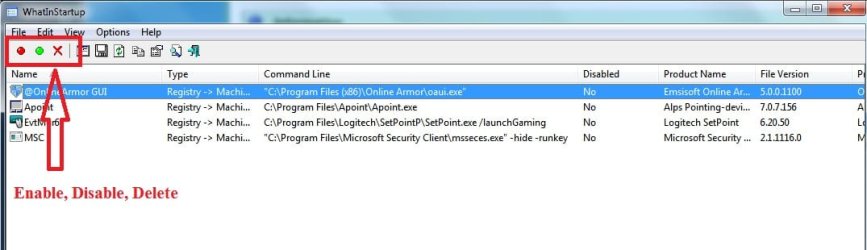
Something may be starting with Windows. Use What's In Startup to stop unnecessary apps from starting with Windows.
 

Attachments

  • WhatsInStartup.jpg
    WhatsInStartup.jpg
    40.8 KB · Views: 8

My Computer My Computer

At a glance

64
OS
64
I would agree, except as far as I can find there is no software left installed that would account for the virtual CDROM drive. Have been uninstalling anything I don't know and am now getting rid of stuff that I do know, still nothing.

Hmm, tricky...Sounds like maybe an incomplete uninstallation of said software. Try going to Device Manager, there should be an entry for the virtual CDROM drive and you can look at its properties to find out the name of the driver file responsible for it. Most likely it'll be sitting in \Windows\system32. Wouldn't surprise me if you could simply uninstall/delete the device while you're at it. :)
 

My Computer My Computer

At a glance

Windows 7 Professional SP1 32-bitIntel Core 2 Duo E6600 2.4GHz4GB DDR2-667 (4x1GB in dual-channel config)nVidia GeForce 9800 GT
Computer type
PC/Desktop
Computer Manufacturer/Model Number
Custom-built
OS
Windows 7 Professional SP1 32-bit
CPU
Intel Core 2 Duo E6600 2.4GHz
Motherboard
Asus PL5D2
Memory
4GB DDR2-667 (4x1GB in dual-channel config)
Graphics Card(s)
nVidia GeForce 9800 GT
Sound Card
Creative X-Fi XtremeMusic
Monitor(s) Displays
Acer P236H
Screen Resolution
1920x1200 (DVI)
Hard Drives
OCZ SSD Vertex Plus 60GB SATA (Firmware 3.55), 64MB cache
Hitachi HD321KJ SATA, 320GB, 7200rpm, 16MB cache
PSU
Antec TruePower 2.0
Case
Cooler Master Centurion
Cooling
Too many fans
Keyboard
Standard
Mouse
Microsoft wireless optical mouse
Internet Speed
AT&T U-verse (18mbit/sec)
Antivirus
Microsoft Security Essentials
Browser
Firefox
Other Info
Other devices:
Compaq CQ-60 laptop
Google Nexus 7 (2012) tablet
Nvidia SHIELD tablet (US/LTE)
Hardkernel ODROID-XU single-board computer (Samsung Exynos 5420)
Back
Top