Solved Need help removing dual boot

cmmtch

New member
Power User
VIP
Local time
5:03 AM
Messages
112
I am presently dual booting Win7 and XP and would like to remove XP. The two OS's are on different hard drives, Win 7 Home Premium x64 is on an SSD and XP Pro SP3 is on a mechanical HD. I added the SSD and Win7 upgrade to an existing PC with a mechanical HD and haven't used XP since the upgrade and now I want to clear that HD and use it for storage, backups, little used items, etc...

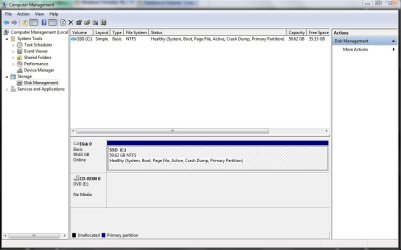
The tutorials about removing dual boot talk about needing to have bootmgr on the correct drive, both of mine show active and I can't be sure which one holds the Win7 bootmgr, I would like to end up with only Win7 booting off the SSD. I've attached a disk management screen shot.
Disk Mgmt.JPG

Steve
 
Last edited:

My Computer My Computer

At a glance

Windows 11 Home x64AMD Ryzen 5 5600GG.SKILL Ripjaws Gaming Series (2x8G) DDR4None (AMD Radeon Graphics on MB and CPU)
Computer type
PC/Desktop
Computer Manufacturer/Model Number
Self built
OS
Windows 11 Home x64
CPU
AMD Ryzen 5 5600G
Motherboard
ASUSTeK Prime B450M-A II
Memory
G.SKILL Ripjaws Gaming Series (2x8G) DDR4
Graphics Card(s)
None (AMD Radeon Graphics on MB and CPU)
Sound Card
None (integrated on MB)
Monitor(s) Displays
Acer S200HLAbd Black 20"
Screen Resolution
1600 x 900
Hard Drives
Samsung SSD 840 EVO 120GB (W10)
WD Blue 500G SATA 6G WDBAAX5000ENC-NRSN (Backup/Storage)
PSU
Corsair CX500 500W ATX12V v2.3 80 Plus Bronze Active PFC
Case
Unknown
Cooling
CPU-stock cooling fan, 1 extra 80mm case fan
Keyboard
Azio KB505U Large Print Tri-Color Illuminated USB Keyboard
Mouse
MS Optical Wheel Mouse (USB)
Internet Speed
ATT Fiber 5000/VOIP 5G down/5G up
Antivirus
Win Defender, SAS, Spyware Blaster all free editions
Browser
Firefox, Waterfox, sometimes Edge
Last edited:

My Computer My Computer

At a glance

Vista, Windows7, Mint Mate, Zorin, Windows 8from 1.6GHz Duo to i7
Computer Manufacturer/Model Number
HP, Dell, Gateway, Toshiba - 4 laptops and 2 desktops
OS
Vista, Windows7, Mint Mate, Zorin, Windows 8
CPU
from 1.6GHz Duo to i7
Monitor(s) Displays
2x HP w2207
Hard Drives
5x HDD, 7x SSD, 12x Externals
Keyboard
with trackball - no mices
Mouse
Trackball mice
Internet Speed
DSL 6000
I have read the tutorials, they seem to be for different partitions on a single drive, nothing about two physically separate drives. It's the same, but different. I can't extend or shrink them. When I'm done I want one 64G SSD with Win 7 OS on it, and one empty 120G HDD.

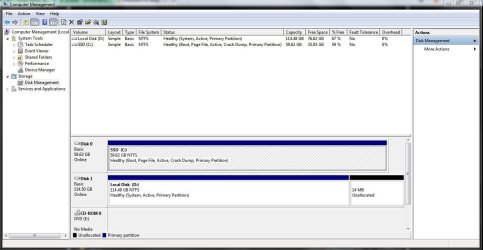
I have two hard drives "C" (SSD with Win 7), "D" (HDD with XP) both drives show "active", XP was there first on the mechanical HD, I added an SSD and installed Win 7 (retail) Home Premium upgrade on the SSD. It saw XP on the HDD and installed itself on the SSD and I ended up with a dual boot system. Now I want to remove XP from the dual boot, format the entire mechanical HD and have it for storage.

Since I can't be sure which drive has bootmgr, I will follow instructions to remove the mechanical HD. Then use the install CD to run repair install 3 times or until Win 7 boots on it's own.

Steve
 

My Computer My Computer

At a glance

Windows 11 Home x64AMD Ryzen 5 5600GG.SKILL Ripjaws Gaming Series (2x8G) DDR4None (AMD Radeon Graphics on MB and CPU)
Computer type
PC/Desktop
Computer Manufacturer/Model Number
Self built
OS
Windows 11 Home x64
CPU
AMD Ryzen 5 5600G
Motherboard
ASUSTeK Prime B450M-A II
Memory
G.SKILL Ripjaws Gaming Series (2x8G) DDR4
Graphics Card(s)
None (AMD Radeon Graphics on MB and CPU)
Sound Card
None (integrated on MB)
Monitor(s) Displays
Acer S200HLAbd Black 20"
Screen Resolution
1600 x 900
Hard Drives
Samsung SSD 840 EVO 120GB (W10)
WD Blue 500G SATA 6G WDBAAX5000ENC-NRSN (Backup/Storage)
PSU
Corsair CX500 500W ATX12V v2.3 80 Plus Bronze Active PFC
Case
Unknown
Cooling
CPU-stock cooling fan, 1 extra 80mm case fan
Keyboard
Azio KB505U Large Print Tri-Color Illuminated USB Keyboard
Mouse
MS Optical Wheel Mouse (USB)
Internet Speed
ATT Fiber 5000/VOIP 5G down/5G up
Antivirus
Win Defender, SAS, Spyware Blaster all free editions
Browser
Firefox, Waterfox, sometimes Edge
Thanks for the replies and advice, I will do it tomorrow and report back when I'm done.

The Windows 7 partition has always been "active" the XP partition is also "active", that's what's confusing (senior moment :().
 

My Computer My Computer

At a glance

Windows 11 Home x64AMD Ryzen 5 5600GG.SKILL Ripjaws Gaming Series (2x8G) DDR4None (AMD Radeon Graphics on MB and CPU)
Computer type
PC/Desktop
Computer Manufacturer/Model Number
Self built
OS
Windows 11 Home x64
CPU
AMD Ryzen 5 5600G
Motherboard
ASUSTeK Prime B450M-A II
Memory
G.SKILL Ripjaws Gaming Series (2x8G) DDR4
Graphics Card(s)
None (AMD Radeon Graphics on MB and CPU)
Sound Card
None (integrated on MB)
Monitor(s) Displays
Acer S200HLAbd Black 20"
Screen Resolution
1600 x 900
Hard Drives
Samsung SSD 840 EVO 120GB (W10)
WD Blue 500G SATA 6G WDBAAX5000ENC-NRSN (Backup/Storage)
PSU
Corsair CX500 500W ATX12V v2.3 80 Plus Bronze Active PFC
Case
Unknown
Cooling
CPU-stock cooling fan, 1 extra 80mm case fan
Keyboard
Azio KB505U Large Print Tri-Color Illuminated USB Keyboard
Mouse
MS Optical Wheel Mouse (USB)
Internet Speed
ATT Fiber 5000/VOIP 5G down/5G up
Antivirus
Win Defender, SAS, Spyware Blaster all free editions
Browser
Firefox, Waterfox, sometimes Edge
Disconnect the XP disk and try to boot Win7. Then you will know whether the Win7 BCD is on the XP disk or not.
 

My Computer My Computer

At a glance

Vista, Windows7, Mint Mate, Zorin, Windows 8from 1.6GHz Duo to i7
Computer Manufacturer/Model Number
HP, Dell, Gateway, Toshiba - 4 laptops and 2 desktops
OS
Vista, Windows7, Mint Mate, Zorin, Windows 8
CPU
from 1.6GHz Duo to i7
Monitor(s) Displays
2x HP w2207
Hard Drives
5x HDD, 7x SSD, 12x Externals
Keyboard
with trackball - no mices
Mouse
Trackball mice
Internet Speed
DSL 6000
Success

I just disconnected the XP HD and the computer booted into Win 7 so the bootmgr is on the SSD.

Thanks much to all who replied, I haven't removed the dual boot yet but since it boots Win 7 from the SSD I can clean the HD and that should take care of it.
Capture.JPG

Steve
 

My Computer My Computer

At a glance

Windows 11 Home x64AMD Ryzen 5 5600GG.SKILL Ripjaws Gaming Series (2x8G) DDR4None (AMD Radeon Graphics on MB and CPU)
Computer type
PC/Desktop
Computer Manufacturer/Model Number
Self built
OS
Windows 11 Home x64
CPU
AMD Ryzen 5 5600G
Motherboard
ASUSTeK Prime B450M-A II
Memory
G.SKILL Ripjaws Gaming Series (2x8G) DDR4
Graphics Card(s)
None (AMD Radeon Graphics on MB and CPU)
Sound Card
None (integrated on MB)
Monitor(s) Displays
Acer S200HLAbd Black 20"
Screen Resolution
1600 x 900
Hard Drives
Samsung SSD 840 EVO 120GB (W10)
WD Blue 500G SATA 6G WDBAAX5000ENC-NRSN (Backup/Storage)
PSU
Corsair CX500 500W ATX12V v2.3 80 Plus Bronze Active PFC
Case
Unknown
Cooling
CPU-stock cooling fan, 1 extra 80mm case fan
Keyboard
Azio KB505U Large Print Tri-Color Illuminated USB Keyboard
Mouse
MS Optical Wheel Mouse (USB)
Internet Speed
ATT Fiber 5000/VOIP 5G down/5G up
Antivirus
Win Defender, SAS, Spyware Blaster all free editions
Browser
Firefox, Waterfox, sometimes Edge
Since SSD has the System Active flags it is good to boot on its own.
 
Back
Top