Need Help Removing GRUB

lazy784

New member
Local time
2:05 PM
Messages
1
Hi guys, been trying out many things and none of them work
I have dual -boot Windows 7 and openSUSE 11.3 with GRUB

now i wish to remove grub, and then linux

i have tried going into System Recovery->cmd and trying out these commands:

bootrec.exe /fixmbr
bootsect /nt60 C:
bootsect /nt60 C: /mbr

and none of these have worked

ANY help will be appreciated

Note: Will not remove linux first
 

My Computer

Computer Manufacturer/Model Number
HP dv6z
OS
Windows 7 Home Premium 64-bit
CPU
AMD Turion II
Memory
4GB
Graphics Card(s)
ATI Radeon 4250 HD
Monitor(s) Displays
Laptop
Hard Drives
320GB
Hi guys, been trying out many things and none of them work
I have dual -boot Windows 7 and openSUSE 11.3 with GRUB

now i wish to remove grub, and then linux

i have tried going into System Recovery->cmd and trying out these commands:

bootrec.exe /fixmbr
bootsect /nt60 C:
bootsect /nt60 C: /mbr

and none of these have worked

ANY help will be appreciated

Note: Will not remove linux first
Hello lazy, and welcome to Windows Seven Forums.

This tutorial shows how to restore the boot files of the MBR after Ubuntu has installed Grub to the MBR of the hard drive: http://www.sevenforums.com/tutorials/20864-mbr-restore-windows-7-master-boot-record.html

However, I have no experience with OpenSusi and so cannot guarantee the same will work here.

First, I would need to know if you had OpenSusi install Grub to the MBR, or somewhere else? Does your HP DV6Z have the 100MB "System Reserved" boot partition? If Grub was not installed in the MBR of the hard drive, then all of the MBR restore utilities will accomplish nothing, sort of what you have described?

Also, according to the HP web site: HP Pavilion dv6 and dv6z series | HP® Official Store , you laptop has "Hard Drive Protection HP ProtectSmart protects the hard drive & data". Again I have no experience with this feature, but is it possible this is preventing you from restoring your computer?

Also stated in this web site is backup software. You should look into applying a backup, if available, to before you installed OpenSusi to return your computer to the condition it was then. Windows Restore may also allow you to do this.

A last resort may be to make use of any HP "Restore" features that will return the laptop to its factory condition. However, be sure to save any files you do not want lost as this type of restore does not save anything.

Good luck to you!
Robert
 

My Computer

OS
...
I would recommend you use EasyBCD to do this.
 

My Computer

OS
Windows 7 Ultimate x64 SP1
CPU
Intel Core i3 530 2.93 Ghz Clarkdale
Motherboard
ASRock P55 PRO/USB3 LGA 1156
Memory
4 GB OCZ DDR3 1600 (PC12800) Low Voltage Desktop Memory
Graphics Card(s)
Nvidia GeForce GTX 550 Ti with 1 GB of RAM
Sound Card
Realtek HD ALC892
Monitor(s) Displays
20'' eMachines E202HDbmd Glare Panel Widescreen
Screen Resolution
1600 x 900
Hard Drives
Western Digital 1 TB Caviar Black Edition (7200 RPM) SATA
Hitachi Deskstar 500 GB (7200 RPM) SATA
Samsung SpinPoint 400 GB (7200 RPM) SATA
PSU
Rosewill Xtreme Series RX750-D-B ATX12V v2.2 & EPS12V (750W)
Case
Cooler Master Centurion 534 RC-534-KKN2-GP Mid-Tower
Cooling
Standard Case Fans and Stock CPU Heatsink
Keyboard
Microsoft Wireless Optical Desktop Elite
Mouse
Microsoft Wireless Optical Desktop Elite
Internet Speed
7.1 Mbps Verizon DSL
Delete the LInux partition as all GRUB must be cleaned off of the HD. I would use free Partition Wizard bootable CD to rightclick>Wipe Partition with one set of zeroes. Partition Wizard.URL You can also recover the wiped Linux space into Win7 if it is first partition by rightclick>Resizing.

Then mark Win7 active using Diskpart from DVD/Repair CD command line: Partition - Mark as Active - Windows 7 Forums.URL or using Partition Wizard to rightclick>Modify.

Next boot into DVD Repair console or Repair CD, click through to Recovery Tools list to run Startup Repair up to 3 separate times with reboots until Win7 starts, to write the MBR to Win7 partition. Startup Repair - Windows 7 Forums.URL
System Repair Disc - Create - Windows 7 Forums.URL

If you have any questions about this please post back a screenshot of your full Disk Mgmt drive map and listings, using Snipping Tool in Start Menu.
 
Last edited:
I would recommend you use EasyBCD to do this.

Not EasyBCD for restoration when not used from start. The correction is easily done at the commamnd prompt option when booted to the repair tools on the 7 dvd.

OP familar with GParted which will clean the OpenSUSe install with a simply reformat to NTFS there.

How to clean up a Grub mess that trashes the 7 mbr? Well when at the command prompt type "bootsect /nt60 C" to start with.

Once you see the "successfully written" messsage you then type "bootrec /fixmbr". You can follow that up with the second "bootrec /fixboot" command.

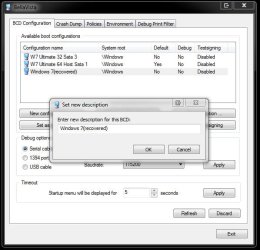
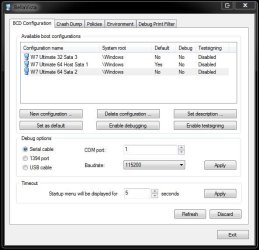
Upon again seeing the "successfully written" message appear you may end up seeing the "Windows 7 (recovered)" type of boot entry for 7 upon the immediate restart. You can use EasyBCD or another freebie called BellaVista to rename or with the second change the "set description" option to rename the entry.

Most likely you will be working with the latest EasyBCD 2.0.2 download now seen and simpy retype the W7 entry and click "save". Then make a backup of the corrected mbr info and call it a day!

The images here will show a repair seen last fall while performing a custom install of one distro onto a usb flash drive that resulted in trashing the 7 mbr here. The BellaVista tool was being looked at when seeing the then RC mbr repair performed with ease.
 

Attachments

  • 20kadzs.jpg
    20kadzs.jpg
    47.7 KB · Views: 111
  • 29535nt.jpg
    29535nt.jpg
    49.5 KB · Views: 64
  • 9kozkm.jpg
    9kozkm.jpg
    48.8 KB · Views: 60

My Computers

System One System Two

  • Computer type
    PC/Desktop
    Computer Manufacturer/Model Number
    Custom builds = 2
    OS
    W7 Ultimate x64/W10 Pro x64/W11 Pro Triple Boot - Main PC W7 Remote PC Micro ATX W7 Pro x64/W11 Pro
    CPU
    AMD Phenom II X4 975 Deneb 3.6ghz - 965 2nd remote pc
    Motherboard
    Gigabyte GA-790XTA-UD4-Gigabyte GA-880GM-D2H remote pc
    Memory
    Kingston Hyper X DDR3 1600 1.5v 16gb - Hyper X Fury 8gb 2nd
    Graphics Card(s)
    MSI HD Radeon 5750 1gb - MSI HD Radeon 6450 on mini tower
    Sound Card
    Creative Labs X-Fi Xtreme Audio P - Realtek onooard 2nd case
    Monitor(s) Displays
    ASUS VW199T-P 19" HP 2082a Main-HP 2082a 20" remote pc
    Screen Resolution
    Asus 1440x900 - HP 1600x900
    Hard Drives
    WD Black 1TB HD per OS W7, W10, and pending W11 presently on 500gb OS Drive - Pending Triple 1TB HDs for Spanned Storage/backup volume
    Single 2TB external USB enclosure, single 1TB System 7 Host/Boot drive, Pending 8TB external HD for system image b
    PSU
    Corsair 750TX - primary / Corsair CX600 - second
    Case
    Antec 900-2 - SSD compatible / NZXT Vulcan mini tower
    Cooling
    Zalman CNPS9900A
    Keyboard
    AZIO L70 Backlit Letters Gaming - ONN Cordless/USB
    Mouse
    MSI DS200 Programmable, Logitech Cordless
    Internet Speed
    30mbps upgrade - primary hard wired - mini tower usb WiFi
    Antivirus
    GFI VIPRE Internet Security 2014 on W7 2016 beta on W10,
    Browser
    Cyberfox, WaterFox 64bit FF variants, FireFox x64, Pale Moon
    Other Info
    Accomdata fan cooled usb 2.0 PIDE/Sata II, III external enclosure.
    Sambient usb/eSata PATA/Sata II, III external enclosure.
  • Computer type
    PC/Desktop
    System Manufacturer/Model Number
    CUSTOM ASSEMBLY
    OS
    W7 Pro x64/W11 Pro
    CPU
    AMD Deneb 3.6ghz - 965
    Motherboard
    Gigabyte GA-880GM-D2H remote pc
    Memory
    Kingston Hyper X Fury 8gb
    Graphics Card(s)
    MSI HD Radeon 6450 DVI Output
    Sound Card
    Realtek onooard Creative or Other separate PENDING
    Monitor(s) Displays
    VIZIO 32" LCD TV Separate LCD Pending
    Screen Resolution
    1600x1080
    Hard Drives
    WD 500GB OS Host/Boot WD Green 1TB Storage/Backup
    PSU
    Corsair 600W - THERMALTAKE 600W spare case
    Case
    NZXT Vulcan mini tower
    Cooling
    Twin 120mm Top Fans - 240mm Side Cover
    Keyboard
    ONN Cordless/USB Logitech Cordless
    Mouse
    ONN USB/Cordless - Logitech Cordless
    Internet Speed
    DSL 5G
    Browser
    MS Edge, FireFox, WaterFox x64, FireFox Nightly
    Other Info
    OS Testing-Remote Access to Main TeamViewer
Back
Top