Solved Need help resizing and moving partition in a dual boot Win 7 / Win 8.1

lukyluc56

New member
Local time
10:10 AM
Messages
2
I have a laptop that had a 500GB disk where I had install Windows 7 and Windows 8.1 dual booting. So when I looked at disk management when Windows was booted I had 4 partitions in that order:

System Partition with 300MB
Windows 7 with 347GB
Windows 8.1 with 131GB
HP_recovery with 22GB

I used the backup and restored application from Windows 7 and created an image backup of my disk with all the partitions. I then removed my 500GB disk and installed a new 1TB disk. I then used the Windows 7 repair disk and restored the image backup onto the new disk. I now have the following map on the disk in that order when Windows is booted which is what I expected.

System Partition with 300MB
Windows 7 with 347GB
Windows 8.1 with 131GB
HP_Recovery with 22GB
Unallocated space with 500GB
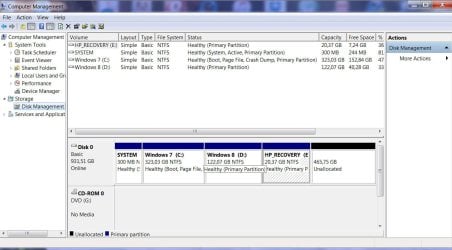
Disk Management.jpg

What I would like to do next is to increase the size of both my Windows 7 and Windows 8.1 and then use what is left to create a Data disk. Basically this is what I would like my partitions to look like.

System Partition with 300MB
Windows 7 with 400GB
Windows 8.1 with 250GB
Data with 300GB
HP_Recovery with 50GB

I read on different product (like Mini tool Partition Wizard, Partition Magic, Paragon Disk Manager) that can be used to resized and moved partition around but my main concern is the booting of Windows 8 after the partitions are resized and moved. About the HP_Recovery form reading a lot on the subject because it is done in the BIOS I'm not sure I will be able to get it to boot after I moved the partition around but that may not be a concern at this time. Unless some knows a way of making it to boot after I moved the partition. Again my main concern is to get Windows 8.1 to boot after it gets moved around. I plan to upgrade it to Windows 10.

Thank you for any help on the matter. Also which partition/disk manager would you recommend.

Regards,

Luc
 

My Computer My Computer

At a glance

Windows 7 64bits
Computer type
PC/Desktop
OS
Windows 7 64bits

My Computer My Computer

At a glance

Windows 10 Pro x64Intel Core i7 6700KGSkill TridentZ RGB 16GB 3600 16-16-16-36EVGA GTX 980 Ti SC x2
Computer type
PC/Desktop
Computer Manufacturer/Model Number
Skylake Special #666
OS
Windows 10 Pro x64
CPU
Intel Core i7 6700K
Motherboard
Asus Sabertooth Z170 Mark 1
Memory
GSkill TridentZ RGB 16GB 3600 16-16-16-36
Graphics Card(s)
EVGA GTX 980 Ti SC x2
Sound Card
Realtek High Definition
Monitor(s) Displays
AOC G2460PG
Screen Resolution
1920 x 1080 144Hz
Hard Drives
Samsung 860 Pro 256GB, Seagate Barracuda 4TB x2
PSU
EVGA 1000 P2, EVGA White Custom Braided Cables
Case
Corsair Vengeance C70 Gunmetal Black
Cooling
Corsair H100i v2, Corsair ML120 x2, Thermal Grizzly Kryonaut
Keyboard
Logitech G910 Orion Spectrum
Mouse
Logitech G700s
Internet Speed
Verizon Fios Quantum Gateway 75/75
Antivirus
Windows Defender, Malwarebytes Free 3.8.3
Browser
Chrome
Other Info
Corsair SP120 x4, LG Blu-ray Drive, Durabrand HT-395 100 Watt Dolby Digital Amp, Corsair H2100 Wireless 7.1 Headset
To be able to do this, you have to use third party software since Disk Management or Diskpart doesn't have the ability to move partition. Since you have create a backup of the entire disk, if something goes wrong, you can still have all your stuff restored.
My suggestion is to use a third party software, AOMEI Partition Assistant, both the standard (free) or the Professional(paid) version will do. you can use it to either move the unallocated space and extend partition with disk Management or directly merge partitions.
 

My Computer My Computer

At a glance

Windows 10 32bit
Computer type
PC/Desktop
OS
Windows 10 32bit
The Boot CD is much safer when working with partitions then installed software.
 

My Computer My Computer

At a glance

Windows 10 Pro x64Intel Core i7 6700KGSkill TridentZ RGB 16GB 3600 16-16-16-36EVGA GTX 980 Ti SC x2
Computer type
PC/Desktop
Computer Manufacturer/Model Number
Skylake Special #666
OS
Windows 10 Pro x64
CPU
Intel Core i7 6700K
Motherboard
Asus Sabertooth Z170 Mark 1
Memory
GSkill TridentZ RGB 16GB 3600 16-16-16-36
Graphics Card(s)
EVGA GTX 980 Ti SC x2
Sound Card
Realtek High Definition
Monitor(s) Displays
AOC G2460PG
Screen Resolution
1920 x 1080 144Hz
Hard Drives
Samsung 860 Pro 256GB, Seagate Barracuda 4TB x2
PSU
EVGA 1000 P2, EVGA White Custom Braided Cables
Case
Corsair Vengeance C70 Gunmetal Black
Cooling
Corsair H100i v2, Corsair ML120 x2, Thermal Grizzly Kryonaut
Keyboard
Logitech G910 Orion Spectrum
Mouse
Logitech G700s
Internet Speed
Verizon Fios Quantum Gateway 75/75
Antivirus
Windows Defender, Malwarebytes Free 3.8.3
Browser
Chrome
Other Info
Corsair SP120 x4, LG Blu-ray Drive, Durabrand HT-395 100 Watt Dolby Digital Amp, Corsair H2100 Wireless 7.1 Headset
Thank you every one for the help. I finally used Partition Wizard Boot CD recommended by AddRAM to move things around and it worked great.

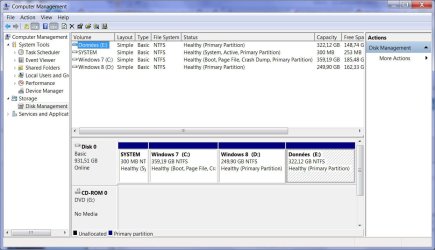
The only issue I encountered was with the HP_Recovery partition. As I expected it after reading on the subject when I moved it to the end of the disk and try to boot, it did not worked. I returned it to it's original location and it booted. But Like I said on my first post it was not really an issue for me. That partition exist to be able to recreate de Disk as it came out of the factory. I don't think I will ever used it. But just to be safe I copied that partition on another disk and then I deleted it all with that Partition Wizard Boot CD.

The next step was to provide space to increase the Windows 7 partition. So I moved the Windows 8 partition to create enough space between 7 and 8. I then did a test and booted Windows 8 and it worked. The last steps were to increase Windows 7 and Windows 8 and create another partition for may data. I created the new partition using the Partition Wizard boot CD. I'm sure I could have been able to do the partition resize with the Partition Wizard boot CD but just to be safe I did this in the OS. It also was a good test to make sure both OS were working properly.

Here is the new layout of my disk.

Disk Management new.jpg

So again thank you for your help guys and for anyone that want to moved OS boot partitions around and don't have to worry about the booting of the OS, the Partition Wizard Boot CD works great.

Luc
 

My Computer My Computer

At a glance

Windows 7 64bits
Computer type
PC/Desktop
OS
Windows 7 64bits
Excellent, great to hear it, good job :thumbsup:

The partition wizard boot cd is a great tool.
 

My Computer My Computer

At a glance

Windows 10 Pro x64Intel Core i7 6700KGSkill TridentZ RGB 16GB 3600 16-16-16-36EVGA GTX 980 Ti SC x2
Computer type
PC/Desktop
Computer Manufacturer/Model Number
Skylake Special #666
OS
Windows 10 Pro x64
CPU
Intel Core i7 6700K
Motherboard
Asus Sabertooth Z170 Mark 1
Memory
GSkill TridentZ RGB 16GB 3600 16-16-16-36
Graphics Card(s)
EVGA GTX 980 Ti SC x2
Sound Card
Realtek High Definition
Monitor(s) Displays
AOC G2460PG
Screen Resolution
1920 x 1080 144Hz
Hard Drives
Samsung 860 Pro 256GB, Seagate Barracuda 4TB x2
PSU
EVGA 1000 P2, EVGA White Custom Braided Cables
Case
Corsair Vengeance C70 Gunmetal Black
Cooling
Corsair H100i v2, Corsair ML120 x2, Thermal Grizzly Kryonaut
Keyboard
Logitech G910 Orion Spectrum
Mouse
Logitech G700s
Internet Speed
Verizon Fios Quantum Gateway 75/75
Antivirus
Windows Defender, Malwarebytes Free 3.8.3
Browser
Chrome
Other Info
Corsair SP120 x4, LG Blu-ray Drive, Durabrand HT-395 100 Watt Dolby Digital Amp, Corsair H2100 Wireless 7.1 Headset
Back
Top