Need help restoring a backup folder

wfc

New member
Local time
11:05 PM
Messages
5
The good news is that I backup, using Windows backup and restore.

The bad news is that I deleted an older backup folder to make space.
The worse news is that I saw I deleted the wrong data folder (to make space) right after I deleted the backup folder.


The good news is that I was able to recover the old backup folder from the recycle bin.

The bad news is that now, Windows restore doesn't "see" the restored folder.

More bad news is that I can't figure out how to access the data in the zip files, which I see in the directory.
The error messages tells me the zip file is invalid, but I don't believe that since I got the files out of the recycle bin right after I deleted it.


What do I need to do to get windows to recognize this backup folder, and/or how can I open the zip files to extract the data?

I have over a years worth of work in the deleted file, so I'm desperate.
Special thanks to anyone who can help me restore my files.
WFC
 

My Computer

Computer Manufacturer/Model Number
HP dv7 Notebook PC
OS
windows home premium 64bit
CPU
Intel 2.00GHz
Motherboard
Intel
Memory
8.00 GB
Graphics Card(s)
Mobile Intel
Sound Card
Intel
Monitor(s) Displays
generic
Hard Drives
Hitachi 750
Try restarting the laptop first!
 

My Computer

Computer type
PC/Desktop
Computer Manufacturer/Model Number
Custom Built PC
OS
Windows 7 Ultimate 64 bit SP1
CPU
Intel(R) Core(TM) i5-2500K
Motherboard
Gigabyte Technology Co., Ltd. Z68X-UD3-B3
Memory
12GB Kingston Hyperx 1600MHz
Graphics Card(s)
Asus GTS 450
PSU
500W Coolink
Other Info
Genius G-Pen F610 (PenPad)
This happened over a month ago, and I've tried everything I can think of to get my data back. The laptop's been restarted hundreds of times since then.
 

My Computer

Computer Manufacturer/Model Number
HP dv7 Notebook PC
OS
windows home premium 64bit
CPU
Intel 2.00GHz
Motherboard
Intel
Memory
8.00 GB
Graphics Card(s)
Mobile Intel
Sound Card
Intel
Monitor(s) Displays
generic
Hard Drives
Hitachi 750

My Computers

System One System Two

  • Computer type
    PC/Desktop
    Computer Manufacturer/Model Number
    ALWAYS UNDER CONSTRUCTION
    OS
    Windows 11 Pro
    CPU
    Ryzen 9 5900X
    Motherboard
    Asus X570 Crosshair Viii Hero
    Memory
    32GB G Skill DDR4-3600
    Graphics Card(s)
    EVGA RTX 3080 FTW 3 Ultra
    Sound Card
    On Board/Sennheiser PC37X Headset
    Monitor(s) Displays
    3 X Asus 27"
    Screen Resolution
    2560x1440
    Hard Drives
    2 X 1 TB NVME drives
    PSU
    EVGA 850
    Case
    Phanteks Eclipse P400A
    Cooling
    EVGA 280 AIO
    Keyboard
    Logitech G510s/ Logitech G13
    Mouse
    Logitech G502
    Internet Speed
    24/1
    Antivirus
    ESET/MBAM Pro/SAS Pro
    Browser
    Chrome/ Firefox/ Edge
  • Computer type
    Laptop
    System Manufacturer/Model Number
    Dell 16 Plus
    OS
    Windows 11 Pro
    CPU
    Intel Ultra 9 288V
    Memory
    32 GB LPDDR5X 8533
    Monitor(s) Displays
    16" Mini-LED HDR600 Touch 90 Hz
    Screen Resolution
    2560X1600
    Hard Drives
    1 TB NVME
How to Manually Recover a Windows Backup

I use but admit both Windows imaging & file/folder backup are not robust in auto locating backup data sets. A corruption of a small MediaID file is all that is needed.
I experimented a little and find this procedure works for me.

How to Manually Recover Windows file/folder Backups

This will retain your original directory/folder structure.

1) Right click your file/folder backup named like "JONES-PC". Select Open and choose a backup set folder eg. "Backup Set 2011-06-23 194949".
2) Double click to open the Backup Set folder. You will see a number of Backup Files folders eg. "Backup Files 2011-06-23 194949". One will be large and be the first main backup of the set. The other folders will be smaller and be subsequent incremental backups.
3) Open each "Backup files " folder and there are your backup .zip files. Start with the large "Backup file ..." folder.
4) Create a recovery folder somewhere (say a data partition or an external drive).
5) Install 7-zip so that it appears as a right click option.
6) Highlight one or more of the .zip files and right click select 7-zip.
7) Choose "Extract files...". Under "Extract to:" browse to your recovery folder.
Ensure "Path mode:" is set to "Full pathnames". Select ok.
8) Do this for all .zip files in each of the "Backup files..." folders.

That's it.

An advantage of the Windows file/folder backup is that the zip files don't form what is called a spanned set like many other backup programs so they can be individually recovered.
 

My Computer

Computer type
PC/Desktop
Computer Manufacturer/Model Number
Own build
OS
Windows 7x64 Home Premium SP1
CPU
Intel i7 2600k
Motherboard
ASUS P8Z68 Deluxe
Memory
G.Skill Ripjaws (DDR3-1600) 2x4GB
Graphics Card(s)
Nvidia GeForce GTS 450; Intel HD Graphics 3000(GT2+)
Monitor(s) Displays
Dell Ultrasharp IPS panel U2311H, Samsung SyncMaster P2350
Screen Resolution
1920x1080
Hard Drives
Samsung 850 Pro SSD 256GB, Samsung SSD 840 120GB, Seagates 1TB Barracuda ST31000528AS x2
PSU
Seasonic M12II 520W
Case
Lian Li Lancool PC-K60
Cooling
Case: 1x120mm, 3x140mm CPU: Hyper 212+
Keyboard
Logitech MK520 (wireless)
Mouse
Logitech MK520
Internet Speed
6-7 Mbps
Antivirus
Norton Security Premium, Malwarebytes on 2 (MSE on 3rd PC)
Browser
FireFox
Other Info
Audio: Logitech Z523 2.1
Thanks for the attempt MJF - I had unsuccessfully used my default, WinRar, to try to unzip, which I assumed would open any zip file.
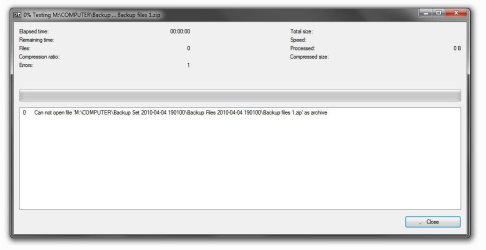
I tried 7-Zip as you suggested and see the same result - can't open the backup zip file as archive.
I don't believe all 186 files are corrupted, but this needs some little trick to access their contents.
 

My Computer

Computer Manufacturer/Model Number
HP dv7 Notebook PC
OS
windows home premium 64bit
CPU
Intel 2.00GHz
Motherboard
Intel
Memory
8.00 GB
Graphics Card(s)
Mobile Intel
Sound Card
Intel
Monitor(s) Displays
generic
Hard Drives
Hitachi 750
@ essenbe - - - Yes, I've studied the tutorial. In a more recent backup, going into the zip files works fine.
 

My Computer

Computer Manufacturer/Model Number
HP dv7 Notebook PC
OS
windows home premium 64bit
CPU
Intel 2.00GHz
Motherboard
Intel
Memory
8.00 GB
Graphics Card(s)
Mobile Intel
Sound Card
Intel
Monitor(s) Displays
generic
Hard Drives
Hitachi 750
Thanks for the attempt MJF - I had unsuccessfully used my default, WinRar, to try to unzip, which I assumed would open any zip file.
I tried 7-Zip as you suggested and see the same result - can't open the backup zip file as archive.
I don't believe all 186 files are corrupted, but this needs some little trick to access their contents.
Curious. Spanned zips can be a problem but I've never can a problem opening Windows zips.

Can you give the specific error when attempting to unzip using 7-zip?

Clutching at straws - it could be an ownership issue. I copy out the zip folder first to another location.
 

My Computer

Computer type
PC/Desktop
Computer Manufacturer/Model Number
Own build
OS
Windows 7x64 Home Premium SP1
CPU
Intel i7 2600k
Motherboard
ASUS P8Z68 Deluxe
Memory
G.Skill Ripjaws (DDR3-1600) 2x4GB
Graphics Card(s)
Nvidia GeForce GTS 450; Intel HD Graphics 3000(GT2+)
Monitor(s) Displays
Dell Ultrasharp IPS panel U2311H, Samsung SyncMaster P2350
Screen Resolution
1920x1080
Hard Drives
Samsung 850 Pro SSD 256GB, Samsung SSD 840 120GB, Seagates 1TB Barracuda ST31000528AS x2
PSU
Seasonic M12II 520W
Case
Lian Li Lancool PC-K60
Cooling
Case: 1x120mm, 3x140mm CPU: Hyper 212+
Keyboard
Logitech MK520 (wireless)
Mouse
Logitech MK520
Internet Speed
6-7 Mbps
Antivirus
Norton Security Premium, Malwarebytes on 2 (MSE on 3rd PC)
Browser
FireFox
Other Info
Audio: Logitech Z523 2.1
..............
 

Attachments

  • 7-Zip error.JPG
    7-Zip error.JPG
    36.3 KB · Views: 9

My Computer

Computer Manufacturer/Model Number
HP dv7 Notebook PC
OS
windows home premium 64bit
CPU
Intel 2.00GHz
Motherboard
Intel
Memory
8.00 GB
Graphics Card(s)
Mobile Intel
Sound Card
Intel
Monitor(s) Displays
generic
Hard Drives
Hitachi 750
I don't know what Windows does if you delete a backup set from within "Manage Space".
I can only suggest you try another recovery approach using RECUVA and see if the zips are in tact.
You can obviously pull the data from a recent image if you have one of the partition.

Did you really have just one backup of a years worth of work:(
 

My Computer

Computer type
PC/Desktop
Computer Manufacturer/Model Number
Own build
OS
Windows 7x64 Home Premium SP1
CPU
Intel i7 2600k
Motherboard
ASUS P8Z68 Deluxe
Memory
G.Skill Ripjaws (DDR3-1600) 2x4GB
Graphics Card(s)
Nvidia GeForce GTS 450; Intel HD Graphics 3000(GT2+)
Monitor(s) Displays
Dell Ultrasharp IPS panel U2311H, Samsung SyncMaster P2350
Screen Resolution
1920x1080
Hard Drives
Samsung 850 Pro SSD 256GB, Samsung SSD 840 120GB, Seagates 1TB Barracuda ST31000528AS x2
PSU
Seasonic M12II 520W
Case
Lian Li Lancool PC-K60
Cooling
Case: 1x120mm, 3x140mm CPU: Hyper 212+
Keyboard
Logitech MK520 (wireless)
Mouse
Logitech MK520
Internet Speed
6-7 Mbps
Antivirus
Norton Security Premium, Malwarebytes on 2 (MSE on 3rd PC)
Browser
FireFox
Other Info
Audio: Logitech Z523 2.1
Back
Top