Need help restoring HDD. Windows 7 won't boot

muhhinz

New member
Local time
11:47 PM
Messages
11
Windows 7 stopped booting and entered an infinate reboot cycle. I took the HDD out and put it into another laptop as a secondary drive but it would only display "system reserved". I have installed slax linux on a usb drive and booted off that with the hdd in the original laptop and have found my files are still intact. I have managed to copy most of the important ones off through fear that the hdd might be dying a slow death. There is loads still on it so I want to try and restore. Reinstall would be an absolute last resort. I have tried all the windows tools to get it up and running but none of them work. From what I've been reading, I'd assume this is an MBR issue? although I don't fully understand what that is. If anyone could offer any advice, I'd be extremely grateful.
 

My Computer My Computer

Computer type
Laptop
Computer Manufacturer/Model Number
Samsung NP-RF511
OS
Window 7 Home Premium 64 bit
CPU
I5
Memory
8gb
Hard Drives
1tb
I'd try to find out if the drive was actually failing, aside from any MBR issues.

Go to the drive manufacturer's web site and download their disk tool. For WD drives, I think it's called Data Lifeguard. Seagate has Seatools. The tools typically have 2 tests---short and extended. You may need the DOS version of the tool.

If the drive is functioning at all, I'd copy all possible files off of it. I'd assume it's dying in short order until I proved otherwise. Never mind the MBR stuff. Worry about that later.
 

My Computer My Computer

Computer type
PC/Desktop
Computer Manufacturer/Model Number
Ignatz Special; 4 speed manual gearbox; factory air conditioning; one of one
OS
Windows 7 Home Premium SP1, 64-bit
CPU
Intel Skylake i5-6600K, not overclocked
Motherboard
AsRock Z170M Extreme 4, micro ATX
Memory
8 GB HyperX DDR4-2666 (2 x 4 GB)
Graphics Card(s)
none; graphics are integrated on CPU
Sound Card
onboard: Realtek ALC1150; external: USB Behringer UF0-202
Monitor(s) Displays
Dell S2340M 23 inch IPS
Screen Resolution
1600 x 900
Hard Drives
System: Crucial MX100 series SSD, 128 GB;
Data: Samsung Spinpoint 103SJ, 1 TB;
Backup: WD Caviar Green WD30EZRX-00D8PB0, 3 TB
PSU
Rosewill SilentNight 500 watt fanless, semi-modular
Case
Antec Solo II
Cooling
Noctua NH-U12S; Noctua F12 intake, Noctua S12A exhaust
Keyboard
Microsoft 200 6JH-00001 USB
Mouse
Dell or Microsoft optical wired; USB
Antivirus
Microsoft Security Essentials and Malwarebytes Premium
Browser
Pale Moon
Other Info
All fans PWM; speeds at idle: CPU circa 500 rpm; intake circa 600 rpm; exhaust circa 600 rpm; CPU temps 27 idle and 47 C load in a warm room (27 C/81 F) when running Intel Extreme Tuning Utility stress test.
I have a samsung laptop and have been trying for the last hour to make Samsung HUTIL work. I can only get it as an ISO, but have no dvd drive, or for floppy disk, I havent seen one of those in 10 years.

I hdd has been working flawlessly for 2 or 3 hours now as my files have been coping across. I've had to stop as I have run out of storage space.

What else can you suggest?
 

My Computer My Computer

Computer type
Laptop
Computer Manufacturer/Model Number
Samsung NP-RF511
OS
Window 7 Home Premium 64 bit
CPU
I5
Memory
8gb
Hard Drives
1tb
Can you get that Samsung utility on a bootable USB flash drive and run it from that?

You can buy storage cheap---around $55 per gigabyte. I don't know how valuable your data is to you, but I'd do what I had to do to get all data backed up. Or at least do some triage---back up only the more important stuff--whatever can't be replaced, in descending order of importance.
 

My Computer My Computer

Computer type
PC/Desktop
Computer Manufacturer/Model Number
Ignatz Special; 4 speed manual gearbox; factory air conditioning; one of one
OS
Windows 7 Home Premium SP1, 64-bit
CPU
Intel Skylake i5-6600K, not overclocked
Motherboard
AsRock Z170M Extreme 4, micro ATX
Memory
8 GB HyperX DDR4-2666 (2 x 4 GB)
Graphics Card(s)
none; graphics are integrated on CPU
Sound Card
onboard: Realtek ALC1150; external: USB Behringer UF0-202
Monitor(s) Displays
Dell S2340M 23 inch IPS
Screen Resolution
1600 x 900
Hard Drives
System: Crucial MX100 series SSD, 128 GB;
Data: Samsung Spinpoint 103SJ, 1 TB;
Backup: WD Caviar Green WD30EZRX-00D8PB0, 3 TB
PSU
Rosewill SilentNight 500 watt fanless, semi-modular
Case
Antec Solo II
Cooling
Noctua NH-U12S; Noctua F12 intake, Noctua S12A exhaust
Keyboard
Microsoft 200 6JH-00001 USB
Mouse
Dell or Microsoft optical wired; USB
Antivirus
Microsoft Security Essentials and Malwarebytes Premium
Browser
Pale Moon
Other Info
All fans PWM; speeds at idle: CPU circa 500 rpm; intake circa 600 rpm; exhaust circa 600 rpm; CPU temps 27 idle and 47 C load in a warm room (27 C/81 F) when running Intel Extreme Tuning Utility stress test.
I've been trying to make it bootable from a flash drive but have been unsuccessful. I have the important stuff off the drive but still want to try and repair it and if it dies in the process, I'll get over it.
 

My Computer My Computer

Computer type
Laptop
Computer Manufacturer/Model Number
Samsung NP-RF511
OS
Window 7 Home Premium 64 bit
CPU
I5
Memory
8gb
Hard Drives
1tb
First things first. As ignatzatsonic rightly pointed out if you value your data as important you should get it off the drive by all means first - even if you have to buy a new drive for space.

Testing the HDD and/or restoring it can be tried later.

As a matter of fact you should stop running the drive in any manner until you are fully ready to copy all data in it elsewhere.
 

My Computer My Computer

OS
Windows 7 Home Premium 32 bit
Right, that's done. All my data is safe. What's next. Remember too, I don't have an optical drive.

I need to test the hdd but I can't get a bootable version of samsung's hutil to work.
 

My Computer My Computer

Computer type
Laptop
Computer Manufacturer/Model Number
Samsung NP-RF511
OS
Window 7 Home Premium 64 bit
CPU
I5
Memory
8gb
Hard Drives
1tb
My advice here is limited to running HUTIL from a bootable DOS drive. How to restore the HDD, I shall leave it to more proficient and knowledgeable hands.

First visit Samsung Support site Verifying The Hard Disk Drive Is Working Normally= and check whether your specific drive can take HUTIL

If yes, download HUTIL210.rar 543.56KB by fanatyk from HDD Firmware Downloads. PC-3000 Support Downloads. Data recovery and HDD repair tools

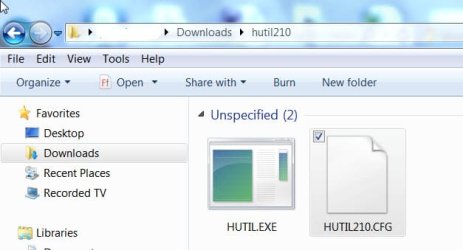
Extract the RAR file and you will have the following two files in the hutil210 folder.

03-03-2015 08-49-55.jpg

Now create a bootable DOS pen drive using RUFUS. https://rufus.akeo.ie/ ( Select MSDOS in the dropdown arrow in "Create a bootable disk using")

Once the DOS boot pendrive is created, copy the above two files into the pendrive ( Do not copy the whole folder.Copy only the two files in that folder)

Now boot from the pen drive and against the command prompt type HUTIL.EXE and press enter. Hopefully it will run. ( I haven't tried it. So don't blame me if it doesn't :D)
 

My Computer My Computer

OS
Windows 7 Home Premium 32 bit
Back
Top