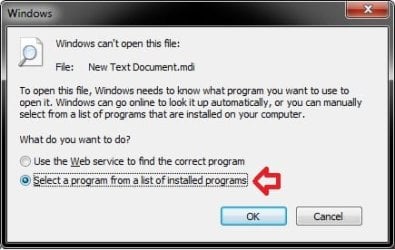
need help selecting default program to open .mdi files from MS Office

ronwood13

New member
Local time
4:03 PM
Messages
3
There are dumb questions. They are only asked by someone that already knows the answer.
That said, I need help selecting a default program to open .mdi files from MS office 2003. I found the program in Programs(86), common files, microsoft shared, MODI, 11, MSPVIEW.EXE. But cannot set it up as a 'Default' program.
Can you help or should I just open the program manually and view my MDI files?
 
Last edited by a moderator:

My Computer My Computer

Computer Manufacturer/Model Number
Acer Aspire 7741Z
OS
windows 7 ultimate x64
CPU
intel 2.0
Motherboard
Acer
Memory
4 gb
Graphics Card(s)
intel
Sound Card
realtek
Monitor(s) Displays
17"
Hard Drives
500 gb
Case
laptop
Cooling
fan

My Computer My Computer

Computer type
PC/Desktop
Computer Manufacturer/Model Number
Self built custom
OS
64-bit Windows 11 Pro for Workstations
CPU
Intel i7-8700K OC'd to 5 GHz
Motherboard
ASUS ROG Maximus XI Formula Z390
Memory
64 GB (4x16GB) G.SKILL TridentZ RGB DDR4 3600 MHz
Graphics Card(s)
ASUS ROG-STRIX-GTX1080TI-O11G-GAMING
Sound Card
Integrated
Monitor(s) Displays
2 x Samsung Odyssey G7 27"
Screen Resolution
2560x1440
Hard Drives
1TB Samsung 990 PRO M.2,
4TB Samsung 990 PRO PRO M.2,
TerraMaster F8 SSD Plus NAS
PSU
Seasonic Prime Titanium 850W
Case
Thermaltake Core P3
Cooling
Corsair Hydro H115i
Keyboard
Logitech wireless K800
Mouse
Logitech MX Master 4
Internet Speed
2 Gb/s Download and 100 Mb/s Upload
Antivirus
Malwarebyte Anti-Malware Premium
Browser
Google Chrome
Other Info
Logitech Z625 speaker system,
Logitech BRIO 4K Pro webcam,
HP Color LaserJet Pro MFP M477fdn,
APC SMART-UPS RT 1000 XL - SURT1000XLI,
Galaxy S23 Plus phone
I have no 'open with' but I can get to the program to open 'MDI' files but it won't accept it . It won't paste it in the open with or 'Other' programs' window.. useing windows programs located in "Default Programs"
Thanks for your help.
 

My Computer My Computer

Computer Manufacturer/Model Number
Acer Aspire 7741Z
OS
windows 7 ultimate x64
CPU
intel 2.0
Motherboard
Acer
Memory
4 gb
Graphics Card(s)
intel
Sound Card
realtek
Monitor(s) Displays
17"
Hard Drives
500 gb
Case
laptop
Cooling
fan

My Computer My Computer

Computer type
PC/Desktop
Computer Manufacturer/Model Number
Self built custom
OS
64-bit Windows 11 Pro for Workstations
CPU
Intel i7-8700K OC'd to 5 GHz
Motherboard
ASUS ROG Maximus XI Formula Z390
Memory
64 GB (4x16GB) G.SKILL TridentZ RGB DDR4 3600 MHz
Graphics Card(s)
ASUS ROG-STRIX-GTX1080TI-O11G-GAMING
Sound Card
Integrated
Monitor(s) Displays
2 x Samsung Odyssey G7 27"
Screen Resolution
2560x1440
Hard Drives
1TB Samsung 990 PRO M.2,
4TB Samsung 990 PRO PRO M.2,
TerraMaster F8 SSD Plus NAS
PSU
Seasonic Prime Titanium 850W
Case
Thermaltake Core P3
Cooling
Corsair Hydro H115i
Keyboard
Logitech wireless K800
Mouse
Logitech MX Master 4
Internet Speed
2 Gb/s Download and 100 Mb/s Upload
Antivirus
Malwarebyte Anti-Malware Premium
Browser
Google Chrome
Other Info
Logitech Z625 speaker system,
Logitech BRIO 4K Pro webcam,
HP Color LaserJet Pro MFP M477fdn,
APC SMART-UPS RT 1000 XL - SURT1000XLI,
Galaxy S23 Plus phone
Will not apply program

Ron,

Check to see if this may help some more.

Right click on the MDI file, click on Open, then select the Select a program from a list of installed programs option, click OK, and try the link below.

ibannieb Tech Support: Unable To Open Mdi File in Office 2003

View attachment 138613
I have gone to the step where I can select the program and it will not apply it. My path was 'Program Files (86), Common files, microsoft shared, 11.0, MODI, MSPVIEW.EXE. When selected it does not appear where it should to select as the defaultprogram. I am stuborn, I like to try at least but I feel I will use the short-cut I made to MSPVIEW.EXE to open my old files.
Thank you very much for your help, Ron
 

My Computer My Computer

Computer Manufacturer/Model Number
Acer Aspire 7741Z
OS
windows 7 ultimate x64
CPU
intel 2.0
Motherboard
Acer
Memory
4 gb
Graphics Card(s)
intel
Sound Card
realtek
Monitor(s) Displays
17"
Hard Drives
500 gb
Case
laptop
Cooling
fan
You're welcome Ron. I wish I could help further. :(
 

My Computer My Computer

Computer type
PC/Desktop
Computer Manufacturer/Model Number
Self built custom
OS
64-bit Windows 11 Pro for Workstations
CPU
Intel i7-8700K OC'd to 5 GHz
Motherboard
ASUS ROG Maximus XI Formula Z390
Memory
64 GB (4x16GB) G.SKILL TridentZ RGB DDR4 3600 MHz
Graphics Card(s)
ASUS ROG-STRIX-GTX1080TI-O11G-GAMING
Sound Card
Integrated
Monitor(s) Displays
2 x Samsung Odyssey G7 27"
Screen Resolution
2560x1440
Hard Drives
1TB Samsung 990 PRO M.2,
4TB Samsung 990 PRO PRO M.2,
TerraMaster F8 SSD Plus NAS
PSU
Seasonic Prime Titanium 850W
Case
Thermaltake Core P3
Cooling
Corsair Hydro H115i
Keyboard
Logitech wireless K800
Mouse
Logitech MX Master 4
Internet Speed
2 Gb/s Download and 100 Mb/s Upload
Antivirus
Malwarebyte Anti-Malware Premium
Browser
Google Chrome
Other Info
Logitech Z625 speaker system,
Logitech BRIO 4K Pro webcam,
HP Color LaserJet Pro MFP M477fdn,
APC SMART-UPS RT 1000 XL - SURT1000XLI,
Galaxy S23 Plus phone

My Computer My Computer

Computer type
PC/Desktop
Computer Manufacturer/Model Number
Packard Bell
OS
Windows 7 Home Premium 64bit
CPU
Intel(R) Core(TM) i3-2120 CPU @ 3.30GHz
Motherboard
Packard Bell IPISB-AG
Memory
3.00 GB
Graphics Card(s)
(1) Intel(R) HD Graphics (2) VNC Mirror Driver
Sound Card
Realtek High Definition Audio
Monitor(s) Displays
AIO LCD
Screen Resolution
1920 x 1080
Hard Drives
WDC WD10EADX-22TDHB0 ATA Device
Fixed hard disk media
4 partitions
931.51 GB
Keyboard
Wireless
Mouse
Wireless
Antivirus
Microsoft Security Essentials
Browser
IE; Firefox
Other Info
Also:
Samsung N220 Plus Netbook - Windows 7 Home
HP laptop
iPad 5
Back
Top