Solved Need help sharing DVD drive

dtgVA

New member
Local time
9:15 AM
Messages
6
Hello...

I have netbook running Windows 7 Home Premium 32bit and a laptop running Vista Home Premium 64bit. The laptop has a DVD drive I would like to share on my wireless network to install software on the netbook. Sharing files and folders have not been a problem, but I can't access the DVD drive from the netbook. I've shared the DVD drive on the laptop and given it full control permission to everyone (only two computers on my home network). The drive shows up on the netbook but when I try to access it I get the error message "Windows cannot access (drive name) You do not have permission to access (drive name). Contact your network administrator to request access." I've rebooted and shutdown a couple of times on both machines and it's still not working. What am I missing? Any help or suggestions would be greatly appreciated.
 

My Computer

Computer Manufacturer/Model Number
Gateway M-2626u Laptop
OS
Windows Vista Home Premium 64bit
Memory
4GB
Hard Drives
160 HDD
I have the same problem -- trying to access the DVD drive on my Vista HP desktop from my Windows 7 Toshiba Satellite T115, and getting the identical message despite going through the sharing protocol on the Vista desktop. Any advice?
 

My Computer

OS
Windows 7 and Vista
I have the same problem -- trying to access the DVD drive on my Vista HP desktop from my Windows 7 Toshiba Satellite T115, and getting the identical message despite going through the sharing protocol on the Vista desktop. Any advice?

Hello athurschwell...

After much trying I wasn't able to share the DVD drive. I posted the same message on the Vista Forum and got several tips on things to try from a gentlemen named Richard. Here's the link: Share DVD drive on wireless network (Group Policy issue?) - Vista Forums

Maybe one of those tips will help you. Report back to let me know if your issue is resolved.

Take care,
dtgVA
 

My Computer

Computer Manufacturer/Model Number
Gateway M-2626u Laptop
OS
Windows Vista Home Premium 64bit
Memory
4GB
Hard Drives
160 HDD
Do you have the same username and password on the laptop and the netbook?
 

My Computer

Computer Manufacturer/Model Number
HAL-9000
OS
Windows 7 Ultimate 64bit
CPU
Intel i7 3770K
Motherboard
Asus Sabertooth Z77
Memory
16GB DDR3 1333 Corsair XMS3
Graphics Card(s)
XFX HD6950 2GB EyeFinity
Sound Card
Logitech G35 & Sennheiser PC135 & VIA HD
Monitor(s) Displays
23" HP 2310e, 23" Samsung B2230, 21.5" Viewsonic
Screen Resolution
5760x1080
Hard Drives
16TB of Storage
128GB & 256GB Crucial M4 SSD's, 2X 1TB WD Black, 3x 2TB WD, 3x 2TB Samsung F4, 1.5TB Seagate, WD 500GB,
PSU
Antec True Power New 650watt
Case
Cooler Master HAF-932
Cooling
Corsair H60 Hydro Cooler, 3x 230mm Fans, 2x120mm Fan
Keyboard
Logitech G15 and G13
Mouse
Logitech G700 Gaming Mouse
Internet Speed
50/10 Mbit
Other Info
Speakers : Alesis M1 Active Mk2 Studio Monitors , APC RS 1200 UPS, HP 4500DN Color Laser, HP P1006 mono Laser, Kodak 8500 Dye-Sub, Epson 1280 inkjet, Epson Worforce 610 MFC
No, different -- does that matter? Would it fix the problem if I did?
 

My Computer

OS
Windows 7 and Vista
Apart from the Everyone group, have you try putting in the useraccount you log onto the sharing machine with (account you log onto the Laptop with). Might be worth adding the account int he security tab as well.

So basically, noteboot (w7) map to laptop (Vista) DVD drive using the logon of the laptop as credentials.
 

My Computer

Computer Manufacturer/Model Number
Lenovo ThinkPad T60
OS
Windows 7 Ultimate 64Bit
CPU
GenuineIntel Intel(R) Core(TM) DuoCore T2400 @ 1.83GHz
Motherboard
Intel(R) 82801G (ICH7 Family)
Memory
2.00 GB
Graphics Card(s)
Mobile Intel(R) 945 Express Chipset
Sound Card
SoundMAX Integrated Digital HD Audio
Monitor(s) Displays
ThinkPad Display
Screen Resolution
1400x1050
Hard Drives
100Gb SATA
Keyboard
Standard Keyboard
Mouse
HID-compliant Mouse
Internet Speed
Cable Broadband - 54Mbps
Other Info
Intel(R) PRO/1000 PL Network Connection
11a/b/g Wireless LAN Mini PCI Express Adapter
Tried, didn't work unfortunately (but I appreciate the help anyway). Added an account username/password to the Vista machine (w/ the DVD drive) that's identical to my Toshiba username/password, but no go. DVD will map to my Z: drive on the Toshiba but otherwise still get the "inaccessible" message. Any further ideas most welcome --
Adam
 

My Computer

OS
Windows 7 and Vista
File and printer sharing is turned ON?
 

My Computer

Computer Manufacturer/Model Number
Lenovo ThinkPad T60
OS
Windows 7 Ultimate 64Bit
CPU
GenuineIntel Intel(R) Core(TM) DuoCore T2400 @ 1.83GHz
Motherboard
Intel(R) 82801G (ICH7 Family)
Memory
2.00 GB
Graphics Card(s)
Mobile Intel(R) 945 Express Chipset
Sound Card
SoundMAX Integrated Digital HD Audio
Monitor(s) Displays
ThinkPad Display
Screen Resolution
1400x1050
Hard Drives
100Gb SATA
Keyboard
Standard Keyboard
Mouse
HID-compliant Mouse
Internet Speed
Cable Broadband - 54Mbps
Other Info
Intel(R) PRO/1000 PL Network Connection
11a/b/g Wireless LAN Mini PCI Express Adapter
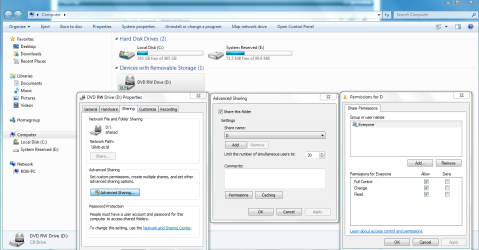
Sharing my DVD drives accross the network works everytime for me on five completely different Homegrouped machines. I can't imagine why it wouldn't work for you, here's what I did. Maybe it's another Vista/Win7 sharing problem but it works with Homegroups everytime. If there is a third party firewall or an A/V software involved then all bets are off on this working.
 

Attachments

  • Sharing D  drive and permissions.PNG
    Sharing D drive and permissions.PNG
    65.4 KB · Views: 1,885

My Computer

Computer type
PC/Desktop
Computer Manufacturer/Model Number
Home built
OS
Windows 7 Ult, Windows 8.1 Pro,
CPU
Q9650-4.275GHz, E8600 4.5GHz, E6750-3.8GHz
Motherboard
Evga 780i FTW
Memory
G.Skill PC2 9600 1200Mhz 5 5 5 15 2T
Graphics Card(s)
GTX480
Sound Card
Asus Xonar D2
Monitor(s) Displays
HannsG
Screen Resolution
1680X1050
Hard Drives
GSkill Phoenix Pro 120GB SSD
PSU
ThermalTake Toughpower 1000Watt modular
Case
ThermalTake XaserV
Cooling
Xigmatek S1283
Keyboard
Logitech G15
Mouse
Logitech G9
Internet Speed
T1
Sharing my DVD drives accross the network works everytime for me on five completely different Homegrouped machines. I can't imagine why it wouldn't work for you, here's what I did. Maybe it's another Vista/Win7 sharing problem but it works with Homegroups everytime.

You're right, it should work. That's what making this problem so perplexing. I think as you indicated it's a Vista/Win7 issue. As I mentioned in an earlier post, sharing files, folders and even a printer has not been a problem. It's only been the DVD drive that's giving me the problem. I went through the exact steps as your graphic depicts to share the DVD drive. What a mystery! :confused:

dtgVA
 

My Computer

Computer Manufacturer/Model Number
Gateway M-2626u Laptop
OS
Windows Vista Home Premium 64bit
Memory
4GB
Hard Drives
160 HDD
I wish I could test this out for you, but all my machines are now converted to Win 7 because I wanted to use Homegroups. It might work if you can figure out a way to add the D drive to one of the Public Sharing folders and share the drive from there.
 

My Computer

Computer type
PC/Desktop
Computer Manufacturer/Model Number
Home built
OS
Windows 7 Ult, Windows 8.1 Pro,
CPU
Q9650-4.275GHz, E8600 4.5GHz, E6750-3.8GHz
Motherboard
Evga 780i FTW
Memory
G.Skill PC2 9600 1200Mhz 5 5 5 15 2T
Graphics Card(s)
GTX480
Sound Card
Asus Xonar D2
Monitor(s) Displays
HannsG
Screen Resolution
1680X1050
Hard Drives
GSkill Phoenix Pro 120GB SSD
PSU
ThermalTake Toughpower 1000Watt modular
Case
ThermalTake XaserV
Cooling
Xigmatek S1283
Keyboard
Logitech G15
Mouse
Logitech G9
Internet Speed
T1
Tried, didn't work unfortunately (but I appreciate the help anyway). Added an account username/password to the Vista machine (w/ the DVD drive) that's identical to my Toshiba username/password, but no go. DVD will map to my Z: drive on the Toshiba but otherwise still get the "inaccessible" message. Any further ideas most welcome --
Adam

All of my machines are now 7, but when I had the 7 RC on my Dell mini and Vista Ultimate on my desktops, I added the username/password from the mini onto my desktop so that I could access the DVD-RW.

If you need a cheap external DVD reader, look for a Microsoft Xbox 360 HD-DVD external drive, should be $30 or so and work great on the netbooks.
YouTube - FormulaZR1's Channel
 

My Computer

Computer Manufacturer/Model Number
HAL-9000
OS
Windows 7 Ultimate 64bit
CPU
Intel i7 3770K
Motherboard
Asus Sabertooth Z77
Memory
16GB DDR3 1333 Corsair XMS3
Graphics Card(s)
XFX HD6950 2GB EyeFinity
Sound Card
Logitech G35 & Sennheiser PC135 & VIA HD
Monitor(s) Displays
23" HP 2310e, 23" Samsung B2230, 21.5" Viewsonic
Screen Resolution
5760x1080
Hard Drives
16TB of Storage
128GB & 256GB Crucial M4 SSD's, 2X 1TB WD Black, 3x 2TB WD, 3x 2TB Samsung F4, 1.5TB Seagate, WD 500GB,
PSU
Antec True Power New 650watt
Case
Cooler Master HAF-932
Cooling
Corsair H60 Hydro Cooler, 3x 230mm Fans, 2x120mm Fan
Keyboard
Logitech G15 and G13
Mouse
Logitech G700 Gaming Mouse
Internet Speed
50/10 Mbit
Other Info
Speakers : Alesis M1 Active Mk2 Studio Monitors , APC RS 1200 UPS, HP 4500DN Color Laser, HP P1006 mono Laser, Kodak 8500 Dye-Sub, Epson 1280 inkjet, Epson Worforce 610 MFC
SOLVED! Finally!!

Well it's been over 7 months since I started this thread. Let me share what I just discovered today was the problem. Two weeks ago I bought an Asus external DVD burner for my 1201N since I didn't have any initial success sharing the DVD drive on my Gateway laptop. I noticed on my wireless home network I could easily share the Asus drive with the Gateway with no problems at all. Well, with both the 1201N (Win7 32) and the Gateway (Vista 64) I was logged on with administrator rights. HOWEVER, in order to share the internal DVD drive on the Gateway laptop, I have to be logged in on the 1201N with the Win 7 built-in Administrator account. This account is different from one you create that has admin rights. "The built-in Administrator account is an account that has full access and permission on the computer, and will not be prompted by UAC." Here's a link for instructions on enabling and disabling the built-in Admin account. The instructions are the same for Vista. (Thanks Brink!!)

http://www.sevenforums.com/tutorials/50 … tml?filter

Hopes this saves some aggrevation and maybe a few bucks. :D
 

My Computer

Computer Manufacturer/Model Number
Gateway M-2626u Laptop
OS
Windows Vista Home Premium 64bit
Memory
4GB
Hard Drives
160 HDD
Well it's been over 7 months since I started this thread. Let me share what I just discovered today was the problem. Two weeks ago I bought an Asus external DVD burner for my 1201N since I didn't have any initial success sharing the DVD drive on my Gateway laptop. I noticed on my wireless home network I could easily share the Asus drive with the Gateway with no problems at all. Well, with both the 1201N (Win7 32) and the Gateway (Vista 64) I was logged on with administrator rights. HOWEVER, in order to share the internal DVD drive on the Gateway laptop, I have to be logged in on the 1201N with the Win 7 built-in Administrator account. This account is different from one you create that has admin rights. "The built-in Administrator account is an account that has full access and permission on the computer, and will not be prompted by UAC." Here's a link for instructions on enabling and disabling the built-in Admin account. The instructions are the same for Vista. (Thanks Brink!!)

http://www.sevenforums.com/tutorials/50 … tml?filter

Hopes this saves some aggrevation and maybe a few bucks. :D

Thanks for reporting back in dtgVA, I knew about the built in Admin account but havn't had to use it to share anything. I think maybe that turning off UAC might have also fixed the problem but can't say for sure.

One thing for sure is that it's easy to share the D drive between Windows 7 machines but I havn't tested it with Vista yet.
 

My Computer

Computer type
PC/Desktop
Computer Manufacturer/Model Number
Home built
OS
Windows 7 Ult, Windows 8.1 Pro,
CPU
Q9650-4.275GHz, E8600 4.5GHz, E6750-3.8GHz
Motherboard
Evga 780i FTW
Memory
G.Skill PC2 9600 1200Mhz 5 5 5 15 2T
Graphics Card(s)
GTX480
Sound Card
Asus Xonar D2
Monitor(s) Displays
HannsG
Screen Resolution
1680X1050
Hard Drives
GSkill Phoenix Pro 120GB SSD
PSU
ThermalTake Toughpower 1000Watt modular
Case
ThermalTake XaserV
Cooling
Xigmatek S1283
Keyboard
Logitech G15
Mouse
Logitech G9
Internet Speed
T1
Windows 7 sharing of DVD Drives

I had the same problem as several here in trying to share out a DVD drive. However, after setting Everyone as having all permissions, when I tried to get the drive to work from another computer across the network, it refused UNTIL I placed a DVD in the drive. Then the sharing worked fine.
 

My Computer

Computer type
Laptop
Computer Manufacturer/Model Number
Sony VAIO VGN-AR550U
OS
Windows 7 Business x64
CPU
1.80 gigahertz Intel Core2 Duo
Memory
3 gb
Hard Drives
Seagate Momentus 5400.6 ST9320325AS 320GB 5400 RPM
Antivirus
Microsoft Security Essentials
Browser
Internet Explorer 9
Back
Top