Solved Need Help to Delete File

Hello Jacee,

The scan just finished. Results are attached. The files of my concern are not shown but it has done some useful work. In addition to the text file, I have attached a screen shot because it shows two entries in red, right at the top of the list, and the action taken regarding them is not shown in the report. Does the red colour mean that they have been deleted?

Regarding the other 5 items, the 'Action' shown is 'deleted - quarantined'. Does it mean deleted OR quarantined? I have not closed ESET. I 'll wait for your advice on what to do with these 7 items.

In the mean time I have downloaded AdwCleaner. I tried again today and it came in without any warnings this time. Should I run this and see what happens?

Kind regards
 

Attachments

  • ESET Scan.txt
    ESET Scan.txt
    868 bytes · Views: 2
  • ESET.PNG
    ESET.PNG
    4.9 KB · Views: 41

My Computer

Computer Manufacturer/Model Number
Laptop - Acer Aspire 5250-BZ479
OS
Windows 7 Home Premium 64bit
CPU
AMD Dual Core C-50
Memory
2GB DDR3/320GB HDD
Graphics Card(s)
AMD Radeon HD 6250
Monitor(s) Displays
15.6" HD LED LCD
Internet Speed
ADSL
Finally! You're on the right track
a041.gif

Check "everything" that ESET found to be quarantined and deleted. Now, run AdwCleaner, following my previous instructions (both steps). Post the results.
 

My Computer

Computer type
PC/Desktop
Computer Manufacturer/Model Number
Bruce ... somewhere in his 40's
OS
Windows 7 Ultimate 32bit SP1
CPU
Intel(R) Core(TM)2 Quad CPU @ 2.40GHz, 2400 MHz
Motherboard
INTEL/D975XBX2
Memory
4 GB
Graphics Card(s)
ATI Radeon HD 2600 Pro
Monitor(s) Displays
Samsung SyncMaster 914v
Screen Resolution
1280 x 1024
Hard Drives
2/500GB each ... ST3500630AS ATA Device.
One is not connected
PSU
Rocketfish 700 W
Case
G.Skill Gigabyte Chassis
Keyboard
Standard PS/2 Keyboard
Mouse
Microsoft PS/2 Mouse
Internet Speed
DSL
Antivirus
Avira Internet Security
Browser
IE 11
Other Info
ATI HDMI Audio
I have attached AdwCleaner scan report. A large number of Registry Key items is present in the list. I don't understand any of them. Please tell me whether it is safe to delete all these Registry items.

Thank you
 

Attachments

My Computer

Computer Manufacturer/Model Number
Laptop - Acer Aspire 5250-BZ479
OS
Windows 7 Home Premium 64bit
CPU
AMD Dual Core C-50
Memory
2GB DDR3/320GB HDD
Graphics Card(s)
AMD Radeon HD 6250
Monitor(s) Displays
15.6" HD LED LCD
Internet Speed
ADSL
You need to get rid of those .... open AdwCleaner, click "clean", save the .txt log and post that for me, please.
 

My Computer

Computer type
PC/Desktop
Computer Manufacturer/Model Number
Bruce ... somewhere in his 40's
OS
Windows 7 Ultimate 32bit SP1
CPU
Intel(R) Core(TM)2 Quad CPU @ 2.40GHz, 2400 MHz
Motherboard
INTEL/D975XBX2
Memory
4 GB
Graphics Card(s)
ATI Radeon HD 2600 Pro
Monitor(s) Displays
Samsung SyncMaster 914v
Screen Resolution
1280 x 1024
Hard Drives
2/500GB each ... ST3500630AS ATA Device.
One is not connected
PSU
Rocketfish 700 W
Case
G.Skill Gigabyte Chassis
Keyboard
Standard PS/2 Keyboard
Mouse
Microsoft PS/2 Mouse
Internet Speed
DSL
Antivirus
Avira Internet Security
Browser
IE 11
Other Info
ATI HDMI Audio
Here is the .txt log after cleaning.

Regards
 

Attachments

My Computer

Computer Manufacturer/Model Number
Laptop - Acer Aspire 5250-BZ479
OS
Windows 7 Home Premium 64bit
CPU
AMD Dual Core C-50
Memory
2GB DDR3/320GB HDD
Graphics Card(s)
AMD Radeon HD 6250
Monitor(s) Displays
15.6" HD LED LCD
Internet Speed
ADSL
Good! Now, download TFC by Old Timer TFC - Temp File Cleaner by OldTimer - Geeks to Go Forum and save it to your desktop.
Save any unsaved work. TFC will close ALL open programs including your browser!
Double-click on TFC.exe to run it. If you are using Vista/Windows 7 right-click on the file and choose Run As Administrator.

Click the Start button to begin the cleaning process and let it run uninterrupted to completion.

Important! Manually reboot the machine to ensure a complete clean.


Tell me if the file you couldn't delete is gone now (C:\Users\MELITA\AppData\Local\Temp\azlocprov_0.1.6.2.zip Type: SIG File), and how your computer is running.
 

My Computer

Computer type
PC/Desktop
Computer Manufacturer/Model Number
Bruce ... somewhere in his 40's
OS
Windows 7 Ultimate 32bit SP1
CPU
Intel(R) Core(TM)2 Quad CPU @ 2.40GHz, 2400 MHz
Motherboard
INTEL/D975XBX2
Memory
4 GB
Graphics Card(s)
ATI Radeon HD 2600 Pro
Monitor(s) Displays
Samsung SyncMaster 914v
Screen Resolution
1280 x 1024
Hard Drives
2/500GB each ... ST3500630AS ATA Device.
One is not connected
PSU
Rocketfish 700 W
Case
G.Skill Gigabyte Chassis
Keyboard
Standard PS/2 Keyboard
Mouse
Microsoft PS/2 Mouse
Internet Speed
DSL
Antivirus
Avira Internet Security
Browser
IE 11
Other Info
ATI HDMI Audio
Yes, all the files are gone! The computer is running much better than it did before this operation. Thank you very much.

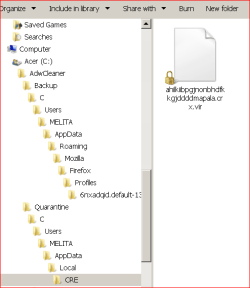
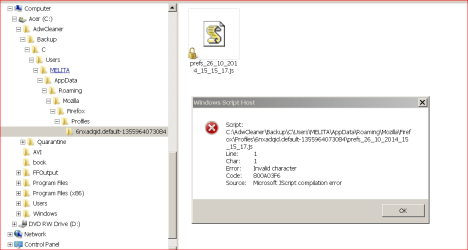
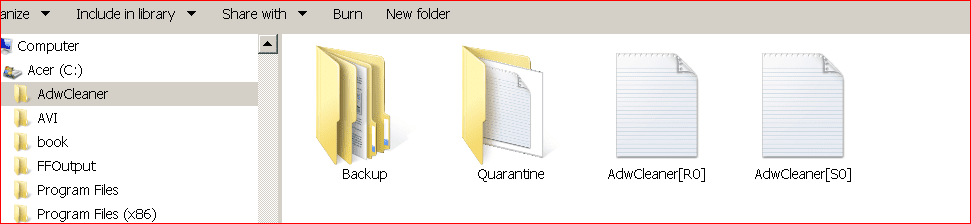
Just on other thing. Please look at the 4 attachments that I have included here. AdwCleaner has, in addition to the two reports, created two folders, namely, Backup and Quarantine. The first one contains 10 folders, each inside the preceding one and all empty except the last, which you can see named 'Windows Script Host'. The second one contains a list of 3 quarantined files and 6 folders in the same way, empty except the last, which has a file with extension .vir. It also has another file named 'Roboot64.exe.vir in System32, which is not shown here - I believe both these are viruses.

What should I do with these folders and the files? Should I delete the whole lot including the 3 quarantined files shown in the notepad?

Regards
 

Attachments

  • AdwCleaner quarantine.PNG
    AdwCleaner quarantine.PNG
    9.1 KB · Views: 29
  • AdwCleaner back up.PNG
    AdwCleaner back up.PNG
    15.1 KB · Views: 0
  • AdwCleaner files.PNG
    AdwCleaner files.PNG
    12.3 KB · Views: 0
  • Quarantine.txt
    Quarantine.txt
    268 bytes · Views: 1
Last edited:

My Computer

Computer Manufacturer/Model Number
Laptop - Acer Aspire 5250-BZ479
OS
Windows 7 Home Premium 64bit
CPU
AMD Dual Core C-50
Memory
2GB DDR3/320GB HDD
Graphics Card(s)
AMD Radeon HD 6250
Monitor(s) Displays
15.6" HD LED LCD
Internet Speed
ADSL
Follow these instructions:


Remove/Uninstall AdwCleaner:


Double click on AdwCleaner.exe to run the tool again. Click on the Uninstall button.
Click Yes when asked are you sure you want to uninstall.
Both AdwCleaner.exe, its folder and all logs will be removed.


Keep TFC and use it!!!


Now, I would like to see what you need to update:
Download Security Check by screen317 from
http://screen317.spywareinfoforum.org/SecurityCheck.exe
or http://screen317.spywareinfoforum.org/
Save it to your Desktop.
Double click SecurityCheck.exe and follow the onscreen instructions inside of the black box.
A Notepad document should open automatically called checkup.txt; please post the contents of that document.
 

My Computer

Computer type
PC/Desktop
Computer Manufacturer/Model Number
Bruce ... somewhere in his 40's
OS
Windows 7 Ultimate 32bit SP1
CPU
Intel(R) Core(TM)2 Quad CPU @ 2.40GHz, 2400 MHz
Motherboard
INTEL/D975XBX2
Memory
4 GB
Graphics Card(s)
ATI Radeon HD 2600 Pro
Monitor(s) Displays
Samsung SyncMaster 914v
Screen Resolution
1280 x 1024
Hard Drives
2/500GB each ... ST3500630AS ATA Device.
One is not connected
PSU
Rocketfish 700 W
Case
G.Skill Gigabyte Chassis
Keyboard
Standard PS/2 Keyboard
Mouse
Microsoft PS/2 Mouse
Internet Speed
DSL
Antivirus
Avira Internet Security
Browser
IE 11
Other Info
ATI HDMI Audio
Good job Melita and Jacee. Well Done.
 

My Computer

Computer type
PC/Desktop
Computer Manufacturer/Model Number
Home made Desktop
OS
Windows 10 Pro. 64/ version 1709 Windows 7 Pro/64
CPU
Intel i7-6800K @ 4.3
Motherboard
ASUS X-99 Deluxe II
Memory
Corsair Platinum 16 gig @2400
Graphics Card(s)
EVGA GTX 1070 OC
Monitor(s) Displays
Asus 27" LED LCD/VE278Q
Screen Resolution
1920-1080 or 1280-720 HDMI
Hard Drives
INTEL SSD 730-240 Gb Sata 3.0/
PSU
EVGA Platium 1200W
Case
Phanteks Luxe Tempered Glass 8 fans/ one radiator
Cooling
XSPC/ Water Cooled CPU
Keyboard
Das 4 Professional
Mouse
Logitech M705/MX Anywhere 2-S
Internet Speed
100 mbits
Antivirus
Microsoft Security Essentials/ Malwarebytes Premium 3.0/ SAS
Browser
I.E. 11 default/Firefox/ ISP Time Warner Cable/Spectrum
Other Info
LG BluRay Burner/
Sound system-KLipsch-THX/
Icy Dock ssd Hot Swap bays.

My Computer

Computer Manufacturer/Model Number
Laptop - Acer Aspire 5250-BZ479
OS
Windows 7 Home Premium 64bit
CPU
AMD Dual Core C-50
Memory
2GB DDR3/320GB HDD
Graphics Card(s)
AMD Radeon HD 6250
Monitor(s) Displays
15.6" HD LED LCD
Internet Speed
ADSL
Here is the security check report.

Some thing curious: there is an entry here 'Google Chrome 37.0.2062.124'. I don't have Google Chrome in my computer!

Regards,
 

Attachments

My Computer

Computer Manufacturer/Model Number
Laptop - Acer Aspire 5250-BZ479
OS
Windows 7 Home Premium 64bit
CPU
AMD Dual Core C-50
Memory
2GB DDR3/320GB HDD
Graphics Card(s)
AMD Radeon HD 6250
Monitor(s) Displays
15.6" HD LED LCD
Internet Speed
ADSL
Let's see where it might be listed. Sometimes it can come bundled with other software you downloaded.


Download DDS from one of these links:
DDS.com
DDS.pif

  • Disable any script blocking protection
  • Double click the dds icon to run the tool.
  • When done, DDS will open two (2) logs:
    1. DDS.txt
    2. Attach.txt <--- will be minimized in the task tray
  • Save both reports to your desktop.

Include the contents of both logs in your next post.
 

My Computer

Computer type
PC/Desktop
Computer Manufacturer/Model Number
Bruce ... somewhere in his 40's
OS
Windows 7 Ultimate 32bit SP1
CPU
Intel(R) Core(TM)2 Quad CPU @ 2.40GHz, 2400 MHz
Motherboard
INTEL/D975XBX2
Memory
4 GB
Graphics Card(s)
ATI Radeon HD 2600 Pro
Monitor(s) Displays
Samsung SyncMaster 914v
Screen Resolution
1280 x 1024
Hard Drives
2/500GB each ... ST3500630AS ATA Device.
One is not connected
PSU
Rocketfish 700 W
Case
G.Skill Gigabyte Chassis
Keyboard
Standard PS/2 Keyboard
Mouse
Microsoft PS/2 Mouse
Internet Speed
DSL
Antivirus
Avira Internet Security
Browser
IE 11
Other Info
ATI HDMI Audio
Here are the two files. The 'attach' file wants me to zip it before uploading. So I have done that.

Regards,
 

Attachments

My Computer

Computer Manufacturer/Model Number
Laptop - Acer Aspire 5250-BZ479
OS
Windows 7 Home Premium 64bit
CPU
AMD Dual Core C-50
Memory
2GB DDR3/320GB HDD
Graphics Card(s)
AMD Radeon HD 6250
Monitor(s) Displays
15.6" HD LED LCD
Internet Speed
ADSL
Looks like your Hosts File isn't quite right! Copy and paste these lines in Note pad.


@Echo on
pushd\windows\system32\drivers\etc
attrib -h -s -r hosts
echo 127.0.0.1 localhost>HOSTS
attrib +r +h +s hosts
popd
ipconfig /release
ipconfig /renew
ipconfig /flushdns
netsh winsock reset all
netsh int ip reset all
shutdown -r -t 1
del %0


Save as flush.bat to your desktop. Right
click on the flush.bat file to run it as Administrator. Your computer should re-boot itself.


After doing the above, let me know if you can remove 'Vuze' from Programs and Features. (I still see it)
 

My Computer

Computer type
PC/Desktop
Computer Manufacturer/Model Number
Bruce ... somewhere in his 40's
OS
Windows 7 Ultimate 32bit SP1
CPU
Intel(R) Core(TM)2 Quad CPU @ 2.40GHz, 2400 MHz
Motherboard
INTEL/D975XBX2
Memory
4 GB
Graphics Card(s)
ATI Radeon HD 2600 Pro
Monitor(s) Displays
Samsung SyncMaster 914v
Screen Resolution
1280 x 1024
Hard Drives
2/500GB each ... ST3500630AS ATA Device.
One is not connected
PSU
Rocketfish 700 W
Case
G.Skill Gigabyte Chassis
Keyboard
Standard PS/2 Keyboard
Mouse
Microsoft PS/2 Mouse
Internet Speed
DSL
Antivirus
Avira Internet Security
Browser
IE 11
Other Info
ATI HDMI Audio
The long list of domains under 'Hosts File Hijack', shown in the 'attach' file, starting with 10.11.12.13 www.freecamsecrets.com, are my entries. Some time ago I was plagued by these rouge domains popping up (opening a new browser window!) and trying to get me to click on various links when I was surfing the internet, that I used this method to block them using the hosts file. It was a complete success and all were blocked. They have not been able to come into my computer for a couple of years now. What will happen to this list if I run this .bat file.

Could you also kindly give me some idea about what happens in the computer when this .bat file is run. It would be nice to know what I am doing :o

Best regards
 

My Computer

Computer Manufacturer/Model Number
Laptop - Acer Aspire 5250-BZ479
OS
Windows 7 Home Premium 64bit
CPU
AMD Dual Core C-50
Memory
2GB DDR3/320GB HDD
Graphics Card(s)
AMD Radeon HD 6250
Monitor(s) Displays
15.6" HD LED LCD
Internet Speed
ADSL
The .bat file flushes any bad DNS cache, restores Microsoft's Hosts File and resets the Internet protocol.
 

My Computer

Computer type
PC/Desktop
Computer Manufacturer/Model Number
Bruce ... somewhere in his 40's
OS
Windows 7 Ultimate 32bit SP1
CPU
Intel(R) Core(TM)2 Quad CPU @ 2.40GHz, 2400 MHz
Motherboard
INTEL/D975XBX2
Memory
4 GB
Graphics Card(s)
ATI Radeon HD 2600 Pro
Monitor(s) Displays
Samsung SyncMaster 914v
Screen Resolution
1280 x 1024
Hard Drives
2/500GB each ... ST3500630AS ATA Device.
One is not connected
PSU
Rocketfish 700 W
Case
G.Skill Gigabyte Chassis
Keyboard
Standard PS/2 Keyboard
Mouse
Microsoft PS/2 Mouse
Internet Speed
DSL
Antivirus
Avira Internet Security
Browser
IE 11
Other Info
ATI HDMI Audio
The .bat file flushes any bad DNS cache, restores Microsoft's Hosts File and resets the Internet protocol.

If it restores the Hosts file would it restore it to the original condition, thereby deleting all the entries that I have made to block those sites? I need to know this before I run the .bat file so that I can make a copy of those entries.

Thank you
 

My Computer

Computer Manufacturer/Model Number
Laptop - Acer Aspire 5250-BZ479
OS
Windows 7 Home Premium 64bit
CPU
AMD Dual Core C-50
Memory
2GB DDR3/320GB HDD
Graphics Card(s)
AMD Radeon HD 6250
Monitor(s) Displays
15.6" HD LED LCD
Internet Speed
ADSL
Just take a copy of your hosts file and keep it somewhere just in case so you have the reference to your entries there. You can also give the copy the .txt extension (Call it hosts.txt) so can open it direct with notepad or similar
 

My Computer

Computer type
PC/Desktop
Computer Manufacturer/Model Number
Home Made
OS
Windows 7 Ultimate x64
CPU
Q6600 3.1ghz
Motherboard
Gigabyte GA-P35-DS3L
Memory
Kingston DDR2 6400 8GB
Graphics Card(s)
Gigabyte Radeon HD 6850 1GB 256-Bit
Sound Card
On board
Monitor(s) Displays
Acer X243H
Screen Resolution
1920x1080
Hard Drives
Intel 330 120GB SSD
WD 2TB 7200
PSU
Thermaltake Toughpower 750W Semi Modular
Case
Modified Alienware
Keyboard
A4Tech
Mouse
Gigabyte ECO600
Antivirus
Comodo
Browser
Cyberfox
The .bat file flushes any bad DNS cache, restores Microsoft's Hosts File and resets the Internet protocol.

If it restores the Hosts file would it restore it to the original condition, thereby deleting all the entries that I have made to block those sites? I need to know this before I run the .bat file so that I can make a copy of those entries.

Thank you
Yes, it will delete all of your entries.
Try what Shimshom suggested.

I sent you a Private Message.
 

My Computer

Computer type
Laptop
Computer Manufacturer/Model Number
Employer provided Dell Latitude
OS
W7 Pro SP1 64bit
CPU
i7
Memory
8GB
Graphics Card(s)
Intel HD Graphics
Hard Drives
crappy SSD
Antivirus
Employer mandated Symantec Endpoint Protection
Browser
Pale Moon 64bit, IE11 64bit & Chrome 64bit
Problems solved. A big Thank you to everybody.

Kind regards
 
Last edited:

My Computer

Computer Manufacturer/Model Number
Laptop - Acer Aspire 5250-BZ479
OS
Windows 7 Home Premium 64bit
CPU
AMD Dual Core C-50
Memory
2GB DDR3/320GB HDD
Graphics Card(s)
AMD Radeon HD 6250
Monitor(s) Displays
15.6" HD LED LCD
Internet Speed
ADSL
Back
Top