
Solved Need help to repartition hard drive but to keep all installed software

webgirl

New member
Local time
12:18 AM
Messages
8
Hi All,

several months ago my laptop's hard drive was repartitioned by our tech services/administrators without consulting with me. I didn't have a large hard drive in the first place and what they did was that they created a smaller C drive (60 GB) and a larger F (data) drive (87 GB).

I am a developer and I need a lot of specific software to be installed on C drive, I have to have Visual Studio 2008 and 2010, SQL Server 2008, Office 2010, service packs, other work related software.

I uninstalled whatever I could from C drive, I keep cleaning it, remove logs etc.

After latest Windows updates I ran out of space on C drive. I have only 2 GB left. The only "solution" that tech services offered was to completely reformat my hard drive and repartiion it again. For me it means that I will have to spend a week re-installing all the software from scratch and possibly losing stuff in the process. I can't afford it because I have work to do.

Is there a way to repartition hard drive without wiping out all the installed programs, just to increase the size of the C drive and decrease the size of the F drive?
 

My Computer My Computer

At a glance

Windows 7 Professional Service Pack 1 32 bitIntel(R) Core(TM)2 Duo CPU P8700 @ 2.53 GHz 2...4 GB
Computer Manufacturer/Model Number
DELL
OS
Windows 7 Professional Service Pack 1 32 bit
CPU
Intel(R) Core(TM)2 Duo CPU P8700 @ 2.53 GHz 2.54 GHz
Memory
4 GB
Hard Drives
One hard drive partitioned as 60 GB C drive and 87 GB F drive
Why don't you just copy your files over onto F:/ if that's the data drive?
 

My Computer My Computer

At a glance

Windows 7 UltimateDualCore Intel Pentium D 930, 3000 MHz (15 x ...3x512mb 1x1GBNVIDIA GeForce 7800 GTX
Computer type
PC/Desktop
Computer Manufacturer/Model Number
HP
OS
Windows 7 Ultimate
CPU
DualCore Intel Pentium D 930, 3000 MHz (15 x 200)
Motherboard
Asus P5LP-LE (Emery)
Memory
3x512mb 1x1GB
Graphics Card(s)
NVIDIA GeForce 7800 GTX
Sound Card
Realtek ALC882/D/M @ Intel 82801GB ICH7
Monitor(s) Displays
Iiyama ProLite E2407HDS
Screen Resolution
1920 x 1080 70 Hz
Hard Drives
1TB WD10EARS-00Y5B1 ATA Device
Keyboard
Hewlett Packard Wireless Ergo
Mouse
Logitech USB Wheel Mouse
Internet Speed
20mbps Download - 2mbps Upload
Antivirus
Windows Defender - Malwarebytes Anti Malware
Browser
Google Chrome
hi webgirl, welcome to sevenforums,

the good news is that it's pretty easy, but can be a bit time consuming, as loads of data needs to be shuffled around.

try downloading the excellent (and free) partition wizard which offers a nice gui for partitioning tasks.

you can do it using windows built-in diskmgmt.msc, but i prefer partition wizard.

saying that, most software should still work if installed on F:
 

My Computer My Computer

At a glance

ultimate 64 sp1i5 2500K [email protected]8 gigs GSkill Ripjaws 1600amd hd6950
Computer Manufacturer/Model Number
mickey megabyte 1234
OS
ultimate 64 sp1
CPU
i5 2500K [email protected]
Motherboard
MSI P67A-GD53
Memory
8 gigs GSkill Ripjaws 1600
Graphics Card(s)
amd hd6950
Sound Card
creative x-fi gamer
Monitor(s) Displays
samsung 24"
Screen Resolution
1920x1080
Hard Drives
ocz vertex 2e 60 gig, samsung f3 1tb, buffalo 2tb ext
PSU
antec 550
Case
antec three hundred
Cooling
i'm a cooling fan
Keyboard
saitek eclipse ii
Mouse
logitech g3
Internet Speed
about 4 Mbps
Other Info
i love win7
"Why don't you just copy your files over onto F:/ if that's the data drive? " - I cannot just simply copy program files to data drive because program files are not data files. If a program is installed on C and I move files to F, program will not work.
 

My Computer My Computer

At a glance

Windows 7 Professional Service Pack 1 32 bitIntel(R) Core(TM)2 Duo CPU P8700 @ 2.53 GHz 2...4 GB
Computer Manufacturer/Model Number
DELL
OS
Windows 7 Professional Service Pack 1 32 bit
CPU
Intel(R) Core(TM)2 Duo CPU P8700 @ 2.53 GHz 2.54 GHz
Memory
4 GB
Hard Drives
One hard drive partitioned as 60 GB C drive and 87 GB F drive
Sounds like u really don't need the other partition so easiest would be to delete it and add the unallocated space back to C:\
 

My Computer My Computer

At a glance

Win7 Home Premium x64 W10Pro&HomeA12 9720p 4+8 TurionII M5206GB 8GBR7
Computer type
Laptop
Computer Manufacturer/Model Number
HP 17-ak0xx, dv7 3173nr
OS
Win7 Home Premium x64 W10Pro&Home
CPU
A12 9720p 4+8 TurionII M520
Motherboard
HP 3839
Memory
6GB 8GB
Graphics Card(s)
R7
Monitor(s) Displays
24" sa550
Screen Resolution
1600x900 1920x1080
Mouse
Logitechx2
Internet Speed
120Mb/s down 12up
DMHolt, it's a very good idea to keep your data and your OS on different partitions - if you ever need to reinstall windows, you won't have to worry about your data.

the OP merely wants to resize the partitions, not get rid of them completely.

webgirl, have you looked at my suggestion (above) yet?
 

My Computer My Computer

At a glance

ultimate 64 sp1i5 2500K [email protected]8 gigs GSkill Ripjaws 1600amd hd6950
Computer Manufacturer/Model Number
mickey megabyte 1234
OS
ultimate 64 sp1
CPU
i5 2500K [email protected]
Motherboard
MSI P67A-GD53
Memory
8 gigs GSkill Ripjaws 1600
Graphics Card(s)
amd hd6950
Sound Card
creative x-fi gamer
Monitor(s) Displays
samsung 24"
Screen Resolution
1920x1080
Hard Drives
ocz vertex 2e 60 gig, samsung f3 1tb, buffalo 2tb ext
PSU
antec 550
Case
antec three hundred
Cooling
i'm a cooling fan
Keyboard
saitek eclipse ii
Mouse
logitech g3
Internet Speed
about 4 Mbps
Other Info
i love win7
I am going to ..
C partition is a little bit more protected. If some appication or even I are trying to write something to C drive, we can't. I need to provide Admin permission if I want to copy some file on C. Any program can write it's data on the data drive. This gives a little bit more security.
 

My Computer My Computer

At a glance

Windows 7 Professional Service Pack 1 32 bitIntel(R) Core(TM)2 Duo CPU P8700 @ 2.53 GHz 2...4 GB
Computer Manufacturer/Model Number
DELL
OS
Windows 7 Professional Service Pack 1 32 bit
CPU
Intel(R) Core(TM)2 Duo CPU P8700 @ 2.53 GHz 2.54 GHz
Memory
4 GB
Hard Drives
One hard drive partitioned as 60 GB C drive and 87 GB F drive
...an even better idea is having your data backed up elsewhere, so when you can't access the hdd you can reconstruct on a new hdd. Flash drives are getting cheap...and holding more data....
 

My Computer My Computer

At a glance

Win7 Home Premium x64 W10Pro&HomeA12 9720p 4+8 TurionII M5206GB 8GBR7
Computer type
Laptop
Computer Manufacturer/Model Number
HP 17-ak0xx, dv7 3173nr
OS
Win7 Home Premium x64 W10Pro&Home
CPU
A12 9720p 4+8 TurionII M520
Motherboard
HP 3839
Memory
6GB 8GB
Graphics Card(s)
R7
Monitor(s) Displays
24" sa550
Screen Resolution
1600x900 1920x1080
Mouse
Logitechx2
Internet Speed
120Mb/s down 12up
Webgirl, all you need do is reduce the size of your F drive from the left then extend the C drive to take up the resulting unallocated space.

Partition Wizard is an ideal tool for this job, as this tutorial explains.

http://www.sevenforums.com/tutorials/93322-partition-wizard-use-bootable-cd.html

It's just a pity that your drives are so small in the first place.

For that reason, I agree with DMHolt's suggestion of having all your data on an external drive, which would mean you could delete the F partition and extend C to take up all the drive space.
 

My Computer My Computer

At a glance

Windows 7 Ultimate SP1 64-BitIntel Core i7 870 @ 2.93GHz8Gb Dual-Channel DDR3 @ 664MHznVidia GeForce GTX 460 1024MB dedicated RAM
Computer Manufacturer/Model Number
HP Pavilion Elite 495UK
OS
Windows 7 Ultimate SP1 64-Bit
CPU
Intel Core i7 870 @ 2.93GHz
Motherboard
MSI 2A9C (CPU1)
Memory
8Gb Dual-Channel DDR3 @ 664MHz
Graphics Card(s)
nVidia GeForce GTX 460 1024MB dedicated RAM
Sound Card
Realtek HD Audio
Monitor(s) Displays
HP2310i
Screen Resolution
1920 x 1080
Hard Drives
1x1954GB Hitachi HDS22020ALA 330 (RAID), 1x1954GB Hitachi External for backup and storage
PSU
460W
Case
HP Elite
Cooling
Air cooled
Keyboard
Logitech K750 solar-powered keyboard
Mouse
Logitech Wireless M180 mouse
Internet Speed
2Mb
Other Info
Pure Avanti Flow Internet Radio with iPod Dock, 64Gb iPod, HP USB Speakers, Sony MDR-V500 Headphones, Sony Vaio F-Series Laptop

My Computer My Computer

At a glance

Windows 7 Professional Service Pack 1 32 bitIntel(R) Core(TM)2 Duo CPU P8700 @ 2.53 GHz 2...4 GB
Computer Manufacturer/Model Number
DELL
OS
Windows 7 Professional Service Pack 1 32 bit
CPU
Intel(R) Core(TM)2 Duo CPU P8700 @ 2.53 GHz 2.54 GHz
Memory
4 GB
Hard Drives
One hard drive partitioned as 60 GB C drive and 87 GB F drive
it's pretty bullet-proof - so long as the power doesn't cut out halfway through the process, you'll be fine. even then, things can be restored.

over the years, i've done it many many times on lots of machines with zero problems.

it's a bit worrying the first time, but after you've done it a couple of times, you'll be doing it like a pro.

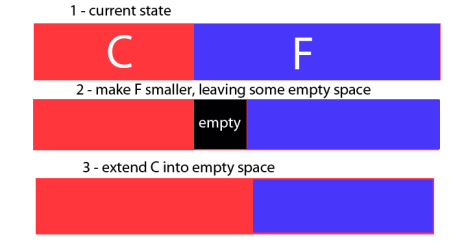
all you need do is make F: smaller, making sure that the free space gets created next to the C: partition, then make C: bigger by extending it into the empty space.

it may well take some time (several hours) as a lot of data has to be shuffled around.

quick'n'dirty graphic:
parts.png
 

My Computer My Computer

At a glance

ultimate 64 sp1i5 2500K [email protected]8 gigs GSkill Ripjaws 1600amd hd6950
Computer Manufacturer/Model Number
mickey megabyte 1234
OS
ultimate 64 sp1
CPU
i5 2500K [email protected]
Motherboard
MSI P67A-GD53
Memory
8 gigs GSkill Ripjaws 1600
Graphics Card(s)
amd hd6950
Sound Card
creative x-fi gamer
Monitor(s) Displays
samsung 24"
Screen Resolution
1920x1080
Hard Drives
ocz vertex 2e 60 gig, samsung f3 1tb, buffalo 2tb ext
PSU
antec 550
Case
antec three hundred
Cooling
i'm a cooling fan
Keyboard
saitek eclipse ii
Mouse
logitech g3
Internet Speed
about 4 Mbps
Other Info
i love win7
Who owns this laptop you or the company or organization? From you first post.
several months ago my laptop's hard drive was repartitioned by our tech services/administrators without consulting with me.
If it belongs to a company/organization and that is the way they want it I would leave it alone until you get permission from them to change it. If it's yours I recommend installing a larger hard drive for now and for future needs. IMHO 140 gigs is not much room to work with.
 

My Computer My Computer

At a glance

Windows 10 Pro. 64/ version 1709 Windows 7 Pr...Intel i7-6800K @ 4.3Corsair Platinum 16 gig @2400EVGA GTX 1070 OC
Computer type
PC/Desktop
Computer Manufacturer/Model Number
Home made Desktop
OS
Windows 10 Pro. 64/ version 1709 Windows 7 Pro/64
CPU
Intel i7-6800K @ 4.3
Motherboard
ASUS X-99 Deluxe II
Memory
Corsair Platinum 16 gig @2400
Graphics Card(s)
EVGA GTX 1070 OC
Monitor(s) Displays
Asus 27" LED LCD/VE278Q
Screen Resolution
1920-1080 or 1280-720 HDMI
Hard Drives
INTEL SSD 730-240 Gb Sata 3.0/
PSU
EVGA Platium 1200W
Case
Phanteks Luxe Tempered Glass 8 fans/ one radiator
Cooling
XSPC/ Water Cooled CPU
Keyboard
Das 4 Professional
Mouse
Logitech M705/MX Anywhere 2-S
Internet Speed
100 mbits
Antivirus
Microsoft Security Essentials/ Malwarebytes Premium 3.0/ SAS
Browser
I.E. 11 default/Firefox/ ISP Time Warner Cable/Spectrum
Other Info
LG BluRay Burner/
Sound system-KLipsch-THX/
Icy Dock ssd Hot Swap bays.
Layback Bear makes a valid point.

If the computer is your own it would be helpful if you upload your fully expanded disk management layout so that we can give you best advice - Mickey's graphics explains things rather well though. :)

http://www.sevenforums.com/tutorials/9733-screenshots-files-upload-post-seven-forums.html

I repeat, I do think you or your company should invest in more hard drive space. By today's standards, 140 GB isn't a lot.

Providing you create a system image backup first, repartitioning your hard drive is not a difficult task.
 

My Computer My Computer

At a glance

Windows 7 Ultimate SP1 64-BitIntel Core i7 870 @ 2.93GHz8Gb Dual-Channel DDR3 @ 664MHznVidia GeForce GTX 460 1024MB dedicated RAM
Computer Manufacturer/Model Number
HP Pavilion Elite 495UK
OS
Windows 7 Ultimate SP1 64-Bit
CPU
Intel Core i7 870 @ 2.93GHz
Motherboard
MSI 2A9C (CPU1)
Memory
8Gb Dual-Channel DDR3 @ 664MHz
Graphics Card(s)
nVidia GeForce GTX 460 1024MB dedicated RAM
Sound Card
Realtek HD Audio
Monitor(s) Displays
HP2310i
Screen Resolution
1920 x 1080
Hard Drives
1x1954GB Hitachi HDS22020ALA 330 (RAID), 1x1954GB Hitachi External for backup and storage
PSU
460W
Case
HP Elite
Cooling
Air cooled
Keyboard
Logitech K750 solar-powered keyboard
Mouse
Logitech Wireless M180 mouse
Internet Speed
2Mb
Other Info
Pure Avanti Flow Internet Radio with iPod Dock, 64Gb iPod, HP USB Speakers, Sony MDR-V500 Headphones, Sony Vaio F-Series Laptop
Yes.


I don't know if I have enough space on disk left to install it ...
It's kind of scary, what if I mess up my machine completely :(
How about just downloading the standalone bootable CD ISO to your F drive, and then burn the bootable CD from that ISO image file on F. Eventually you can/should also install the normal Win7 version but for the immediate issue, the standalone bootable CD is safe and 100% usable.

And besides, in order to enlarge C (your Win7 partition) you'd need to be out of Win7 and booted to the standalone CD anyway.

So you just boot to the standalone bootable CD you just burned, and you can do the resizing that's been recommended: (a) shrink F by moving its left edge to the right, and (b) enlarge C by moving its right edge to the right to pick up all space freed up by the shrinking of F.

The Partition Wizard GUI is truly intuitively obvious.
 

My Computer My Computer

At a glance

Windows 7 Pro x64 (1), Win7 Pro X64 (2)i5-3350p 3.1Ghz/6MB-cache (1); E8400 3.0Ghz/6...8GB PC3-12800 DDR3 (1); 4GB PC3-10600 DDR3 (2)ATI HD7750 (1), (see TV cards); ATI R7 250 (2)
Computer type
PC/Desktop
Computer Manufacturer/Model Number
Home-built, two systems (1) and (2)
OS
Windows 7 Pro x64 (1), Win7 Pro X64 (2)
CPU
i5-3350p 3.1Ghz/6MB-cache (1); E8400 3.0Ghz/6MB-cache (2)
Motherboard
ASUS P8Z77-V Pro (1); ASUS P5Q3 (2)
Memory
8GB PC3-12800 DDR3 (1); 4GB PC3-10600 DDR3 (2)
Graphics Card(s)
ATI HD7750 (1), (see TV cards); ATI R7 250 (2)
Sound Card
Realtek ALC892 HD Audio (1); Realtek ALC1200 HD Audio (2)
Monitor(s) Displays
Eizo HD2441W LCD, Eizo S2433W (1); Eizo 24" S2433W (2)
Screen Resolution
1920x1200, 1920x1200 (1); 1920x1200 (2)
Hard Drives
(1) 1TB SATA-II (7200RPM), 2x2TB SATA-III (7200RPM), 250GB SATA-III (10000RPM) for OS; 2x2TB external USB 3.0

(2) 320GB SATA-II (7200RPM), 750GB SATA-II (7200RPM), 150GB SATA-II (10000RPM) for OS; 2TB external USB 3.0
PSU
Nesteq ECS-6001 600W (1); Nesteq ECS-5001 500W (2)
Case
Acousti-Case 360 (1) and (2)
Cooling
Noctua NH-U12P SE2 for CPU, 2x120mm case fans (1) and (2)
Keyboard
IBM PS/2 (1) and (2)
Mouse
Logitech MX Revolution wireless (1); Microsoft wired (2)
Internet Speed
100mbps down / 10mbps up
Antivirus
Microsoft Security Essentials; Malwarebyte Anti-Malware Pro
Browser
Firefox
Other Info
Ceton InfiniTV 4-tuner cablecard-enabled TV card as well as Hauppauge HVR-2250 OTA/ATSC 2-tuner TV card in (1), running under Win7 WMC
mickey,
thank you so much for letting me know about this program. I used Mini Tool Partition Wizard and it did the magic. I have plenty of space now. :p

Hugs !!!
 

My Computer My Computer

At a glance

Windows 7 Professional Service Pack 1 32 bitIntel(R) Core(TM)2 Duo CPU P8700 @ 2.53 GHz 2...4 GB
Computer Manufacturer/Model Number
DELL
OS
Windows 7 Professional Service Pack 1 32 bit
CPU
Intel(R) Core(TM)2 Duo CPU P8700 @ 2.53 GHz 2.54 GHz
Memory
4 GB
Hard Drives
One hard drive partitioned as 60 GB C drive and 87 GB F drive
happy to help - i told you it was easy! :)
 

My Computer My Computer

At a glance

ultimate 64 sp1i5 2500K [email protected]8 gigs GSkill Ripjaws 1600amd hd6950
Computer Manufacturer/Model Number
mickey megabyte 1234
OS
ultimate 64 sp1
CPU
i5 2500K [email protected]
Motherboard
MSI P67A-GD53
Memory
8 gigs GSkill Ripjaws 1600
Graphics Card(s)
amd hd6950
Sound Card
creative x-fi gamer
Monitor(s) Displays
samsung 24"
Screen Resolution
1920x1080
Hard Drives
ocz vertex 2e 60 gig, samsung f3 1tb, buffalo 2tb ext
PSU
antec 550
Case
antec three hundred
Cooling
i'm a cooling fan
Keyboard
saitek eclipse ii
Mouse
logitech g3
Internet Speed
about 4 Mbps
Other Info
i love win7
Thank you everybody for your answers !
 

My Computer My Computer

At a glance

Windows 7 Professional Service Pack 1 32 bitIntel(R) Core(TM)2 Duo CPU P8700 @ 2.53 GHz 2...4 GB
Computer Manufacturer/Model Number
DELL
OS
Windows 7 Professional Service Pack 1 32 bit
CPU
Intel(R) Core(TM)2 Duo CPU P8700 @ 2.53 GHz 2.54 GHz
Memory
4 GB
Hard Drives
One hard drive partitioned as 60 GB C drive and 87 GB F drive
cute avatar! :)
 

My Computer My Computer

At a glance

ultimate 64 sp1i5 2500K [email protected]8 gigs GSkill Ripjaws 1600amd hd6950
Computer Manufacturer/Model Number
mickey megabyte 1234
OS
ultimate 64 sp1
CPU
i5 2500K [email protected]
Motherboard
MSI P67A-GD53
Memory
8 gigs GSkill Ripjaws 1600
Graphics Card(s)
amd hd6950
Sound Card
creative x-fi gamer
Monitor(s) Displays
samsung 24"
Screen Resolution
1920x1080
Hard Drives
ocz vertex 2e 60 gig, samsung f3 1tb, buffalo 2tb ext
PSU
antec 550
Case
antec three hundred
Cooling
i'm a cooling fan
Keyboard
saitek eclipse ii
Mouse
logitech g3
Internet Speed
about 4 Mbps
Other Info
i love win7
It was a cartoon from my childhood ..
 

My Computer My Computer

At a glance

Windows 7 Professional Service Pack 1 32 bitIntel(R) Core(TM)2 Duo CPU P8700 @ 2.53 GHz 2...4 GB
Computer Manufacturer/Model Number
DELL
OS
Windows 7 Professional Service Pack 1 32 bit
CPU
Intel(R) Core(TM)2 Duo CPU P8700 @ 2.53 GHz 2.54 GHz
Memory
4 GB
Hard Drives
One hard drive partitioned as 60 GB C drive and 87 GB F drive
you're russian?


My Computer My Computer

At a glance

ultimate 64 sp1i5 2500K [email protected]8 gigs GSkill Ripjaws 1600amd hd6950
Computer Manufacturer/Model Number
mickey megabyte 1234
OS
ultimate 64 sp1
CPU
i5 2500K [email protected]
Motherboard
MSI P67A-GD53
Memory
8 gigs GSkill Ripjaws 1600
Graphics Card(s)
amd hd6950
Sound Card
creative x-fi gamer
Monitor(s) Displays
samsung 24"
Screen Resolution
1920x1080
Hard Drives
ocz vertex 2e 60 gig, samsung f3 1tb, buffalo 2tb ext
PSU
antec 550
Case
antec three hundred
Cooling
i'm a cooling fan
Keyboard
saitek eclipse ii
Mouse
logitech g3
Internet Speed
about 4 Mbps
Other Info
i love win7
Back
Top