Need help to restoration my xp partition

bosesubhasis

New member
Local time
4:20 AM
Messages
5
Hello everyone,
I need some serious help from u guys. I had two os partion. C for windows 7 and D for xp. first installed xp on D drive. Then installed windows 7 on C drive. But after installing windows 7 i can't see xp boot option in the boot manager. The system itself is booting into windows 7 only. How can i restore the xp boot options In the windows 7 boot manager.
 

My Computer My Computer

At a glance

Windows 7 ProfessionalIntel Quad Q9650@ 3.00 GhzOCZ Platinum 6400 @ 2x1 GBPalit GTX 260 Sonic
OS
Windows 7 Professional
CPU
Intel Quad Q9650@ 3.00 Ghz
Motherboard
Asus P5Q Deluxe
Memory
OCZ Platinum 6400 @ 2x1 GB
Graphics Card(s)
Palit GTX 260 Sonic
Monitor(s) Displays
Viewsonic 17 CRT
Hard Drives
Seagate 500 GB Baracuda
PSU
Corsair TX750W
Case
Cooler Master CM690
Cooling
5 Delta High RPM Monsters
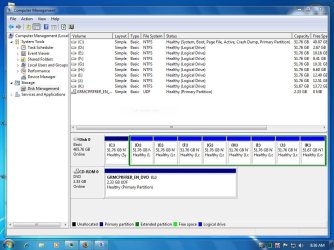
Please post back a screenshot of full Disk Management drive map, using Snipping Tool in Start Menu, attaching file using paper clip in reply box. We can then advise you of the exact steps.

It is most likely a data drive which was marked active and derailed correct configuration of the Dual Boot. Happens here almost every day.
 
have a look at my capture
 

Attachments

  • Capture.JPG
    Capture.JPG
    112.9 KB · Views: 88

My Computer My Computer

At a glance

Windows 7 ProfessionalIntel Quad Q9650@ 3.00 GhzOCZ Platinum 6400 @ 2x1 GBPalit GTX 260 Sonic
OS
Windows 7 Professional
CPU
Intel Quad Q9650@ 3.00 Ghz
Motherboard
Asus P5Q Deluxe
Memory
OCZ Platinum 6400 @ 2x1 GB
Graphics Card(s)
Palit GTX 260 Sonic
Monitor(s) Displays
Viewsonic 17 CRT
Hard Drives
Seagate 500 GB Baracuda
PSU
Corsair TX750W
Case
Cooler Master CM690
Cooling
5 Delta High RPM Monsters
Those OS partitions are pretty small. You don't want to cramp the paging file, which could already be happening on XP and might occur with Win7 as it fills up with programs and data. I'd move data to the other partitions, or delete some of them and reconfigure the OS partitions to be larger.

Just keep in mind you can't expand into space to the left using Disk Management, only a partition manager like free Partition Wizard bootable CD which is highly recommended for Win7.

Partition Wizard can also be used to convert the XP partition to Primary from Logical if it is necessary to mark it active to hold boot critical files. We will try to avoid that by keeping Win7 active for this Dual Boot.

To create the Dual Boot menu you'll need to use EasyBCD 2.0 following Steps 8-17 in Method Two here: http://www.sevenforums.com/tutorials/8057-dual-boot-installation-windows-7-xp.html

View attachment 44888

If there are any problems, post back a screenshot of the EasyBCD listings.
 
Hello My Friend,
Thanks for all ur help. But sorry to say no success still. I followed carefully the steps u have mentioned. EasyBCD successfully added the entry in boot loader and i can see the "Microsoft Windows XP" in boot manager At the time of boot. But After selecting the xp My Screen goes black. Nothing happens not even the HDD led blinking. But I can say the system is not yet hanged, i can turn on/off numlock, capslock keys. After 5 mins I clicked ctrl + alt + del to reboot. And it also rebooted successfully. But can't get into my xp.
 

My Computer My Computer

At a glance

Windows 7 ProfessionalIntel Quad Q9650@ 3.00 GhzOCZ Platinum 6400 @ 2x1 GBPalit GTX 260 Sonic
OS
Windows 7 Professional
CPU
Intel Quad Q9650@ 3.00 Ghz
Motherboard
Asus P5Q Deluxe
Memory
OCZ Platinum 6400 @ 2x1 GB
Graphics Card(s)
Palit GTX 260 Sonic
Monitor(s) Displays
Viewsonic 17 CRT
Hard Drives
Seagate 500 GB Baracuda
PSU
Corsair TX750W
Case
Cooler Master CM690
Cooling
5 Delta High RPM Monsters
Let's make sure boot.ini, ntldr, and ntdetect.com are in the roots of both OS drives.

In Control Panel>FOlder options>View tab: Show hidden files and folders, and unhide protected OS files.

Then check the root of both C and D drive to see that those 3 files are there. If not, copy them over.

Then try to reboot into both OS.

If not, post back a screenshot of the EasyBCD listings and your current Disk Mgmt after adding XP in Easy. We need to determine if XP can function on that logical drive as a Dual Boot. If not, can you move data off the extended partition to reformat a Primary XP drive ?
 
Hello there,
Basically The current partition holds the windows 7,used to hold windows XP 2 days earlier. I had dual boot with 2 XP OS. Recently I had formatted the partition C and clean installed windows 7. As far i can understand, previously the XP-boot-Kernel-files (NTLDR, NTDETECT.COM, BOOT.INI) were in partition C before installing windows 7. As i have formatted the drive C The boot files got deleted. I Can Notice The Ntldr And NTDETECT.com on C: which was previously copied by easybcd while running the process instructed by u. Should I Copy The same files to My D drive as well as the D drive holds the xp installation. But The boot.ini is missing. I can create the boot.ini by running "bootcfg /rebuild" from xp recovery console while booting from the CD. can u supply me a sample xp boot.ini file.
 

My Computer My Computer

At a glance

Windows 7 ProfessionalIntel Quad Q9650@ 3.00 GhzOCZ Platinum 6400 @ 2x1 GBPalit GTX 260 Sonic
OS
Windows 7 Professional
CPU
Intel Quad Q9650@ 3.00 Ghz
Motherboard
Asus P5Q Deluxe
Memory
OCZ Platinum 6400 @ 2x1 GB
Graphics Card(s)
Palit GTX 260 Sonic
Monitor(s) Displays
Viewsonic 17 CRT
Hard Drives
Seagate 500 GB Baracuda
PSU
Corsair TX750W
Case
Cooler Master CM690
Cooling
5 Delta High RPM Monsters
Yes copy Ntldr And NTDETECT.com so they are in both C and D root

How to recover Boot.ini: http://www.proposedsolution.com/solutions/error-invalid-boot-ini-or-missing-windowssystem32hal-dll/

http://support.microsoft.com/kb/330184

Then make sure all 3 files including boot.ini are in the root of both drives.

The wild card is the logical partitition. If XP tries to take the Active flag, it will fail because logical cannot be set Active. So the trick is to get all 3 boot files into both partitions while keeping Win7 Active System Partition. I don't know if it can be done with the XP recovery attempting to reassert XP boot.

You could at point of failure boot the Partition Wizard CD to convert XP partition to Primary. Another wild card is the extended partition will likely all need to be converted (never done that before).

Once converted, boot back into Win7 to see if EasyBCD can now add the boot critical files. If not boot XP CD to try to recover boot.ini, copy 3 files into root of both drives, if neccesary run Easy to add any OS missing from its listings then.


The fallback once boot.ini is restored is to run a http://www.sevenforums.com/tutorials/3413-repair-install.html?ltr=R from Win7 desktop which will keep everything in place but reconfigure the boot correctly now that you have boot.ini in XP. But you may need to boot into Win7 DVD repair console to run Startup Repair up to 3 times to restart Win7 if XP has taken the boot when recovering boot.ini
 
Last edited:
After trying every possible way i made my decision to format both of the drive and run the fresh installation (XP in drive c) and then (windows 7 in drive D). Doing so might solve the boot problems i think.
but one question ? Could i able to activate my windows 7 online with the same cd key as the one is already activated yet. Is there any other way to backup the activation data like vista and restore them after fresh installation.
 

My Computer My Computer

At a glance

Windows 7 ProfessionalIntel Quad Q9650@ 3.00 GhzOCZ Platinum 6400 @ 2x1 GBPalit GTX 260 Sonic
OS
Windows 7 Professional
CPU
Intel Quad Q9650@ 3.00 Ghz
Motherboard
Asus P5Q Deluxe
Memory
OCZ Platinum 6400 @ 2x1 GB
Graphics Card(s)
Palit GTX 260 Sonic
Monitor(s) Displays
Viewsonic 17 CRT
Hard Drives
Seagate 500 GB Baracuda
PSU
Corsair TX750W
Case
Cooler Master CM690
Cooling
5 Delta High RPM Monsters
After trying every possible way i made my decision to format both of the drive and run the fresh installation (XP in drive c) and then (windows 7 in drive D). Doing so might solve the boot problems i think.
but one question ? Could i able to activate my windows 7 online with the same cd key as the one is already activated yet. Is there any other way to backup the activation data like vista and restore them after fresh installation.

Hi

Backup first.

First make a decision on your Partitions,(I would have three only)(100g for XP,100g Win7, the rest for your own DATA)

http://www.sevenforums.com/tutorials/8057-dual-boot-installation-windows-7-xp.html?ltr=D
http://www.sevenforums.com/tutorials/18715-activate-windows-7-phone.html?ltr=A
 

My Computer My Computer

At a glance

ME/XP/Vista/Win7
OS
ME/XP/Vista/Win7
THere is almost never a problem reactivating on a reinstall to same hardware.

Only when you change hardware does it sometimes require a robocall to deactivate the old install and activate the new one.

Good advice from theog on your partitioning and backing up.

Boot from DVD, keep ethernet plugged and "connect to internet during install" to get latest drivers/updates into installer, use Custom installer>Drive Options to delete all partitions, create new ones, format all, then make sure first partition is highlighted when you click Install.

Afterwards, you wil have newer drivers in Windows Update. Any missing in Device Manager can be found quickly by backing up your windows/system32/drivers folder in advance, checking the Support Downloads page for your make and model computer, any drivers/apps CD, or Googling exact device name.
 
Back
Top