Need help trying to dual boot win7 /win8 separate HHD's

lonewolf66

New member
Local time
11:22 PM
Messages
16
Thx for all your help earlier with telling me to load OS separately with 1 hdd disconnected.
My #1 HD is working fine and has Win7 HP on it.
MY #2 HD is where the problem is when i go to Install Win 8 Pro with a retail (upgrade) disk
History of #2 hd
This HD can from a older HP system that I had that originally had Vista on(its a WD 640g drive)
I upgraded it to Win 7 pro
my bios does see this drive
I can load the Win 8 disk and get to command prompt :
Using diskpart my disk looks like this:
list disk

status size Free dyn gpt
* Disk 0 online 596 2048kb
Disk 1 no media 0b 0b
Disk 2 no media 0b 0b
Disk 3 no media 0b 0b
Disk 4 no media 0b 0b
Disk 5 no media 0b 0b

List Partition

Partition### Type Size Offset
Partition 1 Primary 99mb 1024mb
Partition 0 Extended 596gb 101mb
Partition 2 Logical 596gb 102 mb

Let me know if this helps or if ya need more info
Thx
 

My Computer My Computer

At a glance

win7 / win8 proAMD Quad Core 2.2 ghz8gNvidia GeForce GT 240
Computer Manufacturer/Model Number
Acer Aspire M3470g
OS
win7 / win8 pro
CPU
AMD Quad Core 2.2 ghz
Motherboard
Acer
Memory
8g
Graphics Card(s)
Nvidia GeForce GT 240
Sound Card
Board
Monitor(s) Displays
22'
Hard Drives
500g
PSU
300w
Keyboard
Microsoft
Mouse
Razor Deathadder
Internet Speed
Cable
This might help too
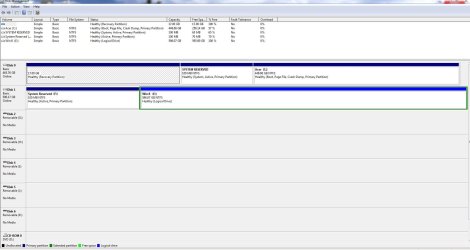
This is currently how these HDD's look through my Win 7 Disk Management
 

Attachments

  • Disk management 2.JPG
    Disk management 2.JPG
    133.7 KB · Views: 11

My Computer My Computer

At a glance

win7 / win8 proAMD Quad Core 2.2 ghz8gNvidia GeForce GT 240
Computer Manufacturer/Model Number
Acer Aspire M3470g
OS
win7 / win8 pro
CPU
AMD Quad Core 2.2 ghz
Motherboard
Acer
Memory
8g
Graphics Card(s)
Nvidia GeForce GT 240
Sound Card
Board
Monitor(s) Displays
22'
Hard Drives
500g
PSU
300w
Keyboard
Microsoft
Mouse
Razor Deathadder
Internet Speed
Cable
Delete the Logical partition, as Windows 8 is not happy install with any Logical partitions on a PC.
 

My Computer My Computer

At a glance

ME/XP/Vista/Win7
OS
ME/XP/Vista/Win7
Thx guys for the responses i finally got win 8 to install on the separate HDD's but this is what is happening now
When i go to to boot through bios i can choose which HD to which works fine I can choose to boot from either drive. Ill boot to the win 8 HD boot up goes well and i can get into win 8. The problem i have is when i go back to boot into the Win 7 HD after I have been on the Win 8 HD. I go into boot command and boot to the Win 7 HD. Win 7 will start to load to splash screen..then the disk will go into check disk and start doing a scan then finish scan and let me go into Win 7.. this is weird.. Why is drive 1(Win 7 on it) going into a chkdsk After I Been on the Win 8 drive (Drive 2)....????? This issue only happens when I have both HDD's connected. If I disconnect HD # 2 (with Win 8) my system boots up just fine...Cant Figure out why this is happening..Thx for all your help..Any suggestions???
 

My Computer My Computer

At a glance

win7 / win8 proAMD Quad Core 2.2 ghz8gNvidia GeForce GT 240
Computer Manufacturer/Model Number
Acer Aspire M3470g
OS
win7 / win8 pro
CPU
AMD Quad Core 2.2 ghz
Motherboard
Acer
Memory
8g
Graphics Card(s)
Nvidia GeForce GT 240
Sound Card
Board
Monitor(s) Displays
22'
Hard Drives
500g
PSU
300w
Keyboard
Microsoft
Mouse
Razor Deathadder
Internet Speed
Cable
Did you have Drive 1 pluged in when installing Windows 8.?
 

My Computer My Computer

At a glance

ME/XP/Vista/Win7
OS
ME/XP/Vista/Win7
Ill do it in a bit need to work bbl ... thx
 

My Computer My Computer

At a glance

win7 / win8 proAMD Quad Core 2.2 ghz8gNvidia GeForce GT 240
Computer Manufacturer/Model Number
Acer Aspire M3470g
OS
win7 / win8 pro
CPU
AMD Quad Core 2.2 ghz
Motherboard
Acer
Memory
8g
Graphics Card(s)
Nvidia GeForce GT 240
Sound Card
Board
Monitor(s) Displays
22'
Hard Drives
500g
PSU
300w
Keyboard
Microsoft
Mouse
Razor Deathadder
Internet Speed
Cable
Last edited:

My Computer My Computer

At a glance

win7 / win8 proAMD Quad Core 2.2 ghz8gNvidia GeForce GT 240
Computer Manufacturer/Model Number
Acer Aspire M3470g
OS
win7 / win8 pro
CPU
AMD Quad Core 2.2 ghz
Motherboard
Acer
Memory
8g
Graphics Card(s)
Nvidia GeForce GT 240
Sound Card
Board
Monitor(s) Displays
22'
Hard Drives
500g
PSU
300w
Keyboard
Microsoft
Mouse
Razor Deathadder
Internet Speed
Cable

My Computer My Computer

At a glance

ME/XP/Vista/Win7
OS
ME/XP/Vista/Win7

Attachments

  • disk manag 3.JPG
    disk manag 3.JPG
    134.5 KB · Views: 6

My Computer My Computer

At a glance

win7 / win8 proAMD Quad Core 2.2 ghz8gNvidia GeForce GT 240
Computer Manufacturer/Model Number
Acer Aspire M3470g
OS
win7 / win8 pro
CPU
AMD Quad Core 2.2 ghz
Motherboard
Acer
Memory
8g
Graphics Card(s)
Nvidia GeForce GT 240
Sound Card
Board
Monitor(s) Displays
22'
Hard Drives
500g
PSU
300w
Keyboard
Microsoft
Mouse
Razor Deathadder
Internet Speed
Cable
Thx guys for the responses i finally got win 8 to install on the separate HDD's but this is what is happening now
When i go to to boot through bios i can choose which HD to which works fine I can choose to boot from either drive. Ill boot to the win 8 HD boot up goes well and i can get into win 8. The problem i have is when i go back to boot into the Win 7 HD after I have been on the Win 8 HD. I go into boot command and boot to the Win 7 HD. Win 7 will start to load to splash screen..then the disk will go into check disk and start doing a scan then finish scan and let me go into Win 7.. this is weird.. Why is drive 1(Win 7 on it) going into a chkdsk After I Been on the Win 8 drive (Drive 2)....????? This issue only happens when I have both HDD's connected. If I disconnect HD # 2 (with Win 8) my system boots up just fine...Cant Figure out why this is happening..Thx for all your help..Any suggestions???

See if this stops the scanning. (Turn Off)
Fast Startup - Turn On or Off in Windows 8
 
Last edited:

My Computer My Computer

At a glance

ME/XP/Vista/Win7
OS
ME/XP/Vista/Win7
Now boot into Win8 and post back a screenshot of it's Disk Mgmt. I'm wondering why it has no System flag in that screenshot if it was installed separately with other HD unplugged.

Once we confirm Win8 has it's own System flag would you like to create a Windows Dual Boot menu from Win8 using EasyBCD which might be easier?
 
Can you post back another Disk Mgmt screenshot?

Best to also run the maker's HD Diagnostic on both HD's to confirm their status, or at least install CrystalDiskInfo - Software to read their SMART status.

Do you want a disk mngt screenshot with both HD's pluged in from win 7???

Did you have Drive 1 pluged in when installing Windows 8.?


Yes, with both HD Drive, from 7 & 8.

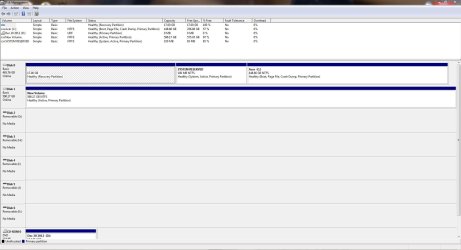
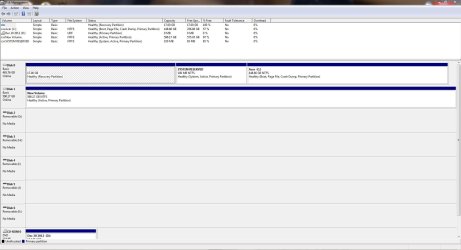
Here is my current with both HD's
 

Attachments

  • disk manag 3.JPG
    disk manag 3.JPG
    134.5 KB · Views: 5

My Computer My Computer

At a glance

win7 / win8 proAMD Quad Core 2.2 ghz8gNvidia GeForce GT 240
Computer Manufacturer/Model Number
Acer Aspire M3470g
OS
win7 / win8 pro
CPU
AMD Quad Core 2.2 ghz
Motherboard
Acer
Memory
8g
Graphics Card(s)
Nvidia GeForce GT 240
Sound Card
Board
Monitor(s) Displays
22'
Hard Drives
500g
PSU
300w
Keyboard
Microsoft
Mouse
Razor Deathadder
Internet Speed
Cable
Ill have to do it tomm night greg plz check back im sort of tired..
Btw should i disconnect the win 7 hard drive when doing this or leave both hard drives connected.??.this is truly a weird situation... also did you notice win 8 partition was active and primary but they're was no system on that drive??? Talk to ya tomm and thx again
 

My Computer My Computer

At a glance

win7 / win8 proAMD Quad Core 2.2 ghz8gNvidia GeForce GT 240
Computer Manufacturer/Model Number
Acer Aspire M3470g
OS
win7 / win8 pro
CPU
AMD Quad Core 2.2 ghz
Motherboard
Acer
Memory
8g
Graphics Card(s)
Nvidia GeForce GT 240
Sound Card
Board
Monitor(s) Displays
22'
Hard Drives
500g
PSU
300w
Keyboard
Microsoft
Mouse
Razor Deathadder
Internet Speed
Cable
I guess you still didn't read my post because I asked you about that, so yes I did notice it.

Keep both HD's plugged in but make the screenshot from Win8 this time.
 
Greg why does my main HD have this protected Q: drive on it???
 

Attachments

  • HDD #1 Image.JPG
    HDD #1 Image.JPG
    49.3 KB · Views: 6

My Computer My Computer

At a glance

win7 / win8 proAMD Quad Core 2.2 ghz8gNvidia GeForce GT 240
Computer Manufacturer/Model Number
Acer Aspire M3470g
OS
win7 / win8 pro
CPU
AMD Quad Core 2.2 ghz
Motherboard
Acer
Memory
8g
Graphics Card(s)
Nvidia GeForce GT 240
Sound Card
Board
Monitor(s) Displays
22'
Hard Drives
500g
PSU
300w
Keyboard
Microsoft
Mouse
Razor Deathadder
Internet Speed
Cable
The drive is part of MS Office.
 

My Computer My Computer

At a glance

ME/XP/Vista/Win7
OS
ME/XP/Vista/Win7
Back
Top