Need help upgrading to Win 10 with dynamic drive

gusser

New member
Local time
10:04 AM
Messages
9
I have been attempting to use EaseUS to clone a dynamic (single) system drive to a smaller SDD in order to make the upgrade and speed I need but the cloned drive doesn't boot (I'm not doing a sector by sector clone so the SDD has plenty of space.

If I can't get the clone to work, is it true that I can NOT do the upgrade using the dynamic drive and that it must be converted to basic first? If so I will continue my efforts but I'm ready to give up. Thanks for any feedback at all.
 

My Computer My Computer

Computer type
PC/Desktop
OS
Windows 7 64 bit Ultimate & Pro
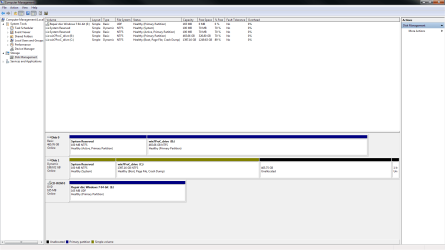
Post a screenshot of disk management window.
 

My Computers My Computers

System One System Two

  • Computer type
    PC/Desktop
    OS
    7 X64
    CPU
    i5 8400
    Motherboard
    gigabyte b365m ds3h
    Memory
    2x8gb 3200mhz
    Hard Drives
    various
    PSU
    pure power 11 400w cm
    Case
    Coolermaster
    Cooling
    cryorig m9i
  • Computer type
    PC/Desktop
    OS
    7x64
    CPU
    g5400
    Motherboard
    ga b365m ds3h
    Memory
    8gb ddr4 2400
    PSU
    xfx pro 450w
I got the screen shot but it's a Word doc (attached). Don't know any other way...

Disk -0- is the clone I made with EaseUS (but it won't boot)
Disk 1 is a drive I used to mirror the original system disk (which I saved in case I mess things up). I simply unplugged the original. It works fine but is dynamic.
 

Attachments

My Computer My Computer

Computer type
PC/Desktop
OS
Windows 7 64 bit Ultimate & Pro
What do you mean by "doesn't boot"? Is there a boot menu entry? How many boot menu entries? What happens when you select it?


Picture1.png
 

My Computers My Computers

System One System Two

  • Computer type
    PC/Desktop
    OS
    7 X64
    CPU
    i5 8400
    Motherboard
    gigabyte b365m ds3h
    Memory
    2x8gb 3200mhz
    Hard Drives
    various
    PSU
    pure power 11 400w cm
    Case
    Coolermaster
    Cooling
    cryorig m9i
  • Computer type
    PC/Desktop
    OS
    7x64
    CPU
    g5400
    Motherboard
    ga b365m ds3h
    Memory
    8gb ddr4 2400
    PSU
    xfx pro 450w
What do you mean by "doesn't boot"? Is there a boot menu entry? What happens when you select it?


View attachment 410579

The cloned SDD seems to have no boot record. I had disconnected everything except the SDD, went into bios and picked it as the 2nd boot device (1st is CD Rom). I tried the repair disk listed on the screenshot and another one and I can't get to "repair" with either one. I thought the new SDD would need a repair but I get the message device not available (CD ROM) and I can't enter the repair. So I'm back to booting to the 2 tb dynamic drive.
 

My Computer My Computer

Computer type
PC/Desktop
OS
Windows 7 64 bit Ultimate & Pro
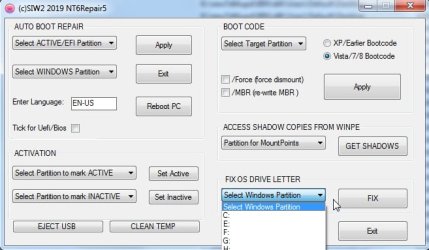
1. Under FIX OS DRIVE LETTER section

Select B: in the dropdown then click FIX.


nt6repair-FIX.jpg

:ar: View attachment nt6repair5x86.zip


2. Give the 100mb partition on disk0 drive letter S

Under AUTO BOOT REPAIR section

Select S: as the Active partition

Select B: as the Windows partition

Click APPLY

[Use nt6repair5 ( attached in zip file file above ). Will get around to compiling nt6repair6 properly eventually]
 
Last edited:

My Computers My Computers

System One System Two

  • Computer type
    PC/Desktop
    OS
    7 X64
    CPU
    i5 8400
    Motherboard
    gigabyte b365m ds3h
    Memory
    2x8gb 3200mhz
    Hard Drives
    various
    PSU
    pure power 11 400w cm
    Case
    Coolermaster
    Cooling
    cryorig m9i
  • Computer type
    PC/Desktop
    OS
    7x64
    CPU
    g5400
    Motherboard
    ga b365m ds3h
    Memory
    8gb ddr4 2400
    PSU
    xfx pro 450w
Thanks for all your help. I got it to boot to the windows splash screen and then it hangs. I had been using EASEUS todo incorrectly. When I did it the proper way the clone stops at 18 %. After days of that and no support, I tried Macrium and it cloned the system reserved and hung up around 16 % on the primary drive, just like EASEUS. I'm running another chkdsk now. Previously used /f several times. This time /r and I'm waiting to see what it does.
 

My Computer My Computer

Computer type
PC/Desktop
OS
Windows 7 64 bit Ultimate & Pro
Back
Top