
Need HELP w/ Dual Boot XP Pro32 & Win7 Ultimate -VHD or Partition

bjack56

New member
Local time
1:35 AM
Messages
9
Just got the Win 7 Ultimate Full Retail 32/64 software & I'm not sure which method is best for now & future...Virtual Hard Drive or add another Partiton to one of my (2) hard drives?

I need to migrate slowly to Win 7 to get used to the interface & do 64bit software installs after using XP for so long. Time to get full use of my DualCore machine!

XP Pro 32 currently installed.

HD #1 (160gb)
C:92gb (54gb free) = Windows, Hardware & Drivers
D:62gb (47gb free) = Installed Programs
HD #2 (250gb)
E:47gb (14gb free) = Backups, Downloads
F:47gb (35gb free) = Program Files
G:139gb (81gb free) = Music, Videos, Movies & DVD Creation
RAM = only 4gb for now

So, I have read enough of the tutorials here know enough to "F" something up, but want to try & start on the right foot.

Questions:
1) Install VHD, add a partition to an existing HD, add a new HD or add external HD for Win 7?
2) Size & location of VHD or partition
3) Best toutorial for the above?
4) Any other recommendations?

Thanks
 

My Computer My Computer

At a glance

XP Pro 32bit (sp3) & Windows 7 Ultimate 64-bitZIF Socket Intel® Core™2 Duo CPU 3.00GHz Max ...2x2GB (4GB) 128bit DRAM DIMM Speed 800MHznVidia GeForce GTX 560 Ti
Computer Manufacturer/Model Number
Xi Computer - Custom CAD M-Tower
OS
XP Pro 32bit (sp3) & Windows 7 Ultimate 64-bit
CPU
ZIF Socket Intel® Core™2 Duo CPU 3.00GHz Max 200MHz Ext 3
Motherboard
EVGA 132-YW-E178-FTW
Memory
2x2GB (4GB) 128bit DRAM DIMM Speed 800MHz
Graphics Card(s)
nVidia GeForce GTX 560 Ti
Sound Card
Onboard - RealTek HD Audio
Monitor(s) Displays
Gateway FHD2400
Hard Drives
WDC 1601ABYS - 160GB
Partition C=92GB D=62GB
WDC 2500JS - 250GB
Partition E=14.5GB F=35.5GB G=139GB
PSU
CoolerMaster Real Power Pro 850w
Case
Centurion Tower
Hello bjack56, welcome to Seven Forums!


As you have 2 separate HDDs have a look through this information below and be sure to post back with any further questions you may have and to keep us informed.

However you do it, be sure to put Windows 7 on a Primary partition and not an Extended/ Logical drive, Windows cannot boot natively from an Extended partition.

   Information

The easiest way to do away with boot issues between separate Operating Systems (OS) is to use the BIOS one time boot menu to select which OS to boot at system startup, each motherboard has an individual hot-key to tap during system start-up to access this menu.

If you have 2 separate Hard Disk Drives (HDD) and have one OS installed to one HDD and you want to install another OS to the second HDD, disconnect the HDD with the first OS installed on it and leave only the HDD you want to install the second OS to connected.
Install the second OS to the connected HDD and when complete and the system is booting good, power down and reconnect the first HDD with the first OS on it.

This way the OSs will boot independently of each other and there will be no boot conflicts between the 2 separate OSs to have to sort later.


Then set the BIOS to boot the HDD / OS you want as default and if you want to start the other (new) OS you use the BIOS one-time boot menu to select that HDD / OS to start when the PC is started.
  • Asus - F8
  • HP/Compaq - Esc
  • Sony - F2
  • Acer – F12
  • Packard Bell
  • Gateway - F10
  • eMachnes - F10
  • Gigabyte – F12
  • Toshiba - F12
  • Dell - F12
  • IBM/Lenovo - the blue Thinkvantage button
 

My Computer My Computer

At a glance

W 7 64-bit UltimateIntel Q9550 Yorkfield8GB Dominator 8500C5DATI : XFX 5870
Computer Manufacturer/Model Number
* BFK Customs *
OS
W 7 64-bit Ultimate
CPU
Intel Q9550 Yorkfield
Motherboard
ASUS P5Q Pro
Memory
8GB Dominator 8500C5D
Graphics Card(s)
ATI : XFX 5870
Sound Card
Realtek HD Audio 7-1
Monitor(s) Displays
1x 47" LCD HDMI & 3x 26" LCD HDMI
Screen Resolution
1920x1080P & 1920x1200
Hard Drives
1x 80GB Intel X25-M G2 SSD : 1x 500GB & 1x 640GB WD Caviar Black(s)
PSU
Corsair 620HX
Case
Cooler Master RC-690
Cooling
Tuniq Tower 120, 2x 140mm and 3x 120mm case fans
Keyboard
Microsoft 500
Mouse
Razer Diamondback 3G
Internet Speed
14 Mb/s
Other Info
1x Koutech 3Gb/s SATA HDD Hot Swap Rack
Questions:
1) Install VHD, add a partition to an existing HD, add a new HD or add external HD for Win 7?
2) Size & location of VHD or partition
3) Best toutorial for the above?
4) Any other recommendations?

You have pretty much answered your own question...

Go with option 1) ...add a new HD.

As drives are inexpensive and you listed that as an option, go for it. Then:


  • Unplug current hard drives (from the drives themselves or the mobo).
  • Install and plug in new hard drive.
  • Start computer, insert Win7 DVD and boot to it.
  • Install Win7 to the new drive.
  • Shut down/turn off computer.
  • Reconnect original HD(s).
  • Start computer, go to BIOS and set the desired DEFAULT hard drive boot order.

To change boot order, enter the "one time" boot select during startup - keystroke will depend on your mobo/BIOS (mine is F12). Select the desired drive and go for it.

Regards,
GEWB
 

My Computer My Computer

At a glance

Linux Mint / XP / Win7 Home, Pro, Ultimate / ...
Computer type
PC/Desktop
Computer Manufacturer/Model Number
(7 different computers booting up to 10 systems)
OS
Linux Mint / XP / Win7 Home, Pro, Ultimate / Win8.1 / Win10
Other Info
Four desktops, two laptops, one notebook and one tablet
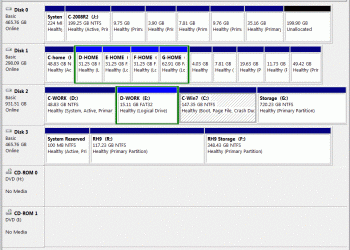
My C: (System) & E: are shown as Primary Partitions in Computer Mgmt.
So, do not used this tutorial? http://www.sevenforums.com/tutorials/8057-dual-boot-installation-windows-7-xp.html

Looks like adding an HD would be best for future?

What about the other questions...NO to VHD?

Edit: Sent at same time as GEWB

GEWB...does the connection order matter, like cable select vs DIP? Can I just connect 3rd HD anywhere on my system, like last with letter H-Z, & boot to 1st HD C: or 3rd HD H:+?

Hey I only mess with this stuff every 3-4 years :)
 

My Computer My Computer

At a glance

XP Pro 32bit (sp3) & Windows 7 Ultimate 64-bitZIF Socket Intel® Core™2 Duo CPU 3.00GHz Max ...2x2GB (4GB) 128bit DRAM DIMM Speed 800MHznVidia GeForce GTX 560 Ti
Computer Manufacturer/Model Number
Xi Computer - Custom CAD M-Tower
OS
XP Pro 32bit (sp3) & Windows 7 Ultimate 64-bit
CPU
ZIF Socket Intel® Core™2 Duo CPU 3.00GHz Max 200MHz Ext 3
Motherboard
EVGA 132-YW-E178-FTW
Memory
2x2GB (4GB) 128bit DRAM DIMM Speed 800MHz
Graphics Card(s)
nVidia GeForce GTX 560 Ti
Sound Card
Onboard - RealTek HD Audio
Monitor(s) Displays
Gateway FHD2400
Hard Drives
WDC 1601ABYS - 160GB
Partition C=92GB D=62GB
WDC 2500JS - 250GB
Partition E=14.5GB F=35.5GB G=139GB
PSU
CoolerMaster Real Power Pro 850w
Case
Centurion Tower
My C:(System) & E: are shown as Primary Partitions in Computer Mgmt.

So, do not used this tutorial? http://www.sevenforums.com/tutorials/8057-dual-boot-installation-windows-7-xp.html

Looks like adding an HD would be best for future?

What about the other questions...NO to VHD?

In your original post you stated:

"So, I have read enough of the tutorials here know enough to "F" something up, but want to try & start on the right foot."

And you listed adding a new hard drive in your first option - you have pretty much answered your own questions and concerns. Follow the steps I gave and you will not mess up your current drives/programs/files while installing Win7.

(Oh, one thing - don't register your Win7 during installation, do it after you complete the install and reconnect the other drives.)

Regards,
GEWB
 

My Computer My Computer

At a glance

Linux Mint / XP / Win7 Home, Pro, Ultimate / ...
Computer type
PC/Desktop
Computer Manufacturer/Model Number
(7 different computers booting up to 10 systems)
OS
Linux Mint / XP / Win7 Home, Pro, Ultimate / Win8.1 / Win10
Other Info
Four desktops, two laptops, one notebook and one tablet
If you want to slowly move all your personal data to Windows 7 from XP, continuing to use Windows 7 and remove XP, the 2 separate HDD method has the fewer related issues in the long-run.

A VHD won't work if the above is the grand scheme of things though for information sake, have a look through this tutorial linked below.


My Computer My Computer

At a glance

W 7 64-bit UltimateIntel Q9550 Yorkfield8GB Dominator 8500C5DATI : XFX 5870
Computer Manufacturer/Model Number
* BFK Customs *
OS
W 7 64-bit Ultimate
CPU
Intel Q9550 Yorkfield
Motherboard
ASUS P5Q Pro
Memory
8GB Dominator 8500C5D
Graphics Card(s)
ATI : XFX 5870
Sound Card
Realtek HD Audio 7-1
Monitor(s) Displays
1x 47" LCD HDMI & 3x 26" LCD HDMI
Screen Resolution
1920x1080P & 1920x1200
Hard Drives
1x 80GB Intel X25-M G2 SSD : 1x 500GB & 1x 640GB WD Caviar Black(s)
PSU
Corsair 620HX
Case
Cooler Master RC-690
Cooling
Tuniq Tower 120, 2x 140mm and 3x 120mm case fans
Keyboard
Microsoft 500
Mouse
Razer Diamondback 3G
Internet Speed
14 Mb/s
Other Info
1x Koutech 3Gb/s SATA HDD Hot Swap Rack
GEWB...does the connection order matter, like cable select vs DIP? Can I just connect 3rd HD anywhere on my system, like last with letter H-Z, & boot to 1st HD C: or 3rd HD H:+?

Your mobo has six SATA connections - use a SATA hard drive. The mobo BIOS doesn't know drive letters (C:, D:, etc.) only physical device designations base on the SATA channel it is plugged into on the mobo.

When you UNPLUG all current hard drives, plug in the new drive and install Windows, Win7 will assign "C:\" to the first active partition and it will STAY that way whenever you boot into Win7. However, when you boot into XP it will see the Win7 "drive" and partitions as different drive letters.

SUGGESTION:
Name the partions (partition label) something easy to recognize under any OS. Mine are names like:

  • C-XP-home
  • C-XP-work
  • C-Win7
  • C-2008r2

You get the idea.

Regards,
GEWB
 

My Computer My Computer

At a glance

Linux Mint / XP / Win7 Home, Pro, Ultimate / ...
Computer type
PC/Desktop
Computer Manufacturer/Model Number
(7 different computers booting up to 10 systems)
OS
Linux Mint / XP / Win7 Home, Pro, Ultimate / Win8.1 / Win10
Other Info
Four desktops, two laptops, one notebook and one tablet
Points taken guy's...will add a HD & use your directions.

Dumb question but...
1) Can you recommend a HD?
2) As you can see, I prefer to separate all my stuff on different drives. What happens to all my new Win7 Hardware Installs, Program Installs & File Pointers if I get a new computer? Should I just put ALL Win7 programs, files, etc...on the 3rd HD w/ the OS or can I just put them on existing HD #1 & 2 directories so I don't have to change all my "locations" or re-install w/ new computer?
 

My Computer My Computer

At a glance

XP Pro 32bit (sp3) & Windows 7 Ultimate 64-bitZIF Socket Intel® Core™2 Duo CPU 3.00GHz Max ...2x2GB (4GB) 128bit DRAM DIMM Speed 800MHznVidia GeForce GTX 560 Ti
Computer Manufacturer/Model Number
Xi Computer - Custom CAD M-Tower
OS
XP Pro 32bit (sp3) & Windows 7 Ultimate 64-bit
CPU
ZIF Socket Intel® Core™2 Duo CPU 3.00GHz Max 200MHz Ext 3
Motherboard
EVGA 132-YW-E178-FTW
Memory
2x2GB (4GB) 128bit DRAM DIMM Speed 800MHz
Graphics Card(s)
nVidia GeForce GTX 560 Ti
Sound Card
Onboard - RealTek HD Audio
Monitor(s) Displays
Gateway FHD2400
Hard Drives
WDC 1601ABYS - 160GB
Partition C=92GB D=62GB
WDC 2500JS - 250GB
Partition E=14.5GB F=35.5GB G=139GB
PSU
CoolerMaster Real Power Pro 850w
Case
Centurion Tower
Points taken guy's...will add a HD & use your directions.

Dumb question but...
1) Can you recommend a HD?
2) As you can see, I prefer to separate all my stuff on different drives. What happens to all my new Win7 Hardware Installs, Program Installs & File Pointers if I get a new computer? Should I just put ALL Win7 programs, files, etc...on the 3rd HD w/ the OS or can I just put them on existing HD #1 & 2 directories so I don't have to change all my "locations" or re-install w/ new computer?

Motto
MISS and KISS

(Make It Stupid Simple and Keep It Stupid Simple)

You can partition your new drive and use it as you wish but I recommend the new drive (regardless of partions) be used for Win7 work - you CAN swap/use compatable files between XP and Win7regardless of the location, just keep your installed PROGRAMS separate.

Regards,
GEWB
 

My Computer My Computer

At a glance

Linux Mint / XP / Win7 Home, Pro, Ultimate / ...
Computer type
PC/Desktop
Computer Manufacturer/Model Number
(7 different computers booting up to 10 systems)
OS
Linux Mint / XP / Win7 Home, Pro, Ultimate / Win8.1 / Win10
Other Info
Four desktops, two laptops, one notebook and one tablet
Here is a screen shot sampling of one of my computers Windows Explorer - it has four hard drives, each is dual boot yielding seven different operating systems (I have two XP installations). This Explorer screen shot shows the WINDOWS partitions only (Windows doesn't "see" the Linux partitions).

Drives-GEWB.GIF

You can see I'm currently booted into C-Win7 ("C:\" and there are other "C:" drive labels for the other Windows version boot options. I use several partitions for mass storage of files that I share between Windows versions.

Here is a screen shot of Disk Manager.

DiskMngr-GEWB.GIF

I hope it gives you some ideas.

Regards,
GEWB
 

My Computer My Computer

At a glance

Linux Mint / XP / Win7 Home, Pro, Ultimate / ...
Computer type
PC/Desktop
Computer Manufacturer/Model Number
(7 different computers booting up to 10 systems)
OS
Linux Mint / XP / Win7 Home, Pro, Ultimate / Win8.1 / Win10
Other Info
Four desktops, two laptops, one notebook and one tablet
Guess I'm simple & stupid :D

When I currently install programs on D-drive, XP will put some of the programs crap on C-drive regardless with pointers back to D-drive programs. If I understand correctly, I would have to add a folder to my D-drive (like Win 7), with sub-folders within it for each new 64bit program install. That way, with a new computer I could take the Win 7 (HD#3 discussed above), put it in the new system & done except for changing a few program file location pointers?

Also, I added a 3gb switch to my XP Pro boot.ini a while back. When I turn on my machine it gives me 30sec. to decide between the two (XP std. or XP switched). Can similar be done for Win 7 load option or do I NEED to go into BIOS every time to select?

THX
 

My Computer My Computer

At a glance

XP Pro 32bit (sp3) & Windows 7 Ultimate 64-bitZIF Socket Intel® Core™2 Duo CPU 3.00GHz Max ...2x2GB (4GB) 128bit DRAM DIMM Speed 800MHznVidia GeForce GTX 560 Ti
Computer Manufacturer/Model Number
Xi Computer - Custom CAD M-Tower
OS
XP Pro 32bit (sp3) & Windows 7 Ultimate 64-bit
CPU
ZIF Socket Intel® Core™2 Duo CPU 3.00GHz Max 200MHz Ext 3
Motherboard
EVGA 132-YW-E178-FTW
Memory
2x2GB (4GB) 128bit DRAM DIMM Speed 800MHz
Graphics Card(s)
nVidia GeForce GTX 560 Ti
Sound Card
Onboard - RealTek HD Audio
Monitor(s) Displays
Gateway FHD2400
Hard Drives
WDC 1601ABYS - 160GB
Partition C=92GB D=62GB
WDC 2500JS - 250GB
Partition E=14.5GB F=35.5GB G=139GB
PSU
CoolerMaster Real Power Pro 850w
Case
Centurion Tower
Guess I'm simple & stupid :D


Umm, no, that's why it's written "make it stupid simple" - if you were stupid the motto would be "make it simple, stupid" (there is a big difference). :geek: :geek:

When I currently install programs on D-drive, XP will put some of the programs crap on C-drive regardless with pointers back to D-drive programs. If I understand correctly, I would have to add a folder to my D-drive (like Win 7), with sub-folders within it for each new 64bit program install. That way, with a new computer I could take the Win 7 (HD#3 discussed above), put it in the new system & done except for changing a few program file location pointers?

If during Win7 install you partition the new drive into "C:\[C-Win7]" and "D:\[D-Win7]" you would follow what you do with your XP install as under Win7 "C:" would be the Win7 "C:" drive and "D:" would be the second partition on the new drive - your XP related drives/partitions would be identified further down the alphabet. There would be no need to reset pointer in Win7 if you stuck with "C:" and "D:" partitions on a single physical drive.

Also, I added a 3gb switch to my XP Pro boot.ini a while back. When I turn on my machine it gives me 30sec. to decide between the two (XP std. or XP switched). Can similar be done for Win 7 load option or do I NEED to go into BIOS every time to select?

THX

Boot device selection at startup (after POST). Believe me, it's no big deal - after the second time you do it you'll be a pro at it (it's that hard!).

Regards,
GEWB
 

My Computer My Computer

At a glance

Linux Mint / XP / Win7 Home, Pro, Ultimate / ...
Computer type
PC/Desktop
Computer Manufacturer/Model Number
(7 different computers booting up to 10 systems)
OS
Linux Mint / XP / Win7 Home, Pro, Ultimate / Win8.1 / Win10
Other Info
Four desktops, two laptops, one notebook and one tablet
Unfortunately, I am the latter NOT the former :)

My system is SCSI capable, but I've never had a problem w/ WD SATA drives (knock,knock). Found a couple of options with 6gb sec. transfer.
1) 7200rpm w/64mb cache - 1tb
2) 10000RPM w/32mb cache - 150gb
Suggestion?

3) What min. size should I make the new HD partitions - "C:\[C-Windows 7]" and "D:\[D-Windows 7]"?
4) Should I do any mobo or bios "flash" updates prior to Win 7 install or leave it be?

TY for your VERY kind info. & assistance! Now onto figuring out how to setup an XAMPP (apache) webserver for either OS to communicate with a new Yamaha Network Stereo Receiver on my home network which is supposed to be controllable from PC/Laptop :confused: which started this whole problem/fix.
 

My Computer My Computer

At a glance

XP Pro 32bit (sp3) & Windows 7 Ultimate 64-bitZIF Socket Intel® Core™2 Duo CPU 3.00GHz Max ...2x2GB (4GB) 128bit DRAM DIMM Speed 800MHznVidia GeForce GTX 560 Ti
Computer Manufacturer/Model Number
Xi Computer - Custom CAD M-Tower
OS
XP Pro 32bit (sp3) & Windows 7 Ultimate 64-bit
CPU
ZIF Socket Intel® Core™2 Duo CPU 3.00GHz Max 200MHz Ext 3
Motherboard
EVGA 132-YW-E178-FTW
Memory
2x2GB (4GB) 128bit DRAM DIMM Speed 800MHz
Graphics Card(s)
nVidia GeForce GTX 560 Ti
Sound Card
Onboard - RealTek HD Audio
Monitor(s) Displays
Gateway FHD2400
Hard Drives
WDC 1601ABYS - 160GB
Partition C=92GB D=62GB
WDC 2500JS - 250GB
Partition E=14.5GB F=35.5GB G=139GB
PSU
CoolerMaster Real Power Pro 850w
Case
Centurion Tower
Unfortunately, I am the latter NOT the former :)


4) Should I do any mobo or bios "flash" updates prior to Win 7 install or leave it be?


Leave it be, if something goes bad, doing a BIOS flash has the potential of disabling the mobo forever.
 

My Computer My Computer

At a glance

W 7 64-bit UltimateIntel Q9550 Yorkfield8GB Dominator 8500C5DATI : XFX 5870
Computer Manufacturer/Model Number
* BFK Customs *
OS
W 7 64-bit Ultimate
CPU
Intel Q9550 Yorkfield
Motherboard
ASUS P5Q Pro
Memory
8GB Dominator 8500C5D
Graphics Card(s)
ATI : XFX 5870
Sound Card
Realtek HD Audio 7-1
Monitor(s) Displays
1x 47" LCD HDMI & 3x 26" LCD HDMI
Screen Resolution
1920x1080P & 1920x1200
Hard Drives
1x 80GB Intel X25-M G2 SSD : 1x 500GB & 1x 640GB WD Caviar Black(s)
PSU
Corsair 620HX
Case
Cooler Master RC-690
Cooling
Tuniq Tower 120, 2x 140mm and 3x 120mm case fans
Keyboard
Microsoft 500
Mouse
Razer Diamondback 3G
Internet Speed
14 Mb/s
Other Info
1x Koutech 3Gb/s SATA HDD Hot Swap Rack
Unfortunately, I am the latter NOT the former :)

You'll do just fine - this stuff isn't rocket science, just a little common sense, mechanical aptitude and a desire to try something new.

My system is SCSI capable, but I've never had a problem w/ WD SATA drives (knock,knock).

No need to worry about SCSI or RAID or anything else at this point. Get into that later if you want.

Found a couple of options with 6gb sec. transfer.
1) 7200rpm w/64mb cache - 1tb
2) 10000RPM w/32mb cache - 150gb
Suggestion?

Option (1) will be just fine.

3) What min. size should I make the new HD partitions - "C:\[C-Windows 7]" and "D:\[D-Windows 7]"?

Depends on the drive you install. Ask 10 people and you'll get 9 different answers. I suggest no less than 100GB for "C:" (no real reason except my Win7 boxes use 25GB to 50GB depending on the software I installed). Use the rest for the "D:" (and any additional) drive.

4) Should I do any mobo or bios "flash" updates prior to Win 7 install or leave it be?

See BFK's reply - if it works now, don't fix it!

TY for your VERY kind info. & assistance! Now onto figuring out how to setup an XAMPP (apache) webserver for either OS to communicate with a new Yamaha Network Stereo Receiver on my home network which is supposed to be controllable from PC/Laptop :confused: which started this whole problem/fix.

Ah, maybe someone else can jump in on that (start a new thread topic).

Regards,
GEWB
 

My Computer My Computer

At a glance

Linux Mint / XP / Win7 Home, Pro, Ultimate / ...
Computer type
PC/Desktop
Computer Manufacturer/Model Number
(7 different computers booting up to 10 systems)
OS
Linux Mint / XP / Win7 Home, Pro, Ultimate / Win8.1 / Win10
Other Info
Four desktops, two laptops, one notebook and one tablet
Back
Top