Need Help | Windows 7 re-install

blankblack

New member
Local time
9:30 PM
Messages
30
Location
Planet Earth
Hi!

I want to re-install Windows 7 on my computer and was wondering what are the risks for doing the same. Would I lose ALL data?

Also, I made a backup disc as is required by the Windows 7 software. Do I use that same disc for re-installation?

Please help..
 

My Computer

Computer Manufacturer/Model Number
TOSHIBA Satellite L505
OS
Windows 7 Home Premium x86
CPU
Intel Core 2 Duo
Memory
3.00 GB
You should have your data backed up externally at all times so losing your data will never be a concern. Use a USB External HD, another internal HD, DVD, USB flash stick, another computer on the network, or using 14gb free storage on Skydrive which comes with every Windows Live ID.

What disk did you make exactly? Was it the Win7 Repair CD offered when you backup a Win7 image? This is only used to repair or reimage Win7.

Is this a computer you bought in a store which came with Win7 preinstalled?
If you made the Factory Recovery Disks they can be used to reinstall Win7 with all of the factory bloatware which comes preinstalled, but there would be more than one disk. I would save these to use as a backup to running the Recovery Partition. If you tell us your computer maker we can tell you how to run Factory Recovery if that's what you want.

To clean reinstall Win7 you need to find a Win7 installation DVD and follow these tips to get a perfect clean reinstall: Clean Reinstall steps
 

My Computer

Computer Manufacturer/Model Number
TOSHIBA Satellite L505
OS
Windows 7 Home Premium x86
CPU
Intel Core 2 Duo
Memory
3.00 GB
Are you be using
1) Toshiba Restose disks
2) Windows 7 backup image
3) Windows 7 Install DVD
 

My Computer

OS
ME/XP/Vista/Win7
I did not receive a separate Windows 7 installation CD or DVD when I bought my computer.

All I have is the DVD I made via instructions given on my computer i.e. --- Control Panel -> Backup and Restore -> Set up backup

Do I need to make any other disks or copies of anything else?
 

My Computer

Computer Manufacturer/Model Number
TOSHIBA Satellite L505
OS
Windows 7 Home Premium x86
CPU
Intel Core 2 Duo
Memory
3.00 GB
First Backup your Data.

Read this part of manual, Using Toshiba HDD Recovery Utility from the recovery partition.
or
Hard Disk Drive Recovery using Recovery CDs or DVDs
 

My Computer

OS
ME/XP/Vista/Win7
OK. I have read the info on that link. Must I go ahead and complete that process?

Also, I want everything like it was when I first bought the computer and switched it on for the first time. So as per the instructions given in that link, I must press 1 to restore original factory image. Am I right in doing that (just confirming)?
 

My Computer

Computer Manufacturer/Model Number
TOSHIBA Satellite L505
OS
Windows 7 Home Premium x86
CPU
Intel Core 2 Duo
Memory
3.00 GB
Step 2 in Using Toshiba HDD Recovery Utility from the recovery partition
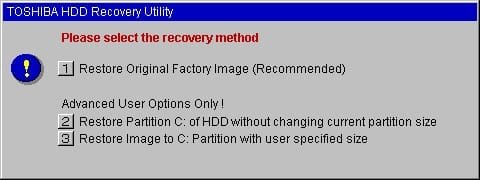
Press and hold the 0 (zero) key on your keyboard and then press the computers power switch. When the computer turns on, the Toshiba HDD Recovery Utility screen will appear, presenting three options:

Will be all back to as switched it on for the first time.

all your DATA will be lost.
 

My Computer

OS
ME/XP/Vista/Win7
Sorry to bother you again. I have one more question - I had some infections/viruses in my computer in the past. If any of them are still lurking somewhere in the system, will they all be gone as well?

Also, when the Toshiba HDD Recovery Utility screen appears, do I press 1 , 2 or 3 ???
 

My Computer

Computer Manufacturer/Model Number
TOSHIBA Satellite L505
OS
Windows 7 Home Premium x86
CPU
Intel Core 2 Duo
Memory
3.00 GB
Sorry to bother you again. I have one more question - I had some infections/viruses in my computer in the past. If any of them are still lurking somewhere in the system, will they all be gone as well?

We hope so.

Also, when the Toshiba HDD Recovery Utility screen appears, do I press 1 , 2 or 3 ???


If you are happy with the partitioning you have, press 2.

HTD7C02140000R0136063.jpg
 

My Computer

OS
ME/XP/Vista/Win7
OK. I am going to go ahead and get going with the process then. Thank you for your help so far and I will update this post when I have hopefully restored everything to its original state.
 

My Computer

Computer Manufacturer/Model Number
TOSHIBA Satellite L505
OS
Windows 7 Home Premium x86
CPU
Intel Core 2 Duo
Memory
3.00 GB
OK. The restoration was successful and everything is back to the original default state.

Thank you very much theog.
 

My Computer

Computer Manufacturer/Model Number
TOSHIBA Satellite L505
OS
Windows 7 Home Premium x86
CPU
Intel Core 2 Duo
Memory
3.00 GB
Back
Top