Need help with a Home Network

Static

New member
Power User
Local time
5:58 PM
Messages
173
Hey all. This is not just a windows 7 problem, it's more of a home networking thing, but since IT guys I call all suck, Im hoping some of you all can help.

I have the modem and router both in my room. It's a netgear wireless router. I am hotwired with ethernet and so I do not use wireless internet. My family and other computers however all use wireless. I am the only computer running windows 7, and my internet is 100% perfect.

The problem I have is mostly with my father's desktop running XP. I have just barely started to google and learn and what not how to set up passkeys and WEPs etc for a wireless network.

here is what I want. I want to set up the network so that ANYONE can join IF they have the password. Just one single password. not a ton of keys generated from a passphrase. Just one password that my father's desktop (with wireless card), my sisters laptop, and my girlfriend's laptop can all use and get internet long as they apply the password to the network thru their wireless card.

How do I set this up? is this possible? How do I do it? I can access my router (on my computer) and these are my options...
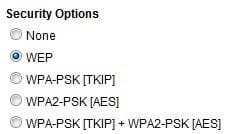
Netgear Secuity Options.JPG
 

My Computer

OS
Windows 7 RC - 7100 64bit
CPU
AMD Athlon(tm) 64 x2 4800+ 2.50Ghz Dual Core
Motherboard
Hewlett Packard
Memory
4 gig Kingston DDR2
Graphics Card(s)
XFX Nvidia GeForce GTS 250
Sound Card
na
Monitor(s) Displays
22" Samsung LCD Syncmaster
Screen Resolution
1680x1050
Hard Drives
300gig Western Digital
PSU
BFG Tech 550watt
Case
Crap stock Dell
Cooling
Side panel open on case, and a box fan blowing in.
Keyboard
G15
Mouse
G9
Internet Speed
Bike Messenger
WPA2-PSK AES is the best option there. You just need enter the same passphrase on all devices.
 

My Computer

Computer Manufacturer/Model Number
Too many to list.
OS
XP, Seven, 2008R2
CPU
AMD, Intel, VIA
Motherboard
Various
Memory
Corsair, Kingston, etc.
Graphics Card(s)
ATI, NVIDIA
Monitor(s) Displays
Samsung
Hard Drives
Maxtor, Western Digital
Keyboard
qwerty
Internet Speed
22 Mb/s @ home, 1 Gb/s @ server
Other Info
All of my systems still run fastest on XP 32-bit for the most part. Win7 is fun to play with, but I still prefer XP for raw speed, security, and functionality.
My best advice is use a Business type network setup not the Win7 homegroup as it only works with other win7 computers. I am sure other members can help you with the password setup. :geek:

" Doc "
 

My Computer

Computer type
PC/Desktop
Computer Manufacturer/Model Number
Built them myself, Science Experiments !
OS
Win7 Enterprise, Win7 x86 (Ult 7600), Win7 x64 Ult 7600, TechNet RTM on AMD x64 (2.8Ghz)
CPU
AMD fx8350 4ghz, AMD-32 2400mhz, AMD-64 3200mhz, AMDx64 2.8G
Motherboard
SIS 755, ECS-K8M890M-M (Ult 7600), GigaByte & others
Memory
2gb, 4gb on the Ult 7600, 4gb on Technet RTM, 32gb on FX8350
Graphics Card(s)
Draw my own Graphics, several nVidia cards
Sound Card
on motherboard
Monitor(s) Displays
19" flat scr, 28" I-Inc widescr,22" Emprex Widescr, 23" Acer
Screen Resolution
1280 x 1024, 1440 x 900, 1920 x 1080
Hard Drives
6 pata Ide HD's & 2 Sata HD's
added 80gb external on Ult 7600 computer,
numerous extra 1tb, 2TB, 3Tb SATA HD's
A collection of ext HD Docks w/ HDs
PSU
430w, 550w, 600w, 700, 800, etc
Case
All Generic Full Towers
Cooling
Open Air & a few fans, some w/ colored LEDs
Keyboard
Compaq & Dell recycled from GoodWill
Mouse
Made in China Optical Wired Mouse
Internet Speed
Fast Cable InterNet
Antivirus
AVG Free on 24 different Desktops, NO Problems!
Browser
IE 8 is preferred, but use FireFox sometimes
Other Info
Linksys Routers, switches, & Hubs
Too Many USB Flash Drives to count, Biggest is 64GB !
Eight computers in my home network.
Sixteen computers at my business network.
Linked via TeamViewer !
Lots of old used spare computer parts everywhere!
My best advice is use a Business type network setup not the Win7 homegroup as it only works with other win7 computers. I am sure other members can help you with the password setup. :geek:

" Doc "

Thanks Doc. but unless it somehow updated itself when I installed win7 by default, it's the same XP/Vista network we've been using for a few years now. Just a virus ruined my dad's computer and since we've re installed everything and messed with so many settings, his wireless card and the router hate eachother specifically.

and thanks supersport. Going to give that one a try.
 

My Computer

OS
Windows 7 RC - 7100 64bit
CPU
AMD Athlon(tm) 64 x2 4800+ 2.50Ghz Dual Core
Motherboard
Hewlett Packard
Memory
4 gig Kingston DDR2
Graphics Card(s)
XFX Nvidia GeForce GTS 250
Sound Card
na
Monitor(s) Displays
22" Samsung LCD Syncmaster
Screen Resolution
1680x1050
Hard Drives
300gig Western Digital
PSU
BFG Tech 550watt
Case
Crap stock Dell
Cooling
Side panel open on case, and a box fan blowing in.
Keyboard
G15
Mouse
G9
Internet Speed
Bike Messenger
Ok, so my father's PC is running XP, and for whatever reason, his wireless driver or something is only allowing him to use a WEP. and it's annoying.

Where can I change this? or what info do I need to supply to help me troubleshoot this.

I tried the WPA2-PSK AES and when I put in the password it said the password needs to be some hexidecimal something or 8-15 ascii yadda yadda. I'll have to find a camera or my usb drive and ill supply some screenshots.
 

My Computer

OS
Windows 7 RC - 7100 64bit
CPU
AMD Athlon(tm) 64 x2 4800+ 2.50Ghz Dual Core
Motherboard
Hewlett Packard
Memory
4 gig Kingston DDR2
Graphics Card(s)
XFX Nvidia GeForce GTS 250
Sound Card
na
Monitor(s) Displays
22" Samsung LCD Syncmaster
Screen Resolution
1680x1050
Hard Drives
300gig Western Digital
PSU
BFG Tech 550watt
Case
Crap stock Dell
Cooling
Side panel open on case, and a box fan blowing in.
Keyboard
G15
Mouse
G9
Internet Speed
Bike Messenger
home networking

Ok, so my father's PC is running XP, and for whatever reason, his wireless driver or something is only allowing him to use a WEP. and it's annoying.

Where can I change this? or what info do I need to supply to help me troubleshoot this.

I tried the WPA2-PSK AES and when I put in the password it said the password needs to be some hexidecimal something or 8-15 ascii yadda yadda. I'll have to find a camera or my usb drive and ill supply some screenshots.

Hey Static

While less secure and not desirable you could leave the wifi in the clear and require a username and password to log on to ALL the computers. In XP you may only be able to run wep and it is annoying.

I am assuming you dont want to install win 7 on your dad (and other comps). If they were all on win 7 you could run homegroup and password the group logon.

Ill be checking back in

Ken
 

My Computer

Computer Manufacturer/Model Number
HP Pavillion dv-7 1005 Tx
OS
Win 8 Release candidate 8400
CPU
[email protected]
Memory
4 gigs
Graphics Card(s)
Nvidia 9600M
Sound Card
HD built-in
Monitor(s) Displays
17" Wxga
Screen Resolution
1440x900
Cooling
none
Internet Speed
45Mb down 5Mb up
Unfortunately, if you cannot find updated drivers, you might be stuck with using the older WEP standard. It works, but it is very poor security because it has been cracked.

Windows XP does indeed support WPA2. It depends on your hardware and drivers.

The only requirement for WPA passphrase is that it needs to be at least 8 characters. If your devices are telling you to put in hexadecimal characters, those are 0 1 2 3 4 5 6 7 8 9 A B C D E F
 

My Computer

Computer Manufacturer/Model Number
Too many to list.
OS
XP, Seven, 2008R2
CPU
AMD, Intel, VIA
Motherboard
Various
Memory
Corsair, Kingston, etc.
Graphics Card(s)
ATI, NVIDIA
Monitor(s) Displays
Samsung
Hard Drives
Maxtor, Western Digital
Keyboard
qwerty
Internet Speed
22 Mb/s @ home, 1 Gb/s @ server
Other Info
All of my systems still run fastest on XP 32-bit for the most part. Win7 is fun to play with, but I still prefer XP for raw speed, security, and functionality.
God I love these forums. Even if we don't end up fixing anything. The speedy responses, the self-less attempts to just help someone in need. Very Appreciated fellas and ladies.

I'll try a few of these examples and see if I can troubleshoot it.

and to clarify some other stuff. What is the standard order of operations? It should go something like...

Web Browser of Router changes Passkey
Save and Close web browser on computer 2.
Unplug router and turn off computer 1.
Plug in router.
Turn on computer 1.
Enter passkey
Profit??????
 

My Computer

OS
Windows 7 RC - 7100 64bit
CPU
AMD Athlon(tm) 64 x2 4800+ 2.50Ghz Dual Core
Motherboard
Hewlett Packard
Memory
4 gig Kingston DDR2
Graphics Card(s)
XFX Nvidia GeForce GTS 250
Sound Card
na
Monitor(s) Displays
22" Samsung LCD Syncmaster
Screen Resolution
1680x1050
Hard Drives
300gig Western Digital
PSU
BFG Tech 550watt
Case
Crap stock Dell
Cooling
Side panel open on case, and a box fan blowing in.
Keyboard
G15
Mouse
G9
Internet Speed
Bike Messenger
Hey Static


I am assuming you dont want to install win 7 on your dad (and other comps). If they were all on win 7 you could run homegroup and password the group logon.


Ken


My dad's such a little girl. Trust me. Ive been trying to convince him to let me install windows7. He's too old school for that? I might just do it anyways and if it works tell em to shut it lol
 

My Computer

OS
Windows 7 RC - 7100 64bit
CPU
AMD Athlon(tm) 64 x2 4800+ 2.50Ghz Dual Core
Motherboard
Hewlett Packard
Memory
4 gig Kingston DDR2
Graphics Card(s)
XFX Nvidia GeForce GTS 250
Sound Card
na
Monitor(s) Displays
22" Samsung LCD Syncmaster
Screen Resolution
1680x1050
Hard Drives
300gig Western Digital
PSU
BFG Tech 550watt
Case
Crap stock Dell
Cooling
Side panel open on case, and a box fan blowing in.
Keyboard
G15
Mouse
G9
Internet Speed
Bike Messenger
home networking

God I love these forums. Even if we don't end up fixing anything. The speedy responses, the self-less attempts to just help someone in need. Very Appreciated fellas and ladies.

I'll try a few of these examples and see if I can troubleshoot it.

and to clarify some other stuff. What is the standard order of operations? It should go something like...

Web Browser of Router changes Passkey Yes
Save and Close web browser on computer 2. not critical
Unplug router and turn off computer 1. NO if you unplug router password (passkey) will revert to stock
Plug in router. still no
Turn on computer 1.Ok
Enter passkey
Profit??????
Here is what I would do

change encryption to wep and enter passkey
save passkey and exit routers page
reboot pc and attempt to connect. When negotiation fisinsh it will ask you for password. enter it. If ok goto next computer. repeat.

If not successful check passkey on router and try again.
Hopefully that should do it.

If not Im leaving a browser window open
Ken
 

My Computer

Computer Manufacturer/Model Number
HP Pavillion dv-7 1005 Tx
OS
Win 8 Release candidate 8400
CPU
[email protected]
Memory
4 gigs
Graphics Card(s)
Nvidia 9600M
Sound Card
HD built-in
Monitor(s) Displays
17" Wxga
Screen Resolution
1440x900
Cooling
none
Internet Speed
45Mb down 5Mb up
I would look for updated drivers, and only use WEP as a last resort.
 

My Computer

Computer Manufacturer/Model Number
Too many to list.
OS
XP, Seven, 2008R2
CPU
AMD, Intel, VIA
Motherboard
Various
Memory
Corsair, Kingston, etc.
Graphics Card(s)
ATI, NVIDIA
Monitor(s) Displays
Samsung
Hard Drives
Maxtor, Western Digital
Keyboard
qwerty
Internet Speed
22 Mb/s @ home, 1 Gb/s @ server
Other Info
All of my systems still run fastest on XP 32-bit for the most part. Win7 is fun to play with, but I still prefer XP for raw speed, security, and functionality.
networking

My dad's such a little girl. Trust me. Ive been trying to convince him to let me install windows7. He's too old school for that? I might just do it anyways and if it works tell em to shut it lol

I understand but if you are thinking abt it BACKUP FIRST. Else he might kill you

Ken
 

My Computer

Computer Manufacturer/Model Number
HP Pavillion dv-7 1005 Tx
OS
Win 8 Release candidate 8400
CPU
[email protected]
Memory
4 gigs
Graphics Card(s)
Nvidia 9600M
Sound Card
HD built-in
Monitor(s) Displays
17" Wxga
Screen Resolution
1440x900
Cooling
none
Internet Speed
45Mb down 5Mb up
Here is what I would do

change encryption to wep and enter passkey
save passkey and exit routers page
reboot pc and attempt to connect. When negotiation fisinsh it will ask you for password. enter it. If ok goto next computer. repeat.

If not successful check passkey on router and try again.
Hopefully that should do it.

If not Im leaving a browser window open
Ken

I've done this a few times. It works for awhile but then we kept having problems. It would disconnect him every 20-60minutes and he'd have to go to network connections and reconnect.

and it generates 4 passkeys and only the first one will work at all. The last 3 don't even work. and we could only assign one computer the first passkey, then when another entered it, it disconnected the first computer. Which i guess temporarily works but is a pain for us since we have 3 wireless computers around here.
 

My Computer

OS
Windows 7 RC - 7100 64bit
CPU
AMD Athlon(tm) 64 x2 4800+ 2.50Ghz Dual Core
Motherboard
Hewlett Packard
Memory
4 gig Kingston DDR2
Graphics Card(s)
XFX Nvidia GeForce GTS 250
Sound Card
na
Monitor(s) Displays
22" Samsung LCD Syncmaster
Screen Resolution
1680x1050
Hard Drives
300gig Western Digital
PSU
BFG Tech 550watt
Case
Crap stock Dell
Cooling
Side panel open on case, and a box fan blowing in.
Keyboard
G15
Mouse
G9
Internet Speed
Bike Messenger
wifi prob

I've done this a few times. It works for awhile but then we kept having problems. It would disconnect him every 20-60minutes and he'd have to go to network connections and reconnect.

and it generates 4 passkeys and only the first one will work at all. The last 3 don't even work. and we could only assign one computer the first passkey, then when another entered it, it disconnected the first computer. Which i guess temporarily works but is a pain for us since we have 3 wireless computers around here.

I mean is there anything critical on the computers like bank record or other important stuff? I bet its not being backed up. I am right now running in the clear cause I have a neighbor with a cb radio that keeps knocking me off if I use encryption. If the encryption is causing more trouble than its worth you might want to consider it. Just remember by cautious.

Im willing to worry this to death. If you have the time and the interest we probably can work this out.

'Ken
 

My Computer

Computer Manufacturer/Model Number
HP Pavillion dv-7 1005 Tx
OS
Win 8 Release candidate 8400
CPU
[email protected]
Memory
4 gigs
Graphics Card(s)
Nvidia 9600M
Sound Card
HD built-in
Monitor(s) Displays
17" Wxga
Screen Resolution
1440x900
Cooling
none
Internet Speed
45Mb down 5Mb up
Ok, let's try troubleshooting this.

I'll try and do some walkthrough type stuff. with pictures. see if it helps.

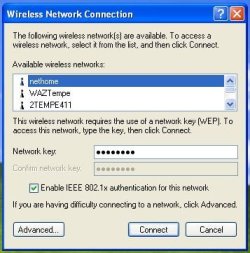
This is the network panel.

Wireless Default snipped.JPG

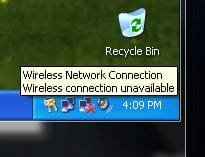
The annoying part is if I input a password when it's looking for a WEP, it accepts it regardless if it's correct or not. And it doesn't say Complete!, or Incorrect password, or anything at all. it just closes the window regardless of what I type and then hit enter. So I cannot really tell you if it's because I type things incorrectly or if there is a major problem. Then it shows that I have a network connection but is still blocked or something? denoted by this picture. meaning it's reading the network just not allowing me useage.

Toolbar Snipped.JPG


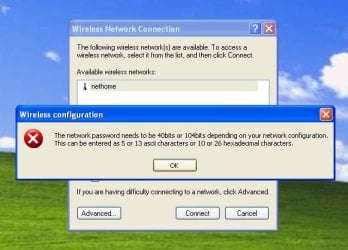
When I try and use WPA2-PSK AES, this is what I get when I try and put in the password I set up previously. I've tried random passwords, Hexidecimal passwords, everything. His computer has not ever come close to allowing WPA2-PSK AES to work. I get this error every single time.

Wireless error snipped.JPG


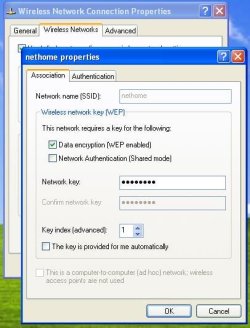
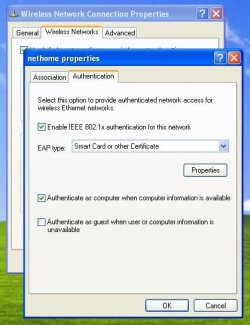
So now, Here are the 2 pages of things I can change and alter. If I want to use WPA2-PSK AES, what should I try and set up my password as (ie, length, hexidecimal units only etc)? and which boxes under these 2 pages should be checked or unchecked?

W Page 1 Snipped.JPGW Page 2 Snipped.JPG

Anything anyone notices is welcome for comments. If more info is needed etc let me know. Im just trying to provide what I can in a desperate hope for help! lol
 

My Computer

OS
Windows 7 RC - 7100 64bit
CPU
AMD Athlon(tm) 64 x2 4800+ 2.50Ghz Dual Core
Motherboard
Hewlett Packard
Memory
4 gig Kingston DDR2
Graphics Card(s)
XFX Nvidia GeForce GTS 250
Sound Card
na
Monitor(s) Displays
22" Samsung LCD Syncmaster
Screen Resolution
1680x1050
Hard Drives
300gig Western Digital
PSU
BFG Tech 550watt
Case
Crap stock Dell
Cooling
Side panel open on case, and a box fan blowing in.
Keyboard
G15
Mouse
G9
Internet Speed
Bike Messenger
and it generates 4 passkeys and only the first one will work at all. The last 3 don't even work. and we could only assign one computer the first passkey, then when another entered it, it disconnected the first computer. Which i guess temporarily works but is a pain for us since we have 3 wireless computers around here.

yeah, WEP is silly like that. You still need to enter the same hexadecimal key in all devices.

If it doesn't work, maybe it's a problem with your router's firmware. It should not be kicking other users off when everyone uses the same passkey.
 

My Computer

Computer Manufacturer/Model Number
Too many to list.
OS
XP, Seven, 2008R2
CPU
AMD, Intel, VIA
Motherboard
Various
Memory
Corsair, Kingston, etc.
Graphics Card(s)
ATI, NVIDIA
Monitor(s) Displays
Samsung
Hard Drives
Maxtor, Western Digital
Keyboard
qwerty
Internet Speed
22 Mb/s @ home, 1 Gb/s @ server
Other Info
All of my systems still run fastest on XP 32-bit for the most part. Win7 is fun to play with, but I still prefer XP for raw speed, security, and functionality.
I mean is there anything critical on the computers like bank record or other important stuff? I bet its not being backed up. I am right now running in the clear cause I have a neighbor with a cb radio that keeps knocking me off if I use encryption. If the encryption is causing more trouble than its worth you might want to consider it. Just remember by cautious.

Im willing to worry this to death. If you have the time and the interest we probably can work this out.

'Ken


I lightly touched that he had a virus before and that is what started this mess. Well at that time we knew it was time for a fresh install. So I made him backup everything. All pictures, documents, etc are all backup-ed. and as of an hour before I began this thread, I did a fresh install of Windows XP Home.

I have all of his video, sound, wireless card, etc drivers on a USB Flash drive which I installed right after the fresh XP install. I am next to 100% sure the wireless card driver is up to date and or only a week or 2 out of date because I called their tech service last weekend and had them e-mail me the driver.

So if he were to allow it or if I just wanted to test it, at any time I would have no problem with trying to install windows 7 64bit 7100 RC on his computer as it is the version I am running atm on my main PC.
 

My Computer

OS
Windows 7 RC - 7100 64bit
CPU
AMD Athlon(tm) 64 x2 4800+ 2.50Ghz Dual Core
Motherboard
Hewlett Packard
Memory
4 gig Kingston DDR2
Graphics Card(s)
XFX Nvidia GeForce GTS 250
Sound Card
na
Monitor(s) Displays
22" Samsung LCD Syncmaster
Screen Resolution
1680x1050
Hard Drives
300gig Western Digital
PSU
BFG Tech 550watt
Case
Crap stock Dell
Cooling
Side panel open on case, and a box fan blowing in.
Keyboard
G15
Mouse
G9
Internet Speed
Bike Messenger
If it doesn't work, maybe it's a problem with your router's firmware. It should not be kicking other users off when everyone uses the same passkey.

Interesting. see I've never used WEP, didn't know that. But I do know that I did update the firmware on the router 2 weekends ago for the first time in like 2 years. and I think it added more problems than it fixed to be honest lol.

I think if no one sees any critical problems from my pictures and what not, I'll try WEP again and see if I can get it a bit more stable. I'm not worried really about anyone hacking our wireless network. We live in an elderly neighborhood. I just don't want to run without ANY password protection. By all means I have heard and know that WEP is outdated, but I would be willing to run with it if we can get it to work stabley.
 

My Computer

OS
Windows 7 RC - 7100 64bit
CPU
AMD Athlon(tm) 64 x2 4800+ 2.50Ghz Dual Core
Motherboard
Hewlett Packard
Memory
4 gig Kingston DDR2
Graphics Card(s)
XFX Nvidia GeForce GTS 250
Sound Card
na
Monitor(s) Displays
22" Samsung LCD Syncmaster
Screen Resolution
1680x1050
Hard Drives
300gig Western Digital
PSU
BFG Tech 550watt
Case
Crap stock Dell
Cooling
Side panel open on case, and a box fan blowing in.
Keyboard
G15
Mouse
G9
Internet Speed
Bike Messenger
home networking

I lightly touched that he had a virus before and that is what started this mess. Well at that time we knew it was time for a fresh install. So I made him backup everything. All pictures, documents, etc are all backup-ed. and as of an hour before I began this thread, I did a fresh install of Windows XP Home.

I have all of his video, sound, wireless card, etc drivers on a USB Flash drive which I installed right after the fresh XP install. I am next to 100% sure the wireless card driver is up to date and or only a week or 2 out of date because I called their tech service last weekend and had them e-mail me the driver.

So if he were to allow it or if I just wanted to test it, at any time I would have no problem with trying to install windows 7 64bit 7100 RC on his computer as it is the version I am running atm on my main PC.

Yesyes, and as long as he is 64 bit.

Sup3rsprts idea abt the firmware is spot on try it first. In any case you wanna get all your boxes on win 7

Your posts w pics are great keep that up you bee doing fine

Ken
 

My Computer

Computer Manufacturer/Model Number
HP Pavillion dv-7 1005 Tx
OS
Win 8 Release candidate 8400
CPU
[email protected]
Memory
4 gigs
Graphics Card(s)
Nvidia 9600M
Sound Card
HD built-in
Monitor(s) Displays
17" Wxga
Screen Resolution
1440x900
Cooling
none
Internet Speed
45Mb down 5Mb up
I got it. Gentlemen you are my wind goddess.


I'm using WEP, I updated the firmware again and it said there was an error it needed to fix, and after it fixed the error it finally not only connected, but gave a 6/6 bar connection which is more than it had previously.

+rep to both of you. And I also award you an additional +2 Internets.

My computer, Father's computer, and my sister's laptop are all online atm and running smoothe.

Many thanks and appreciations.
 

My Computer

OS
Windows 7 RC - 7100 64bit
CPU
AMD Athlon(tm) 64 x2 4800+ 2.50Ghz Dual Core
Motherboard
Hewlett Packard
Memory
4 gig Kingston DDR2
Graphics Card(s)
XFX Nvidia GeForce GTS 250
Sound Card
na
Monitor(s) Displays
22" Samsung LCD Syncmaster
Screen Resolution
1680x1050
Hard Drives
300gig Western Digital
PSU
BFG Tech 550watt
Case
Crap stock Dell
Cooling
Side panel open on case, and a box fan blowing in.
Keyboard
G15
Mouse
G9
Internet Speed
Bike Messenger
Back
Top