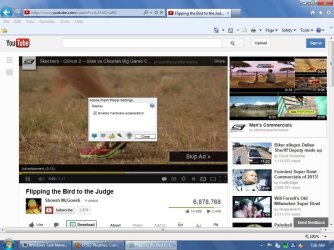
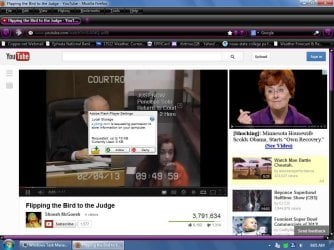
Hello all, I just recently developed a problem wherein every time I go to YouTube I get the dialog box asking if flash can store information on my computer. I cannot click on it or make changes, the box stays put in the middle of video. Also, the amount of storage I choose never stays, meaning I choose unlimited, but later the slider will have moved, changing the quality of the video playing. I have gone into Control Panel > Flash and chosen to allow all sites to store information on my computer, but it does not seem to have any effect. I uploaded two screenshots. I tried Adobe's website, but the time involved to get an answer is ridiculous, so I am turning to the best source of information in hopes that someone here can help me with this issue. My flash player and plugin are current, and I uninstalled and reinstalled the flash players, with no change and it happens on either FireFox and IE. Thanks in advance!!
Attachments

My Computer
At a glance
Windows 7 professional 64 bitAMD Athlon(tm) II X2 220 Processor3GBNVIDIA GeForce 6150SE nForce 430
- Computer type
- PC/Desktop
- Computer Manufacturer/Model Number
- HP 505B B2C02UT Business Desktop
- OS
- Windows 7 professional 64 bit
- CPU
- AMD Athlon(tm) II X2 220 Processor
- Motherboard
- PEGATRON (2A99)
- Memory
- 3GB
- Graphics Card(s)
- NVIDIA GeForce 6150SE nForce 430
- Sound Card
- Realtek ALC662 High Definition Audio (OEM)
- Monitor(s) Displays
- OEM Dell CRT
- Screen Resolution
- N/A
- Hard Drives
- (1) NCQ Smart IV 500GB Hard Drive - 7,200RPM - SATA 3.0Gb/s
HP LightScribe CD/DVD burner
- PSU
- OEM HP 300 watt
- Case
- OEM
- Cooling
- OEM
- Keyboard
- wired Logitech K120
- Mouse
- wired M100 mouse
- Internet Speed
- G5 High Speed Internet
- Antivirus
- ZoneAlarm Extreme Security
- Browser
- FF36.04 IE11
- Other Info
- JRivers Media Center v17
AudioQuest dragonfly DAC V1.2
Mackie MR5 Studio Monitors