Solved Need help with an external drive problem

jadinolf

Very Senior Member
Power User
VIP
Local time
10:22 PM
Messages
1,596
Location
California
This is a problem with an external eSATA drive which I use for backups.

It has been plaguing me for several days. Here's what happens: when I am ready to backup I turn on the external drive and get the sound BUT the drive doesn't show up in Computer. I then go to Control Panel to select a new drive letter and now I can do the backup.

If I try a backup the next day, the same thing happens. Yesterday, I replaced the old drive which I have been using for years with a brand new one and it was recognized and the backup ran fine.

This morning, still using the new drive, same thing old problem happened.

I am stumped so I am coming to you for help. Short of going through the same exercise every day, I give up.

I appreciate any suggestions. Thanks.
 

My Computer

Computer type
PC/Desktop
Computer Manufacturer/Model Number
Home Built
OS
Windows `10 Professional 64bit
CPU
Intel i5 [email protected]
Motherboard
MSI P67A-GD55 (MS7681)
Memory
Corsair Vengeance DDR3 1600 16G
Graphics Card(s)
NVIDIA GeForce GT520 1GHz
Sound Card
Realtek High Definition Audio
Monitor(s) Displays
Haans G 241
Screen Resolution
1600X1024
Hard Drives
Crucial MX100 256GB SSD
PSU
OCZ ModXStream Modular High Performance 500 Watt
Case
Rosewill Challenger-U3
Cooling
Just Fans
Keyboard
Kensington K64338B
Mouse
Microsoft wheel mouse 1.1A
Internet Speed
240.0 Mbps
Antivirus
ESET Internet Security
Browser
Firefox
Other Info
SuperAntiSpyware-Pro
Malwarebytes (Premium)
Kerish Doctor
Try this:

Please remove all exteral drives from your PC

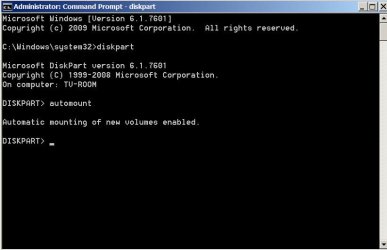
Start > All Programs > Accessories > Right click on Command Prompt and Run as administrator.
Then
diskpart [ENTER]
Against the DISKPART prompt
automount [ENTER]
Does it say "automatic mounting of new volumes disabled" ? Then
automount enable [ENTER]
"automatic mounting of new volumes enabled"

Close Command Window.

Edit: Reboot your PC for the change to take effect

Now connect your external drive and check whether it gets a drive letter automatically..
 
Last edited:

My Computer

OS
Windows 7 Home Premium 32 bit
Well, here goes.

I followed the procedure and it did report "automatic mounting of new volumes disabled"

And then "automatic mounting of new volumes enabled"

Closed command window.

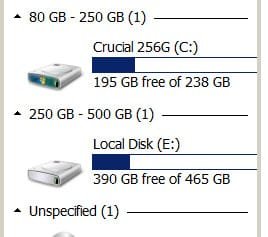
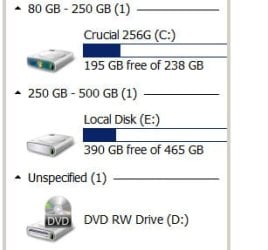
Drive letter showed (attached).

Disconnected external drive. Drive E is the external drive.

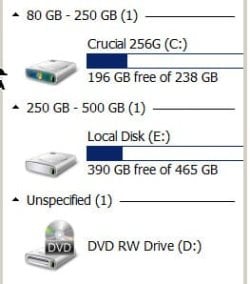
Turned it on and heard typical sound but drive did not show in Computer. (attached).

Thanks for help. What the heck is going on here?
 

Attachments

  • problem.jpg
    problem.jpg
    13.3 KB · Views: 30
  • problem2.jpg
    problem2.jpg
    9.2 KB · Views: 30

My Computer

Computer type
PC/Desktop
Computer Manufacturer/Model Number
Home Built
OS
Windows `10 Professional 64bit
CPU
Intel i5 [email protected]
Motherboard
MSI P67A-GD55 (MS7681)
Memory
Corsair Vengeance DDR3 1600 16G
Graphics Card(s)
NVIDIA GeForce GT520 1GHz
Sound Card
Realtek High Definition Audio
Monitor(s) Displays
Haans G 241
Screen Resolution
1600X1024
Hard Drives
Crucial MX100 256GB SSD
PSU
OCZ ModXStream Modular High Performance 500 Watt
Case
Rosewill Challenger-U3
Cooling
Just Fans
Keyboard
Kensington K64338B
Mouse
Microsoft wheel mouse 1.1A
Internet Speed
240.0 Mbps
Antivirus
ESET Internet Security
Browser
Firefox
Other Info
SuperAntiSpyware-Pro
Malwarebytes (Premium)
Kerish Doctor
Did you run the Command as administrator?

If automatic mounting is disabled and then enabled in diskpart, it should stick.

Redo it again taking care that you run as administrator. After automount is enabled using diskpart, close the Command Window.

You may perhaps require a reboot for the change to become effective. So reboot and then plug /unplug your drive and check.

I shall see the results report tomorrow morning. Bedtime :)
 

My Computer

OS
Windows 7 Home Premium 32 bit
Did you run the Command as administrator?

If automatic mounting is disabled and then enabled in diskpart, it should stick.

Redo it again taking care that you run as administrator. After automount is enabled using diskpart, close the Command Window.

You may perhaps require a reboot for the change to become effective. So reboot and then plug /unplug your drive and check.

I shall see the results report tomorrow morning. Bedtime :)

Yes, I did run as administrator but will try reboot.

Sleep well and thanks again.
 

My Computer

Computer type
PC/Desktop
Computer Manufacturer/Model Number
Home Built
OS
Windows `10 Professional 64bit
CPU
Intel i5 [email protected]
Motherboard
MSI P67A-GD55 (MS7681)
Memory
Corsair Vengeance DDR3 1600 16G
Graphics Card(s)
NVIDIA GeForce GT520 1GHz
Sound Card
Realtek High Definition Audio
Monitor(s) Displays
Haans G 241
Screen Resolution
1600X1024
Hard Drives
Crucial MX100 256GB SSD
PSU
OCZ ModXStream Modular High Performance 500 Watt
Case
Rosewill Challenger-U3
Cooling
Just Fans
Keyboard
Kensington K64338B
Mouse
Microsoft wheel mouse 1.1A
Internet Speed
240.0 Mbps
Antivirus
ESET Internet Security
Browser
Firefox
Other Info
SuperAntiSpyware-Pro
Malwarebytes (Premium)
Kerish Doctor
O.K.

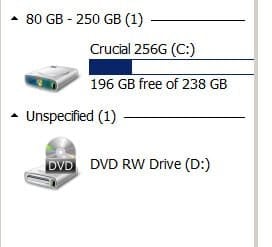
Repeated the procedure and rebooted. Disk showed in Computer. Rebooted again and it was still there.

Looks good so far. Thanks very much jumanji

I'll report in tomorrow.


Let's see how it looks later today and tomorrow.
 

Attachments

  • diskpart.jpg
    diskpart.jpg
    31 KB · Views: 0
  • second_reboot.jpg
    second_reboot.jpg
    12.9 KB · Views: 31

My Computer

Computer type
PC/Desktop
Computer Manufacturer/Model Number
Home Built
OS
Windows `10 Professional 64bit
CPU
Intel i5 [email protected]
Motherboard
MSI P67A-GD55 (MS7681)
Memory
Corsair Vengeance DDR3 1600 16G
Graphics Card(s)
NVIDIA GeForce GT520 1GHz
Sound Card
Realtek High Definition Audio
Monitor(s) Displays
Haans G 241
Screen Resolution
1600X1024
Hard Drives
Crucial MX100 256GB SSD
PSU
OCZ ModXStream Modular High Performance 500 Watt
Case
Rosewill Challenger-U3
Cooling
Just Fans
Keyboard
Kensington K64338B
Mouse
Microsoft wheel mouse 1.1A
Internet Speed
240.0 Mbps
Antivirus
ESET Internet Security
Browser
Firefox
Other Info
SuperAntiSpyware-Pro
Malwarebytes (Premium)
Kerish Doctor
Still working.:thumbsup::thumbsup::thumbsup:
 

My Computer

Computer type
PC/Desktop
Computer Manufacturer/Model Number
Home Built
OS
Windows `10 Professional 64bit
CPU
Intel i5 [email protected]
Motherboard
MSI P67A-GD55 (MS7681)
Memory
Corsair Vengeance DDR3 1600 16G
Graphics Card(s)
NVIDIA GeForce GT520 1GHz
Sound Card
Realtek High Definition Audio
Monitor(s) Displays
Haans G 241
Screen Resolution
1600X1024
Hard Drives
Crucial MX100 256GB SSD
PSU
OCZ ModXStream Modular High Performance 500 Watt
Case
Rosewill Challenger-U3
Cooling
Just Fans
Keyboard
Kensington K64338B
Mouse
Microsoft wheel mouse 1.1A
Internet Speed
240.0 Mbps
Antivirus
ESET Internet Security
Browser
Firefox
Other Info
SuperAntiSpyware-Pro
Malwarebytes (Premium)
Kerish Doctor
:thumbsup: Sometimes I miss the obvious. In this case as in many other instances, a reboot is required for rhe change to take effect. I have since added it to my first post in this thread. Thank you for waking me up. May be I was too sleepy then :D.
 

My Computer

OS
Windows 7 Home Premium 32 bit
jumanji, I have 5 computers and 2 external drives on each computer and have never gone through that procedure before and never had that problem before.

I wonder what caused it to happen?

In any event, I think I will do it to all the drives just to be safe.

Do I recall that you are now in Spain? Seems that I remember you saying you were going there.That would explain the time difference.

Anyway, I will be back here in the morning and I expect good news.

See you.
 

My Computer

Computer type
PC/Desktop
Computer Manufacturer/Model Number
Home Built
OS
Windows `10 Professional 64bit
CPU
Intel i5 [email protected]
Motherboard
MSI P67A-GD55 (MS7681)
Memory
Corsair Vengeance DDR3 1600 16G
Graphics Card(s)
NVIDIA GeForce GT520 1GHz
Sound Card
Realtek High Definition Audio
Monitor(s) Displays
Haans G 241
Screen Resolution
1600X1024
Hard Drives
Crucial MX100 256GB SSD
PSU
OCZ ModXStream Modular High Performance 500 Watt
Case
Rosewill Challenger-U3
Cooling
Just Fans
Keyboard
Kensington K64338B
Mouse
Microsoft wheel mouse 1.1A
Internet Speed
240.0 Mbps
Antivirus
ESET Internet Security
Browser
Firefox
Other Info
SuperAntiSpyware-Pro
Malwarebytes (Premium)
Kerish Doctor
I was travelling in Spain only from June 1 -June 10 and returned to India on June 12. The time shown is the current local time in India ahead +9 to +12 US.

........I wonder what caused it to happen?

One of the many Window's Wonders :).

And my answer http://www.sevenforums.com/hardware-devices/363015-not-recognising-usb-hdd-s.html#post3016060

( Actually it was in this thread, Layback Bear reminded me "@jumanji Would it be helpful after following your instructions to reboot?" And as usual I forget his wise counsel. jumanji's wonders - more aptly blunders :D)

"Neither men nor machines are 100% perfect.:)

Some random event had caused the registry value HKEY_LOCAL_MACHINE\SYSTEM\CurrentControlSet\Services\MountMgr\NoAutoMount to change
from 0 to 1 . We just reversed it.

What that event was in your case is hard to guess.

In Nov 2014, when Lady Fitzgerald was setting up her new Lenovo laptop, she had the same problem. Considering that it was a brand new laptop, it is even harder to guess.:)

Anyway, I have added your question to the "100 things to do research" list, but I don't know when I will do it. I am not perfect either. :D "

While this pill treats this anamoly, you may also do a drive cleanup periodically on all your PCs that would remove all non-present devices, the redundant drive letters and registry entries associated with such devices, locked by Windows.
http://www.sevenforums.com/hardware...ut-laptop-still-can-detect-2.html#post3113391
 

My Computer

OS
Windows 7 Home Premium 32 bit
All is well!

jumanji, thank you for all of the help and advice.

I can now relax for a while.
 

Attachments

  • WORKS.jpg
    WORKS.jpg
    10.9 KB · Views: 17

My Computer

Computer type
PC/Desktop
Computer Manufacturer/Model Number
Home Built
OS
Windows `10 Professional 64bit
CPU
Intel i5 [email protected]
Motherboard
MSI P67A-GD55 (MS7681)
Memory
Corsair Vengeance DDR3 1600 16G
Graphics Card(s)
NVIDIA GeForce GT520 1GHz
Sound Card
Realtek High Definition Audio
Monitor(s) Displays
Haans G 241
Screen Resolution
1600X1024
Hard Drives
Crucial MX100 256GB SSD
PSU
OCZ ModXStream Modular High Performance 500 Watt
Case
Rosewill Challenger-U3
Cooling
Just Fans
Keyboard
Kensington K64338B
Mouse
Microsoft wheel mouse 1.1A
Internet Speed
240.0 Mbps
Antivirus
ESET Internet Security
Browser
Firefox
Other Info
SuperAntiSpyware-Pro
Malwarebytes (Premium)
Kerish Doctor

bienvenido amigo :).
 

My Computer

OS
Windows 7 Home Premium 32 bit

My Computer

Computer type
PC/Desktop
Computer Manufacturer/Model Number
Home Built
OS
Windows `10 Professional 64bit
CPU
Intel i5 [email protected]
Motherboard
MSI P67A-GD55 (MS7681)
Memory
Corsair Vengeance DDR3 1600 16G
Graphics Card(s)
NVIDIA GeForce GT520 1GHz
Sound Card
Realtek High Definition Audio
Monitor(s) Displays
Haans G 241
Screen Resolution
1600X1024
Hard Drives
Crucial MX100 256GB SSD
PSU
OCZ ModXStream Modular High Performance 500 Watt
Case
Rosewill Challenger-U3
Cooling
Just Fans
Keyboard
Kensington K64338B
Mouse
Microsoft wheel mouse 1.1A
Internet Speed
240.0 Mbps
Antivirus
ESET Internet Security
Browser
Firefox
Other Info
SuperAntiSpyware-Pro
Malwarebytes (Premium)
Kerish Doctor
Thank You Jumanji! Your solution worked even without a restart! I had some loose connections on the power supply and esata cables and a combination of intermittent loose contacts might have caused the problem.
 

My Computer

Computer type
PC/Desktop
Computer Manufacturer/Model Number
Dell Latitude 6420
OS
Windows 7 Ultimate 32 bit
CPU
Intel
Memory
3 Gb
Antivirus
F-Secure
Browser
Chrome
:thumbsup: Glad you could resolve the problem looking at this old thread.
 

My Computer

OS
Windows 7 Home Premium 32 bit
Back
Top