Need help with Asus N53JQ recovery

DTSManiaC

New member
Local time
2:41 PM
Messages
13
Hello guys.
I've got an Asus N53JQ series laptop. Yesterday I decided to roll back my laptop to factory settings with pressing F9 button when ASUS logo shows on boot. It opens windows 7 boot manager successfully, but the "Windows Setup [EMS Enabled]" didn't show up so i can't do the recovery.

Note:
-The recovery partition still exists,
-I did the recovery with F9 three times before,
-I burnt all recovery DVDs with Asus AI Recovery, but they didin't boot too,
-I've tried many combinations such as "Alt+F9, Ctrl+F9, Fn+F9" but they didn't work.

Is there any point that i'm missing? Please help me before i throw this pc from findow...
 

My Computer My Computer

At a glance

Windows 7 Ultimate x64Intel i7-QM74012GB 1333mHz RAMNVIDIA GeForce GT 425M
Computer Manufacturer/Model Number
Asus N53JQ
OS
Windows 7 Ultimate x64
CPU
Intel i7-QM740
Memory
12GB 1333mHz RAM
Graphics Card(s)
NVIDIA GeForce GT 425M
Sound Card
Creative SB Audigy 2 NX
Screen Resolution
1366x768
Hard Drives
SanDisk Extreme SSD 120GB SATA III
Seagate 320GB 5400rpm 2.5" HDD
Keyboard
Logitech G19
Mouse
Logitech Anywhere MX
Cause of some virus issues. I don't like using antivirus, it always makes a warning, attention bla bla during games.
 

My Computer My Computer

At a glance

Windows 7 Ultimate x64Intel i7-QM74012GB 1333mHz RAMNVIDIA GeForce GT 425M
Computer Manufacturer/Model Number
Asus N53JQ
OS
Windows 7 Ultimate x64
CPU
Intel i7-QM740
Memory
12GB 1333mHz RAM
Graphics Card(s)
NVIDIA GeForce GT 425M
Sound Card
Creative SB Audigy 2 NX
Screen Resolution
1366x768
Hard Drives
SanDisk Extreme SSD 120GB SATA III
Seagate 320GB 5400rpm 2.5" HDD
Keyboard
Logitech G19
Mouse
Logitech Anywhere MX
Check the hard drive, than post back.
 

My Computer My Computer

At a glance

ME/XP/Vista/Win7
OS
ME/XP/Vista/Win7
There's a lot of test oprions in SeaTools:

-S.M.A.R.T. Check
-Short Drive Self Test
-Drive Info
-Short Generic
-Long Generic
-Advanced Tests

I've made all the tests except "Advanced Tests" (because it says i can lose data) and HDD passed every tests successfully. But i still can't do recovery..
 

My Computer My Computer

At a glance

Windows 7 Ultimate x64Intel i7-QM74012GB 1333mHz RAMNVIDIA GeForce GT 425M
Computer Manufacturer/Model Number
Asus N53JQ
OS
Windows 7 Ultimate x64
CPU
Intel i7-QM740
Memory
12GB 1333mHz RAM
Graphics Card(s)
NVIDIA GeForce GT 425M
Sound Card
Creative SB Audigy 2 NX
Screen Resolution
1366x768
Hard Drives
SanDisk Extreme SSD 120GB SATA III
Seagate 320GB 5400rpm 2.5" HDD
Keyboard
Logitech G19
Mouse
Logitech Anywhere MX
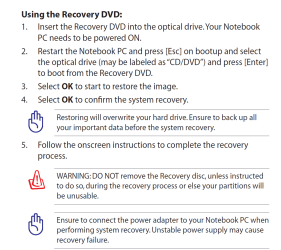
You can download the manual for Asus N53JQ from the web site.
Snapshot from manual.

Captureasus.PNG
 

My Computer My Computer

At a glance

ME/XP/Vista/Win7
OS
ME/XP/Vista/Win7
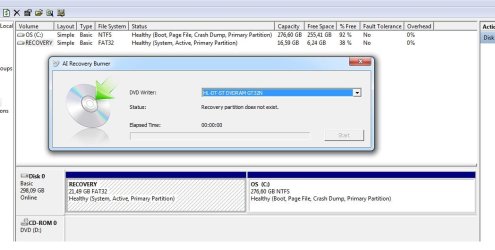
It didn't work. I also tried to waste some DVDs again with AI Recovery Burner but it says "Recovery partition does not exists".

Here is the snapshot:
partition.jpg
 

My Computer My Computer

At a glance

Windows 7 Ultimate x64Intel i7-QM74012GB 1333mHz RAMNVIDIA GeForce GT 425M
Computer Manufacturer/Model Number
Asus N53JQ
OS
Windows 7 Ultimate x64
CPU
Intel i7-QM740
Memory
12GB 1333mHz RAM
Graphics Card(s)
NVIDIA GeForce GT 425M
Sound Card
Creative SB Audigy 2 NX
Screen Resolution
1366x768
Hard Drives
SanDisk Extreme SSD 120GB SATA III
Seagate 320GB 5400rpm 2.5" HDD
Keyboard
Logitech G19
Mouse
Logitech Anywhere MX
You can only make your recovery disks once.
Run a antivirus scan.
 

My Computer My Computer

At a glance

ME/XP/Vista/Win7
OS
ME/XP/Vista/Win7
No, i did the recovery discs 2 times. Isn't there anyway to get this recovery partition work? Or the recovery partition stopped to work because of i made that recovery DVDs??
 

My Computer My Computer

At a glance

Windows 7 Ultimate x64Intel i7-QM74012GB 1333mHz RAMNVIDIA GeForce GT 425M
Computer Manufacturer/Model Number
Asus N53JQ
OS
Windows 7 Ultimate x64
CPU
Intel i7-QM740
Memory
12GB 1333mHz RAM
Graphics Card(s)
NVIDIA GeForce GT 425M
Sound Card
Creative SB Audigy 2 NX
Screen Resolution
1366x768
Hard Drives
SanDisk Extreme SSD 120GB SATA III
Seagate 320GB 5400rpm 2.5" HDD
Keyboard
Logitech G19
Mouse
Logitech Anywhere MX
Replace the the recovery disks.
You can Order Asus recovery disks from here:
ASUS eStore
At the search box, type in RECOVERY


Run a Antivirus scan on the Recovery Partition.
 

My Computer My Computer

At a glance

ME/XP/Vista/Win7
OS
ME/XP/Vista/Win7
There isn't any Recovery DVDs on Asus eStore compatible with n53jq. I'll run an antivirus scan on the recovery partition and post back..
 

My Computer My Computer

At a glance

Windows 7 Ultimate x64Intel i7-QM74012GB 1333mHz RAMNVIDIA GeForce GT 425M
Computer Manufacturer/Model Number
Asus N53JQ
OS
Windows 7 Ultimate x64
CPU
Intel i7-QM740
Memory
12GB 1333mHz RAM
Graphics Card(s)
NVIDIA GeForce GT 425M
Sound Card
Creative SB Audigy 2 NX
Screen Resolution
1366x768
Hard Drives
SanDisk Extreme SSD 120GB SATA III
Seagate 320GB 5400rpm 2.5" HDD
Keyboard
Logitech G19
Mouse
Logitech Anywhere MX
Hello DTSManiaC, welcome to Seven Forums!


It's rather foolish not to use an anti-virus ...

Have a look at Avast Home Free I believe it has a gaming mode.


That being said, have a look at this information below, doing a wipe secure erase of the entire Hard Disk Drive would be a very good idea and be sure to post back with any further questions you may have and to keep us informed.


After you have copied out or made back-ups of the data you need to save to external media; if you can find an exact Windows version that the PC shipped with you can do a clean install using the activation key on the COA sticker attached to the PC though it may require a robo-call to MS to sort the OEM batch-key.

How to Activate Windows 7 by Phone


If you can't find an exact same version, you could use the info in this tutorial to create an "all versions" installer of any version Windows installer, to install using the same method I posted above.

Windows 7 Universal Installation Disc - Create


After you have made backups of everything you care to save, the best method is to do a complete wipe (secure erase) of the entire Hard Disk Drive first, it over-writes everything, all the old Windows code including all the old drivers/programs, giving you the best possible space to install Windows to.

SSD / HDD : Optimize for Windows Reinstallation
 

My Computer My Computer

At a glance

W 7 64-bit UltimateIntel Q9550 Yorkfield8GB Dominator 8500C5DATI : XFX 5870
Computer Manufacturer/Model Number
* BFK Customs *
OS
W 7 64-bit Ultimate
CPU
Intel Q9550 Yorkfield
Motherboard
ASUS P5Q Pro
Memory
8GB Dominator 8500C5D
Graphics Card(s)
ATI : XFX 5870
Sound Card
Realtek HD Audio 7-1
Monitor(s) Displays
1x 47" LCD HDMI & 3x 26" LCD HDMI
Screen Resolution
1920x1080P & 1920x1200
Hard Drives
1x 80GB Intel X25-M G2 SSD : 1x 500GB & 1x 640GB WD Caviar Black(s)
PSU
Corsair 620HX
Case
Cooler Master RC-690
Cooling
Tuniq Tower 120, 2x 140mm and 3x 120mm case fans
Keyboard
Microsoft 500
Mouse
Razer Diamondback 3G
Internet Speed
14 Mb/s
Other Info
1x Koutech 3Gb/s SATA HDD Hot Swap Rack
No virus on recovery partition...
 

My Computer My Computer

At a glance

Windows 7 Ultimate x64Intel i7-QM74012GB 1333mHz RAMNVIDIA GeForce GT 425M
Computer Manufacturer/Model Number
Asus N53JQ
OS
Windows 7 Ultimate x64
CPU
Intel i7-QM740
Memory
12GB 1333mHz RAM
Graphics Card(s)
NVIDIA GeForce GT 425M
Sound Card
Creative SB Audigy 2 NX
Screen Resolution
1366x768
Hard Drives
SanDisk Extreme SSD 120GB SATA III
Seagate 320GB 5400rpm 2.5" HDD
Keyboard
Logitech G19
Mouse
Logitech Anywhere MX
I've made it. This morning i perfomed a full format with my old win 7 dvd. But I'm wondering that can't i use my factory OEM anymore???
 

My Computer My Computer

At a glance

Windows 7 Ultimate x64Intel i7-QM74012GB 1333mHz RAMNVIDIA GeForce GT 425M
Computer Manufacturer/Model Number
Asus N53JQ
OS
Windows 7 Ultimate x64
CPU
Intel i7-QM740
Memory
12GB 1333mHz RAM
Graphics Card(s)
NVIDIA GeForce GT 425M
Sound Card
Creative SB Audigy 2 NX
Screen Resolution
1366x768
Hard Drives
SanDisk Extreme SSD 120GB SATA III
Seagate 320GB 5400rpm 2.5" HDD
Keyboard
Logitech G19
Mouse
Logitech Anywhere MX
If you Reinstalled with a MS Windows 7 DVD, this will make the Recovery Partition unusable.
As you only done a format, & not a clean all.
 

My Computer My Computer

At a glance

ME/XP/Vista/Win7
OS
ME/XP/Vista/Win7
You may want to contact Asus to see if they will sell you a recovery disk.

That said, if you've re-installed Windows 7 it has a huge driver database so just check in Device Manager to see what's needed (if any) and you should be able to download any drivers you need from Asus.
 

My Computer My Computer

At a glance

Windows 7 Ultimate SP1 64-BitIntel Core i7 870 @ 2.93GHz8Gb Dual-Channel DDR3 @ 664MHznVidia GeForce GTX 460 1024MB dedicated RAM
Computer Manufacturer/Model Number
HP Pavilion Elite 495UK
OS
Windows 7 Ultimate SP1 64-Bit
CPU
Intel Core i7 870 @ 2.93GHz
Motherboard
MSI 2A9C (CPU1)
Memory
8Gb Dual-Channel DDR3 @ 664MHz
Graphics Card(s)
nVidia GeForce GTX 460 1024MB dedicated RAM
Sound Card
Realtek HD Audio
Monitor(s) Displays
HP2310i
Screen Resolution
1920 x 1080
Hard Drives
1x1954GB Hitachi HDS22020ALA 330 (RAID), 1x1954GB Hitachi External for backup and storage
PSU
460W
Case
HP Elite
Cooling
Air cooled
Keyboard
Logitech K750 solar-powered keyboard
Mouse
Logitech Wireless M180 mouse
Internet Speed
2Mb
Other Info
Pure Avanti Flow Internet Radio with iPod Dock, 64Gb iPod, HP USB Speakers, Sony MDR-V500 Headphones, Sony Vaio F-Series Laptop
But the recovery partition has already became unusable before i reinstall OS with Win 7 DVD. And now you're saying that i can't use recovery anymore, right?
 

My Computer My Computer

At a glance

Windows 7 Ultimate x64Intel i7-QM74012GB 1333mHz RAMNVIDIA GeForce GT 425M
Computer Manufacturer/Model Number
Asus N53JQ
OS
Windows 7 Ultimate x64
CPU
Intel i7-QM740
Memory
12GB 1333mHz RAM
Graphics Card(s)
NVIDIA GeForce GT 425M
Sound Card
Creative SB Audigy 2 NX
Screen Resolution
1366x768
Hard Drives
SanDisk Extreme SSD 120GB SATA III
Seagate 320GB 5400rpm 2.5" HDD
Keyboard
Logitech G19
Mouse
Logitech Anywhere MX
If you wiped your HD (as suggested) before install then you no longer have the Recovery Partition, which didn't work anyway.

Now your best backup option is to save externally a Win7 backup image which can be reimaged to the HD or it's replacement in 20 minutes using the DVD Repair Console and stored image.
Backup Complete Computer - Create an Image Backup
System Image Recovery

You should also use a free lightweight AV which will not interfere with gaming. Try Microsoft Security Essentials which works perfectly with the Win7 firewall which should be kept updated.

Running without an AV then restoring if infected is reckless behavior that will come back to bite you big time. Losing your Recovery Partition is just the beginning of what's to come if you don't get and stay protected.
 
Thanks for helping guys. I decided to use this recovery partition to backup my current OS...
 

My Computer My Computer

At a glance

Windows 7 Ultimate x64Intel i7-QM74012GB 1333mHz RAMNVIDIA GeForce GT 425M
Computer Manufacturer/Model Number
Asus N53JQ
OS
Windows 7 Ultimate x64
CPU
Intel i7-QM740
Memory
12GB 1333mHz RAM
Graphics Card(s)
NVIDIA GeForce GT 425M
Sound Card
Creative SB Audigy 2 NX
Screen Resolution
1366x768
Hard Drives
SanDisk Extreme SSD 120GB SATA III
Seagate 320GB 5400rpm 2.5" HDD
Keyboard
Logitech G19
Mouse
Logitech Anywhere MX
Back
Top