Need help with booting.

CogitoSum

New member
Local time
10:45 PM
Messages
3
Running Win7 Home Premium 64bit fully updated and Macrium Reflect 5.2.6437. In Windows/Control Panel/System/Advanced System Settings/Startup & Recovery it shows a drop-down box containing "Windows7" and "Macrium Reflect". Just what I'd expect. But on starting Windows all I get is "Starting Windows" or if I have highlighted "Macrium" it starts Macrium. Not what I expect. I'd like a choice for 10 seconds as specified by my Windows settings. Any suggestions?
 

My Computer

Computer type
PC/Desktop
Computer Manufacturer/Model Number
Custom Built
OS
Win& home premium 64bit
Memory
8 gig
Hard Drives
500 meg
Antivirus
AVG free
Browser
Opera 18
Running Win7 Home Premium 64bit fully updated and Macrium Reflect 5.2.6437. In Windows/Control Panel/System/Advanced System Settings/Startup & Recovery it shows a drop-down box containing "Windows7" and "Macrium Reflect". Just what I'd expect. But on starting Windows all I get is "Starting Windows" or if I have highlighted "Macrium" it starts Macrium. Not what I expect. I'd like a choice for 10 seconds as specified by my Windows settings. Any suggestions?

You won't get the choice. Macrium is a program for imaging Windows. You can not start Macrium without starting Windows. Are you trying to schedule a backup or what are you trying to do with Macrium?
 

My Computer

Computer type
PC/Desktop
Computer Manufacturer/Model Number
Custom Build
OS
Windows 7 Home Premium 32-Bit - Build 7600 SP1
CPU
Intel Core i3-2120 3.30Ghz
Motherboard
Asus P8Z68-V LX Intel Z68 Socket H2 ATX
Memory
Kingston 4 GB DDR3 1333 mhz
Graphics Card(s)
AMD Radeon HD6670
Sound Card
Sound Blaster Audigy SE 24-Bit
Monitor(s) Displays
Asus VE228
Screen Resolution
1440 X 900
Hard Drives
OCZ Vertex 3 120 GB Sata 3 SSD ==
Kingston SH103/S3 120 G Hyper X 120 GB SSD ==
Western Digital 500 GB Caviar Green 7200 RPM ==
PSU
Corsair CX600M == 600 Watt
Case
NZXT Apollo - Silver with Clear Side Panel
Cooling
Three 120 mm Fans
Keyboard
Microsoft Natural 4000
Mouse
Microsoft Custom Optical 3000
Internet Speed
AT&T Fiber Optic Wireless Network
Antivirus
Microsoft Security Essentials
Browser
Chrome
Other Info
120 mm Blue LED Fan -- Three Blue LED Lazer Light Sticks
As bigmck says you cannot boot Macrium on its own as it operates from within Windows.

But you can boot the Macrium Recovery option as an alternative to Windows but you have to set that from within Macrium. When you have Macrium running select "Other Tasks" & then select "Add Recovery Boot Menu Options". This will open a window for you to select what you have set up for that.

When that option is set you should have a boot option when you are starting your computer will give you a short time to select either Windows or Macrium Recovery & the default is Windows if you don't select in time. But this will not start Macrium Reflect it is only to enable you to use to your recovery disc so as you can reinstall after a disaster.
 

My Computer

Computer type
PC/Desktop
Computer Manufacturer/Model Number
Self built using existing case
OS
Windows 7 Home Premium 64 bit sp1
CPU
Intel i5 3570 3.4Ghz Ivy Bridge SKT 1155 quad core
Motherboard
Gigabyte Z77-HD3 SKT 1155 2xSata 3, 4x USB 3.0
Memory
G-Skill Rip Jaws 16Gb (8x2) DDR3 -1600 PC3 12800 CL 10 red
Graphics Card(s)
Gigabyte NVIDIA GT610 1Gb DDR3 810/1200 PCI-E 2.0 Silent
Sound Card
NVIDIA High Definition & Realtech High Definition Audio
Monitor(s) Displays
2 x Philips 226V4L 16:9 aspect ratio
Screen Resolution
1920 x 1080 HD
Hard Drives
Samsung 840 Pro 256gb SSD, SATA 3.
Hitachi Touro Portable 1tb, USB 3.0 HDD used for image b/ups.
PSU
Corsair VS450
Case
Codeng
Cooling
PSU fan & CPU fan
Keyboard
Logitech
Mouse
Logitech Wireless trackball M570
Internet Speed
Wireless 3G. 3mg down & 550kb up.
Antivirus
Bitdefender Internet Security 2020
Browser
Opera (Current Version) & Firefox
Other Info
MS Office 2013 Pro. Davis weather station software. MGE Nova 600 avr UPS.
If you want to boot Macrium alone, get the Macrium WinPE .iso from here and burn it to CD. Then boot with that CD. You can then make Macrium images or recover from a Macrium image - but nothing else.
 

My Computer

Computer Manufacturer/Model Number
HP, Dell, Gateway, Toshiba - 4 laptops and 2 desktops
OS
Vista, Windows7, Mint Mate, Zorin, Windows 8
CPU
from 1.6GHz Duo to i7
Monitor(s) Displays
2x HP w2207
Hard Drives
5x HDD, 7x SSD, 12x Externals
Keyboard
with trackball - no mices
Mouse
Trackball mice
Internet Speed
DSL 6000
As bigmck says you cannot boot Macrium on its own as it operates from within Windows.

But you can boot the Macrium Recovery option as an alternative to Windows but you have to set that from within Macrium. When you have Macrium running select "Other Tasks" & then select "Add Recovery Boot Menu Options". This will open a window for you to select what you have set up for that.

When that option is set you should have a boot option when you are starting your computer will give you a short time to select either Windows or Macrium Recovery & the default is Windows if you don't select in time. But this will not start Macrium Reflect it is only to enable you to use to your recovery disc so as you can reinstall after a disaster.

I'm sorry for the confusion. What I meant was I'm trying to boot either Win7 or Macrium Recovery. I've done everything you suggested which is why my boot menu within "System settings" etc. displays both settings but does not allow me a choice. Both timers are checked and set to 10 secs.
 

My Computer

Computer type
PC/Desktop
Computer Manufacturer/Model Number
Custom Built
OS
Win& home premium 64bit
Memory
8 gig
Hard Drives
500 meg
Antivirus
AVG free
Browser
Opera 18
Just as was said above, you can only do two things. One boot Windows and then start Macrium. You can also boot with the Macrium boot disk as WHS said above. Nothing else.
 

My Computer

Computer type
PC/Desktop
Computer Manufacturer/Model Number
Custom Build
OS
Windows 7 Home Premium 32-Bit - Build 7600 SP1
CPU
Intel Core i3-2120 3.30Ghz
Motherboard
Asus P8Z68-V LX Intel Z68 Socket H2 ATX
Memory
Kingston 4 GB DDR3 1333 mhz
Graphics Card(s)
AMD Radeon HD6670
Sound Card
Sound Blaster Audigy SE 24-Bit
Monitor(s) Displays
Asus VE228
Screen Resolution
1440 X 900
Hard Drives
OCZ Vertex 3 120 GB Sata 3 SSD ==
Kingston SH103/S3 120 G Hyper X 120 GB SSD ==
Western Digital 500 GB Caviar Green 7200 RPM ==
PSU
Corsair CX600M == 600 Watt
Case
NZXT Apollo - Silver with Clear Side Panel
Cooling
Three 120 mm Fans
Keyboard
Microsoft Natural 4000
Mouse
Microsoft Custom Optical 3000
Internet Speed
AT&T Fiber Optic Wireless Network
Antivirus
Microsoft Security Essentials
Browser
Chrome
Other Info
120 mm Blue LED Fan -- Three Blue LED Lazer Light Sticks
There is the option to boot directly from "Macrium" -- if you used the option to install the Recovery Boot Menu Option.

This basically launches WinPE with some customization added by Macrium. You are not booting Win7 first when using this option; instead, you are booting using WinPE.

There are different Recovery Boot Options available when you install it, but basically, it is used primarily to run a restore from a saved MR image when you can't boot into Windows.
 

My Computer

Computer type
PC/Desktop
Computer Manufacturer/Model Number
Custom
OS
Win7 Pro 32-bit, Win8 Pro 32-bit
CPU
AMD Phenom II X6 1090T
Motherboard
Gigabyte
Memory
4GB ddr3 1300
Graphics Card(s)
AMD HD 4290 onboard
Sound Card
Builtin Realtek HD Audio
Monitor(s) Displays
Samsung 24" widescreen, LG 23" widescreen
Screen Resolution
1920x1200/1920x1080
Hard Drives
Kingston 256GB SSD
Keyboard
Logitech Illuminated Keyboard
Mouse
Logitech M705 wireless mouse
Antivirus
Norton Av 2013
Browser
IE v10
That's what I thought.

OP seems concerned that he can't get a Dual Boot menu, just one choice or the other he's preselecting. It would help to see some screenshots of all of his settings choices.
 
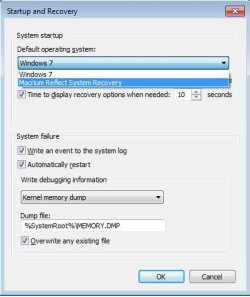
Srart & Recovery.jpg

Clicking on the drop down arrow beside Windows 7 shows what's available to me. If I were to highlight the Macrium option then my PC boots into Macrium without any choice. Set as it is it boots into Windows without any choice. I would just like a choice for 10 seconds.
 

My Computer

Computer type
PC/Desktop
Computer Manufacturer/Model Number
Custom Built
OS
Win& home premium 64bit
Memory
8 gig
Hard Drives
500 meg
Antivirus
AVG free
Browser
Opera 18
It seems to be ignoring the settings you've made in Win7.

See what settings are available in Macrium for this program.
 
Back
Top