
Need help with Default Gateway issues

bullrhino

New member
Local time
10:13 AM
Messages
6
On an almost daily basis I will lose my internet connection on my desktop computer and when I go through the trouble shooting process it finally pops up and says something about the Default Gateway being lost or disconnected and then it fixes it and I'm fine for the rest of the day. It appears to happen more often when I'm streaming some video I've found on Facebook, or it's really bad when I'm streaming the weather report from a local news station, but sometimes I'm not streaming anything (that I know of) and just opening a new webpage. This has been going on almost since I got the computer over two years ago and I called HP support and they were not help at all. I do turn my computer off every night. Sometimes I'll go two or three days without an issue, but not very often. It is not my modem or router. I have a laptop and my wife's desktop and other devices such as cell phones and smart TV that are still getting signal when my desktop cannot get a connection so it is clearly just this one desktop which happens to be the one I use all the time. It's not a huge deal but it wastes a little time each day so I'm wondering if anyone knows how to fix it permanently.

Thanks for any assistance.
 

My Computer

Computer type
PC/Desktop
Computer Manufacturer/Model Number
HP P7-1257cb
OS
Windows 7 Home Premium 64bit
CPU
AMD Quad Core A8-3820
Memory
16Gb
Hard Drives
Hitachi 1 TB
Antivirus
Norton
Browser
Firefox
Open Command Prompt and run ipconfig /all and post the results. Is this a wireless or wired connection?
 

My Computer

Computer type
PC/Desktop
OS
Windows 7 Pro
Thank you for helping.

I am on a wired connection and here is the IP Config data:

Windows IP Configuration

Host Name . . . . . . . . . . . . : Scott-HP
Primary Dns Suffix . . . . . . . :
Node Type . . . . . . . . . . . . : Hybrid
IP Routing Enabled. . . . . . . . : No
WINS Proxy Enabled. . . . . . . . : No

Ethernet adapter Local Area Connection:

Connection-specific DNS Suffix . :
Description . . . . . . . . . . . : Realtek PCIe GBE Family Controller
Physical Address. . . . . . . . . : E8-40-F2-0E-C5-81
DHCP Enabled. . . . . . . . . . . : Yes
Autoconfiguration Enabled . . . . : Yes
Link-local IPv6 Address . . . . . : fe80::245d:5202:d92c:7ab2%13(Preferred)
IPv4 Address. . . . . . . . . . . : 192.168.1.143(Preferred)
Subnet Mask . . . . . . . . . . . : 255.255.255.0
Lease Obtained. . . . . . . . . . : Thursday, February 12, 2015 7:27:47 AM
Lease Expires . . . . . . . . . . : Friday, February 13, 2015 12:29:25 PM
Default Gateway . . . . . . . . . : 192.168.1.1
DHCP Server . . . . . . . . . . . : 192.168.1.1
DHCPv6 IAID . . . . . . . . . . . : 272130167
DHCPv6 Client DUID. . . . . . . . : 00-01-00-01-16-9E-54-97-E8-40-F2-0E-C5-81

DNS Servers . . . . . . . . . . . : 192.168.1.1
NetBIOS over Tcpip. . . . . . . . : Enabled

Tunnel adapter isatap.{4120C02B-5377-45F5-B967-BDE9B198F517}:

Media State . . . . . . . . . . . : Media disconnected
Connection-specific DNS Suffix . :
Description . . . . . . . . . . . : Microsoft ISATAP Adapter
Physical Address. . . . . . . . . : 00-00-00-00-00-00-00-E0
DHCP Enabled. . . . . . . . . . . : No
Autoconfiguration Enabled . . . . : Yes

Tunnel adapter Local Area Connection* 9:

Media State . . . . . . . . . . . : Media disconnected
Connection-specific DNS Suffix . :
Description . . . . . . . . . . . : Microsoft 6to4 Adapter
Physical Address. . . . . . . . . : 00-00-00-00-00-00-00-E0
DHCP Enabled. . . . . . . . . . . : No
Autoconfiguration Enabled . . . . : Yes

Tunnel adapter Local Area Connection* 12:

Connection-specific DNS Suffix . :
Description . . . . . . . . . . . : Microsoft Teredo Tunneling Adapter
Physical Address. . . . . . . . . : 00-00-00-00-00-00-00-E0
DHCP Enabled. . . . . . . . . . . : No
Autoconfiguration Enabled . . . . : Yes
IPv6 Address. . . . . . . . . . . : 2001:0:9d38:6abd:20bf:3e66:b3e8:d4e7(Pref
erred)
Link-local IPv6 Address . . . . . : fe80::20bf:3e66:b3e8:d4e7%12(Preferred)
Default Gateway . . . . . . . . . : ::
NetBIOS over Tcpip. . . . . . . . : Disabled
 

My Computer

Computer type
PC/Desktop
Computer Manufacturer/Model Number
HP P7-1257cb
OS
Windows 7 Home Premium 64bit
CPU
AMD Quad Core A8-3820
Memory
16Gb
Hard Drives
Hitachi 1 TB
Antivirus
Norton
Browser
Firefox
Go in the ethernet adapter properties, uncheck ipv6, not needed. Check in the power management tab, that is in the Configure button for the Realtek Family Controller in Device Manager, uncheck box says, Allow the computer to turn off this device to save power. Reboot...
 

My Computer

Computer type
Laptop
Computer Manufacturer/Model Number
HP 17-ak0xx, dv7 3173nr
OS
Win7 Home Premium x64 W10Pro&Home
CPU
A12 9720p 4+8 TurionII M520
Motherboard
HP 3839
Memory
6GB 8GB
Graphics Card(s)
R7
Monitor(s) Displays
24" sa550
Screen Resolution
1600x900 1920x1080
Mouse
Logitechx2
Internet Speed
120Mb/s down 12up
DMHolt57

Thanks for your suggestions. I've gone in and done what you said, so now I'll watch and see what happens. I'm hoping it works and if so I'll come back in and give you the credit you deserve.

Thanks again.
 

My Computer

Computer type
PC/Desktop
Computer Manufacturer/Model Number
HP P7-1257cb
OS
Windows 7 Home Premium 64bit
CPU
AMD Quad Core A8-3820
Memory
16Gb
Hard Drives
Hitachi 1 TB
Antivirus
Norton
Browser
Firefox
ipv6 is needed for windows disabling it in Ethernet properties will not disable it, It will still be running in the background. there are a few programs that need ipv6, the first one that comes to mind is Remote Desktop also when ipv6 gains more popularity you may have crippled your computer also any updates to windows are checked with ipv6 turned on so at some point down the road you may break some updates, If I were you I give your Ethernet a static ip of 8.8.8.8 and the secondary one 8.8.4.4

Sorry meant to say change your DNS settings of the Ethernet card to a static IP of 8.8.8.8 and 8.8.4.4
 
Last edited:

My Computer

Computer type
PC/Desktop
Computer Manufacturer/Model Number
Compac
OS
Microsoft Windows 7 Ultimate 32-bit 7601
CPU
Intel(R) Pentium(R) Dual CPU E2160 @ 1.80GHz
Motherboard
MSI Boston
Memory
4.00 GB
Graphics Card(s)
(1) VNC Mirror Driver (2) Intel(R) G33/G31 Express Chipset
Sound Card
Disabled
Monitor(s) Displays
Headless
Screen Resolution
1280 x 960 x 32 bits (4294967296 colors) @ 60 Hz
Hard Drives
ST3320820AS ATA Device
Keyboard
Headless
Mouse
Headless
Antivirus
Malwarebytes pro
Other Info
Also
Windows 8.1 Laptop and Desktop both Acer
If I were you I give your Ethernet a static ip of 8.8.8.8 and the secondary one 8.8.4.4

Those are Google DNS addresses, not sure what you meant by "giving them to the Ethernet".


OP - you said that there are TVs, laptops, etc. connected to the network, but you also said that your PC is wired. Is the entire network wired or is it hybrid with wireless (like a Linksys wi-fi router with ports)?
 

My Computer

Computer type
PC/Desktop
OS
Windows 7 Pro
doctore, To answer your last question, only my main computer that is having issues is hardwired the rest are all wireless.

Unfortunately the solution offered by DMHolt57 is not working, and based on the comments by sml156 I want to go back and check my IPV6 to turn it back on. The problem is that I don't remember how I got into it to turn it off. Would someone be willing to walk me through that so I can get it back on in case it is ever needed.

Thanks to ALL for your help!
 

My Computer

Computer type
PC/Desktop
Computer Manufacturer/Model Number
HP P7-1257cb
OS
Windows 7 Home Premium 64bit
CPU
AMD Quad Core A8-3820
Memory
16Gb
Hard Drives
Hitachi 1 TB
Antivirus
Norton
Browser
Firefox
You can recheck the box in the device manager, network adapters, select the properties of the adapter, you will see the box...
 

My Computer

Computer type
Laptop
Computer Manufacturer/Model Number
HP 17-ak0xx, dv7 3173nr
OS
Win7 Home Premium x64 W10Pro&Home
CPU
A12 9720p 4+8 TurionII M520
Motherboard
HP 3839
Memory
6GB 8GB
Graphics Card(s)
R7
Monitor(s) Displays
24" sa550
Screen Resolution
1600x900 1920x1080
Mouse
Logitechx2
Internet Speed
120Mb/s down 12up
Maybe I'm losing my mind:p. I remember when I went in previously to follow your instructions there was a box that I unchecked. Now I go into Device Manager and go into the Realtek adapter, which is my only choice, and after clicking on the different tabs I finally tried the advanced tab and there no boxes next to anything, however, there are three lines in there that also have IPV6 in parenthesis and when I click on each of those there is another "window" on the right side that says either enabled or Rx & Tx Enabled. I don't know how I found the box that I unchecked before.
 

My Computer

Computer type
PC/Desktop
Computer Manufacturer/Model Number
HP P7-1257cb
OS
Windows 7 Home Premium 64bit
CPU
AMD Quad Core A8-3820
Memory
16Gb
Hard Drives
Hitachi 1 TB
Antivirus
Norton
Browser
Firefox
Last edited:

My Computer

Computer type
PC/Desktop
Computer Manufacturer/Model Number
Compac
OS
Microsoft Windows 7 Ultimate 32-bit 7601
CPU
Intel(R) Pentium(R) Dual CPU E2160 @ 1.80GHz
Motherboard
MSI Boston
Memory
4.00 GB
Graphics Card(s)
(1) VNC Mirror Driver (2) Intel(R) G33/G31 Express Chipset
Sound Card
Disabled
Monitor(s) Displays
Headless
Screen Resolution
1280 x 960 x 32 bits (4294967296 colors) @ 60 Hz
Hard Drives
ST3320820AS ATA Device
Keyboard
Headless
Mouse
Headless
Antivirus
Malwarebytes pro
Other Info
Also
Windows 8.1 Laptop and Desktop both Acer
You can turn back IPv6 on by right clicking your adapter and checking the box as per screenshot below:
 

Attachments

  • ipv6.jpg
    ipv6.jpg
    216.1 KB · Views: 6

My Computer

Computer type
PC/Desktop
OS
Windows 7 Pro
Now, the DHCP problem is certainly not DNS-related, so I wouldn't mess with the DNS settings.

You can assign your computer a static IP address that is outside your router's DCHP scope and avoid DHCP issues, while tracking down the problem (or permanently). Let me know your router model and I can walk you trough it, if you wish.

Btw, are any computers on your network with a static IP? This could be messing with the DHCP, if not done right.
 

My Computer

Computer type
PC/Desktop
OS
Windows 7 Pro
Thanks doctore. I got my IPV6 box checked again. My router is a Lynksys EA2700. I don't know anything about what a DHCP is and I don't know if there are any computers or other devices on my network with a static IP, and obviously don't know how to find out.

I noticed in some previous posts some were suggesting something about setting something to 8.8.8.8 and 8.8.4.4 but I'm not sure what they were talking about, whether it is a good idea or why or how I would do that.

I really appreciate your help on this!!!
 

My Computer

Computer type
PC/Desktop
Computer Manufacturer/Model Number
HP P7-1257cb
OS
Windows 7 Home Premium 64bit
CPU
AMD Quad Core A8-3820
Memory
16Gb
Hard Drives
Hitachi 1 TB
Antivirus
Norton
Browser
Firefox
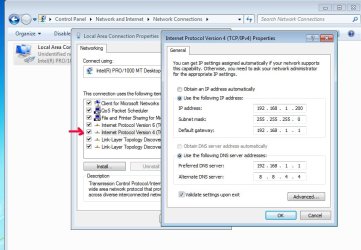
Assuming you haven't done any changes to the router - go to your network adapter, open the properties like the previous screenshot I posted, but this time double-click "IPv4" (make sure that you don't uncheck it!). When the new window opens, select "Use the following IP address" and enter it exactly as it appears on the screenshot below. You should be all set.

As far as changing to 8.8.8.8 - you don't need to do it, but I have put in the 8.8.4.4 DNS, just in case.


Attachments

  • ipv4.jpg
    ipv4.jpg
    326.4 KB · Views: 2

My Computer

Computer type
PC/Desktop
OS
Windows 7 Pro
Back
Top