Need help with disk partition (OEM Windows 7 Home Premium)

TigerPunk

New member
Local time
1:32 PM
Messages
6
Hi,

I recently purchased HP pavilion DV6 3124TX notebook with OEM windows 7 home premium installed . At the time of purchase there was a single partition of over 500GB and another recovery partition of 20GB. Upon my request the store staff (not HP staff but some random store which shelves numerous brands) made two more partitions of 136GB and 147GB respectively leaving the primary partion of 244 GB. However, in doing so the HP recovery tool was deleted and I realised upon reaching home that I cannot create recovery disk any more.
Now, I have two questions regarding which I need help:
1) I want the C drive partition to be 120 GB only. I was told by the HP support team that OEM software would always make a primary partition of 300GB. I found it ridiculous. Is there any way I can do this myself? I read in another thread that this can be done by calling the Microsoft support guys since I have the product key. If yes, should I wait for the recovery disk to arrive or should I go ahead and delete everything and follow the instructions from support team to do a custom install?
2) Is there a proper step by step guide to prepare your system for a fresh installation?

Any help will be appreciated. Thanks in advance.
 

My Computer My Computer

At a glance

Windows 7 Home Premium 64bitIntel Core I7Radeon Premium Graphics
Computer Manufacturer/Model Number
HP Pavilion DV6 3124TX
OS
Windows 7 Home Premium 64bit
CPU
Intel Core I7
Graphics Card(s)
Radeon Premium Graphics
1) Microsoft support will not send you any disks.For OEM manufacturer's

2) The Notebook was partition by HP, not the Retailer.

3) HP setup the HD with 4 partitions.

5) How to make HP Recovery DVD disks:
Recover Windows Vista Operating System Using HP Recovery - HP Customer Care (United States - English)

How to make HP Recovery USB disk:
Creating a Recovery Disk on a USB Flash Disk HP Pavilion dv6700z CTO Entertainment Notebook PC - HP Customer Care (United States - English)

or
You can Order HP Recovery Disks from here:
http://h20000.www2.hp.com/bizsuppor...ortFAQ&prodSeriesId=4247485&prodTypeId=321957

6) If you have a Retail copy of Windodws 7 Home Premium
http://www.sevenforums.com/tutorials/91339-ssd-hdd-optimize-windows-reinstallation.html

http://www.sevenforums.com/tutorials/1649-clean-install-windows-7-a.html?ltr=C
 

My Computer My Computer

At a glance

ME/XP/Vista/Win7
OS
ME/XP/Vista/Win7
In order to give you good advice I suggest you post a picture of your Disk Management. That will tell us what your partition structure is and what we can recommend as the best course of action.

Also tell us what you want to do with the free space after you reduced the size of the C partition. In the meantime do not experiment with a fresh installation. I do not think that this is required.
 

My Computer My Computer

At a glance

Vista, Windows7, Mint Mate, Zorin, Windows 8from 1.6GHz Duo to i7
Computer Manufacturer/Model Number
HP, Dell, Gateway, Toshiba - 4 laptops and 2 desktops
OS
Vista, Windows7, Mint Mate, Zorin, Windows 8
CPU
from 1.6GHz Duo to i7
Monitor(s) Displays
2x HP w2207
Hard Drives
5x HDD, 7x SSD, 12x Externals
Keyboard
with trackball - no mices
Mouse
Trackball mice
Internet Speed
DSL 6000
In order to give you good advice I suggest you post a picture of your Disk Management. That will tell us what your partition structure is and what we can recommend as the best course of action.

Also tell us what you want to do with the free space after you reduced the size of the C partition. In the meantime do not experiment with a fresh installation. I do not think that this is required.


Hello TigerPunk, welcome to Seven Forums!


Unfortunately MS will not help with a factory built PC without compensation, even though you have a Windows activation key.

I'm sure the ones that 'added' the partitions removed the HP Tools for you and it is their fault that you are in this situation, perhaps you should speak to them about reparations.


Please do post a pic of Windows disk management for us to see, here is a link to a tutorial that helps explain the procedure.


How to Upload and Post a Screenshot and File in Seven Forums
 

My Computer My Computer

At a glance

W 7 64-bit UltimateIntel Q9550 Yorkfield8GB Dominator 8500C5DATI : XFX 5870
Computer Manufacturer/Model Number
* BFK Customs *
OS
W 7 64-bit Ultimate
CPU
Intel Q9550 Yorkfield
Motherboard
ASUS P5Q Pro
Memory
8GB Dominator 8500C5D
Graphics Card(s)
ATI : XFX 5870
Sound Card
Realtek HD Audio 7-1
Monitor(s) Displays
1x 47" LCD HDMI & 3x 26" LCD HDMI
Screen Resolution
1920x1080P & 1920x1200
Hard Drives
1x 80GB Intel X25-M G2 SSD : 1x 500GB & 1x 640GB WD Caviar Black(s)
PSU
Corsair 620HX
Case
Cooler Master RC-690
Cooling
Tuniq Tower 120, 2x 140mm and 3x 120mm case fans
Keyboard
Microsoft 500
Mouse
Razer Diamondback 3G
Internet Speed
14 Mb/s
Other Info
1x Koutech 3Gb/s SATA HDD Hot Swap Rack
Please post back the screenshot of your maximized Disk Mgmt drive map with listings, using Snipping Tool in Start Menu.

Make it clear exactly what you want to do. We will give you the steps.
 
Last edited:
Factory restores are generally good enough in my opinion. Except for HP when they leave the user with 1 primary partition and use the other 3 (only 4 primaries available). In this case I'd do a clean install if you can borrow a set of install DVDs.

Bouncing with thread changes - yes a disk management screenshot probably helps.
 
Last edited:

My Computer My Computer

At a glance

Windows 7x64 Home Premium SP1Intel i7 2600kG.Skill Ripjaws (DDR3-1600) 2x4GBNvidia GeForce GTS 450; Intel HD Graphics 300...
Computer type
PC/Desktop
Computer Manufacturer/Model Number
Own build
OS
Windows 7x64 Home Premium SP1
CPU
Intel i7 2600k
Motherboard
ASUS P8Z68 Deluxe
Memory
G.Skill Ripjaws (DDR3-1600) 2x4GB
Graphics Card(s)
Nvidia GeForce GTS 450; Intel HD Graphics 3000(GT2+)
Monitor(s) Displays
Dell Ultrasharp IPS panel U2311H, Samsung SyncMaster P2350
Screen Resolution
1920x1080
Hard Drives
Samsung 850 Pro SSD 256GB, Samsung SSD 840 120GB, Seagates 1TB Barracuda ST31000528AS x2
PSU
Seasonic M12II 520W
Case
Lian Li Lancool PC-K60
Cooling
Case: 1x120mm, 3x140mm CPU: Hyper 212+
Keyboard
Logitech MK520 (wireless)
Mouse
Logitech MK520
Internet Speed
6-7 Mbps
Antivirus
Norton Security Premium, Malwarebytes on 2 (MSE on 3rd PC)
Browser
FireFox
Other Info
Audio: Logitech Z523 2.1
Another vote for a snapshot of your disk management output.


HOW TO POST A SNAPSHOT OF DISK MANAGEMENT DISPLAY

Run disk management:
WIN | type DISKMGMT.MSC | ENTER
WIN is the key with the wavy flag.

Maximize the output of Disk Management:
ALT-Spacebar key combo (this pops up a menu) |
X key (selects Maximize) |
Drag the field separators (such as between Status and Capacity) to show entire field. This is very important, otherwise, needed info is not visible.

Make a snapshot:
WIN | type SNIPPING | ENTER
Click the New button.
Drag the cursor around the area you want to snip.
File | Save as | select save location and name | Save button

Post the snapshot:
· Click on the paperclip icon in that row of icons at the top of the message box.
· Click on a BROWSE button. There are 5 of them.
· Navigate to the folder containing the snapshot.
· Click on the snapshot.
· Click on the OPEN button.
· Click on the UPLOAD button adjacent to the 5th BROWSE button.
· Close the MANAGE ATTACHMENTS window.
· Position the cursor at the spot in the message where you want the
snapshot to appear.
· Click on the PaperClip again.
· Click on the file which you want to insert
· Attach code will be inserted into your message.
 

My Computer My Computer

At a glance

MS Windows 7 Ultimate SP1 64-bitAMD A10-4600M6.00 GB Dual-Channel DDR3 @ 798MHz (11-11-12-28)AMD Radeon HD 7660G
Computer Manufacturer/Model Number
Toshiba Satellite S875D-S7239 laptop
OS
MS Windows 7 Ultimate SP1 64-bit
CPU
AMD A10-4600M
Motherboard
AMD Pumori (Socket FT1)
Memory
6.00 GB Dual-Channel DDR3 @ 798MHz (11-11-12-28)
Graphics Card(s)
AMD Radeon HD 7660G
Sound Card
High Definition Audio Device
Monitor(s) Displays
Generic PnP Monitor (1600x900@60Hz)
Screen Resolution
1600x900@60Hz
Hard Drives
SSD 119GB Corsair CSSD-V128GB2 ATA Device
Keyboard
Standard PS/2 Keyboard
Mouse
HP Wireless Optical Mobile Mouse Model FHA-3410
Internet Speed
What the local pub, local coffee shop offers.
Other Info
Optical Drive:MATSHITA BD-CMB UJ160B ATA Device


Also have an Asus ha1002xp netbook with Win 7 Ultimate installed.
Hi,

Sorry for the late reply. First of all thanks for the valuable advise.
I went to the store and spoke with their manager about repairs. Although, they admit to the mistake but when I asked for immediate repairs the guys directed me to the HP guys who told me to do run the recovery disk to re-instate the factory settings. Since the disk would take atleast two weeks to arrive I find myself in a fix.
I have started using the notebook since I cannot afford to wait for two weeks.

Kindly advise me what should I do?
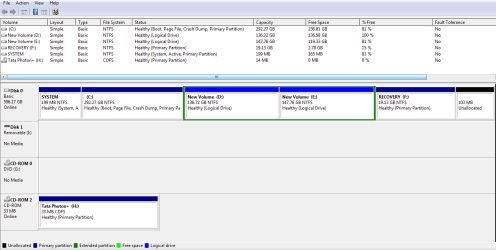
Currently, the structure is:
C-236GB
D- 136GB
E - 148 GB
I need C drive to be 120GB. Another two partitions of ~220GB.
As per your directions, I have attached a snapshot of disk management.

Thanks again for the prompt response.
Regards
 

Attachments

  • Snapshot.PNG
    Snapshot.PNG
    20.1 KB · Views: 97

My Computer My Computer

At a glance

Windows 7 Home Premium 64bitIntel Core I7Radeon Premium Graphics
Computer Manufacturer/Model Number
HP Pavilion DV6 3124TX
OS
Windows 7 Home Premium 64bit
CPU
Intel Core I7
Graphics Card(s)
Radeon Premium Graphics
Start by seeing how much you can shrink the right side of the C: partition.

Don't try to do anything else, just shrink C: and post back.
 

My Computer My Computer

At a glance

W 7 64-bit UltimateIntel Q9550 Yorkfield8GB Dominator 8500C5DATI : XFX 5870
Computer Manufacturer/Model Number
* BFK Customs *
OS
W 7 64-bit Ultimate
CPU
Intel Q9550 Yorkfield
Motherboard
ASUS P5Q Pro
Memory
8GB Dominator 8500C5D
Graphics Card(s)
ATI : XFX 5870
Sound Card
Realtek HD Audio 7-1
Monitor(s) Displays
1x 47" LCD HDMI & 3x 26" LCD HDMI
Screen Resolution
1920x1080P & 1920x1200
Hard Drives
1x 80GB Intel X25-M G2 SSD : 1x 500GB & 1x 640GB WD Caviar Black(s)
PSU
Corsair 620HX
Case
Cooler Master RC-690
Cooling
Tuniq Tower 120, 2x 140mm and 3x 120mm case fans
Keyboard
Microsoft 500
Mouse
Razer Diamondback 3G
Internet Speed
14 Mb/s
Other Info
1x Koutech 3Gb/s SATA HDD Hot Swap Rack
Tiger,
Excellent.
That clarifies many points.

There are several ways to accomplish your objective.

The quicky way is to use Partition Wizard, but this way can also lead to some possible complications. Win 7 doesn't let you expand a partition to the left and is difficult when it comes to shrinking a partition.

My way would be still more work and would eliminate any traces of HP from the hard disk, in other words, the recovery partition would be gone and their junk ware would be gone.

I'm going to sit back and watch the suggestions from the others since right now you are in a time-crunch if I understand you correctly.

Just as a question, since you will probably get asked this by others:
Do you have a Win 7 DVD? Here I'm not talking about the Recovery dvds. Which if you don't have them, making them would be wise as a fall-back in case disaster strikes.
 

My Computer My Computer

At a glance

MS Windows 7 Ultimate SP1 64-bitAMD A10-4600M6.00 GB Dual-Channel DDR3 @ 798MHz (11-11-12-28)AMD Radeon HD 7660G
Computer Manufacturer/Model Number
Toshiba Satellite S875D-S7239 laptop
OS
MS Windows 7 Ultimate SP1 64-bit
CPU
AMD A10-4600M
Motherboard
AMD Pumori (Socket FT1)
Memory
6.00 GB Dual-Channel DDR3 @ 798MHz (11-11-12-28)
Graphics Card(s)
AMD Radeon HD 7660G
Sound Card
High Definition Audio Device
Monitor(s) Displays
Generic PnP Monitor (1600x900@60Hz)
Screen Resolution
1600x900@60Hz
Hard Drives
SSD 119GB Corsair CSSD-V128GB2 ATA Device
Keyboard
Standard PS/2 Keyboard
Mouse
HP Wireless Optical Mobile Mouse Model FHA-3410
Internet Speed
What the local pub, local coffee shop offers.
Other Info
Optical Drive:MATSHITA BD-CMB UJ160B ATA Device


Also have an Asus ha1002xp netbook with Win 7 Ultimate installed.
As Bare Foot suggested,
try using the Shrink option in Disk Management and let us know how much you "shrunk".

If you have questions, be sure to ask because safe is better than sorry when changing partitions.
 

My Computer My Computer

At a glance

MS Windows 7 Ultimate SP1 64-bitAMD A10-4600M6.00 GB Dual-Channel DDR3 @ 798MHz (11-11-12-28)AMD Radeon HD 7660G
Computer Manufacturer/Model Number
Toshiba Satellite S875D-S7239 laptop
OS
MS Windows 7 Ultimate SP1 64-bit
CPU
AMD A10-4600M
Motherboard
AMD Pumori (Socket FT1)
Memory
6.00 GB Dual-Channel DDR3 @ 798MHz (11-11-12-28)
Graphics Card(s)
AMD Radeon HD 7660G
Sound Card
High Definition Audio Device
Monitor(s) Displays
Generic PnP Monitor (1600x900@60Hz)
Screen Resolution
1600x900@60Hz
Hard Drives
SSD 119GB Corsair CSSD-V128GB2 ATA Device
Keyboard
Standard PS/2 Keyboard
Mouse
HP Wireless Optical Mobile Mouse Model FHA-3410
Internet Speed
What the local pub, local coffee shop offers.
Other Info
Optical Drive:MATSHITA BD-CMB UJ160B ATA Device


Also have an Asus ha1002xp netbook with Win 7 Ultimate installed.
@Karlsnooks
I did not get the recovery disk or the Windows 7 dvd with the notebook. The HP support team explained to me that the OEM version restricts the user to lower the C partition below 250 GB.
Although, I am in a hurry but considering the fact that by deleting the HP recovery tools my notebook can't be restored to its initial settings, I don't want to take any further risk.
What I don't understand is why HP doesn't provide Windows 7 dvds to its buyers since they pay for the notebook and the original OS?
I am also thinking of buying a retail copy of Windows 7 in case this issue is not resolved.

@everyone: I don't know if this is of any help but the HP manual says that one can create a recovery disk onto a pen drive. For that one must press f11 while booting. This doesn't happen with my notebook. I was told by the Hp support person that since the recovery tools were accidently deleted the only way is to order a recovery disk.

Regards
 

My Computer My Computer

At a glance

Windows 7 Home Premium 64bitIntel Core I7Radeon Premium Graphics
Computer Manufacturer/Model Number
HP Pavilion DV6 3124TX
OS
Windows 7 Home Premium 64bit
CPU
Intel Core I7
Graphics Card(s)
Radeon Premium Graphics
Partition should let you shrink C: unless you have unmovable files. I think the Master File Table should be towards the start of the partition and not cause a problem.

You or someone else deleted the HP tools partition (unallocated at end) to give you your existing extended partition.
I would still keep the Recovery partition unless you decide to do a total clean install.
 

My Computer My Computer

At a glance

Windows 7x64 Home Premium SP1Intel i7 2600kG.Skill Ripjaws (DDR3-1600) 2x4GBNvidia GeForce GTS 450; Intel HD Graphics 300...
Computer type
PC/Desktop
Computer Manufacturer/Model Number
Own build
OS
Windows 7x64 Home Premium SP1
CPU
Intel i7 2600k
Motherboard
ASUS P8Z68 Deluxe
Memory
G.Skill Ripjaws (DDR3-1600) 2x4GB
Graphics Card(s)
Nvidia GeForce GTS 450; Intel HD Graphics 3000(GT2+)
Monitor(s) Displays
Dell Ultrasharp IPS panel U2311H, Samsung SyncMaster P2350
Screen Resolution
1920x1080
Hard Drives
Samsung 850 Pro SSD 256GB, Samsung SSD 840 120GB, Seagates 1TB Barracuda ST31000528AS x2
PSU
Seasonic M12II 520W
Case
Lian Li Lancool PC-K60
Cooling
Case: 1x120mm, 3x140mm CPU: Hyper 212+
Keyboard
Logitech MK520 (wireless)
Mouse
Logitech MK520
Internet Speed
6-7 Mbps
Antivirus
Norton Security Premium, Malwarebytes on 2 (MSE on 3rd PC)
Browser
FireFox
Other Info
Audio: Logitech Z523 2.1
Did you try the shrink? Have a look at this information below.


After you have copied out or made back-ups of the data you need to save to external media.

If you can find an exact Windows version installation media that the PC shipped with you can do a clean install using the activation key on the COA sticker attached to the PC though it may require a robo-call to MS to sort the OEM batch-key.

How to Activate Windows 7 by Phone

If you can't find an exact same version, you could use the info in this tutorial to create an "all versions" installer of any version Windows installer, to install using the same method I posted above.

Windows 7 Universal Installation Disc - Create

After you have made backups of everything you care to save, the best method is to do a complete wipe secure erase of the entire Hard Disk Drive first, it over-writes everything, all the old Windows code including all the old drivers/programs, giving you the best possible space to install Windows to.

SSD / HDD : Optimize for Windows Reinstallation
 

My Computer My Computer

At a glance

W 7 64-bit UltimateIntel Q9550 Yorkfield8GB Dominator 8500C5DATI : XFX 5870
Computer Manufacturer/Model Number
* BFK Customs *
OS
W 7 64-bit Ultimate
CPU
Intel Q9550 Yorkfield
Motherboard
ASUS P5Q Pro
Memory
8GB Dominator 8500C5D
Graphics Card(s)
ATI : XFX 5870
Sound Card
Realtek HD Audio 7-1
Monitor(s) Displays
1x 47" LCD HDMI & 3x 26" LCD HDMI
Screen Resolution
1920x1080P & 1920x1200
Hard Drives
1x 80GB Intel X25-M G2 SSD : 1x 500GB & 1x 640GB WD Caviar Black(s)
PSU
Corsair 620HX
Case
Cooler Master RC-690
Cooling
Tuniq Tower 120, 2x 140mm and 3x 120mm case fans
Keyboard
Microsoft 500
Mouse
Razer Diamondback 3G
Internet Speed
14 Mb/s
Other Info
1x Koutech 3Gb/s SATA HDD Hot Swap Rack
HP's have the worst load of bloatware of any makes. This weighs down and can corrupt the Win7 OS from being the featherlight, instantaneous OS it is natively.

This is deliberate because the bloatware sponsors rake in billions which make up almost all the profit on today's low-margin consumer rigs. Most makers not only won't provide a disk today, but try to enforce the bloatware by refusing to support a clean reinstall even though MS EULA agreement requires maker's to provide a clean installation method and allows consumers to reinstall their OS property any way they want.

In addition the useless factory utilities are unneeded since Win7 has better versions built into it.

The best approach is to work progressively toward a clean reinstall of just the OS, starting with cleaning up the factory bloatware following these tips based on hundreds of reinstalls of factory OEM I've done: http://www.sevenforums.com/installa...p-all-four-primary-partitions.html#post952573

Once you see how much Disk Mgmt will shrink C, you can burn to CD free Partition Wizard to shrink it as much as you want since System Files will not be running.
 
@bare foot

I did a check. It's 139479 MB volume that is shrinkable.
You would advise me to create a new volume by shrinking the space from C but can I split this space between D and E (existing drives)?
 

My Computer My Computer

At a glance

Windows 7 Home Premium 64bitIntel Core I7Radeon Premium Graphics
Computer Manufacturer/Model Number
HP Pavilion DV6 3124TX
OS
Windows 7 Home Premium 64bit
CPU
Intel Core I7
Graphics Card(s)
Radeon Premium Graphics
Use Disk Mgmt to safely shrink C - it offered you more than expected.

Then I'd Create a new logical sub-partition in Disk Mgmt, or you can use Partition Wizard CD to Resize D to the left and adjust the size of E.
 
Hello mate, I'm finished for the day, I'm sure my mate gregrocker will help you out!
 

My Computer My Computer

At a glance

W 7 64-bit UltimateIntel Q9550 Yorkfield8GB Dominator 8500C5DATI : XFX 5870
Computer Manufacturer/Model Number
* BFK Customs *
OS
W 7 64-bit Ultimate
CPU
Intel Q9550 Yorkfield
Motherboard
ASUS P5Q Pro
Memory
8GB Dominator 8500C5D
Graphics Card(s)
ATI : XFX 5870
Sound Card
Realtek HD Audio 7-1
Monitor(s) Displays
1x 47" LCD HDMI & 3x 26" LCD HDMI
Screen Resolution
1920x1080P & 1920x1200
Hard Drives
1x 80GB Intel X25-M G2 SSD : 1x 500GB & 1x 640GB WD Caviar Black(s)
PSU
Corsair 620HX
Case
Cooler Master RC-690
Cooling
Tuniq Tower 120, 2x 140mm and 3x 120mm case fans
Keyboard
Microsoft 500
Mouse
Razer Diamondback 3G
Internet Speed
14 Mb/s
Other Info
1x Koutech 3Gb/s SATA HDD Hot Swap Rack
I didn't see you in the thread so went ahead and answered, Ted.

Do you concur on Disk Mgmt?
 
I didn't see you in the thread so went ahead and answered, Ted. Do you concur?


It seems he can shrink what he needs, if he can use a third Logical it would be a whole lot easier than Resizing the existing Extended into the unallocated space.


I just realized ...

Won't he still need to Resize the Extended partition into the unallocated space using PW so he can create another Logical?
 

My Computer My Computer

At a glance

W 7 64-bit UltimateIntel Q9550 Yorkfield8GB Dominator 8500C5DATI : XFX 5870
Computer Manufacturer/Model Number
* BFK Customs *
OS
W 7 64-bit Ultimate
CPU
Intel Q9550 Yorkfield
Motherboard
ASUS P5Q Pro
Memory
8GB Dominator 8500C5D
Graphics Card(s)
ATI : XFX 5870
Sound Card
Realtek HD Audio 7-1
Monitor(s) Displays
1x 47" LCD HDMI & 3x 26" LCD HDMI
Screen Resolution
1920x1080P & 1920x1200
Hard Drives
1x 80GB Intel X25-M G2 SSD : 1x 500GB & 1x 640GB WD Caviar Black(s)
PSU
Corsair 620HX
Case
Cooler Master RC-690
Cooling
Tuniq Tower 120, 2x 140mm and 3x 120mm case fans
Keyboard
Microsoft 500
Mouse
Razer Diamondback 3G
Internet Speed
14 Mb/s
Other Info
1x Koutech 3Gb/s SATA HDD Hot Swap Rack
Back
Top