Need help with formatting *IMPORTANT*

Ritmann

New member
Local time
11:53 PM
Messages
7
Hi guys, I seriously needs some help with formattign my computer. I've got some virus' on my computer, and I'm not able to remove them (I have tried with Hijackthis and NOD32 Antivirus).
My problem is, that when I changed to Win7, my computer automaticly remved my recovery file, which holds my Windows Vista file. This means I can't install any operating system after format. I also need to format to clean up my computer etc. but that's unimportant.
This is a serious problem to me, because I use my computer for basically everything, and I have to use it on secondary college next year, and I can't afford a new one. so please help me, as fast as possible!
(I might have some problems understanding too complicated words, because I'm from Denmark, so please don't use those hard words too much :D.)
Well, hope to hear from you guys.
 

My Computer

Computer Manufacturer/Model Number
FN639EA#UUW
OS
Windows 7
CPU
2.24 GHz Duo core
Memory
4 GB RAM
Graphics Card(s)
NVIDIA Geforce 9600M
formatting help

Hi guys, I seriously needs some help with formattign my computer. I've got some virus' on my computer, and I'm not able to remove them (I have tried with Hijackthis and NOD32 Antivirus).
My problem is, that when I changed to Win7, my computer automaticly remved my recovery file, which holds my Windows Vista file. This means I can't install any operating system after format. I also need to format to clean up my computer etc. but that's unimportant.
This is a serious problem to me, because I use my computer for basically everything, and I have to use it on secondary college next year, and I can't afford a new one. so please help me, as fast as possible!
(I might have some problems understanding too complicated words, because I'm from Denmark, so please don't use those hard words too much :D.)
Well, hope to hear from you guys.

Hi and welcome to sevenforums.

Do you have a win 7 dvd to re-install from?
Are you really sure its a virus?
Could you tell us everything abt your computer so we can help you better

Hope this helps a little

Ken
 

My Computer

Computer Manufacturer/Model Number
HP Pavillion dv-7 1005 Tx
OS
Win 8 Release candidate 8400
CPU
[email protected]
Memory
4 gigs
Graphics Card(s)
Nvidia 9600M
Sound Card
HD built-in
Monitor(s) Displays
17" Wxga
Screen Resolution
1440x900
Cooling
none
Internet Speed
45Mb down 5Mb up

My Computer

Computer type
PC/Desktop
Computer Manufacturer/Model Number
Home built
OS
Win7 Ulitmate x64
CPU
AMD Phenom II X4 840 3.2 GHz
Motherboard
ASRock 890GX Pro3
Memory
16 GB
Graphics Card(s)
ATI Radion HD 4290 on the MoBo
Sound Card
M-Audio Delta 66, AMD on MoBo
Monitor(s) Displays
LG 34", AOC 22" flat screens
Screen Resolution
2560x1080, 1680x1050
Hard Drives
3 TB, 750 gig, 500 gig
PSU
500w
Case
no-name
Cooling
ps fan, case fan, cpu fan
Keyboard
Logitech
Mouse
Logitech
Internet Speed
45+Mbps
Antivirus
Microsoft Security Essentials
Browser
Mozilla SeaMonkey, Chrome
Other Info
I'm a musician and a composer, so this PC is used primarily as a digital audio workstation (DAW), so sound is king. I'm also a photographer, so I also make use of it for image processing. I find the ATI Radion on the MoBo to be perfectly adequate in this respect and the AOC 22" monitor to be respectable. It's about time for an upgrade, though.
formatting

Before you do anything you can't un-do later, I recommend that you try another anti-virus program. AVG has a free version that's worked well for me. I've just installed on my Win7 machine, and it works fine. Here's a link to the free version of AVG:

AVG Free - Download Free Antivirus and Antispyware for Windows XP and Vista

Best,
Michael

There is alo microsoft security essential newly out that works too

Try it one more time before you format it but if you must...

Ken
 

My Computer

Computer Manufacturer/Model Number
HP Pavillion dv-7 1005 Tx
OS
Win 8 Release candidate 8400
CPU
[email protected]
Memory
4 gigs
Graphics Card(s)
Nvidia 9600M
Sound Card
HD built-in
Monitor(s) Displays
17" Wxga
Screen Resolution
1440x900
Cooling
none
Internet Speed
45Mb down 5Mb up
There is alo microsoft security essential newly out that works too

Try it one more time before you format it but if you must...

Ken

MSE is no longer available for download as far as I know.
 

My Computer

Computer Manufacturer/Model Number
Custom | Whitebox
OS
Windows 7 Ultimate, OS X 10.7, Ubuntu 11.04
CPU
Intel E6750 @ 3.80GHz
Motherboard
Gigabyte GA-EP45-UD3L (Revision 1.1)
Memory
2x2GB & 2x1GB (6GB) OCZ Reaper 1066MHz @ 1080MHz
Graphics Card(s)
EVGA nVidia GTX 260 896mb (216 Core) FTW Edition
Sound Card
Realtek ALC888
Monitor(s) Displays
21" VIZIO TV
Screen Resolution
1680x1050 @ 60Hz
Hard Drives
Western Digital WD6401AALS - 640GB
Hitachi HDP725016GLA380 - 160GB
PSU
Corsair 750W
Case
NZXT Nemesis Elite
Cooling
Thermaltake SpinQ
Keyboard
Logitech Wireless S520
Mouse
Logitech Wireless S520 - Microsoft Wireless Arc Mouse
Internet Speed
Download: 20mbps, Upload: 3mbps
I'm quite sure it's a virus, because I've a well experinced friend, who could apply it was spyware. It's not so bad if I have to format, if just I can reinstall some OS on my computer. I've no Windows 7 CD, I downloaded the beta from their site.
I've thought a bit about it, and it's an .iso-file you download form their site. If I can get a DVD-ROM which is big enough, then I could just burn the .iso to the DVD? Would that work, or am I totally F...'ed without an original copy of Windows?
I've tried to look at HP's homepage, I can't find the recovery- and back-up file in there, though I've written my product number in the search engine.
Information about my laptop: It's a HP Pavilion Notebook with product number "FN639EA#UUW". It has 4 GB RAM, Intel Core Duo CPU with 2(.24) GHz Processor, NVIDIA GeForce 9600M and the standard OS is 32-bit Vista Home Premium.
 

My Computer

Computer Manufacturer/Model Number
FN639EA#UUW
OS
Windows 7
CPU
2.24 GHz Duo core
Memory
4 GB RAM
Graphics Card(s)
NVIDIA Geforce 9600M
Your HP laptop should have come with at least a "crash recovery" CD, which will include the original version of the OS that was installed on your machine.

According to the specs on your machine I found here:

https://h10057.www1.hp.com/ecomcat/hpcatalog/specs/provisioner/05/FN639EA.htm

it can burn dvds. So once you've reinstalled your OS, you can burn the iso to dvd and install Win7.

Still, I'd try running a couple more virus programs first, though.

Best,
Michael
 

My Computer

Computer type
PC/Desktop
Computer Manufacturer/Model Number
Home built
OS
Win7 Ulitmate x64
CPU
AMD Phenom II X4 840 3.2 GHz
Motherboard
ASRock 890GX Pro3
Memory
16 GB
Graphics Card(s)
ATI Radion HD 4290 on the MoBo
Sound Card
M-Audio Delta 66, AMD on MoBo
Monitor(s) Displays
LG 34", AOC 22" flat screens
Screen Resolution
2560x1080, 1680x1050
Hard Drives
3 TB, 750 gig, 500 gig
PSU
500w
Case
no-name
Cooling
ps fan, case fan, cpu fan
Keyboard
Logitech
Mouse
Logitech
Internet Speed
45+Mbps
Antivirus
Microsoft Security Essentials
Browser
Mozilla SeaMonkey, Chrome
Other Info
I'm a musician and a composer, so this PC is used primarily as a digital audio workstation (DAW), so sound is king. I'm also a photographer, so I also make use of it for image processing. I find the ATI Radion on the MoBo to be perfectly adequate in this respect and the AOC 22" monitor to be respectable. It's about time for an upgrade, though.
Hi Ritman ,

You should try scan with AVG , and then Spybot . it's agood pair.
 

My Computer

OS
windows 7
formatting

I'm quite sure it's a virus, because I've a well experinced friend, who could apply it was spyware. It's not so bad if I have to format, if just I can reinstall some OS on my computer. I've no Windows 7 CD, I downloaded the beta from their site.
I've thought a bit about it, and it's an .iso-file you download form their site. If I can get a DVD-ROM which is big enough, then I could just burn the .iso to the DVD? Would that work, or am I totally F...'ed without an original copy of Windows?
I've tried to look at HP's homepage, I can't find the recovery- and back-up file in there, though I've written my product number in the search engine.
Information about my laptop: It's a HP Pavilion Notebook with product number "FN639EA#UUW". It has 4 GB RAM, Intel Core Duo CPU with 2(.24) GHz Processor, NVIDIA GeForce 9600M and the standard OS is 32-bit Vista Home Premium.

Burning the iso would work just make sure its intact dont copy all the files just the iso, or it will not boot.

I have subscribed to this thread so anytime someone posts I get email to I will pop back in to see how you are doing

Good Luck

Ken
 

My Computer

Computer Manufacturer/Model Number
HP Pavillion dv-7 1005 Tx
OS
Win 8 Release candidate 8400
CPU
[email protected]
Memory
4 gigs
Graphics Card(s)
Nvidia 9600M
Sound Card
HD built-in
Monitor(s) Displays
17" Wxga
Screen Resolution
1440x900
Cooling
none
Internet Speed
45Mb down 5Mb up
Try running FREE MalWareBytes it cleaned up a badly infected computer of BAD Spyware for me.

" Doc "
 

My Computer

Computer type
PC/Desktop
Computer Manufacturer/Model Number
Built them myself, Science Experiments !
OS
Win7 Enterprise, Win7 x86 (Ult 7600), Win7 x64 Ult 7600, TechNet RTM on AMD x64 (2.8Ghz)
CPU
AMD fx8350 4ghz, AMD-32 2400mhz, AMD-64 3200mhz, AMDx64 2.8G
Motherboard
SIS 755, ECS-K8M890M-M (Ult 7600), GigaByte & others
Memory
2gb, 4gb on the Ult 7600, 4gb on Technet RTM, 32gb on FX8350
Graphics Card(s)
Draw my own Graphics, several nVidia cards
Sound Card
on motherboard
Monitor(s) Displays
19" flat scr, 28" I-Inc widescr,22" Emprex Widescr, 23" Acer
Screen Resolution
1280 x 1024, 1440 x 900, 1920 x 1080
Hard Drives
6 pata Ide HD's & 2 Sata HD's
added 80gb external on Ult 7600 computer,
numerous extra 1tb, 2TB, 3Tb SATA HD's
A collection of ext HD Docks w/ HDs
PSU
430w, 550w, 600w, 700, 800, etc
Case
All Generic Full Towers
Cooling
Open Air & a few fans, some w/ colored LEDs
Keyboard
Compaq & Dell recycled from GoodWill
Mouse
Made in China Optical Wired Mouse
Internet Speed
Fast Cable InterNet
Antivirus
AVG Free on 24 different Desktops, NO Problems!
Browser
IE 8 is preferred, but use FireFox sometimes
Other Info
Linksys Routers, switches, & Hubs
Too Many USB Flash Drives to count, Biggest is 64GB !
Eight computers in my home network.
Sixteen computers at my business network.
Linked via TeamViewer !
Lots of old used spare computer parts everywhere!
malwarebytes

Try running FREE MalWareBytes it cleaned up a badly infected computer of BAD Spyware for me.

" Doc "

Nice. I forgot abt it. OP is convinced its virii. didnt see you online

Ken
 

My Computer

Computer Manufacturer/Model Number
HP Pavillion dv-7 1005 Tx
OS
Win 8 Release candidate 8400
CPU
[email protected]
Memory
4 gigs
Graphics Card(s)
Nvidia 9600M
Sound Card
HD built-in
Monitor(s) Displays
17" Wxga
Screen Resolution
1440x900
Cooling
none
Internet Speed
45Mb down 5Mb up
I have tried with several anti-virus programs, they all het the same result. "Can't open/scan the file". And no, my laptop wasn't delivered with any kind of CD, I only had the recovery file, which was on the D-Drive. I've taken a look on it, and it still uses the 8 GB, or so, space from the harddisk, but there's only an empty folder in there, which uses 4.41 mb space.
My dad has bought a Windows XP Home Edition CD, and I wonder if I can see anything when I've installed XP, because of the drivers. I've heard some rumors about, that windows stopped making XP-drivers, to sell more Vista; CD's and computers, so I'm a bit worried if they haven't made an XP-driver for my NVIDIA GeForce 9600M, and if they have, that I can't see anything after installing XP, because the missing driver. Would it be possible to install the driver from another computer, so it would work?
And I'll format my computer now, no problems about that, I'll follow the thread from another computer.

Thanks for the help guys,
Ritmann
 

My Computer

Computer Manufacturer/Model Number
FN639EA#UUW
OS
Windows 7
CPU
2.24 GHz Duo core
Memory
4 GB RAM
Graphics Card(s)
NVIDIA Geforce 9600M
I just need to know, if it's possible to format with windows 7 somehow, because my dad has bought a Windows XP original DVD, so I can install that, after my format. Is it totally impossible? I've tried to boot my PC from CD/DVD-ROM drive, that doesn't work. I get an error with blue screen and everything.
 

My Computer

Computer Manufacturer/Model Number
FN639EA#UUW
OS
Windows 7
CPU
2.24 GHz Duo core
Memory
4 GB RAM
Graphics Card(s)
NVIDIA Geforce 9600M
I just need to know, if it's possible to format with windows 7 somehow, because my dad has bought a Windows XP original DVD, so I can install that, after my format. Is it totally impossible? I've tried to boot my PC from CD/DVD-ROM drive, that doesn't work. I get an error with blue screen and everything.

Yes you can use the dvd to format the disk but you will also need a win 7 disk if you want to re-install that, do you have one?

Ken
 

My Computer

Computer Manufacturer/Model Number
HP Pavillion dv-7 1005 Tx
OS
Win 8 Release candidate 8400
CPU
[email protected]
Memory
4 gigs
Graphics Card(s)
Nvidia 9600M
Sound Card
HD built-in
Monitor(s) Displays
17" Wxga
Screen Resolution
1440x900
Cooling
none
Internet Speed
45Mb down 5Mb up
I have tried to format by using my XP-disc, but it doesn't work. I've burned the .iso to a DVD-R, but if I boot from it, my computer just starts normally. I've also tried to open the XP-CD after starting Windows 7, but it says that it won't install, because it's an older version of Windows I'm trying to install. Would it be different, if I booted from an USB with WinXP on? It isn't possible to format, as far as I've experienced. And if you right-click the C-drive and press the "format," you can't, because the OS is installed on that drive.
 

My Computer

Computer Manufacturer/Model Number
FN639EA#UUW
OS
Windows 7
CPU
2.24 GHz Duo core
Memory
4 GB RAM
Graphics Card(s)
NVIDIA Geforce 9600M
Hi Ritman,

Your 7 dvd is not booting.

Did you burn the .iso as an image - not as data.?

If you are using Vista - it does not natively Burn the image file.

You need a special burner - use this one - and an new dvd -r.

Do not format the dvd - if Autoplay pops up, just close it.

View attachment Burn CDCC.zip
 

My Computers

System One System Two

  • Computer type
    PC/Desktop
    OS
    7 X64
    CPU
    i5 8400
    Motherboard
    gigabyte b365m ds3h
    Memory
    2x8gb 3200mhz
    Hard Drives
    various
    PSU
    pure power 11 400w cm
    Case
    Coolermaster
    Cooling
    cryorig m9i
  • Computer type
    PC/Desktop
    OS
    7x64
    CPU
    g5400
    Motherboard
    ga b365m ds3h
    Memory
    8gb ddr4 2400
    PSU
    xfx pro 450w
My friend has sent me a program (an .iso), that I've burned to a DVD-R. This program will completely format my computer, though Win7 doesn't allow to format. If I choose to do this, would I then get the same error while installing WinXP? (This blue-screen error, and error number with a lot of 0's). I won't do this, at least I'm 100% sure it works, because a PC without an OS isn't fun to use, and I can't use that on my Sec. College.

What I'm trying is to install a new OS, then later on change back to Win7, because when I re-install Win7, it saves the old Folder with windows, called "Windows.old". And this folder of course holds my virus, and even though I delete this "windows.old", my anti-virus and anti-spyware keeps finding infected files that cannot be removed, healed or moved to Virus Vault.
Until I find a solution, I'll try to find this list I got, when I bought it (the warranty thing), so I might get a new back-up, or maybe a CD, to fix my computer.

Thank you very much for all your support,
Ritmann
 
Last edited:

My Computer

Computer Manufacturer/Model Number
FN639EA#UUW
OS
Windows 7
CPU
2.24 GHz Duo core
Memory
4 GB RAM
Graphics Card(s)
NVIDIA Geforce 9600M
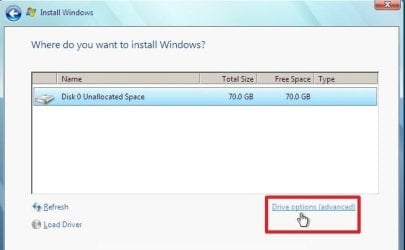
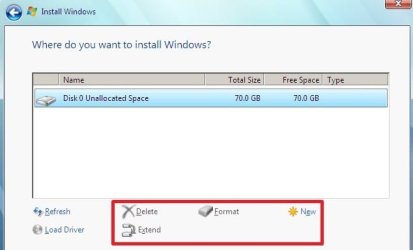
When you install by booting the 7 dvd - you have 2 choices.

1. Either click directly on the partition you wish to install to - then you will get the Windows.old folder.

2. Or go to Drive Options (advanced) and format the partition first (or delete , then create then format).

DRIVE OPTIONS -1 -2009-06-28_131025.jpg


DRIVEOPTIONS-2-2009-06-28_131101.jpg


Click on the partition you just formatted and it will install there - without the Windows.old folder.
 

My Computers

System One System Two

  • Computer type
    PC/Desktop
    OS
    7 X64
    CPU
    i5 8400
    Motherboard
    gigabyte b365m ds3h
    Memory
    2x8gb 3200mhz
    Hard Drives
    various
    PSU
    pure power 11 400w cm
    Case
    Coolermaster
    Cooling
    cryorig m9i
  • Computer type
    PC/Desktop
    OS
    7x64
    CPU
    g5400
    Motherboard
    ga b365m ds3h
    Memory
    8gb ddr4 2400
    PSU
    xfx pro 450w
I'll try to see, if it's possible to do anything, using my new Vista-DVD-R, or I'll burn a new Windows 7 disc, and follow your instructions.

Once again, thank you all for your help, it means a lot to me, and my education too,
Ritmann
 

My Computer

Computer Manufacturer/Model Number
FN639EA#UUW
OS
Windows 7
CPU
2.24 GHz Duo core
Memory
4 GB RAM
Graphics Card(s)
NVIDIA Geforce 9600M
Back
Top