Need help with FTP

C13H18N2

New member
Local time
8:32 AM
Messages
12
I hope this is the right section. Anyway, I am trying to set up an ftp on my computer. I would like to do this as simply as possible and without a static IP address or file transfer software. I used to rent a game server to which I would connect via FTP. I remember I would just use Windows explorer to navigate the files on the server. I never used and file transfer software or anything. That's how I would like to do it; nice and simple.

So, I just enabled the ISS/FTP in windows last night following various tutorials I found on the web. Problem is: none of them seem to go any further than enabling the IIS/FTP. When I open the manager in windows, everything seems to be ready. The status of the site is active. The thing is, I don't know how to access the site from another computer. I can't find anything anywhere that tells me what the ftp://address is to my computer's FTP directory (Don't even know where that is yet, either). So, now that my site is "running" what do I do? How do I find out what the ftp address is? How can I change it?
 

My Computer

OS
Windows 7 Professional x32 bit
CPU
Intel E8500
Motherboard
Asus Striker II NSE
Memory
2 Gb
Graphics Card(s)
GTS 8800 512
Sound Card
SoundMAX Supremefx II
Monitor(s) Displays
Vizio
PSU
Corsair 750W
Case
Sagitta Raidmax
The FTP address of the FTP server is the same as the address for your computer.

type "ipconfig" in a command prompt to see what the IP address for your computer is (There may be more than one adapter, be sure to lok for the adapter names and pick the one that is your wired lan connection).

Of course you can only get to that FTP site from your internal lan, not from the internet at this point. At least not without more setup on your router between the internet and your local network...

I think the harder part might be managing the user accounts on the FTP server in order to even be allowed to connect to it though... By default it's pretty locked down from what I rememebr. Assuming you haven't already turned on anonymous guest accounts or added your other computer's user account on the FTP server.
 

My Computer

Computer Manufacturer/Model Number
Scratch built
OS
Windows 7 x64 Ultimate
CPU
i7 960
Motherboard
Asus P6X58D
Memory
12 Gig Corsair Dominator
Graphics Card(s)
Nvidia 480
Sound Card
Maudio Delta 44 + breakout box
Monitor(s) Displays
Dell UltraSharp U2410 24in and Samsung 21 dual monitors
Screen Resolution
1920x1200 and 1280x1024
Hard Drives
Primary: Intel X-25M G2 160G SSD
Secondary: Segate baracuda 1.0 TB
HDs in AHCI mode.
PSU
Corasair TX850
Case
Cooler Master HAF
Cooling
Corsair H50
Keyboard
Logitech G15 + N52 game pad
Mouse
Logitech MX518
Internet Speed
15kbs down 4.5kbps up
Other Info
WEI 7.6
CPU & RAM 7.6
Graphics 7.9
Hard disk 7.7
So to access my FTP server I would type FTP://myipaddress?

I haven't fully grasped all the settings yet since I haven't really had a chance to connect to the server and see what does what, but here are some settings I have within the IIS Manager which I think might be relavent:
Note: Anything within () represents the selected setting.

IPv4 address and domain restriction settings:
-Access for unspecified clients (allowed)
-Enable domain name restrictions (disabled)

FTP SSL Settings:
-SSl Certificate (None)
-SSL Policy (Require SSL Connections)

FTP Authorization Rules:
-Mode (Allow)
-Users (All Users)
-Permissions (Write)

FTP Directory Browsing:
-Directory Listing Style (MS-DOS)
-Directory Listing Options (Display - virtual directories)
 

My Computer

OS
Windows 7 Professional x32 bit
CPU
Intel E8500
Motherboard
Asus Striker II NSE
Memory
2 Gb
Graphics Card(s)
GTS 8800 512
Sound Card
SoundMAX Supremefx II
Monitor(s) Displays
Vizio
PSU
Corsair 750W
Case
Sagitta Raidmax
"So to access my FTP server I would type FTP://myipaddress?"

That is correct, or use any FTP client and just "open <youripaddress>"

The settings all look optimistic :) But it's been a while since I set up an ISS FTP server :/
 

My Computer

Computer Manufacturer/Model Number
Scratch built
OS
Windows 7 x64 Ultimate
CPU
i7 960
Motherboard
Asus P6X58D
Memory
12 Gig Corsair Dominator
Graphics Card(s)
Nvidia 480
Sound Card
Maudio Delta 44 + breakout box
Monitor(s) Displays
Dell UltraSharp U2410 24in and Samsung 21 dual monitors
Screen Resolution
1920x1200 and 1280x1024
Hard Drives
Primary: Intel X-25M G2 160G SSD
Secondary: Segate baracuda 1.0 TB
HDs in AHCI mode.
PSU
Corasair TX850
Case
Cooler Master HAF
Cooling
Corsair H50
Keyboard
Logitech G15 + N52 game pad
Mouse
Logitech MX518
Internet Speed
15kbs down 4.5kbps up
Other Info
WEI 7.6
CPU & RAM 7.6
Graphics 7.9
Hard disk 7.7

My Computer

Computer Manufacturer/Model Number
Toshiba L505
OS
Windows 7 64x
CPU
AMD Turion II Dual-Core Mobile M520 2.30 GHz
Memory
4GB
Graphics Card(s)
ATI Radeon HD 4200
Setting up an FTP server for external internet access opens a whole can of worms :(

Yes, a DynIP service is needed, plus port forwarding at the internet/lan gateway and of course anynomous read/write access should be off (Read only in one place and write only in another at worst). Lots of security issues with running an FTP server acessable from the internet. If not set up right it'll become a warez drop box in about 2 hours...

Hopefully the OP is just using it for internal stuff?
 

My Computer

Computer Manufacturer/Model Number
Scratch built
OS
Windows 7 x64 Ultimate
CPU
i7 960
Motherboard
Asus P6X58D
Memory
12 Gig Corsair Dominator
Graphics Card(s)
Nvidia 480
Sound Card
Maudio Delta 44 + breakout box
Monitor(s) Displays
Dell UltraSharp U2410 24in and Samsung 21 dual monitors
Screen Resolution
1920x1200 and 1280x1024
Hard Drives
Primary: Intel X-25M G2 160G SSD
Secondary: Segate baracuda 1.0 TB
HDs in AHCI mode.
PSU
Corasair TX850
Case
Cooler Master HAF
Cooling
Corsair H50
Keyboard
Logitech G15 + N52 game pad
Mouse
Logitech MX518
Internet Speed
15kbs down 4.5kbps up
Other Info
WEI 7.6
CPU & RAM 7.6
Graphics 7.9
Hard disk 7.7
I should have read more carefully. I wasn't aware you were doing local only.
 

My Computer

Computer Manufacturer/Model Number
Toshiba L505
OS
Windows 7 64x
CPU
AMD Turion II Dual-Core Mobile M520 2.30 GHz
Memory
4GB
Graphics Card(s)
ATI Radeon HD 4200
My intention with the ftp server is to share movies with my girlfriend's computer. I have a prtition dedicated to movies and I figured it would be a bit easier than having to create torrents. What are te security risks of having an FTP server with read permissions only and a secure log in? Is it at all possible for someone to access other parts of my computer through this server? Now that I have just the basics down, I suppose I'll start using a static ip address, if it's necessary. Is it necessary? I mean given that the server is read only and only contains movies, should I still be worried about security? By the way, thank you guys for your input on this. I really appreciate it!
 

My Computer

OS
Windows 7 Professional x32 bit
CPU
Intel E8500
Motherboard
Asus Striker II NSE
Memory
2 Gb
Graphics Card(s)
GTS 8800 512
Sound Card
SoundMAX Supremefx II
Monitor(s) Displays
Vizio
PSU
Corsair 750W
Case
Sagitta Raidmax
To be clear, is your GFs computer in the same house/on the same local network?

Or do you plan on getting to your computer from hers through the internet?
 

My Computer

Computer Manufacturer/Model Number
Scratch built
OS
Windows 7 x64 Ultimate
CPU
i7 960
Motherboard
Asus P6X58D
Memory
12 Gig Corsair Dominator
Graphics Card(s)
Nvidia 480
Sound Card
Maudio Delta 44 + breakout box
Monitor(s) Displays
Dell UltraSharp U2410 24in and Samsung 21 dual monitors
Screen Resolution
1920x1200 and 1280x1024
Hard Drives
Primary: Intel X-25M G2 160G SSD
Secondary: Segate baracuda 1.0 TB
HDs in AHCI mode.
PSU
Corasair TX850
Case
Cooler Master HAF
Cooling
Corsair H50
Keyboard
Logitech G15 + N52 game pad
Mouse
Logitech MX518
Internet Speed
15kbs down 4.5kbps up
Other Info
WEI 7.6
CPU & RAM 7.6
Graphics 7.9
Hard disk 7.7
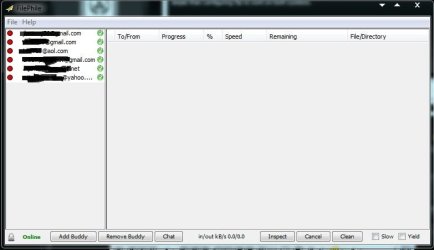
I know you said that you did not want to use any other apps but instalingl and using FilePhile is much more simple than configuring ftp to work on both systems.

What could be easier than clicking on the user's email address, browsing for the file and then sending? You can set it up so that the it dumps directly into the folder the user specifies. You can also configure it so that the other user doesn't even have to confirm the transfer so you two could send files to each other at anytime as long as the Filephile software is running.
 

Attachments

  • Capture.JPG
    Capture.JPG
    31.6 KB · Views: 11

My Computer

Computer Manufacturer/Model Number
Toshiba L505
OS
Windows 7 64x
CPU
AMD Turion II Dual-Core Mobile M520 2.30 GHz
Memory
4GB
Graphics Card(s)
ATI Radeon HD 4200
No, my GF's pc is not on the same network. haha. Sorry. I should have made that more clear to begin with. The idea is that, she or I (if I'm at her house) can access a partition on my hard drive at any time from her computer.
 

My Computer

OS
Windows 7 Professional x32 bit
CPU
Intel E8500
Motherboard
Asus Striker II NSE
Memory
2 Gb
Graphics Card(s)
GTS 8800 512
Sound Card
SoundMAX Supremefx II
Monitor(s) Displays
Vizio
PSU
Corsair 750W
Case
Sagitta Raidmax
Well ok, your going to need more specific help than I can give. Doing this safely will take some effort.

One thing you might want to consider is setting up a Windows Home Server. There is a SUPER EASY way of doing this very thing all built in and reasonably secure. :)

Downside is you need a second computer sand youhave to buy Windows Home Server but as someone pointed out in antoher thread that's only $69 right now. Pretty good bargain.
 

My Computer

Computer Manufacturer/Model Number
Scratch built
OS
Windows 7 x64 Ultimate
CPU
i7 960
Motherboard
Asus P6X58D
Memory
12 Gig Corsair Dominator
Graphics Card(s)
Nvidia 480
Sound Card
Maudio Delta 44 + breakout box
Monitor(s) Displays
Dell UltraSharp U2410 24in and Samsung 21 dual monitors
Screen Resolution
1920x1200 and 1280x1024
Hard Drives
Primary: Intel X-25M G2 160G SSD
Secondary: Segate baracuda 1.0 TB
HDs in AHCI mode.
PSU
Corasair TX850
Case
Cooler Master HAF
Cooling
Corsair H50
Keyboard
Logitech G15 + N52 game pad
Mouse
Logitech MX518
Internet Speed
15kbs down 4.5kbps up
Other Info
WEI 7.6
CPU & RAM 7.6
Graphics 7.9
Hard disk 7.7
I think I actualy have enough old computer parts to assemble a mediocre computer, probably perfect for a server. I might just look into that; would make for a fun project, I suppose. Thank you guys for your help!
 

My Computer

OS
Windows 7 Professional x32 bit
CPU
Intel E8500
Motherboard
Asus Striker II NSE
Memory
2 Gb
Graphics Card(s)
GTS 8800 512
Sound Card
SoundMAX Supremefx II
Monitor(s) Displays
Vizio
PSU
Corsair 750W
Case
Sagitta Raidmax
I haven't actually used it but WHS comes with a free subscription to a service that allows your WHS machine to advertise itself to a microsoft server. You can then log into that server and get acess to files in "shared" folder on your server. So you don't need the Dyn IP stuff and your ISP can't block it or complain about you running a "server" because your WHS machine initiates the connection to the Microsoft site.

Here's a little review of the process: A first look: Inside Windows Home Server remote access
 

My Computer

Computer Manufacturer/Model Number
Scratch built
OS
Windows 7 x64 Ultimate
CPU
i7 960
Motherboard
Asus P6X58D
Memory
12 Gig Corsair Dominator
Graphics Card(s)
Nvidia 480
Sound Card
Maudio Delta 44 + breakout box
Monitor(s) Displays
Dell UltraSharp U2410 24in and Samsung 21 dual monitors
Screen Resolution
1920x1200 and 1280x1024
Hard Drives
Primary: Intel X-25M G2 160G SSD
Secondary: Segate baracuda 1.0 TB
HDs in AHCI mode.
PSU
Corasair TX850
Case
Cooler Master HAF
Cooling
Corsair H50
Keyboard
Logitech G15 + N52 game pad
Mouse
Logitech MX518
Internet Speed
15kbs down 4.5kbps up
Other Info
WEI 7.6
CPU & RAM 7.6
Graphics 7.9
Hard disk 7.7
I haven't actually used it but WHS comes with a free subscription to a service that allows your WHS machine to advertise itself to a microsoft server. You can then log into that server and get acess to files in "shared" folder on your server. So you don't need the Dyn IP stuff and your ISP can't block it or complain about you running a "server" because your WHS machine initiates the connection to the Microsoft site.

Here's a little review of the process: A first look: Inside Windows Home Server remote access

That is a great idea and I may even experiment with that myself. However, I do think that is a lot of work just to be able to exchange files between just between 2 people. IMO their are easier ways to accomplish this task.

BUT.....then again! If you are a PC hobbyist and just like to do this type of thing like I do then this may be a treat.

@fseal
Please don't take this as a knock on your idea because it is a great one. I just think there are much easier ways to do this.
 

My Computer

Computer Manufacturer/Model Number
Toshiba L505
OS
Windows 7 64x
CPU
AMD Turion II Dual-Core Mobile M520 2.30 GHz
Memory
4GB
Graphics Card(s)
ATI Radeon HD 4200
Heh I hear ya about the work involved :D

But actually allowing a safe interconnect between two machines across the net really is one of the hardest things to do. I mean its's not THAT hard if you don't mind your maschine being pwned, but every time I've set something up it was a PITA. with getting firewalls and routers and ftp servers all setup properly.

Another option, the one I use now, is to get yourself a private domain and a hosted website somewhere. I now just SFTP my stuff up to the website and then I can get to it and even stream videos live from it from anywhere from "hidden" folders.

SUPER easy since the hosting site is the one that has to set everything up behind the scenes...

Will generally cost at least 9.95 a month though. But for me it was worth /them/ taking all the hassle of keeping an up to date and secure server/os/firewall up and running 24/7 for me to use at leasure. :)
 

My Computer

Computer Manufacturer/Model Number
Scratch built
OS
Windows 7 x64 Ultimate
CPU
i7 960
Motherboard
Asus P6X58D
Memory
12 Gig Corsair Dominator
Graphics Card(s)
Nvidia 480
Sound Card
Maudio Delta 44 + breakout box
Monitor(s) Displays
Dell UltraSharp U2410 24in and Samsung 21 dual monitors
Screen Resolution
1920x1200 and 1280x1024
Hard Drives
Primary: Intel X-25M G2 160G SSD
Secondary: Segate baracuda 1.0 TB
HDs in AHCI mode.
PSU
Corasair TX850
Case
Cooler Master HAF
Cooling
Corsair H50
Keyboard
Logitech G15 + N52 game pad
Mouse
Logitech MX518
Internet Speed
15kbs down 4.5kbps up
Other Info
WEI 7.6
CPU & RAM 7.6
Graphics 7.9
Hard disk 7.7
Back
Top