Need help with my laptop

GeakFromThePeak

New member
Local time
8:38 AM
Messages
20
Hello so I stupidly reinstalled a new copy of win 7 on my lap top (Toshiba Satellite L650 - 12Q )

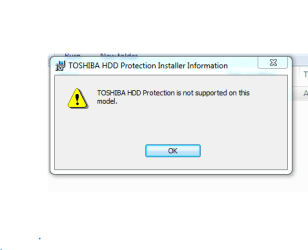
I downloaded all the drivers from the Toshiba website and have installed all of them apart from the one listed bellow


hddprot-20100511155645

And a few others I am not sure of

Can someone run me through how I can get my laptop back to working order it would be much appreciated

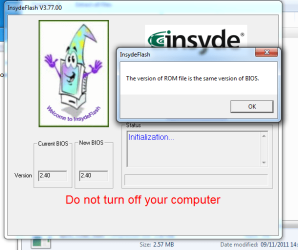
I will also attach pictures of the pop-up's I am getting thanks for any help at all
 

Attachments
  • Drivers Not installed properly.PNG
    Drivers Not installed properly.PNG
    4.6 KB · Views: 22
  • hddprot-20100511155645.PNG
    hddprot-20100511155645.PNG
    5.4 KB · Views: 22
  • Is this BIOS installed correctly.PNG
    Is this BIOS installed correctly.PNG
    31.7 KB · Views: 22

My Computer My Computer

Computer type
Laptop
Computer Manufacturer/Model Number
Toshiba Satellite L650 - 12Q
OS
Windows 7
CPU
4 gb
Antivirus
MSE
Browser
FIREFOX
Hi welcome to the forum

go to device manager and anything with a yellow mark next to it will need drivers start with that.
 

My Computer My Computer

Computer type
PC/Desktop
Computer Manufacturer/Model Number
dell xps 9000
OS
win 10
Hi welcome to the forum

go to device manager and anything with a yellow mark next to it will need drivers start with that.


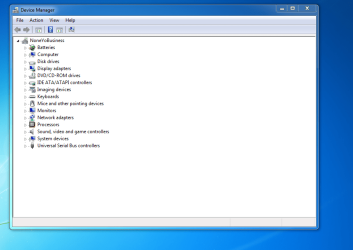
Thanks for your help I done what you said and here is my results
 

Attachments

  • device manager.PNG
    device manager.PNG
    44.5 KB · Views: 0

My Computer My Computer

Computer type
Laptop
Computer Manufacturer/Model Number
Toshiba Satellite L650 - 12Q
OS
Windows 7
CPU
4 gb
Antivirus
MSE
Browser
FIREFOX
well doesn't look like you need any drivers. what are you having problems with.
 

My Computer My Computer

Computer type
PC/Desktop
Computer Manufacturer/Model Number
dell xps 9000
OS
win 10
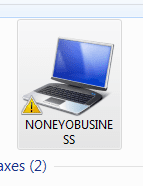
Because of this sign in my devices does that not mean something is not installed properly ? I tryed this same proceedure last night but my mouse ended up sticking and I had to reinstall everything again, The mouse thing thats the first time will every thing be ok if I just install all updates
 

My Computer My Computer

Computer type
Laptop
Computer Manufacturer/Model Number
Toshiba Satellite L650 - 12Q
OS
Windows 7
CPU
4 gb
Antivirus
MSE
Browser
FIREFOX
i am not following you. your mouse not moving? or what
 

My Computer My Computer

Computer type
PC/Desktop
Computer Manufacturer/Model Number
dell xps 9000
OS
win 10
No sorry, I mean last night I tryed the same proceedure except I downloaded display and lan driver's only and updated through ethernet so this might of been the problem, but am I good to go otherwise after all updates installed :)
 

My Computer My Computer

Computer type
Laptop
Computer Manufacturer/Model Number
Toshiba Satellite L650 - 12Q
OS
Windows 7
CPU
4 gb
Antivirus
MSE
Browser
FIREFOX
yes get all updates and install an av and maleware software
 

My Computer My Computer

Computer type
PC/Desktop
Computer Manufacturer/Model Number
dell xps 9000
OS
win 10
Happy days mate thank you, you helped me a million :)
 

My Computer My Computer

Computer type
Laptop
Computer Manufacturer/Model Number
Toshiba Satellite L650 - 12Q
OS
Windows 7
CPU
4 gb
Antivirus
MSE
Browser
FIREFOX
your welcome
 

My Computer My Computer

Computer type
PC/Desktop
Computer Manufacturer/Model Number
dell xps 9000
OS
win 10
Today I woke up turned on my laptop and the mouse has froze again I reinstalled Win7 and the mouse moves, and when i install all the drivers then update it wont let me update a windows package thats why I think the mouse wont move please help me again guys
 

My Computer My Computer

Computer type
Laptop
Computer Manufacturer/Model Number
Toshiba Satellite L650 - 12Q
OS
Windows 7
CPU
4 gb
Antivirus
MSE
Browser
FIREFOX
What error message are you getting when do windows updates
 

My Computer My Computer

Computer type
PC/Desktop
Computer Manufacturer/Model Number
dell xps 9000
OS
win 10
I think it was windows 7 package I dont know, But it turns on and off 3 times for more updates then them mouse wont move
 

My Computer My Computer

Computer type
Laptop
Computer Manufacturer/Model Number
Toshiba Satellite L650 - 12Q
OS
Windows 7
CPU
4 gb
Antivirus
MSE
Browser
FIREFOX
is it only the mouse that your having problems with? does an external mouse work?
 

My Computer My Computer

Computer type
PC/Desktop
Computer Manufacturer/Model Number
dell xps 9000
OS
win 10
No the whole computer freezes and I have to power off by using the power button

I am just about to dban my laptop seems the only option ?

If I dban can I come back here for proper set-up advice
 

My Computer My Computer

Computer type
Laptop
Computer Manufacturer/Model Number
Toshiba Satellite L650 - 12Q
OS
Windows 7
CPU
4 gb
Antivirus
MSE
Browser
FIREFOX
have you ever cleaned out the vents with compressed air to blow the dust out of it and clean the fan area? maybe it is heat issue making it freeze. as test the ram with memtest86+ Memtest86+ - Advanced Memory Diagnostic Tool run at least 7 passes
 

My Computer My Computer

Computer type
PC/Desktop
Computer Manufacturer/Model Number
dell xps 9000
OS
win 10
I downloaded that, Do I have to restart f12 to boot ? I did that and got a system repair checking for problems
 

My Computer My Computer

Computer type
Laptop
Computer Manufacturer/Model Number
Toshiba Satellite L650 - 12Q
OS
Windows 7
CPU
4 gb
Antivirus
MSE
Browser
FIREFOX
well you could run the diagnostics that are offered in the menu. you will need to burn the iso file to disk then you will need to boot off the disk and run the test.
 

My Computer My Computer

Computer type
PC/Desktop
Computer Manufacturer/Model Number
dell xps 9000
OS
win 10
Can I not boot from USB ?
 

My Computer My Computer

Computer type
Laptop
Computer Manufacturer/Model Number
Toshiba Satellite L650 - 12Q
OS
Windows 7
CPU
4 gb
Antivirus
MSE
Browser
FIREFOX
Back
Top