- Local time
- 11:47 AM
- Messages
- 139
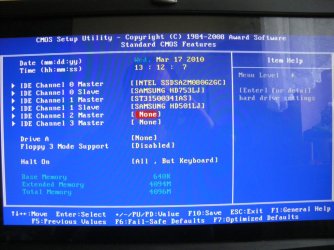
I dont know exacly when or how this happened but it seems like sata ports 4 and 5 out of the total 6 has stopped showing up its connected hdd's in windows even tho they are visible in the bios.
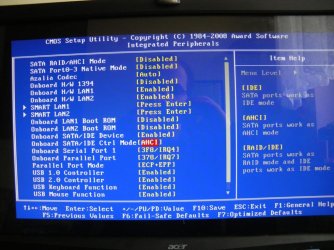
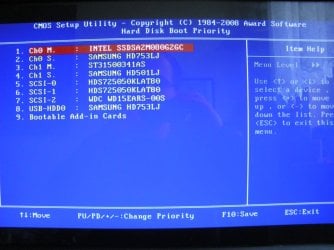
i have taken picture of my bios settings and bios post check at startup and the device manager inside windows, please help me.
These drives works perfecly if i plug them in using a usb hdd chassi so there's nothing wrong with the drives.
also, please help me to ensure i have the optimal bios settings configured as i dont fully understand them all and the manual doesn't help explain anything.
I am using windows 7 x64, latest updates and all. my motherboard is a Gigabyte, the modell and BIOS version is listed in the pictures i included, i have the latest bios from 1 year ago, beta.
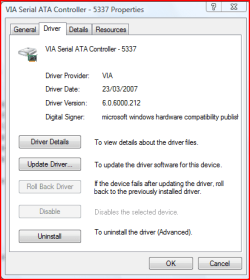
i went to intels website and downloaded infinst911autol and installed it, now i got a bit different case in the device manager update screenshot after the installation, but it still didnt do anything.
I just bought a new hdd and plugged it in, when i booted up the computer did not activate any installation for new found harddrive and it doesn't show up in disk managment. I tried troubleshooting and it tried reinstalling but it didnt work, got some error message.
In the second bios post boot image why does the 2 IDE drives show up there with the new SATA drive and not with the other drives in the first post bios image? The IDE drives are working in windows as are 4 sata drives but not the other 2 sata drives for ports 4-5 on the mainboard. however they cant be broken since they show up in the bios, right?
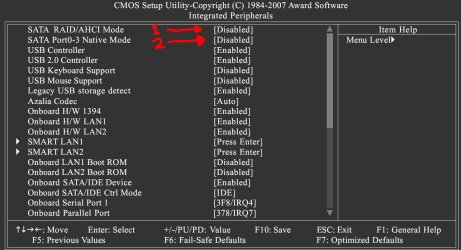
The black&white picture i added, nr1 marked red, when i set that as AHCI and reboot, the computer never gets passed the second post bios screen, i have to reset the mainboard CMOS to even be able to do anything, i can't access bios settings.
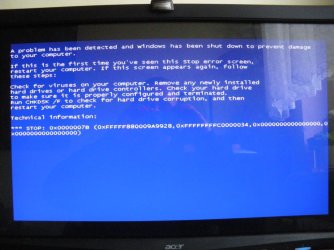
The second marked in red, what does this do? and why do i have to activate this before i install windows, if i do after i get a BSOD as seen in the picture. Is this setting even important?
i have taken picture of my bios settings and bios post check at startup and the device manager inside windows, please help me.
These drives works perfecly if i plug them in using a usb hdd chassi so there's nothing wrong with the drives.
also, please help me to ensure i have the optimal bios settings configured as i dont fully understand them all and the manual doesn't help explain anything.
I am using windows 7 x64, latest updates and all. my motherboard is a Gigabyte, the modell and BIOS version is listed in the pictures i included, i have the latest bios from 1 year ago, beta.
i went to intels website and downloaded infinst911autol and installed it, now i got a bit different case in the device manager update screenshot after the installation, but it still didnt do anything.
I just bought a new hdd and plugged it in, when i booted up the computer did not activate any installation for new found harddrive and it doesn't show up in disk managment. I tried troubleshooting and it tried reinstalling but it didnt work, got some error message.
In the second bios post boot image why does the 2 IDE drives show up there with the new SATA drive and not with the other drives in the first post bios image? The IDE drives are working in windows as are 4 sata drives but not the other 2 sata drives for ports 4-5 on the mainboard. however they cant be broken since they show up in the bios, right?
The black&white picture i added, nr1 marked red, when i set that as AHCI and reboot, the computer never gets passed the second post bios screen, i have to reset the mainboard CMOS to even be able to do anything, i can't access bios settings.
The second marked in red, what does this do? and why do i have to activate this before i install windows, if i do after i get a BSOD as seen in the picture. Is this setting even important?
Attachments
-
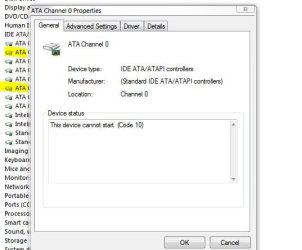 Device manager.JPG33.5 KB · Views: 9
 -
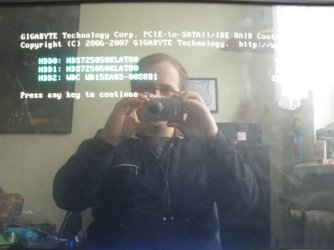 Bios post check 2.JPG79.8 KB · Views: 13
 -
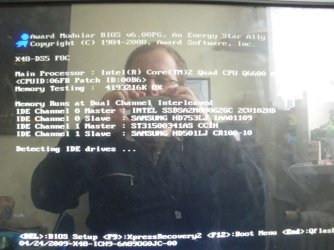 Bios post check 1.JPG100.1 KB · Views: 45
 -
 IMGP2022.JPG143 KB · Views: 10
 -
 IMGP2023.JPG103.4 KB · Views: 9
 -
 IMGP2024.JPG125.1 KB · Views: 10
 -
 device manager updated.JPG56.9 KB · Views: 7
 -
 Bios Integratred peripherals.JPG128 KB · Views: 10
 -
 IMGP2015.JPG103.4 KB · Views: 8
Last edited:
My Computer
- Computer Manufacturer/Model Number
- White Box
- OS
- Windows 7 RTM x64
- CPU
- Core 2 Quad 2.6GHz
- Motherboard
- Gigabyte Ga-x48-ds5
- Memory
- 4GB Ram
- Graphics Card(s)
- Asus nvidia 260
- Sound Card
- Built in, Using Optical Out with Logitech Z-5500 5.1
- Monitor(s) Displays
- Acer T230H & Samsung LCD TV FULL HD "LE46B530"
- Screen Resolution
- 1920x1080 + 1920x1080
- Hard Drives
- 8 of them, about 6.5TB
- PSU
- 750 watt
- Case
- Antec P180
- Cooling
- Default Intel stock
- Keyboard
- Logitech Dinovo edge
- Mouse
- wireless laser mouse
- Internet Speed
- 15mbit Cable
- Other Info
- Primary monitor is multitouch (yay)