
You are using an out of date browser. It may not display this or other websites correctly.
You should upgrade or use an alternative browser.
You should upgrade or use an alternative browser.
need help with .net framework
- Thread starter foldy619
- Start date


Welcome
Might not be installed properly
http://support.microsoft.com/kb/923100/en-us
Use Ccleaner to get rid of remanants.
http://www.piriform.com/ccleaner
Then try to reinstall.
Before starting anything make a system restore point, in case of problems
Might not be installed properly
http://support.microsoft.com/kb/923100/en-us
Use Ccleaner to get rid of remanants.
http://www.piriform.com/ccleaner
Then try to reinstall.
Before starting anything make a system restore point, in case of problems
Last edited:
My Computer
- Computer type
- PC/Desktop
- Computer Manufacturer/Model Number
- Dell XPS 420
- OS
- Windows 10, Home Clean Install
- CPU
- Intel Core2 processsor Q8200(2.33Ghz 1333FSB) Quad Core Tech
- Motherboard
- Dell
- Memory
- 6 gb
- Graphics Card(s)
- ATI Radeon 256MB HD3650
- Sound Card
- Intergrated 7.1 Channel Audio
- Monitor(s) Displays
- Dell SP2009W 20"
- Hard Drives
- 640 GB Serial ATA Hard drive
- Cooling
- Fan
- Keyboard
- Dell USB Keyboard
- Mouse
- Dell Premium Optical USB
- Internet Speed
- DSL 2.85
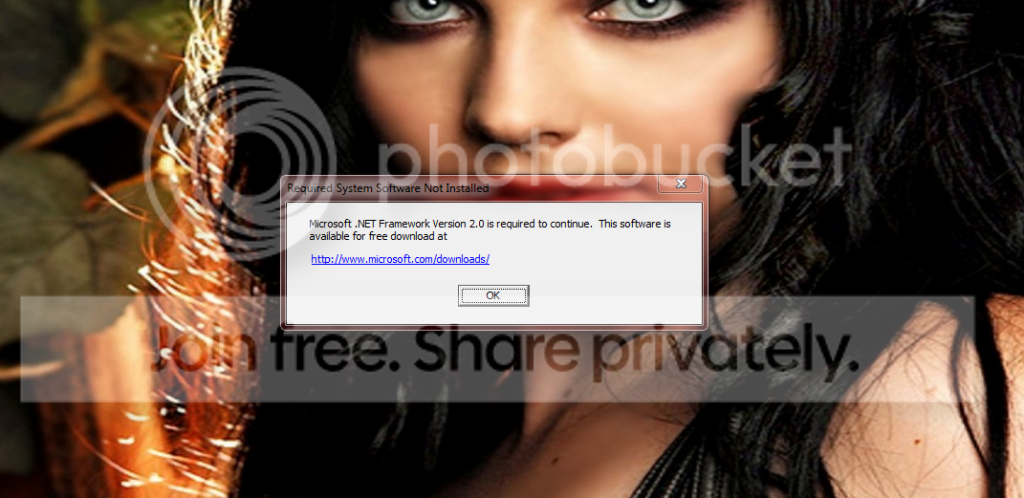
thanks for the reply, i haven't got a problem installing anything, the pop up says i need to install but when i do it says it already installed. im a bit of a newbie when it comes to this and don't really want to play about with the reg. is there an easier guide to follow?
My Computer
- Computer Manufacturer/Model Number
- hp
- OS
- windows 7
I have edited my first post.
What I am saying is that it is not properly installed, so it does not work. But when you want to
install it is picked up as installed. Do this
Before anything make a system restore point, which enables you to go back to the good times.
http://www.sevenforums.com/tutorials/700-system-restore.html
Then run Ccleaner and see how it goes, now try to install.
What I am saying is that it is not properly installed, so it does not work. But when you want to
install it is picked up as installed. Do this
Before anything make a system restore point, which enables you to go back to the good times.
http://www.sevenforums.com/tutorials/700-system-restore.html
Then run Ccleaner and see how it goes, now try to install.
Last edited:
My Computer
- Computer type
- PC/Desktop
- Computer Manufacturer/Model Number
- Dell XPS 420
- OS
- Windows 10, Home Clean Install
- CPU
- Intel Core2 processsor Q8200(2.33Ghz 1333FSB) Quad Core Tech
- Motherboard
- Dell
- Memory
- 6 gb
- Graphics Card(s)
- ATI Radeon 256MB HD3650
- Sound Card
- Intergrated 7.1 Channel Audio
- Monitor(s) Displays
- Dell SP2009W 20"
- Hard Drives
- 640 GB Serial ATA Hard drive
- Cooling
- Fan
- Keyboard
- Dell USB Keyboard
- Mouse
- Dell Premium Optical USB
- Internet Speed
- DSL 2.85

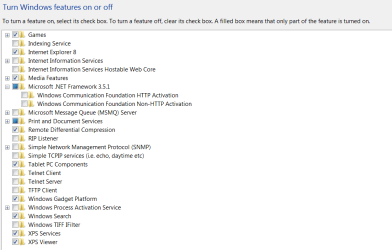
.NET Framework is included with Windows 7 as a Feature.
Go to Control Panel - Programs and Features. On the left side click on Turn Windows Features on or off. .NET will be listed as Microsoft .NET Framework 3.5.1 and includes also .NET 2.0 and .NET 3.0. The check box should be shaded if it is active. If not check it and let it install. There is no need to download the package. It will not show up in the normal Program listings since it is a Windows 7 Feature.
Jim
Go to Control Panel - Programs and Features. On the left side click on Turn Windows Features on or off. .NET will be listed as Microsoft .NET Framework 3.5.1 and includes also .NET 2.0 and .NET 3.0. The check box should be shaded if it is active. If not check it and let it install. There is no need to download the package. It will not show up in the normal Program listings since it is a Windows 7 Feature.
Jim
My Computer
- Computer type
- PC/Desktop
- Computer Manufacturer/Model Number
- Home Built
- OS
- Windows 8.1 Pro w/Media Center 64bit, Windows 7 HP 64bit
- CPU
- Phenom II X6 1100T
- Motherboard
- ASUS M5A99X EVO
- Memory
- Crucial Balistic 8gb DDR3-1866 CL9
- Graphics Card(s)
- MSI R6850 Cyclone IGD5 PE
- Sound Card
- On Board
- Monitor(s) Displays
- ASUS VE258Q 25" LED with DVI-HDMI-DisplayPort
- Screen Resolution
- 1920 x 1080
- Hard Drives
- Two WD Cavier Black 2TB Sata III, WD My Book Essential 2TB USB 3.0
- PSU
- Seasonic X650 80 Plus GOLD Modular
- Case
- Corsair 400R
- Cooling
- Antec Kuhler H2O 620, Two 120mm and four 140mm
- Keyboard
- Logitech K120
- Mouse
- Logitech Marble Mouse USB, Logitech Precision Game Pad
- Internet Speed
- 15MB
- Antivirus
- Norton IS 2013, Malwarebytes Pro Beta 2
- Browser
- IE-11, FF-27
- Other Info
- APC UPS ES 750, Netgear WNR3500L Gigabit & Wireless N Router with SamKnows Test Program, Motorola SB6120 Gigabit Cable Modem. Brother HL-2170W Laser Printer, Epson V300 Scanner

- Local time
- 2:07 PM
- Messages
- 4,772
Hello !!
If the .NET Frameworks is corrupted try to remove all versions of .NET Frameworks How to Completely Remove & Uninstall .Net Framework On Windows 7 then install it back one by one make sure you install .NET 1.1, 2.0, 3.0 and 3.5
Hope this helps,
Captain
If the .NET Frameworks is corrupted try to remove all versions of .NET Frameworks How to Completely Remove & Uninstall .Net Framework On Windows 7 then install it back one by one make sure you install .NET 1.1, 2.0, 3.0 and 3.5
Hope this helps,
Captain
My Computer
- Computer Manufacturer/Model Number
- Samsung NP550P5C-S02IN
- OS
- Windows 7 Ultimate - 64-bit | Windows 8 Pro - 64-bit
- CPU
- Intel® Core™ i7 Processor 3,610QM (2.30Hz, 6MB L3 Cach
- Memory
- 8 GB
- Graphics Card(s)
- NVIDIA® GeForce® GT 650M 2GB Graphics, Optimus™ techno
- Sound Card
- SoundAlive™ JBL 3 Speakers (With sub-Woofer)
- Monitor(s) Displays
- 39.62cm (15.6) SuperBright 300nit HD+ LED Display
- Screen Resolution
- 1,600 x 900, Anti-Reflective
- Hard Drives
- 1TB S-ATA II Hard Drive (5,400RPM)