Solved Need help with Office 2007

  • Thread starter Thread starter Seven 7 Seven
  • Start date Start date
S

Seven 7 Seven

Guest
Hello everybody, brand new to the forum!

I need some help with Outlook 2007. A couple days ago my display on how I see things (like the view) suddenly changed and I can't seem to get it back:(
Here is my current display:
Untitled.png


I would like to go back to the original display, like when you first get the program for the first time. All help would be appreciated!

Thank!
 
Try going to the View menu and playing around with the various settings there. I can't remember what the default arrangement is, but I think maybe the To Do bar is on the right - you can set that in the View menu :)

Lots of info on setting Outlook views
 

My Computer My Computer

Computer Manufacturer/Model Number
Custom
OS
Windows 7 Enterprise x64
CPU
Intel i7 920
Motherboard
Asus P6T Deluxe v2
Memory
6 GB
Graphics Card(s)
nVidia GTX260 + nVidia 3D
Sound Card
Onboard
Monitor(s) Displays
Samsung SyncMaster 2233RZ
Screen Resolution
1680 x 1050
Hard Drives
1 x 64GB SSD primary
2 x 1 TB (mirrored)
PSU
700W
Other Info
Edimax 802.11n Wireless PCI Card
Netgear DG834G router
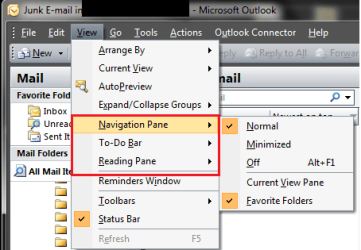
Have a look at the Panes area, you can alter how they show.

See my pic.

Good Luck!
 

Attachments

  • email config.png
    email config.png
    13.9 KB · Views: 11

My Computer My Computer

Computer Manufacturer/Model Number
Custom Hack job
OS
Windows 7 Ultimate 64 bit
CPU
Intel(R) Core(TM)2 Quad CPU Q8200 @ 2.33GHz
Motherboard
GigaByte EP45-UD3
Memory
8 GB Kingston
Graphics Card(s)
Nvidia GeForce 9600GT
Sound Card
Soundblaster Audigy
Monitor(s) Displays
AOC x2 22"
Hard Drives
2 x Samsung 500GB (RAID)
2 x Samsung 2TB
1 x WD Green 2TB
1 x Seagate 1TB
1 x Samsung 500GB
PSU
Thermaltake QFan 750W
Case
CM Scout Gaming
Cooling
Coolermaster V10
Keyboard
Microsoft Wireless Keyboard 1000
Mouse
Microsoft Wireless Optical 2000
Internet Speed
320
Other Info
Winfast PVR2000CP
LG DVD-RAM DVD/RW/DL Super Multi
Linksys WMP300Nx2 Wireless Adapter
Back
Top