
EDIT: Somehow the tab that was missing has started to appear again, don't know how because I haven't done anything but it's back anyway!
I recently re-installed windows 7 ultimate, the same I had the last time on my computer. But I noticed one thing. Before I re-installed windows, all the files, programs, etc. in their "Properties" looked like this:
Tabs in one row only, and also a tab either named "customize" or "icons".
But now all the file and program properties look like this:
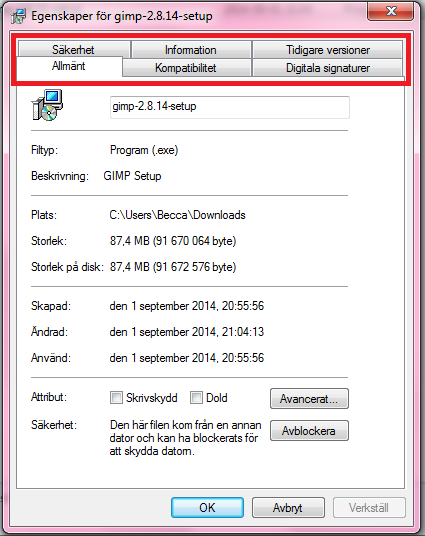
It's in swedish, to translate, the tabs within the red lines are
"Safety"
"Information"
"Previous versions"
"General"
"Compability"
"Digital Signatures".
My issue is, before I re-installed windows, the tabs in properties for both files and programs, (anything almost) wasn't lined in two rows like in the picture above, they were only lined in one, just like with folder properties. And I had the ability to change a file or program's icon in "properties". I don't know how get that back, I've tried to google it but I can't find anything on how to fix this. All I can find is people showing how to get "Customize" tab to work in folder properties, but I've always had the "Customize" or "icons" tab in all my program files properties too, and I want it back. Please help!
/Becca
I recently re-installed windows 7 ultimate, the same I had the last time on my computer. But I noticed one thing. Before I re-installed windows, all the files, programs, etc. in their "Properties" looked like this:
Tabs in one row only, and also a tab either named "customize" or "icons".
But now all the file and program properties look like this:
It's in swedish, to translate, the tabs within the red lines are
"Safety"
"Information"
"Previous versions"
"General"
"Compability"
"Digital Signatures".
My issue is, before I re-installed windows, the tabs in properties for both files and programs, (anything almost) wasn't lined in two rows like in the picture above, they were only lined in one, just like with folder properties. And I had the ability to change a file or program's icon in "properties". I don't know how get that back, I've tried to google it but I can't find anything on how to fix this. All I can find is people showing how to get "Customize" tab to work in folder properties, but I've always had the "Customize" or "icons" tab in all my program files properties too, and I want it back. Please help!
/Becca
Last edited:
My Computer
- Computer type
- PC/Desktop
- Computer Manufacturer/Model Number
- MSI
- OS
- Windows 7 Ultimate x64
