Need help with restoring data from deleted user

mchlkwn

New member
Local time
2:45 PM
Messages
2
Hi:

I need help with restoring data. I made a stupid move and need to restore data that I deleted.

This is what I did.

I deleted the user. When the windows ask if I want to delete user's data, I clicked "Yes". After that, I recreated the same user again.

Please advise if this is possible to restore user's information after I did that.

thanks in advice.
 

My Computer

Computer type
PC/Desktop
OS
New Jersey
Use Glary Utilities to recover the deleted files.

Provided those haven't been overwritten, you should be able to recover.

Recover your files to another pen drive/ external drive and not to the same drive to avoid any further overwriting.

http://www.sevenforums.com/general-...-deleted-my-recovery-partion.html#post3064015

Let us know how it did.

Note: Installing Glary Utilities in itself, may overwrite some files. But if you want to do it the easy way use this hoping it wouldn't overwrite any of your files.:)

Otherwise Run TestDisk for DOS from a bootable pen drive and and try to recover the files.

http://www.sevenforums.com/backup-r...able-media-includes-testdisk.html#post3070044

A general guide on using Test Disk. http://www.sevenforums.com/software/190430-regain-lost-drive-using-test-disk-illustrated-guide.html

Note: Once TestDisk finds the partitions, you will only copy the files by giving the Command P to list the files , select the files and copy it to another pen drive/external drive which should be connected before booting into TestDisk.
 

My Computer

OS
Windows 7 Home Premium 32 bit
I found another alternate method of running Glary Utilities portable that would not write anything to your existing system drive.

1. Download Glary Utilities 2.56.0.8322 - Portable 8.435KB on another computer. Glary Utilities Builds - Clean Registry, Fix PC Errors, Protect Privacy | Glarysoft

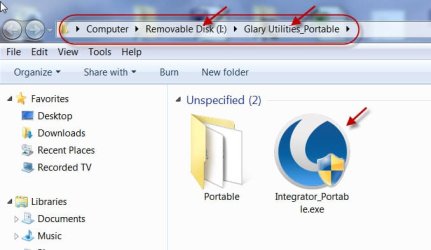
2. Extract the Zip file into a Pen drive. You will find a folder Glary Utilities portable containing Integrator_Portable.exe

3. Boot your system from which you want to recover, plug in the pendrive and run Integrator_Portable.exe

26-05-2015 13-24-02.jpg

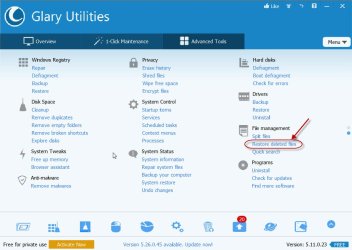
4. Click on Restore deleted files, select your C drive and look for the deleted files. If those are not overwritten, you may copy those to your pendrive.

26-05-2015 13-41-06.jpg
 

My Computer

OS
Windows 7 Home Premium 32 bit
Thanks, I will try it and let you know. thanks again
 

My Computer

Computer type
PC/Desktop
OS
New Jersey
Back
Top