
You are using an out of date browser. It may not display this or other websites correctly.
You should upgrade or use an alternative browser.
You should upgrade or use an alternative browser.
Need help with some detective work.
- Thread starter rydahl
- Start date

Carl Lawrence
Little Helper
I do not know if that is possible.
My Computer
- Computer Manufacturer/Model Number
- Advent
- OS
- Dual-boot: Windows 7 HP 32-bit SP1 & Windows XP Pro 32-bit SP2.
- CPU
- AMD Phenom X4 9550 2.8Ghz
- Motherboard
- FOXCONN A6VMX (Socket 940)
- Memory
- 4.0GB RAM
- Graphics Card(s)
- 256MB On-board ATI Radeon X1200 Series
- Sound Card
- UnKnown
- Monitor(s) Displays
- 19" TFT Mointor
- Screen Resolution
- 1400 by 900
- Hard Drives
- 500GB Western Digital WDC
- Keyboard
- HP Keyboard
- Internet Speed
- Dial-up via Mobile phone (Three)
- Other Info
- 80GB External Hard-drive.
Also I have an old Windows XP Laptop for backup/occasional use etc.
To my knowledge, there is currently no default way of doing that at this time.
I believe you would need some intrusion software installed on your computer, maybe Symantec Endpoint Protection, or any Intrusion Detection software that would monitor connection of USB devices. You would also have to configure it to log it.
As for seeing what files were copied, that is difficult without another sort of logging program, but I have not investigated far enough to know which ones you can look into to do such a thing at this time.
I believe you would need some intrusion software installed on your computer, maybe Symantec Endpoint Protection, or any Intrusion Detection software that would monitor connection of USB devices. You would also have to configure it to log it.
As for seeing what files were copied, that is difficult without another sort of logging program, but I have not investigated far enough to know which ones you can look into to do such a thing at this time.
My Computer
- Computer Manufacturer/Model Number
- Alienware Area 51 Desktop and Dell Inspirion 17R (N7010)
- OS
- Windows 7 Ultimate x64 and Home Premium x64
- CPU
- Intel i7 960 (3.2 GHz Quad Core)
- Motherboard
- Alienware Intel based X58
- Memory
- 12 Gigs (Triple Channel)
- Graphics Card(s)
- Alienware OEM nVidia GTX 560 Ti (1.25 Gig)
- Sound Card
- Creative Labs X-Fi Titanium
- Monitor(s) Displays
- Samsung PX2370 LED 23" Monitor
- Screen Resolution
- 1920x1080
- Hard Drives
- 2 320 Gig SATA in Raid 1 Configuration (System/App)
1 1 Tera SATA (Games)
1 1 Tera SATA (Data/Music/Videos)
- PSU
- 750 Watt Power Supply
- Case
- Alienware Area 51 Desktop
- Cooling
- Liquid Cooled
- Keyboard
- Logitech G510
- Mouse
- Microsoft Trackball Explorer
- Internet Speed
- Cable

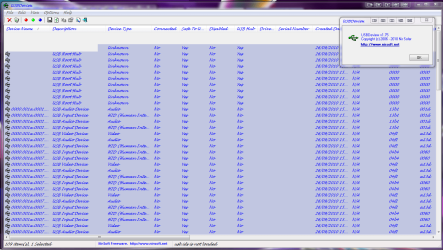
i dont no if this can help?
View any installed/connected USB device on your system
View any installed/connected USB device on your system
Attachments
My Computer
- Computer Manufacturer/Model Number
- packard bell IXTREME M5722
- OS
- Operating System : Windows 7 Home Premium Edition 6.01.7600 SP1 (x64)
- CPU
- Processor : Intel Core 2 Quad Q8300 @ 2500 MHz
- Motherboard
- Mainboard : Packard Bell (Acer EG43M )
- Memory
- Physical Memory :8GB Corsair4x 2GB 800MHz C5 DDR2
- Graphics Card(s)
- Video Card : XFX 6700 AMD
- Monitor(s) Displays
- Maestro 234DL - BenQ V2220 - BenQ VW2420H
- Screen Resolution
- Current Display :1920x1080p pixels at 60 Hz in HD LED
- Hard Drives
- Hard Disks : WDC (1000 GB)
Drive C: (Hard Disk) : 428 GB available on 491 GB
Drive D: (Hard Disk) : 426 GB available on 492 GB
SAMSUNG spinpoint HD103SJ 1000.2 GB
(X 2) KINGSTON SSD NOW V 30GB
- PSU
- XFX ProSeries 550W PSU
- Case
- PACKARD BELL IXTREME
- Cooling
- System Blower Current: 150mA Air Flow16CFM ;Akasa 90mm rear
- Keyboard
- Gigabyte Aivia K8100
- Mouse
- TRUST-Wireless Laser Mouse - Carbon edition MI-7770C
- Internet Speed
- TP-LINK > TL-WN951N / AV500 Gigabit Powerline Adapters
- Browser
- chrome dev
- Other Info
- EXTRA COOLING>(FAN CONTROLLER) PC Bay Cooler 3 x 40mm fans; Akasa AK-HD-BL Blue hard drive cooler 2 x 40 mm fan 4500 rpm 29.7 dBA
Bios> American Megatrends Inc.
Version : P01-A1
Date : 08/31/2009

You can also enable the system variable show_nonpresent_devices.
Right-click Computer.
Click Properties.
Click the Advanced system settings.
Click the Environment Variables tab.
Set the new variable in the System Variables box.
variable: devmgr_show_nonpresent_devices
value: 1
NOTE: You must first select show hidden devices on the Device Manager View menu before you can see devices that are no longer present in the system.
Right-click Computer.
Click Properties.
Click the Advanced system settings.
Click the Environment Variables tab.
Set the new variable in the System Variables box.
variable: devmgr_show_nonpresent_devices
value: 1
NOTE: You must first select show hidden devices on the Device Manager View menu before you can see devices that are no longer present in the system.
My Computer
- Computer Manufacturer/Model Number
- Asus N73SV
- OS
- Windows 7 x64 Ultimate SP1
- CPU
- Core i7-2630QM
- Motherboard
- Intel HM 65
- Memory
- 6 GB DDR3
- Graphics Card(s)
- Nvidia GT 540M / Intel HD 3000 - Optimus switching
- Sound Card
- HD Audio (Intel Azalia/Realtek) ALC269
- Monitor(s) Displays
- LED flat panel
- Screen Resolution
- 1920 x 1080
- Hard Drives
- 2x Seagate Momentus 640 GB - 1,28 TB in total
- Internet Speed
- 4 MB/256 kbps
- Other Info
- External HDs
WD Elements 1,5 TB
WD MyBook 500 GB
When you say 'protect your data'... Consider this.
One - If this is a computer in a corporate environment, always lock your station when you walk away from it. You do this with Ctrl-Alt-Delete. It is highly recommended as you are held responsible for whatever happens under your login.
Two - Medium to Large corporation enterprises with managed AV support should have intrusion protection measures in place to prevent that. For home situations, you just have to make sure no one can access your machine without knowledge, which includes putting a password protection on it.
Three - Consider using Bitlocker if you are on Windows 7 Ultimate or encryption based software to secure your data. Drawback to this, is that by doing so, you can potentially lock yourself out of your own data depending on the encryption method and if your computer decides to go boom on you.
One - If this is a computer in a corporate environment, always lock your station when you walk away from it. You do this with Ctrl-Alt-Delete. It is highly recommended as you are held responsible for whatever happens under your login.
Two - Medium to Large corporation enterprises with managed AV support should have intrusion protection measures in place to prevent that. For home situations, you just have to make sure no one can access your machine without knowledge, which includes putting a password protection on it.
Three - Consider using Bitlocker if you are on Windows 7 Ultimate or encryption based software to secure your data. Drawback to this, is that by doing so, you can potentially lock yourself out of your own data depending on the encryption method and if your computer decides to go boom on you.
My Computer
- Computer Manufacturer/Model Number
- Alienware Area 51 Desktop and Dell Inspirion 17R (N7010)
- OS
- Windows 7 Ultimate x64 and Home Premium x64
- CPU
- Intel i7 960 (3.2 GHz Quad Core)
- Motherboard
- Alienware Intel based X58
- Memory
- 12 Gigs (Triple Channel)
- Graphics Card(s)
- Alienware OEM nVidia GTX 560 Ti (1.25 Gig)
- Sound Card
- Creative Labs X-Fi Titanium
- Monitor(s) Displays
- Samsung PX2370 LED 23" Monitor
- Screen Resolution
- 1920x1080
- Hard Drives
- 2 320 Gig SATA in Raid 1 Configuration (System/App)
1 1 Tera SATA (Games)
1 1 Tera SATA (Data/Music/Videos)
- PSU
- 750 Watt Power Supply
- Case
- Alienware Area 51 Desktop
- Cooling
- Liquid Cooled
- Keyboard
- Logitech G510
- Mouse
- Microsoft Trackball Explorer
- Internet Speed
- Cable

- Local time
- 4:50 AM
- Messages
- 50,634
In a home environment, the simple way to protect against this is to password your User account, then enable the Guest account for others to use. Or create them a standard user account without sharing your files.
Files you want to keep private can be zipped up and passworded using SevenZip. Recycle the original.
Files you want to keep private can be zipped up and passworded using SevenZip. Recycle the original.