Need help with system restore on Win 7 Home premium x64

hpx64

New member
Local time
5:22 AM
Messages
15
Hey all,
I have windows 7 home premium x64 and i need to do a system recovery and roll it back to day one in a sense. i upgraded it from vista home premium x64 ( i only bought the win 7 upgrade disk) i tried searching this forum but i couldnt find anything relavent to what i needed. Any ideas on how to do the system recovery? and i DO NOT want to load a system restore point.
 

My Computer My Computer

At a glance

VistaAMD Athlon Dual Core QL-604 GBATI Radeon HD3200
Computer Manufacturer/Model Number
HP DV4-1000 CTO
OS
Vista
CPU
AMD Athlon Dual Core QL-60
Memory
4 GB
Graphics Card(s)
ATI Radeon HD3200
Sound Card
IDT HD Audio
Monitor(s) Displays
14.1"
Hard Drives
140 GB
Hello,

Unless you created a backup, or have a recovery partition from the manufacturer, your only option is System Restore.

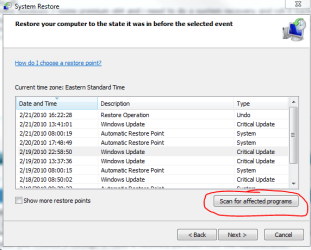
If it cheers you up any, Windows 7 has a feature that allows you to scan for programs that will be affected by a System Restore.

Capture.PNG

See this link about System Restore: http://www.sevenforums.com/tutorials/700-system-restore.html
 

My Computer My Computer

At a glance

Windows 7 Professional x64Intel i7 2600K OC'd @ 4620 MHz16GB GSkill Sniper 2133 Mhz (4x4GB)EVGA GeForce GTX 480 SuperClocked+
Computer Manufacturer/Model Number
Custom
OS
Windows 7 Professional x64
CPU
Intel i7 2600K OC'd @ 4620 MHz
Motherboard
Asus P8Z68-V Pro
Memory
16GB GSkill Sniper 2133 Mhz (4x4GB)
Graphics Card(s)
EVGA GeForce GTX 480 SuperClocked+
Sound Card
Realtek High Definition Audio
Monitor(s) Displays
2x Acer S273HLbmii 27"
Screen Resolution
2 x 1920x1080
Hard Drives
64GB Crucial M4 SSD

Storage: Hitachi 1TB 5400RPM, Samsung 1.5TB 5400RPM
PSU
Corsair HW Series 750w (modular)
Case
Cooler Master HAF 932 Advanced Blue Edition
Cooling
CM Hyper 212+ CPU cooler, 3x 230mm + 1x 140mm case fans
Keyboard
Logitech MK320 (wireless)
Mouse
Logitech MK320 (wireless)
Internet Speed
30 Mb/s : 2 Mb/s
darn...haha hmm.. so im guessing my best bet would be to do a re install of w7, i already tried the system restore thing. w7 is just bogged down with apps n stuff n its getting slow ive tried all the optimizers ram and regisrty cleaners n everything
 

My Computer My Computer

At a glance

VistaAMD Athlon Dual Core QL-604 GBATI Radeon HD3200
Computer Manufacturer/Model Number
HP DV4-1000 CTO
OS
Vista
CPU
AMD Athlon Dual Core QL-60
Memory
4 GB
Graphics Card(s)
ATI Radeon HD3200
Sound Card
IDT HD Audio
Monitor(s) Displays
14.1"
Hard Drives
140 GB
You may have made it worse with optimizers and registry cleaners which are largely crapware.

The only tools for cleaning and optimizing recognized by all professionals as state-of-the-art are CCleaner ("Run Cleaner" button and Registry tab) and Auslogics defraggers.

After clean reinstall, check performance after installation of Windows Updates, MS Security Essentials or Avast, each driver missing in Device Manager and programs.

When complete, run CCleaner and Disk and Registry defraggers. Then save a Win7 Backup Image exernally so you never have to reinstall again - just reimage the HD or a replacement using install DVD Repair console.

http://www.sevenforums.com/tutorials/1649-clean-install-windows-7-a.html
 
Back
Top