Need help with user account

deonholt

New member
Local time
3:48 AM
Messages
5
Hi there and thanx for your help.

This is my 1st post here as I only am with Win 7 for a week or so.

I have a LG DCD writer which I have installed the software of. Now, everytime I switch on my PC, a warning pops up asking me if I want this software to make changes to my HDD since Win does not know it. The same thing happens with my wife's PC, also Win 7 and asks the question about LG Mobile's PC Suite. This is so annoying.

Where can I change this? I have tried to change it with the option win provides, but that is a general notification which I don't want to loose.

Please help me out.

Regards,
Deon
 

My Computer

OS
Win 7 Home Premium 64bit
CPU
i5Q650
Motherboard
Asus P7P55-M
Memory
4Gig
Graphics Card(s)
nVidia GeForce 9600GT
Sound Card
Onboard
Monitor(s) Displays
Mecer 19"
Hard Drives
Internal: 1Tb Saegate Barracuda 7200.12
External: 1Tb Saegate Barracuda 7200.12
PSU
450W
Case
CoolerMaster Elite 310
Cooling
Nothing Extra
Hi Deon,
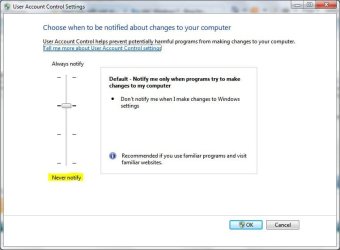
Are you talking about the UAC prompt? that comes up..
windows-7-uac-nag.jpg

The only way to not to get that(As of what I Know) is to Disable the UAC. Which is not recommend as it is a safety feature in Windows 7...
UAC.JPG

Hope this Helps.
 

My Computer

Computer Manufacturer/Model Number
HP Pavilion dv5 Notebook PC
OS
Windows Seven x64
CPU
2.2 GHz Dual Core
Motherboard
Quanta 3600
Memory
4GB
Graphics Card(s)
ATI Mobility RADEON HD 3470
Sound Card
ATI
Monitor(s) Displays
Laptop
Hard Drives
ATA Hitachi HTS543215 (5400RPM)
Case
Laptop
Cooling
Fan
Internet Speed
Basic DSL 1.5 up and Down
It is indeed very easy with Windows 7 to stop all the annoying little reminders, but they are important. I do not know how you spend your time during the day. Maybe you work or go to school. But you are going to have a bad day, once in a while. You might, then, go to the computer to write an email, etc, but then you try to change something that you should not. Those warning will warn you to think twice. Without that warning you will make the change you shouldn't because you are preoccupied with the bad day. You have to be the first line of defense against all that can happen to your computer and not your A/V or Firewall.
 

My Computer

Computer type
PC/Desktop
Computer Manufacturer/Model Number
Dell XPS 420
OS
Windows 10, Home Clean Install
CPU
Intel Core2 processsor Q8200(2.33Ghz 1333FSB) Quad Core Tech
Motherboard
Dell
Memory
6 gb
Graphics Card(s)
ATI Radeon 256MB HD3650
Sound Card
Intergrated 7.1 Channel Audio
Monitor(s) Displays
Dell SP2009W 20"
Hard Drives
640 GB Serial ATA Hard drive
Cooling
Fan
Keyboard
Dell USB Keyboard
Mouse
Dell Premium Optical USB
Internet Speed
DSL 2.85

My Computer

OS
Windows 7 & Windows Vista Ultimate
Thanx for all the help guys.
The UAC is indeed the pop-up that I am talking about. I have decided to accept the fact that the pop-up is there and live with it. They are there to protect me.
The pop-up is for the:
LG ODD Auto Firmware Update

thanx again.
Deon
 

My Computer

OS
Win 7 Home Premium 64bit
CPU
i5Q650
Motherboard
Asus P7P55-M
Memory
4Gig
Graphics Card(s)
nVidia GeForce 9600GT
Sound Card
Onboard
Monitor(s) Displays
Mecer 19"
Hard Drives
Internal: 1Tb Saegate Barracuda 7200.12
External: 1Tb Saegate Barracuda 7200.12
PSU
450W
Case
CoolerMaster Elite 310
Cooling
Nothing Extra
Back
Top