Need help with XP and Windows 7 dual boot startup issue

slepy

New member
Local time
8:01 AM
Messages
3
Hi! I've used method 2 and can choose between XP and 7, but there is still one problem well described here by p314: strange crash when dual booting Windows 7 and Xp - The NeoSmart Forums

Making it short: "When I start I get the option to boot XP or Windows 7, if i load XP and then restart and load 7, it switches off while loading 7 and restarts. If I select 7 again it offers to Start Windows normally or go into safe mode etc. If I select Start Windows normally it will work this time. Then if i go back to XP i get the same problem, restarts first and then will start under start windows normally."

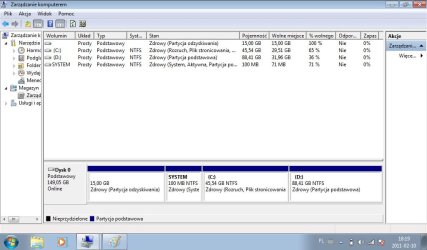
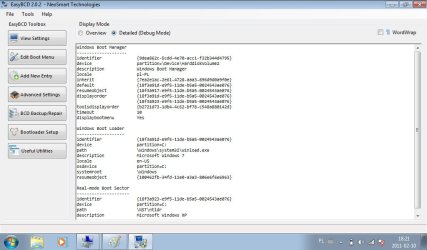
7 is on C: and XP is installed on D:. This is how it looks from 7:

easy.jpg

BCD.jpg


The solution might be very simple, but I couldn't find it. How to solve it?
Thanks in advance
 
Last edited by a moderator:

My Computer My Computer

At a glance

WindowsXP32/7 Starter 32
OS
WindowsXP32/7 Starter 32
You cut off the Disk Management drive map and listings sizes, so we can't see the most important information.

Please post the maximized Disk Mgmt full drive map with full listings. Click and drag the Volumin and Akcje borders to left and right to make more room for listings.

Please tell us what is on each partition.
 
What method did you use to make your Win XP USB stick?
 

My Computer My Computer

At a glance

ME/XP/Vista/Win7
OS
ME/XP/Vista/Win7
Sorry for those pictures, they were no help.
Partitions:
System (Primary,Healthy,Active)
C: (Boot,Healthy,PageFile,CrashDump,Primary) - Windows 7
D: (Primary,Healthy) - Windows XP
15 GB - Recovery, Healthy

theog:
I really don't remember, which method I used. I did it a few months ago...
 

Attachments

  • BCD.jpg
    BCD.jpg
    68.7 KB · Views: 18
  • easy.jpg
    easy.jpg
    67.7 KB · Views: 9

My Computer My Computer

At a glance

WindowsXP32/7 Starter 32
OS
WindowsXP32/7 Starter 32

My Computer My Computer

At a glance

ME/XP/Vista/Win7
OS
ME/XP/Vista/Win7
First try installing EasyBCD 2.0 to Win7, delete XP OS on Edit OS tab. Restart to check behavior.

On restart to Win7, in EasyBCD add XP on Add OS tab, accept boot files if offered, it will autocomplete, Save, Restart.

This should refresh the Dual Boot so that hopefully it works correctly.

If not you can run a Repair install of Win7 which should completely reconfigure the Dual Boot with XP: http://www.sevenforums.com/tutorials/3413-repair-install.html?ltr=R

If the same problem reoccurs then you likely have boot sector corruption, overcome by wiping the HD before reinstalling both OS's.

But first make sure you have the latest BIOS update and if so reset the CMOS: http://pcsupport.about.com/od/fixtheproblem/tp/clearcmos.htm
 
I've just tried to refresh the Dual Boot as Gregrocker said, but there is no change. Complete restore using Samsung Recovery Solution and Recover partition (I don't have Windows 7 DVD) didn't help too. Seems that only formatting and installing everything anew could help. Thanks for your pieces of advice Gregrocker and Theog.
 

My Computer My Computer

At a glance

WindowsXP32/7 Starter 32
OS
WindowsXP32/7 Starter 32
Hello slepy, welcome to Seven Forums!


If you're going to completely reinstall everything, the best way forward is to start with a complete wipe (secure erase) of the entire HDD to over-write all old code.

SSD / HDD : Optimize for Windows Reinstallation


Then using the outline in Step Two #2 of the same tutorial above, create a partition large enough for both Windows 7 and XP, that can be "Resized" using the method outlined in this tutorial below.

Clean Install Windows 7 : Ahead of XP

Then install XP first so it will give itself the C: drive letter so that doesn't cause issues; XP will letter the first partition on the HDD as C: and if XP is not on the first partition it will take the next available letter for itself and that can cause issues with installed programs/apps.

Then "shrink/resize" the XP partition so Windows 7 can be installed to the 'created' first partition on the HDD using the method above.


It's an extremely easy and reliable way to accomplish this and is the only way I would do a Windows managed dual boot.

Be sure to post back with any further questions you may have and to keep us informed.
 

My Computer My Computer

At a glance

W 7 64-bit UltimateIntel Q9550 Yorkfield8GB Dominator 8500C5DATI : XFX 5870
Computer Manufacturer/Model Number
* BFK Customs *
OS
W 7 64-bit Ultimate
CPU
Intel Q9550 Yorkfield
Motherboard
ASUS P5Q Pro
Memory
8GB Dominator 8500C5D
Graphics Card(s)
ATI : XFX 5870
Sound Card
Realtek HD Audio 7-1
Monitor(s) Displays
1x 47" LCD HDMI & 3x 26" LCD HDMI
Screen Resolution
1920x1080P & 1920x1200
Hard Drives
1x 80GB Intel X25-M G2 SSD : 1x 500GB & 1x 640GB WD Caviar Black(s)
PSU
Corsair 620HX
Case
Cooler Master RC-690
Cooling
Tuniq Tower 120, 2x 140mm and 3x 120mm case fans
Keyboard
Microsoft 500
Mouse
Razer Diamondback 3G
Internet Speed
14 Mb/s
Other Info
1x Koutech 3Gb/s SATA HDD Hot Swap Rack
I've just tried to refresh the Dual Boot as Gregrocker said, but there is no change. Complete restore using Samsung Recovery Solution and Recover partition (I don't have Windows 7 DVD) didn't help too. Seems that only formatting and installing everything anew could help. Thanks for your pieces of advice Gregrocker and Theog.

Did you run Factory Restore and then reinstall XP, or did you leave XP in place while running the Restore to C: partition only?

The reason I ask is because running Factory Restore doesn't reconfigure the boot but just reimages the partition or HD with the factory boot files and settings.

Try to find a Win7 installer for your version - or any version can be unlocked to choose your version - so you can run a http://www.sevenforums.com/tutorials/3413-repair-install.html?ltr=R
http://www.sevenforums.com/tutorials/85813-windows-7-universal-installation-disc-create.html

This should correctly reconfigure the Dual Boot with XP since it will effectively be Win7 reinstalled after XP.
 
Back
Top