Need Help

lordvader

New member
Member
VIP
Local time
6:15 PM
Messages
96
Location
New York
Hi All

I had Vista & Installed Win7 Ultimate on it (64)

Not able to do my System Image Recovery :(

i had done a backup on a Ext Usb hard drive

Now its not showing up

My laptop is running slow so was trying
backup also it is not even doing a system restore :(

I did not make a CD

Please Help
 

My Computer

Computer Manufacturer/Model Number
Alienware m17
OS
Windows 7 Ultimate
CPU
Core 2 Extreme CPU Q9300 @ 2.53GHz
Memory
4 GB
Graphics Card(s)
2x3870 Ati
Hard Drives
2x500 GB Samsung 7200rpm
You can't "system restore" from Windows 7 back to Vista.

Do you mean that you saved an image of Vista on your external hard drive and now want to give up on Windows 7 and return to Vista?
 

My Computer

Computer type
PC/Desktop
Computer Manufacturer/Model Number
Ignatz Special; 4 speed manual gearbox; factory air conditioning; one of one
OS
Windows 7 Home Premium SP1, 64-bit
CPU
Intel Skylake i5-6600K, not overclocked
Motherboard
AsRock Z170M Extreme 4, micro ATX
Memory
8 GB HyperX DDR4-2666 (2 x 4 GB)
Graphics Card(s)
none; graphics are integrated on CPU
Sound Card
onboard: Realtek ALC1150; external: USB Behringer UF0-202
Monitor(s) Displays
Dell S2340M 23 inch IPS
Screen Resolution
1600 x 900
Hard Drives
System: Crucial MX100 series SSD, 128 GB;
Data: Samsung Spinpoint 103SJ, 1 TB;
Backup: WD Caviar Green WD30EZRX-00D8PB0, 3 TB
PSU
Rosewill SilentNight 500 watt fanless, semi-modular
Case
Antec Solo II
Cooling
Noctua NH-U12S; Noctua F12 intake, Noctua S12A exhaust
Keyboard
Microsoft 200 6JH-00001 USB
Mouse
Dell or Microsoft optical wired; USB
Antivirus
Microsoft Security Essentials and Malwarebytes Premium
Browser
Pale Moon
Other Info
All fans PWM; speeds at idle: CPU circa 500 rpm; intake circa 600 rpm; exhaust circa 600 rpm; CPU temps 27 idle and 47 C load in a warm room (27 C/81 F) when running Intel Extreme Tuning Utility stress test.
You can't "system restore" from Windows 7 back to Vista.

Do you mean that you saved an image of Vista on your external hard drive and now want to give up on Windows 7 and return to Vista?

Sorry i did not Explain better
Just wanted to inform That I have Installed Win7 on Vista
& had made Win7 back up & want to restore that System Image
to a back date, cos then the comp was running well

Cos im having wiered issues
like when Im checking my E mail & want to
save a E mail in a folder, it doesnt allow me
to click on the Move To drop down menu
I need to close the browser & then open again to
do that action :(


Thanks
 

My Computer

Computer Manufacturer/Model Number
Alienware m17
OS
Windows 7 Ultimate
CPU
Core 2 Extreme CPU Q9300 @ 2.53GHz
Memory
4 GB
Graphics Card(s)
2x3870 Ati
Hard Drives
2x500 GB Samsung 7200rpm
Have you attempted to do a system restore to an earlier date?

Not restoring an image, but just using the System Restore capability built into Windows 7. Your system should make a system restore point automatically once or twice a week. That's the quickest way to revert to "how things used to be".
 

My Computer

Computer type
PC/Desktop
Computer Manufacturer/Model Number
Ignatz Special; 4 speed manual gearbox; factory air conditioning; one of one
OS
Windows 7 Home Premium SP1, 64-bit
CPU
Intel Skylake i5-6600K, not overclocked
Motherboard
AsRock Z170M Extreme 4, micro ATX
Memory
8 GB HyperX DDR4-2666 (2 x 4 GB)
Graphics Card(s)
none; graphics are integrated on CPU
Sound Card
onboard: Realtek ALC1150; external: USB Behringer UF0-202
Monitor(s) Displays
Dell S2340M 23 inch IPS
Screen Resolution
1600 x 900
Hard Drives
System: Crucial MX100 series SSD, 128 GB;
Data: Samsung Spinpoint 103SJ, 1 TB;
Backup: WD Caviar Green WD30EZRX-00D8PB0, 3 TB
PSU
Rosewill SilentNight 500 watt fanless, semi-modular
Case
Antec Solo II
Cooling
Noctua NH-U12S; Noctua F12 intake, Noctua S12A exhaust
Keyboard
Microsoft 200 6JH-00001 USB
Mouse
Dell or Microsoft optical wired; USB
Antivirus
Microsoft Security Essentials and Malwarebytes Premium
Browser
Pale Moon
Other Info
All fans PWM; speeds at idle: CPU circa 500 rpm; intake circa 600 rpm; exhaust circa 600 rpm; CPU temps 27 idle and 47 C load in a warm room (27 C/81 F) when running Intel Extreme Tuning Utility stress test.
Have you attempted to do a system restore to an earlier date?

Not restoring an image, but just using the System Restore capability built into Windows 7. Your system should make a system restore point automatically once or twice a week. That's the quickest way to revert to "how things used to be".

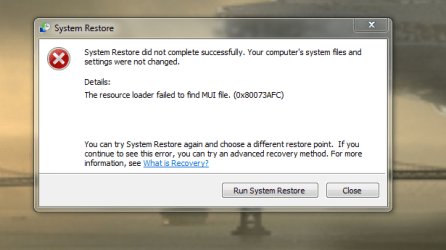
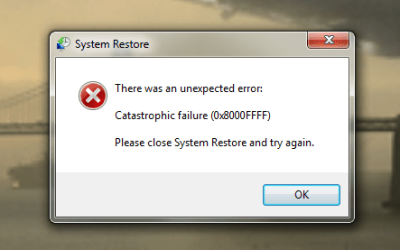
Not able to run System restore
this is what happens :-
 

Attachments

  • Untitled.png
    Untitled.png
    36.1 KB · Views: 4
  • Untitled2.png
    Untitled2.png
    22 KB · Views: 4

My Computer

Computer Manufacturer/Model Number
Alienware m17
OS
Windows 7 Ultimate
CPU
Core 2 Extreme CPU Q9300 @ 2.53GHz
Memory
4 GB
Graphics Card(s)
2x3870 Ati
Hard Drives
2x500 GB Samsung 7200rpm
Do you get the same error on all available restore points?

Your original post says "my laptop was running slow".

If that is the only reason you are attempting a system restore, I would suggest that you find out why it is running slow. At this point, you have no reason to believe a system restore would help.

What makes you think it is running slow?

When was it last "running fast" and what might have been done to the laptop since that date?

Do you know if you are malware and virus free?

Do you have any other issues or signs of hardware problems?

I have run system restore at least 50 times and had it fail to complete once. I wouldn't get bogged down on why it won't run in your case at this time.
 

My Computer

Computer type
PC/Desktop
Computer Manufacturer/Model Number
Ignatz Special; 4 speed manual gearbox; factory air conditioning; one of one
OS
Windows 7 Home Premium SP1, 64-bit
CPU
Intel Skylake i5-6600K, not overclocked
Motherboard
AsRock Z170M Extreme 4, micro ATX
Memory
8 GB HyperX DDR4-2666 (2 x 4 GB)
Graphics Card(s)
none; graphics are integrated on CPU
Sound Card
onboard: Realtek ALC1150; external: USB Behringer UF0-202
Monitor(s) Displays
Dell S2340M 23 inch IPS
Screen Resolution
1600 x 900
Hard Drives
System: Crucial MX100 series SSD, 128 GB;
Data: Samsung Spinpoint 103SJ, 1 TB;
Backup: WD Caviar Green WD30EZRX-00D8PB0, 3 TB
PSU
Rosewill SilentNight 500 watt fanless, semi-modular
Case
Antec Solo II
Cooling
Noctua NH-U12S; Noctua F12 intake, Noctua S12A exhaust
Keyboard
Microsoft 200 6JH-00001 USB
Mouse
Dell or Microsoft optical wired; USB
Antivirus
Microsoft Security Essentials and Malwarebytes Premium
Browser
Pale Moon
Other Info
All fans PWM; speeds at idle: CPU circa 500 rpm; intake circa 600 rpm; exhaust circa 600 rpm; CPU temps 27 idle and 47 C load in a warm room (27 C/81 F) when running Intel Extreme Tuning Utility stress test.
You can't "system restore" from Windows 7 back to Vista.

Do you mean that you saved an image of Vista on your external hard drive and now want to give up on Windows 7 and return to Vista?

Sorry i did not Explain better
Just wanted to inform That I have Installed Win7 on Vista
& had made Win7 back up & want to restore that System Image
to a back date, cos then the comp was running well

Cos im having wiered issues
like when Im checking my E mail & want to
save a E mail in a folder, it doesnt allow me
to click on the Move To drop down menu
I need to close the browser & then open again to
do that action :(


Thanks

If you mean from the highlighted part that you did an upgrade and not a clean install, this could be the source of your trouble. A clean install is the preferred way to install Win 7. This will most likely get rid of your problems.
 

My Computer

Computer type
PC/Desktop
Computer Manufacturer/Model Number
Custom Build
OS
Windows 7 Home Premium 32-Bit - Build 7600 SP1
CPU
Intel Core i3-2120 3.30Ghz
Motherboard
Asus P8Z68-V LX Intel Z68 Socket H2 ATX
Memory
Kingston 4 GB DDR3 1333 mhz
Graphics Card(s)
AMD Radeon HD6670
Sound Card
Sound Blaster Audigy SE 24-Bit
Monitor(s) Displays
Asus VE228
Screen Resolution
1440 X 900
Hard Drives
OCZ Vertex 3 120 GB Sata 3 SSD ==
Kingston SH103/S3 120 G Hyper X 120 GB SSD ==
Western Digital 500 GB Caviar Green 7200 RPM ==
PSU
Corsair CX600M == 600 Watt
Case
NZXT Apollo - Silver with Clear Side Panel
Cooling
Three 120 mm Fans
Keyboard
Microsoft Natural 4000
Mouse
Microsoft Custom Optical 3000
Internet Speed
AT&T Fiber Optic Wireless Network
Antivirus
Microsoft Security Essentials
Browser
Chrome
Other Info
120 mm Blue LED Fan -- Three Blue LED Lazer Light Sticks
Hi Vader !
Are you trying to system restore through the Accessories > system tools > system restore ?

You may have an alternative try. Download Windows 7 System Recovery Discs .

Burn it in a disk using ImgBurn , boot it, and try a system restore .
 

My Computer

Computer type
PC/Desktop
Computer Manufacturer/Model Number
Self Assembled
OS
Microsoft Windows 10 Pro Insider Preview 64-bit
CPU
Intel(R) Core(TM) i3-4130 CPU @ 3.40GHz
Motherboard
Gigabyte Technology Co., Ltd. B85M-D3H
Memory
Corsair Vengence 4GB x2 (8.00GB Dual-Channel DDR3 @ 798MHz)
Graphics Card(s)
2047MB GeForce GTS 450 (ZOTAC International)
Sound Card
Onboard (Realtek High Definition Audio)
Monitor(s) Displays
LG Flatron E2040T
Screen Resolution
1600x900
Hard Drives
Western Digital 1 TB
Seagate 500 GB
PSU
Corsair VS550
Case
Cooler Master K380
Cooling
Cooler Master Seidon 120V Plus
Keyboard
Logitech MK260r
Mouse
Logitech MK260r
Internet Speed
PMPL Broadband
Antivirus
Windows Defender + MBAM
Browser
Firefox
Other Info
Dell Studio 15" Laptop
Do you get the same error on all available restore points?

Your original post says "my laptop was running slow".

If that is the only reason you are attempting a system restore, I would suggest that you find out why it is running slow. At this point, you have no reason to believe a system restore would help.

What makes you think it is running slow?

When was it last "running fast" and what might have been done to the laptop since that date?

Do you know if you are malware and virus free?

Do you have any other issues or signs of hardware problems?

I have run system restore at least 50 times and had it fail to complete once. I wouldn't get bogged down on why it won't run in your case at this time.


Doesnt show more Restore points only 1

I felt its running bad for few weeks now
 

My Computer

Computer Manufacturer/Model Number
Alienware m17
OS
Windows 7 Ultimate
CPU
Core 2 Extreme CPU Q9300 @ 2.53GHz
Memory
4 GB
Graphics Card(s)
2x3870 Ati
Hard Drives
2x500 GB Samsung 7200rpm
We need more info.

Give us some examples of what it used to do but can no longer do as well.

It used to boot in 60 seconds and now it takes 120 seconds? That type of thing.

Have you spent any time looking at task manager when you think it is running particularly slow?

Is it constantly slow, or just slow at certain points in the day?

Did you do an upgrade install or a clean install?

I assume it performed well for some period of time after Windows 7 was installed?
 

My Computer

Computer type
PC/Desktop
Computer Manufacturer/Model Number
Ignatz Special; 4 speed manual gearbox; factory air conditioning; one of one
OS
Windows 7 Home Premium SP1, 64-bit
CPU
Intel Skylake i5-6600K, not overclocked
Motherboard
AsRock Z170M Extreme 4, micro ATX
Memory
8 GB HyperX DDR4-2666 (2 x 4 GB)
Graphics Card(s)
none; graphics are integrated on CPU
Sound Card
onboard: Realtek ALC1150; external: USB Behringer UF0-202
Monitor(s) Displays
Dell S2340M 23 inch IPS
Screen Resolution
1600 x 900
Hard Drives
System: Crucial MX100 series SSD, 128 GB;
Data: Samsung Spinpoint 103SJ, 1 TB;
Backup: WD Caviar Green WD30EZRX-00D8PB0, 3 TB
PSU
Rosewill SilentNight 500 watt fanless, semi-modular
Case
Antec Solo II
Cooling
Noctua NH-U12S; Noctua F12 intake, Noctua S12A exhaust
Keyboard
Microsoft 200 6JH-00001 USB
Mouse
Dell or Microsoft optical wired; USB
Antivirus
Microsoft Security Essentials and Malwarebytes Premium
Browser
Pale Moon
Other Info
All fans PWM; speeds at idle: CPU circa 500 rpm; intake circa 600 rpm; exhaust circa 600 rpm; CPU temps 27 idle and 47 C load in a warm room (27 C/81 F) when running Intel Extreme Tuning Utility stress test.
We need more info.

Give us some examples of what it used to do but can no longer do as well.

It used to boot in 60 seconds and now it takes 120 seconds? That type of thing.

Have you spent any time looking at task manager when you think it is running particularly slow?

Is it constantly slow, or just slow at certain points in the day?

Did you do an upgrade install or a clean install?

I assume it performed well for some period of time after Windows 7 was installed?

I did upgrade Install
boots in 59sec
some time slows down after few hrs of use 2/3hrs

& like I showed in Pic below is not doing system restore
so am wooried if sometime i need System restore it wont do that :(

*Today
I also just installed Diskkeeper & ran it

should I Install Cclener & run it ?


thanks for ur help
 

My Computer

Computer Manufacturer/Model Number
Alienware m17
OS
Windows 7 Ultimate
CPU
Core 2 Extreme CPU Q9300 @ 2.53GHz
Memory
4 GB
Graphics Card(s)
2x3870 Ati
Hard Drives
2x500 GB Samsung 7200rpm
A 59 second boot time is certainly respectable.

CCleaner is a decent application, but I wouldn't expect it to resolve your problem.

I think Diskkeeper is a defrag program and I wouldn't expect it to do wonders either.

Do this:

Reboot and then open task manager and look at the processes tab. Check "show processes for all users". Write down how many processes are shown.

Go to the performance tab. Write down what it shows in the CPU usage and Memory windows.

Continue using your PC. When you think it is running slow, open task manager and write down what it says in the same 3 places. How much do those 3 numbers differ from when you checked them right after a boot?

What are you typically doing with the PC when you think it is running slow? Reading email? Calculating Pi to 100 milllion decimal places?

You could try to make a new system restore point now and then see if you can restore to it, just to see if it will fail again.
 

My Computer

Computer type
PC/Desktop
Computer Manufacturer/Model Number
Ignatz Special; 4 speed manual gearbox; factory air conditioning; one of one
OS
Windows 7 Home Premium SP1, 64-bit
CPU
Intel Skylake i5-6600K, not overclocked
Motherboard
AsRock Z170M Extreme 4, micro ATX
Memory
8 GB HyperX DDR4-2666 (2 x 4 GB)
Graphics Card(s)
none; graphics are integrated on CPU
Sound Card
onboard: Realtek ALC1150; external: USB Behringer UF0-202
Monitor(s) Displays
Dell S2340M 23 inch IPS
Screen Resolution
1600 x 900
Hard Drives
System: Crucial MX100 series SSD, 128 GB;
Data: Samsung Spinpoint 103SJ, 1 TB;
Backup: WD Caviar Green WD30EZRX-00D8PB0, 3 TB
PSU
Rosewill SilentNight 500 watt fanless, semi-modular
Case
Antec Solo II
Cooling
Noctua NH-U12S; Noctua F12 intake, Noctua S12A exhaust
Keyboard
Microsoft 200 6JH-00001 USB
Mouse
Dell or Microsoft optical wired; USB
Antivirus
Microsoft Security Essentials and Malwarebytes Premium
Browser
Pale Moon
Other Info
All fans PWM; speeds at idle: CPU circa 500 rpm; intake circa 600 rpm; exhaust circa 600 rpm; CPU temps 27 idle and 47 C load in a warm room (27 C/81 F) when running Intel Extreme Tuning Utility stress test.
I am not sure whether I am to give you such a suggestion or not, but it may be a way out.

I hope you will be mentally happy if you can do a clean install . Actually while downloading Win 7 , it is better to get it via Windows 7 USB download Tool , so that you can use it in future. Bad luck that you dont have the ISO, but are you stored the key secured ? If you have the key , you may download 7 ultimate 64 bit edition from anywhere (this is the part that makes me thinking twice before posting ) , burn it in a DVD , or make a USB installer, and have a http://www.sevenforums.com/tutorials/1649-clean-install-windows-7-a.html .

I hope the same key works for upgrade install and clean install .
 

My Computer

Computer type
PC/Desktop
Computer Manufacturer/Model Number
Self Assembled
OS
Microsoft Windows 10 Pro Insider Preview 64-bit
CPU
Intel(R) Core(TM) i3-4130 CPU @ 3.40GHz
Motherboard
Gigabyte Technology Co., Ltd. B85M-D3H
Memory
Corsair Vengence 4GB x2 (8.00GB Dual-Channel DDR3 @ 798MHz)
Graphics Card(s)
2047MB GeForce GTS 450 (ZOTAC International)
Sound Card
Onboard (Realtek High Definition Audio)
Monitor(s) Displays
LG Flatron E2040T
Screen Resolution
1600x900
Hard Drives
Western Digital 1 TB
Seagate 500 GB
PSU
Corsair VS550
Case
Cooler Master K380
Cooling
Cooler Master Seidon 120V Plus
Keyboard
Logitech MK260r
Mouse
Logitech MK260r
Internet Speed
PMPL Broadband
Antivirus
Windows Defender + MBAM
Browser
Firefox
Other Info
Dell Studio 15" Laptop
Also, type CMD in start search box, rightclick CMD result, Run As Admin, type sfc /scannow to check the integrity of your System files.

Which AV are you using? Have you run a full scan lately? Run one now with Malwarebytes.

Do you have a Win7 DVD for your installed version, and the Product Key which activated it?
 
Thanks Guys
will try it & let you all know

thinking it could be browser Issue

cos before i was useing IE then that was freezing
Now im useing FireFox & thats freezing

like when i open 6 to 8 tabs at a time :)

thinking of uninstalling Firefox & reinstalling
 

My Computer

Computer Manufacturer/Model Number
Alienware m17
OS
Windows 7 Ultimate
CPU
Core 2 Extreme CPU Q9300 @ 2.53GHz
Memory
4 GB
Graphics Card(s)
2x3870 Ati
Hard Drives
2x500 GB Samsung 7200rpm
Reinstall your flashplayer and Java Runtime from their website using latest versions.

Update your display driver: Check optional Windows Updates, your computer maker's Support Download's webpage and then your video card/chip maker's webpage. Try all WIn7 drivers, then Vista drivers in reverse chronological order until the issue goes away.
 
Reinstall your flashplayer and Java Runtime from their website using latest versions.

Update your display driver: Check optional Windows Updates, your computer maker's Support Download's webpage and then your video card/chip maker's webpage. Try all WIn7 drivers, then Vista drivers in reverse chronological order until the issue goes away.

I did update it

I do have - Driver Genius Pro
so all drivers have been update

& Thank you all you guys
fo helping me

God Bless You
 

My Computer

Computer Manufacturer/Model Number
Alienware m17
OS
Windows 7 Ultimate
CPU
Core 2 Extreme CPU Q9300 @ 2.53GHz
Memory
4 GB
Graphics Card(s)
2x3870 Ati
Hard Drives
2x500 GB Samsung 7200rpm
I personally would not rely on a Driver Program as they always come up with bad drivers.

Rely on the drivers given by the WIn7 installer and then updated by optional Windows Updates. Find any missing drivers on your computer/device maker's Support Downloads webpage.

Only if performance dictates should you change out the installers drivers. Try the chipset first, but be prepared to roll back if it doesn't help.
 
Back
Top