
Need Immediate Help!

mccoady

New member
Member
VIP
Local time
5:20 PM
Messages
142
I'm right in the middle of installing Windows 7 home Premium (32 bit) on a Dell E520 desktop I ran Upgrade Advisor and everything was ok. This is an upgrade from XP Pro so I'm doing a Clean Install and have selected "Custom". This install is also on a brand new hard drive.

I'm on step 9 http://www.sevenforums.com/tutorials/1649-clean-install-windows-7-a.html and it ran through everything including the last item "Installing Windows" then rebooted a couple of time.

It's been 15 minutes now and all I have is a black screen and it doesn't sound like the disk is doing anything.

Help what do I do start over??
 

My Computer

Computer type
PC/Desktop
Computer Manufacturer/Model Number
Home Build
OS
Windows 7 Home Premium 64-bit; SP1
CPU
Intel Core i5 2500K
Motherboard
ASRock Z68 Extreme3 Gen3
Memory
Corsair Vengeance 16GB DDR3
Graphics Card(s)
Intel HD Graphics 3000
Sound Card
Integrated
Monitor(s) Displays
Samsung SyncMaster 943BX
Screen Resolution
1280x1024
Hard Drives
Western Digital Caviar Black WD1002FAEX 1TB 7200 RPM 64MB Cache SATA 6.0Gb/s 3.5" Internal

Western Digital Caviar Black WD7501AALS 750GB 7200 RPM 32MB Cache SATA 3.0Gb/s 3.5" Internal
PSU
SeaSonic S12ll 520W Bronze
Case
Cooler Master Haf 912 Advanced
Cooling
Cooler Master Hyper 212 EVO
Keyboard
Logitech Wireless K800
Mouse
Logitech Wireless Performance MX
Internet Speed
5.0 mb
Other Info
LG WH12LS30 Black SATA 12X Blu-ray
ASUS DRW-24B1ST/BLK/B/AS
AFT XM-5UE Card Reader
Maybe your PC has hanged and you have to hard-reboot it... I don't really know, though......
Can you do ANYTHING at all? Move the mouse, etc?
 

My Computer

OS
W7
CPU
i7 2600k
Motherboard
Sabertooth P67 B3
Memory
G.Skill 8GB DDR3 1600Mhz CL9
Graphics Card(s)
580 DCUII
Sound Card
onboard
PSU
tx850v2
Case
HAF X
Cooling
H70
No nothing icon or nothing I just shut it down and in the process of starting over I did unplug anything USB this time except for mouse and keyboard.

I'm on Step 9 again but Step 8 was different this time it showed 2 partitions (1) 100GB for reserved space and (2) Unallocated 930GB for new drive. The first time through it only showed 930GB unallocated so maybe I'm on the right track this time I'll post back.
 

My Computer

Computer type
PC/Desktop
Computer Manufacturer/Model Number
Home Build
OS
Windows 7 Home Premium 64-bit; SP1
CPU
Intel Core i5 2500K
Motherboard
ASRock Z68 Extreme3 Gen3
Memory
Corsair Vengeance 16GB DDR3
Graphics Card(s)
Intel HD Graphics 3000
Sound Card
Integrated
Monitor(s) Displays
Samsung SyncMaster 943BX
Screen Resolution
1280x1024
Hard Drives
Western Digital Caviar Black WD1002FAEX 1TB 7200 RPM 64MB Cache SATA 6.0Gb/s 3.5" Internal

Western Digital Caviar Black WD7501AALS 750GB 7200 RPM 32MB Cache SATA 3.0Gb/s 3.5" Internal
PSU
SeaSonic S12ll 520W Bronze
Case
Cooler Master Haf 912 Advanced
Cooling
Cooler Master Hyper 212 EVO
Keyboard
Logitech Wireless K800
Mouse
Logitech Wireless Performance MX
Internet Speed
5.0 mb
Other Info
LG WH12LS30 Black SATA 12X Blu-ray
ASUS DRW-24B1ST/BLK/B/AS
AFT XM-5UE Card Reader
Ok it's been 10 minutes now on black screen on Step 9 after leaving leaving "Installing Windows" it seems to booted a couple of times.

Should I be seeing something by now or does it sound like it hung again?
 

My Computer

Computer type
PC/Desktop
Computer Manufacturer/Model Number
Home Build
OS
Windows 7 Home Premium 64-bit; SP1
CPU
Intel Core i5 2500K
Motherboard
ASRock Z68 Extreme3 Gen3
Memory
Corsair Vengeance 16GB DDR3
Graphics Card(s)
Intel HD Graphics 3000
Sound Card
Integrated
Monitor(s) Displays
Samsung SyncMaster 943BX
Screen Resolution
1280x1024
Hard Drives
Western Digital Caviar Black WD1002FAEX 1TB 7200 RPM 64MB Cache SATA 6.0Gb/s 3.5" Internal

Western Digital Caviar Black WD7501AALS 750GB 7200 RPM 32MB Cache SATA 3.0Gb/s 3.5" Internal
PSU
SeaSonic S12ll 520W Bronze
Case
Cooler Master Haf 912 Advanced
Cooling
Cooler Master Hyper 212 EVO
Keyboard
Logitech Wireless K800
Mouse
Logitech Wireless Performance MX
Internet Speed
5.0 mb
Other Info
LG WH12LS30 Black SATA 12X Blu-ray
ASUS DRW-24B1ST/BLK/B/AS
AFT XM-5UE Card Reader
Hello.


A clean install takes less than 20 minutes if there's no issues.


You need to have a look a look at the info below, you may be one of the ones that have issues installing Windows 7 to too large a partition and be sure to post back with any further questions you may have and to keep us informed.

Since the Hard Disk Drive is new you can use the clean command in Step One instead of the clean all command to just remove the format configuration data then create a 100GB Primary partition to do the install to.


After you have copied out or made back-ups of the data you need to save to external media, use Step One of this tutorial at the link below to do a wipe (secure erase) to the entire Hard Disk Drive / Solid State Drive.
  • Then if you do not want to create the new Windows 7 "System Reserved" partition use the outline in Step Two #2 to create, format and mark Active a single 100GB partition to do the installation to.
  • If you do want to create the "System Reserved" partition use the outline in Step Two #3 to create, format and mark Active the System Reserved partition and then create and format the 100GB partition to do the installation to.
Either way, running the "clean all" then creating and formatting the partition(s) using diskpart will get you the best possible space to do a clean install of Windows 7 to; you can always extend the Windows partition to include the remaining unallocated space on the HDD / SSD or create additional Primary partitions or an Extended partition after the installation completes if you choose.

SSD / HDD : Optimize for Windows Reinstallation

DISKPART : At PC Startup

Do a Clean Install with a Upgrade Windows 7 Version
 

My Computer

Computer Manufacturer/Model Number
* BFK Customs *
OS
W 7 64-bit Ultimate
CPU
Intel Q9550 Yorkfield
Motherboard
ASUS P5Q Pro
Memory
8GB Dominator 8500C5D
Graphics Card(s)
ATI : XFX 5870
Sound Card
Realtek HD Audio 7-1
Monitor(s) Displays
1x 47" LCD HDMI & 3x 26" LCD HDMI
Screen Resolution
1920x1080P & 1920x1200
Hard Drives
1x 80GB Intel X25-M G2 SSD : 1x 500GB & 1x 640GB WD Caviar Black(s)
PSU
Corsair 620HX
Case
Cooler Master RC-690
Cooling
Tuniq Tower 120, 2x 140mm and 3x 120mm case fans
Keyboard
Microsoft 500
Mouse
Razer Diamondback 3G
Internet Speed
14 Mb/s
Other Info
1x Koutech 3Gb/s SATA HDD Hot Swap Rack
Ok finally it got it to install turns out I had a DVI cable plugged in going to a tv and that was causing it to hang.

Now here's my issue though this DVI to HDMI cable runs out of my son's computer to his Plasma's HDMI input and anytime I plug this back in Windows hangs at startup. There were no issues with this before the Windows 7 upgrade.

This is a must to get going what do I need to do? Thanks!
 

My Computer

Computer type
PC/Desktop
Computer Manufacturer/Model Number
Home Build
OS
Windows 7 Home Premium 64-bit; SP1
CPU
Intel Core i5 2500K
Motherboard
ASRock Z68 Extreme3 Gen3
Memory
Corsair Vengeance 16GB DDR3
Graphics Card(s)
Intel HD Graphics 3000
Sound Card
Integrated
Monitor(s) Displays
Samsung SyncMaster 943BX
Screen Resolution
1280x1024
Hard Drives
Western Digital Caviar Black WD1002FAEX 1TB 7200 RPM 64MB Cache SATA 6.0Gb/s 3.5" Internal

Western Digital Caviar Black WD7501AALS 750GB 7200 RPM 32MB Cache SATA 3.0Gb/s 3.5" Internal
PSU
SeaSonic S12ll 520W Bronze
Case
Cooler Master Haf 912 Advanced
Cooling
Cooler Master Hyper 212 EVO
Keyboard
Logitech Wireless K800
Mouse
Logitech Wireless Performance MX
Internet Speed
5.0 mb
Other Info
LG WH12LS30 Black SATA 12X Blu-ray
ASUS DRW-24B1ST/BLK/B/AS
AFT XM-5UE Card Reader

My Computer

Computer type
PC/Desktop
Computer Manufacturer/Model Number
Home Build
OS
Windows 7 Home Premium 64-bit; SP1
CPU
Intel Core i5 2500K
Motherboard
ASRock Z68 Extreme3 Gen3
Memory
Corsair Vengeance 16GB DDR3
Graphics Card(s)
Intel HD Graphics 3000
Sound Card
Integrated
Monitor(s) Displays
Samsung SyncMaster 943BX
Screen Resolution
1280x1024
Hard Drives
Western Digital Caviar Black WD1002FAEX 1TB 7200 RPM 64MB Cache SATA 6.0Gb/s 3.5" Internal

Western Digital Caviar Black WD7501AALS 750GB 7200 RPM 32MB Cache SATA 3.0Gb/s 3.5" Internal
PSU
SeaSonic S12ll 520W Bronze
Case
Cooler Master Haf 912 Advanced
Cooling
Cooler Master Hyper 212 EVO
Keyboard
Logitech Wireless K800
Mouse
Logitech Wireless Performance MX
Internet Speed
5.0 mb
Other Info
LG WH12LS30 Black SATA 12X Blu-ray
ASUS DRW-24B1ST/BLK/B/AS
AFT XM-5UE Card Reader
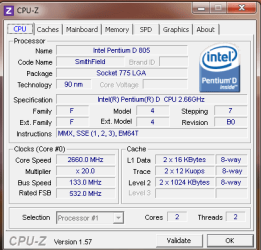
if it makes it to the desktop and then go's blank maybe it's the video card drivers that need to be updated .

scrooge
 

My Computer

Computer Manufacturer/Model Number
home build
OS
win 7 ( 64 bit)
CPU
Intel Core i7-870 Lynnfield 2.93GHz 8MB L3 Cache LGA 1156 95
Motherboard
ASUS P7P55 LX LGA 1156
Memory
G.SKILL Sniper Series 16GB (4 x 4GB) 240-Pin DDR3 SDRAM
Graphics Card(s)
ATI Radeon HD6800 Series
Sound Card
hdmi
Monitor(s) Displays
42" lg 3d tv
Screen Resolution
1920 x 1080
Hard Drives
1 ssd pci-e revodrive
4 seagate 1.5 tb
PSU
Rosewill BRONZE Series RBR1000-M 1000W Continuous@40°C, 80Pl
Case
CoolMaster 922
Cooling
CORSAIR CWCH60 Hydro Series H60 High Performance Liquid CPU
Keyboard
logtech
Mouse
logitect
Internet Speed
5 mbit
You may need to borrow a VGA monitor to get this started so you can update the HDTV driver which appears to be hanging the startup.

Try to get into Safe Mode which will default to a standard VGA driver which might work on the TV, then update the hdtv driver. If it won't install driver then in Device Manager uninstall the listed Display adapter to try to get it to start with standard vga driver.

Here is another way to get into the Device manager during install to uninstall the hanging Display driver - use the steps at the end of the tutorial skipping over reinstall: .http://www.sevenforums.com/tutorials/15856-device-manager-access-during-windows-7-installation.html
 
I just want to make clear my situation if there's any confusion. My son uses a VGA monitor for doing things on his computer but also has connected a DVI to HDMI cable ran to his LG 50PG20 Plasma.

If I leave the DVI cable disconnected his computer loads fine no issues at all but if I connect it then it gets to his desktop and hangs although I do have a cursor. None of this was an issue before upgrading to 7.

After installing Windows 7 there was a Windows Update for his GeForce 7300LE video card and I had it update it.

So I'm a little confused on what Greg wants me to do since I have no problem getting to the Device Manager as long as the DVI cable is disconnected but as I said there was already a Windows Update for the video card?
 

Attachments

  • Capture.PNG
    Capture.PNG
    11.8 KB · Views: 1
  • Capture1.PNG
    Capture1.PNG
    7.6 KB · Views: 1
  • Capture2.PNG
    Capture2.PNG
    10.7 KB · Views: 1

My Computer

Computer type
PC/Desktop
Computer Manufacturer/Model Number
Home Build
OS
Windows 7 Home Premium 64-bit; SP1
CPU
Intel Core i5 2500K
Motherboard
ASRock Z68 Extreme3 Gen3
Memory
Corsair Vengeance 16GB DDR3
Graphics Card(s)
Intel HD Graphics 3000
Sound Card
Integrated
Monitor(s) Displays
Samsung SyncMaster 943BX
Screen Resolution
1280x1024
Hard Drives
Western Digital Caviar Black WD1002FAEX 1TB 7200 RPM 64MB Cache SATA 6.0Gb/s 3.5" Internal

Western Digital Caviar Black WD7501AALS 750GB 7200 RPM 32MB Cache SATA 3.0Gb/s 3.5" Internal
PSU
SeaSonic S12ll 520W Bronze
Case
Cooler Master Haf 912 Advanced
Cooling
Cooler Master Hyper 212 EVO
Keyboard
Logitech Wireless K800
Mouse
Logitech Wireless Performance MX
Internet Speed
5.0 mb
Other Info
LG WH12LS30 Black SATA 12X Blu-ray
ASUS DRW-24B1ST/BLK/B/AS
AFT XM-5UE Card Reader
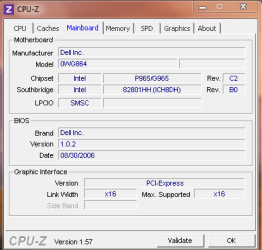
If you can get to the desktop using the VGA monitor, then plug in the LG HDTV and see if it needs its driver updated. Updates should deliver one shortly, or browse on internet from the listing in Device manager to see if it picks one up.

The device is fully compatible with Win7 and says it should self-install. So absent a driver which remedies the situation, I would scour the logs and other resources for clues as to what is happening to cause startup to hang when LG is plugged in: Win7 troubleshooting fundamentals
 
Are you saying I can plug in the DVI cable while the computer is already up and running and I'm already on my desktop? I didn't know you could plug in a DVI cable while the computer was running.

I did notice the driver it updated to had a date of 7/9/2010 and you can get a newer update from Nvidia website dated 1/18/2011. Would it hurt to update to it or would it have to come from Dell?
 

My Computer

Computer type
PC/Desktop
Computer Manufacturer/Model Number
Home Build
OS
Windows 7 Home Premium 64-bit; SP1
CPU
Intel Core i5 2500K
Motherboard
ASRock Z68 Extreme3 Gen3
Memory
Corsair Vengeance 16GB DDR3
Graphics Card(s)
Intel HD Graphics 3000
Sound Card
Integrated
Monitor(s) Displays
Samsung SyncMaster 943BX
Screen Resolution
1280x1024
Hard Drives
Western Digital Caviar Black WD1002FAEX 1TB 7200 RPM 64MB Cache SATA 6.0Gb/s 3.5" Internal

Western Digital Caviar Black WD7501AALS 750GB 7200 RPM 32MB Cache SATA 3.0Gb/s 3.5" Internal
PSU
SeaSonic S12ll 520W Bronze
Case
Cooler Master Haf 912 Advanced
Cooling
Cooler Master Hyper 212 EVO
Keyboard
Logitech Wireless K800
Mouse
Logitech Wireless Performance MX
Internet Speed
5.0 mb
Other Info
LG WH12LS30 Black SATA 12X Blu-ray
ASUS DRW-24B1ST/BLK/B/AS
AFT XM-5UE Card Reader
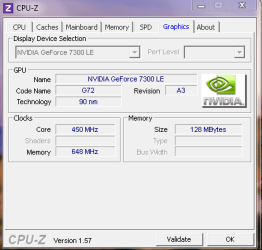
You can plug in the HDTV then observe it's driver loading by clicking bubble from the System Tray. I would have it query Windows Update for driver, examine the driver it's loading in Device manager, consider updating the driver.

You can certainly try the newer driver from Nvidia if it is for the correct display adapter as it may help.

As a general rule I never allow the full video software package to run at Startup as it can cause problems and conflicts. In fact, I don't allow anything in the msconfig>startup list except AV and gadgets/stikynotes as all others are freeloaders on RAM/CPU at all times and can spy on you.
 
Ok thanks I learned something I didn't know you could hot-plug a DVI cable I will give it a try in the morning.

This looks like the Nvidia driver that matches my video card so I'll assume it's the right one NVIDIA DRIVERS 266.58 WHQL
 

My Computer

Computer type
PC/Desktop
Computer Manufacturer/Model Number
Home Build
OS
Windows 7 Home Premium 64-bit; SP1
CPU
Intel Core i5 2500K
Motherboard
ASRock Z68 Extreme3 Gen3
Memory
Corsair Vengeance 16GB DDR3
Graphics Card(s)
Intel HD Graphics 3000
Sound Card
Integrated
Monitor(s) Displays
Samsung SyncMaster 943BX
Screen Resolution
1280x1024
Hard Drives
Western Digital Caviar Black WD1002FAEX 1TB 7200 RPM 64MB Cache SATA 6.0Gb/s 3.5" Internal

Western Digital Caviar Black WD7501AALS 750GB 7200 RPM 32MB Cache SATA 3.0Gb/s 3.5" Internal
PSU
SeaSonic S12ll 520W Bronze
Case
Cooler Master Haf 912 Advanced
Cooling
Cooler Master Hyper 212 EVO
Keyboard
Logitech Wireless K800
Mouse
Logitech Wireless Performance MX
Internet Speed
5.0 mb
Other Info
LG WH12LS30 Black SATA 12X Blu-ray
ASUS DRW-24B1ST/BLK/B/AS
AFT XM-5UE Card Reader
Ok this is what I've done so far but nothing fixes the issue. I hot plugged in the DVI cable and the screen flashes off and back on leaving me the desktop but having no icons or task bar or anything just like before. Now unplugging the cable causes the screen to flash again and when back everything is normal.

Next I updated the driver from Nvidia site but that didn't make a difference.

Next I rebooted to Safe Mode and then plugged in the cable nothing happens so I uninstalled the video driver and then rebooted with the cable still plugged in. After the desktop was loaded everthing was still fine so next I reinstall the driver which prompts a reboot.

After rebooting the desktop appears like before with nothing loaded so I unplug the cable, the screen flashes, and back to normal again.

This has got to be a driver issue right but it wasn't a problem before installing Windows 7 so what gives?

I thought the GeForce 7300LE was decent but would upgrading the video card be a solution? I have a new Gigabyte HD 4350 (ATI) that someone gave me would it be better than the 7300LE if not I'll buy something you recommend.
 

My Computer

Computer type
PC/Desktop
Computer Manufacturer/Model Number
Home Build
OS
Windows 7 Home Premium 64-bit; SP1
CPU
Intel Core i5 2500K
Motherboard
ASRock Z68 Extreme3 Gen3
Memory
Corsair Vengeance 16GB DDR3
Graphics Card(s)
Intel HD Graphics 3000
Sound Card
Integrated
Monitor(s) Displays
Samsung SyncMaster 943BX
Screen Resolution
1280x1024
Hard Drives
Western Digital Caviar Black WD1002FAEX 1TB 7200 RPM 64MB Cache SATA 6.0Gb/s 3.5" Internal

Western Digital Caviar Black WD7501AALS 750GB 7200 RPM 32MB Cache SATA 3.0Gb/s 3.5" Internal
PSU
SeaSonic S12ll 520W Bronze
Case
Cooler Master Haf 912 Advanced
Cooling
Cooler Master Hyper 212 EVO
Keyboard
Logitech Wireless K800
Mouse
Logitech Wireless Performance MX
Internet Speed
5.0 mb
Other Info
LG WH12LS30 Black SATA 12X Blu-ray
ASUS DRW-24B1ST/BLK/B/AS
AFT XM-5UE Card Reader
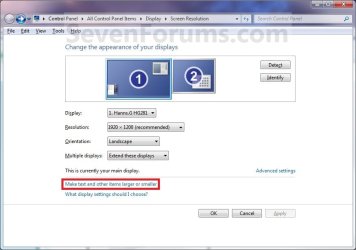
Have you set up a 2nd monitor or TV in Display setting?

Display_Settings.jpg
 

My Computer

OS
ME/XP/Vista/Win7
No not yet because with the DVI cable plugged in I don't get a regular desktop and so no way to get to the Control Panel.

If I boot to Safe Mode with the DVI plugged in will Safe Mode detect the DVI cable (Plasma), if so I could set up a 2nd monitor?
 

My Computer

Computer type
PC/Desktop
Computer Manufacturer/Model Number
Home Build
OS
Windows 7 Home Premium 64-bit; SP1
CPU
Intel Core i5 2500K
Motherboard
ASRock Z68 Extreme3 Gen3
Memory
Corsair Vengeance 16GB DDR3
Graphics Card(s)
Intel HD Graphics 3000
Sound Card
Integrated
Monitor(s) Displays
Samsung SyncMaster 943BX
Screen Resolution
1280x1024
Hard Drives
Western Digital Caviar Black WD1002FAEX 1TB 7200 RPM 64MB Cache SATA 6.0Gb/s 3.5" Internal

Western Digital Caviar Black WD7501AALS 750GB 7200 RPM 32MB Cache SATA 3.0Gb/s 3.5" Internal
PSU
SeaSonic S12ll 520W Bronze
Case
Cooler Master Haf 912 Advanced
Cooling
Cooler Master Hyper 212 EVO
Keyboard
Logitech Wireless K800
Mouse
Logitech Wireless Performance MX
Internet Speed
5.0 mb
Other Info
LG WH12LS30 Black SATA 12X Blu-ray
ASUS DRW-24B1ST/BLK/B/AS
AFT XM-5UE Card Reader
Back
Top