Need iso

cfourkays

New member
Member
Local time
10:05 AM
Messages
62
Location
Jensen Beach FL
Have a Dell Inspiron laptop, W-7 Home, that my customer thought she could free upgrade to Windows 10 using iso from the Media Recovery Tool. She installed a new copy from the USB and now, as she didn't realize, it can't be activated. I tried downloading an iso from the MS site that requires a product key. Says its a Mfg product key and won't accept the product key.
Been trying to get Dell but they say use their Dell OS Recovery Tool with "Another computer" option.
Been trying this from both the non-activated Dell with W-10 and my own work PC. When I enter the service tag it says "No OS images defined for the product.
Isn't there somewhere I can get a plain old W-7 Home iso. I obviously have the Product Key on the bottom of the laptop.
Pete
 

My Computer

Computer Manufacturer/Model Number
Home Built
OS
Windows 7 Professional
CPU
AMD 64 Athlon X2 Dual Core
Motherboard
Asus M3A
Memory
6 Gig
Graphics Card(s)
Nvidia GeForce 8800GTS
Hard Drives
500GB Seagate (2)
Other Info
Laptop is Gateway NV52 with Windows 7 Home Premium
What is the exact 7-character service tag number on that Dell Inspiron laptop?
What is the exact Windows version on its Certificate-Of-Authenticity sticker?

If you try to obtain a Windows 7 .ISO file from the Microsoft site, it will not except an OEM product key.
It will only accept a valid retail product key.
 

My Computer

Computer type
PC/Desktop
Computer Manufacturer/Model Number
Dell OptiPlex 9020
OS
Windows 7 Professional SP1 64-bit
CPU
Intel Core i7-4790 3.60 GHz
Memory
32 GB DDR3-1600 MHz
Graphics Card(s)
Integrated Intel HD Graphics 4600
Monitor(s) Displays
Viewsonic 32" LCD
Hard Drives
Kingston SATA 3 240 GB SSD
Internet Speed
Spectrum Internet 1000 Mbps

My Computer

Computer type
PC/Desktop
Computer Manufacturer/Model Number
HP Desktop & Compaq Laptop
OS
Win 10 x64, Linux Lite, Win 7 x64, BlackArch, & Kali
Hard Drives
Samsung 850 Pro 256Gb,
Hitachi HDD 1Tb,
Crucial MX SSD 250Gb
Segate 3Tb USB 3.0 Ext. Backup HDD
Internet Speed
150Mbps dn, 20Mbps up
Antivirus
Avast Free, Malwarebytes Anti-Exploit & Anti-Ransomware
Browser
Firefox, Chrome, Opera, & VPN
The iso files dell currently do are for the upgrade from win10 to win 7Pro, so you can use that

Check your personal messages
 

My Computers

System One System Two

  • Computer type
    PC/Desktop
    OS
    7 X64
    CPU
    i5 8400
    Motherboard
    gigabyte b365m ds3h
    Memory
    2x8gb 3200mhz
    Hard Drives
    various
    PSU
    pure power 11 400w cm
    Case
    Coolermaster
    Cooling
    cryorig m9i
  • Computer type
    PC/Desktop
    OS
    7x64
    CPU
    g5400
    Motherboard
    ga b365m ds3h
    Memory
    8gb ddr4 2400
    PSU
    xfx pro 450w
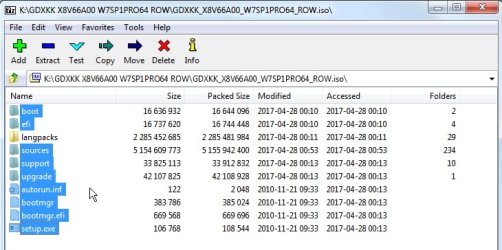
The dell iso files are massive . If you open the iso using 7-zip, the useful bits can be highlighted and copied out - e.g. onto a usb stick. If you want only English, no need to bother copying out the langpacks folder.


GDXKK_X8V66A00_W7SP1PRO64_ROW.iso.jpg
 

My Computers

System One System Two

  • Computer type
    PC/Desktop
    OS
    7 X64
    CPU
    i5 8400
    Motherboard
    gigabyte b365m ds3h
    Memory
    2x8gb 3200mhz
    Hard Drives
    various
    PSU
    pure power 11 400w cm
    Case
    Coolermaster
    Cooling
    cryorig m9i
  • Computer type
    PC/Desktop
    OS
    7x64
    CPU
    g5400
    Motherboard
    ga b365m ds3h
    Memory
    8gb ddr4 2400
    PSU
    xfx pro 450w
Have a Dell Inspiron laptop, W-7 Home, that my customer thought she could free upgrade to Windows 10 using iso from the Media Recovery Tool. She installed a new copy from the USB and now, as she didn't realize, it can't be activated. I tried downloading an iso from the MS site that requires a product key. Says its a Mfg product key and won't accept the product key.

I'm not quite sure what you mean ... I'm guessing sentences 1-2 refer to Win10 and sentences 3-4 refer to Win7?

SIW2 should have you covered for the Win7 reinstallation media, but she should nevertheless be able to use Win10 for free if she really wants to, just by using the Win7 COA product key from the sticker on the bottom.

I installed 10 on a customer's 7 Dell desktop just this afternoon. 7 was pretty messed up, so he wanted a clean install rather than an in-place upgrade. I already had a USB stick with Win10-1903 downloaded earlier from the MS site, so I booted from the USB stick, had it reformat the OS partition, and clean installed 10. I fed it the 7 HomePrem product key from the Dell COA sticker, and it successfully activated the install as 10 Home. I added a couple drivers from the Dell site, but other than that it was a very straightforward process.
 

My Computer

Computer type
PC/Desktop
Computer Manufacturer/Model Number
Dell Optiplex 7050
OS
Windows 7/8.1/10 multiboot
CPU
Intel Core i7-7700
Motherboard
Dell, Intel Q270 chipset
Memory
48GB (2x16GB Crucial DDR4-3200 + 2x8GB Hynix DDR4-2400)
Graphics Card(s)
Intel HD630 + AMD Radeon R7 450 PCIe
Monitor(s) Displays
Asus VC279 (27")
Screen Resolution
1920x1080
Hard Drives
Toshiba M.2 NVMe (256GB),
Samsung 960 Evo (500GB),
WD Red Plus 80EFBX (8TB)
dg1261
I did exactly what you did and get a activation failed. Other posters said that since the original W-7 install is OEM, a clean W-10 will not activate. That's my case.

That machine has now been upgraded to W-10 Home from a clean install.
The W-10 works fine but won't activate.

I'm looking either for a W-7 iso to return and activate with the original OEM product key or:
a way to activate this installed W-10 that came from the Windows Media Creation tool. (I asked customer how she installed the W-10)

I have a W-10 Machine I can't activate and have no W-7 iso to reinstall the original OS.
 

My Computer

Computer Manufacturer/Model Number
Home Built
OS
Windows 7 Professional
CPU
AMD 64 Athlon X2 Dual Core
Motherboard
Asus M3A
Memory
6 Gig
Graphics Card(s)
Nvidia GeForce 8800GTS
Hard Drives
500GB Seagate (2)
Other Info
Laptop is Gateway NV52 with Windows 7 Home Premium
How To Clean Install And Activate Windows 10 In A Computer That Is Running Windows 7 SP1

1. Insert the Windows 10 bootable install disc in its drive, then expose its contents.

2. Expose the contents of the sources folder.

3. Copy the gatherosstate.exe file to the desktop.

4. Right-click that file and then click "Run as Administrator".

5. A GenuineTicket.xml file will appear on the desktop.

6. Copy that file to a USB thumb drive or burn it to a disc.

7. Do a clean install of Windows 10.

8. Skip the step to enter a product key.

9. After Windows 10 is installed, navigate to the C:\ProgramData\Microsoft\Windows\ClipSVC\GenuineTicket folder.

10. Use the media you have the GenuineTicket.xml file saved in to copy it inside the GenuineTicket folder.

11. Restart the computer.

Notes:
The above steps should work in a computer that already has a working activated copy of Windows 7 SP1.

The GenuineTicket.xml file will only work in the same working computer that it was created in.

Before you complete step 9, navigate to File Explorer, then click "View - Options - Change folder and search options", then click "View - Show hidden files, folders and drives", then click Apply.
 

My Computer

Computer type
PC/Desktop
Computer Manufacturer/Model Number
Dell OptiPlex 9020
OS
Windows 7 Professional SP1 64-bit
CPU
Intel Core i7-4790 3.60 GHz
Memory
32 GB DDR3-1600 MHz
Graphics Card(s)
Integrated Intel HD Graphics 4600
Monitor(s) Displays
Viewsonic 32" LCD
Hard Drives
Kingston SATA 3 240 GB SSD
Internet Speed
Spectrum Internet 1000 Mbps

My Computers

System One System Two

  • Computer type
    Laptop
    Computer Manufacturer/Model Number
    Toshiba satellite C650D
    OS
    Windows 7 Home Premium x64
    CPU
    AMD V120
    Memory
    4GB
    Internet Speed
    150 Mbps
    Antivirus
    MSE
    Browser
    IE11, Edge, Firefox
    Other Info
    I also have W7 Pro on my System Two, and several W7 Hyper-V VMs. My other machines run Windows 10/11. Their specs are in my Ten Forums & Eleven Forum profiles.
  • Computer type
    Laptop
    System Manufacturer/Model Number
    Lenovo Thinkpad T430
    OS
    Windows 7 Pro x64
    CPU
    Intel i5-3320M
    Memory
    8 GB
    Hard Drives
    250GB Samsung SSD 860 EVO
    Antivirus
    MSE
I posted that guide for information only.
 

My Computer

Computer type
PC/Desktop
Computer Manufacturer/Model Number
Dell OptiPlex 9020
OS
Windows 7 Professional SP1 64-bit
CPU
Intel Core i7-4790 3.60 GHz
Memory
32 GB DDR3-1600 MHz
Graphics Card(s)
Integrated Intel HD Graphics 4600
Monitor(s) Displays
Viewsonic 32" LCD
Hard Drives
Kingston SATA 3 240 GB SSD
Internet Speed
Spectrum Internet 1000 Mbps
Other posters said that since the original W-7 install is OEM, a clean W-10 will not activate.
That's categorically untrue. I've had no trouble clean installing with an OEM key. That was precisely the case yesterday.

It will not activate with the SLP key (which is what the manufacturer uses during installation, and what Belarc, ProductKey and others will show you), but it does activate with the OEM key from a legit COA sticker. I imagine most, if not all, of those anecdotes you've read used a keyfinder to pull the SLP key from the OEM installation and tried to use that on the 10 clean install. That doesn't work.

I used to upgrade-install 10 over the top of 7 to get it digitally licensed, then wipe the partition and clean install 10. But for the last dozen cases I haven't even bothered with this two-step approach, after confirming I could do it in one step. These were all Dell machines that had not seen 10 yet but had legit 7 COA stickers on them. Note that in every one of my one-step clean installs, it couldn't have possibly mattered whether the prior OS was OEM or not, because the prior OS was gone by the time 10 started installing.

I wonder if the version makes any difference ... that seems far fetched, but just grasping at straws here. All my trials were with 1809 and 1903, and I'm assuming your installer is 1909.

IAC, I hope SIW2's Win7 solution works for you.

(You don't happen to have another Dell 7 installation disc laying around, do you? They're not machine specific so can be used on other Dells, and aren't even edition specific if you remove the ei.cfg file. I sent about 3 dozen discs to the landfill a few years ago because I really only needed one.)
 

My Computer

Computer type
PC/Desktop
Computer Manufacturer/Model Number
Dell Optiplex 7050
OS
Windows 7/8.1/10 multiboot
CPU
Intel Core i7-7700
Motherboard
Dell, Intel Q270 chipset
Memory
48GB (2x16GB Crucial DDR4-3200 + 2x8GB Hynix DDR4-2400)
Graphics Card(s)
Intel HD630 + AMD Radeon R7 450 PCIe
Monitor(s) Displays
Asus VC279 (27")
Screen Resolution
1920x1080
Hard Drives
Toshiba M.2 NVMe (256GB),
Samsung 960 Evo (500GB),
WD Red Plus 80EFBX (8TB)
cfourkays was given the answer in post 3

HERE


cfourkays best course is to first install win7, then activate it with his coa key or7oemistaller

That is easier than trying to d/l and mess about with a dell iso.

It could have been done long ago. It only takes about 15mins to install and activate win7

It will not activate with the SLP key

SLP activated win7 can be "upgraded" to win10 by doing either an upgrade install, or by using the gatherosstate dance The music on that video is intensely irritating, you might want to turn the sound off.
 

My Computers

System One System Two

  • Computer type
    PC/Desktop
    OS
    7 X64
    CPU
    i5 8400
    Motherboard
    gigabyte b365m ds3h
    Memory
    2x8gb 3200mhz
    Hard Drives
    various
    PSU
    pure power 11 400w cm
    Case
    Coolermaster
    Cooling
    cryorig m9i
  • Computer type
    PC/Desktop
    OS
    7x64
    CPU
    g5400
    Motherboard
    ga b365m ds3h
    Memory
    8gb ddr4 2400
    PSU
    xfx pro 450w
cfourkays best course is to first install win7, then activate it with his coa key or7oemistaller

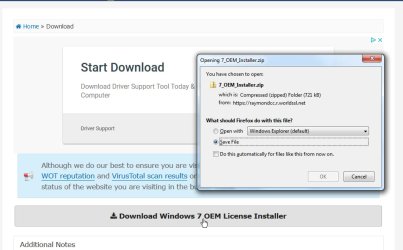
When I click on the link to download 7oeminstaller I get:
Secure Connection Failed
An error occurred during a connection to raymondcc.r.worldssl.net. Cannot communicate securely with peer: no common encryption algorithm(s).

Error code: SSL_ERROR_NO_CYPHER_OVERLAP
If that happens, then the only option I found to complete the download was to change the url of the download from https: to http: to use an insecure connection.

HTH
 

My Computers

System One System Two

  • Computer type
    Laptop
    Computer Manufacturer/Model Number
    Toshiba satellite C650D
    OS
    Windows 7 Home Premium x64
    CPU
    AMD V120
    Memory
    4GB
    Internet Speed
    150 Mbps
    Antivirus
    MSE
    Browser
    IE11, Edge, Firefox
    Other Info
    I also have W7 Pro on my System Two, and several W7 Hyper-V VMs. My other machines run Windows 10/11. Their specs are in my Ten Forums & Eleven Forum profiles.
  • Computer type
    Laptop
    System Manufacturer/Model Number
    Lenovo Thinkpad T430
    OS
    Windows 7 Pro x64
    CPU
    Intel i5-3320M
    Memory
    8 GB
    Hard Drives
    250GB Samsung SSD 860 EVO
    Antivirus
    MSE
Works fine for me.

7oemistaller-download.jpg
 

My Computers

System One System Two

  • Computer type
    PC/Desktop
    OS
    7 X64
    CPU
    i5 8400
    Motherboard
    gigabyte b365m ds3h
    Memory
    2x8gb 3200mhz
    Hard Drives
    various
    PSU
    pure power 11 400w cm
    Case
    Coolermaster
    Cooling
    cryorig m9i
  • Computer type
    PC/Desktop
    OS
    7x64
    CPU
    g5400
    Motherboard
    ga b365m ds3h
    Memory
    8gb ddr4 2400
    PSU
    xfx pro 450w
Flavallee, if anyone else is checking this post on how to do a legit upgrade from W-7 to W-10, great set of directions. I've done hundreds like that. Unfortunately, that's not the case here.
Bree, I'm a small IT business. The "OP" brought the PC to me. Guess you don't read the entire post.

All I really want is a downloadable W-7 iso to restore the W-7 and then do the upgrade the proper way.
 

My Computer

Computer Manufacturer/Model Number
Home Built
OS
Windows 7 Professional
CPU
AMD 64 Athlon X2 Dual Core
Motherboard
Asus M3A
Memory
6 Gig
Graphics Card(s)
Nvidia GeForce 8800GTS
Hard Drives
500GB Seagate (2)
Other Info
Laptop is Gateway NV52 with Windows 7 Home Premium
cfourkays,

I provided the link you requested, Windows 7 x32 and Windows 7 x64.
I've downloaded both from this link, extracted the contents and compared to ISOs from Microsoft.
SHA-256 HASHes match all folders!
Additionally, the ei.cfg utility removes or renames the ei.cfg, which makes all version of Win 7 available

Per forum rules we cannot directly share ISO. Claims to be a copyright violation for the rule.
Admins OKed TeamViewer or similar for M$ ISO sharing.
I'm open to TeamViewer use if you agree!
Snick
 

My Computer

Computer type
PC/Desktop
Computer Manufacturer/Model Number
HP Desktop & Compaq Laptop
OS
Win 10 x64, Linux Lite, Win 7 x64, BlackArch, & Kali
Hard Drives
Samsung 850 Pro 256Gb,
Hitachi HDD 1Tb,
Crucial MX SSD 250Gb
Segate 3Tb USB 3.0 Ext. Backup HDD
Internet Speed
150Mbps dn, 20Mbps up
Antivirus
Avast Free, Malwarebytes Anti-Exploit & Anti-Ransomware
Browser
Firefox, Chrome, Opera, & VPN
Works fine for me.
Yes, it depends on what OS and browser you use to do the download. They need to allow the older insecure TLS1 protocol to be used. That is not the case for the latest Firefox 76.0.1 in W10 which gave the error I quoted above, nor does Edge or IE work.

I gave the 'use http instead' tip in case someone trying to go back to W7 may only have W10 to get the tools.
 

My Computers

System One System Two

  • Computer type
    Laptop
    Computer Manufacturer/Model Number
    Toshiba satellite C650D
    OS
    Windows 7 Home Premium x64
    CPU
    AMD V120
    Memory
    4GB
    Internet Speed
    150 Mbps
    Antivirus
    MSE
    Browser
    IE11, Edge, Firefox
    Other Info
    I also have W7 Pro on my System Two, and several W7 Hyper-V VMs. My other machines run Windows 10/11. Their specs are in my Ten Forums & Eleven Forum profiles.
  • Computer type
    Laptop
    System Manufacturer/Model Number
    Lenovo Thinkpad T430
    OS
    Windows 7 Pro x64
    CPU
    Intel i5-3320M
    Memory
    8 GB
    Hard Drives
    250GB Samsung SSD 860 EVO
    Antivirus
    MSE
Back
Top