
Need New CPU!

nJoyo

New member
Local time
6:50 PM
Messages
107
Location
UK
Hi, I've posted quite a few posts and I was very satisfied with the answers I received and they were reliable, today I'm asking you guys for a new CPU as my one is always at 100% very quick, for instance if I was to run a Safari, it would use most of the CPU (43% Average). I've given a quick specification of the hardware i currently have and would like to only upgrade the CPU, i would like a better CPU which is compatible with the motherboard I have.


My current Specifications are;

OS
Windows 7 Ultimate 64 Bit Operating System
CPU
Intel Core 2 Duo E4500 2.2 GHz
Motherboard
ASUS P5LP-LE
Memory
(1024MB DDR PC2-5300 X2) (1024 DDR PC2-6400 X2)
Graphics Card(s)
NVIDIA GeForce 9500 GT (512MB DDR2 RAM)


Thanks guys for the help!
 

My Computer

OS
Windows 7 Ultimate 64 Bit Operating System
CPU
Intel Core 2 Duo E4500 2.2 GHz
Motherboard
ASUS P5LP-LE
Memory
(1024MB DDR PC2-5300 X2) (1024 DDR PC2-6400 X2)
Graphics Card(s)
NVIDIA GeForce 9500 GT (512MB DDR2 RAM)

My Computer

Computer Manufacturer/Model Number
Custom Build #2
OS
Windows 7 Ultimate 32-Bit
CPU
Intel Core 2 Duo E6300 O.C.'d to 2.80 GHz (For Now >:) )
Motherboard
Gigabyte P43-ES3G
Memory
4x1GB OCZ Dual Channel RAM
Graphics Card(s)
HIS ATI Radeon HD 5770 1GB
Sound Card
Onboard Sound
Monitor(s) Displays
Asus VH-236
Screen Resolution
1920x1080
Hard Drives
WD Caviar-Blue 250 GB SATA
WD Caviar-Green 1.5 TB SATA
PSU
Raidmax RX-630SS
Case
Apevia X-Dreamer
Cooling
Case: Arctic Cooling CPU:Rosewill RCX Z2
Can you give me a option which of the the CPU are the best for me, this has to be better then the current one i am using. Thanks!
 

My Computer

OS
Windows 7 Ultimate 64 Bit Operating System
CPU
Intel Core 2 Duo E4500 2.2 GHz
Motherboard
ASUS P5LP-LE
Memory
(1024MB DDR PC2-5300 X2) (1024 DDR PC2-6400 X2)
Graphics Card(s)
NVIDIA GeForce 9500 GT (512MB DDR2 RAM)
Can you give me a option which of the the CPU are the best for me, this has to be better then the current one i am using. Thanks!

That's going to be entirely dependent on how much money you're willing to spend! Only you can answer that.

Outside of that... this is the only chip in that list that appears to be better than what you currently have.... Core 2 Duo E6x00. I know nothing about the chip... Google is your friend.

today I'm asking you guys for a new CPU as my one is always at 100% very quick, for instance if I was to run a Safari, it would use most of the CPU (43% Average).

You really should start looking at what programs or processes you have running. Replacing the processor isn't going to fix this if you don't deal with unnecessary programs or processes running in the background.

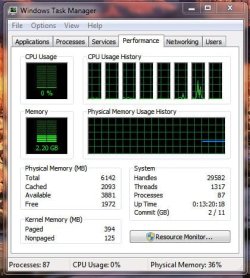
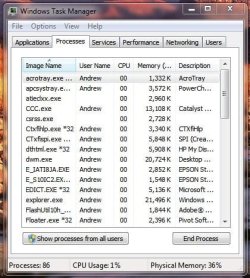
Check Task Manager (Ctrl-Alt-Delete, Task Manager) to see what's running your CPU....

Task Manager - CPU Usage.JPGTask Manager.JPG

Good luck.
 

My Computer

Computer type
PC/Desktop
Computer Manufacturer/Model Number
Custom built by me.
OS
Windows 10 Pro
CPU
Intel Core i7-4770K (3.5Ghz)
Motherboard
Gigabyte G1 Sniper 5 (F10 Bios)
Memory
32 gig Corsair Dominator Platinum (4x8Gig)
Graphics Card(s)
Sapphire Tri-X R9 Fury
Sound Card
Soundblaster ZXR
Monitor(s) Displays
NEC PA242W 24" LCD Monitor
Screen Resolution
1920 x 1200
Hard Drives
Primary - Samsung 850 Pro (512gig), Samsung 840 Pro (256gig), 2TB WD Caviar Black.
PSU
EVGA Supernova 1000 G2
Case
Cooler Master HAF X
Cooling
Corsair H100i with Corsair Air Series SP120 Quiet Fans
Keyboard
Logitech Wireless Wave
Mouse
Logitech Performance MX
Internet Speed
High Speed Cable
Antivirus
Norton Security
Browser
IE11
Other Info
Memory Timings - 1866MHz @ 9-9-9-27-1T @ 1.5 volts
I would go to your favorite PC shop (online or in person) and look at what is compatible and gather the pricing info....then make your choise. The compatibility is the easy part...budgeting might not be.

Anyway, you shouldn't be using half of your CPU power by running a web browser, unless it was getting hammered with a flash game or something like that. You also have to be the first person I've ever seen actually running, or much less even having Safari installed. Even Mac users don't use that crap!
 

My Computer

OS
Windows 7 Ultimate x64 SP1
CPU
Intel Core i7-2600
Motherboard
Gigabyte GA-P67A-UD3P-B3
Memory
12 GB Patriot Extreme DDR3-1333
Graphics Card(s)
Nvidia GTX 470
Monitor(s) Displays
Dell UltraSharp 2209WA
Hard Drives
OCZ Agility3 240 GB, WD5001AALS, WD7501AALS
PSU
OCZ ModStream 700W
Case
CoolerMaster HAF 912 Advanced
Cooling
CoolerMaster Hyper 212 Plus
Outside of that... this is the only chip in that list that appears to be better than what you currently have.... Core 2 Duo E6x00. I know nothing about the chip... Google is your friend.
The difference between the 4500 and a 6300, for example is that the e6300 has a higher FSB (1066 MHz), and intel virtualization.
You can find an e6300 on eBay for like 50 bucks. That's where I got mine.
 

My Computer

Computer Manufacturer/Model Number
Custom Build #2
OS
Windows 7 Ultimate 32-Bit
CPU
Intel Core 2 Duo E6300 O.C.'d to 2.80 GHz (For Now >:) )
Motherboard
Gigabyte P43-ES3G
Memory
4x1GB OCZ Dual Channel RAM
Graphics Card(s)
HIS ATI Radeon HD 5770 1GB
Sound Card
Onboard Sound
Monitor(s) Displays
Asus VH-236
Screen Resolution
1920x1080
Hard Drives
WD Caviar-Blue 250 GB SATA
WD Caviar-Green 1.5 TB SATA
PSU
Raidmax RX-630SS
Case
Apevia X-Dreamer
Cooling
Case: Arctic Cooling CPU:Rosewill RCX Z2
Again, not to lose sight, replacing the CPU isn't necessarily going to get rid of the high processes running on the machine.

So.... outside of getting a better processor, you're not solving the real problem.... the high CPU usage.

My two cents.
 

My Computer

Computer type
PC/Desktop
Computer Manufacturer/Model Number
Custom built by me.
OS
Windows 10 Pro
CPU
Intel Core i7-4770K (3.5Ghz)
Motherboard
Gigabyte G1 Sniper 5 (F10 Bios)
Memory
32 gig Corsair Dominator Platinum (4x8Gig)
Graphics Card(s)
Sapphire Tri-X R9 Fury
Sound Card
Soundblaster ZXR
Monitor(s) Displays
NEC PA242W 24" LCD Monitor
Screen Resolution
1920 x 1200
Hard Drives
Primary - Samsung 850 Pro (512gig), Samsung 840 Pro (256gig), 2TB WD Caviar Black.
PSU
EVGA Supernova 1000 G2
Case
Cooler Master HAF X
Cooling
Corsair H100i with Corsair Air Series SP120 Quiet Fans
Keyboard
Logitech Wireless Wave
Mouse
Logitech Performance MX
Internet Speed
High Speed Cable
Antivirus
Norton Security
Browser
IE11
Other Info
Memory Timings - 1866MHz @ 9-9-9-27-1T @ 1.5 volts
Sygnus is right, don't be too hasty about buying a new processor, it is most likely a software problem.
Have you tried a different browser?
What are you doing when it is doing this?
 

My Computer

Computer Manufacturer/Model Number
Custom Build #2
OS
Windows 7 Ultimate 32-Bit
CPU
Intel Core 2 Duo E6300 O.C.'d to 2.80 GHz (For Now >:) )
Motherboard
Gigabyte P43-ES3G
Memory
4x1GB OCZ Dual Channel RAM
Graphics Card(s)
HIS ATI Radeon HD 5770 1GB
Sound Card
Onboard Sound
Monitor(s) Displays
Asus VH-236
Screen Resolution
1920x1080
Hard Drives
WD Caviar-Blue 250 GB SATA
WD Caviar-Green 1.5 TB SATA
PSU
Raidmax RX-630SS
Case
Apevia X-Dreamer
Cooling
Case: Arctic Cooling CPU:Rosewill RCX Z2
Hi, I've posted quite a few posts and I was very satisfied with the answers I received and they were reliable, today I'm asking you guys for a new CPU as my one is always at 100% very quick, for instance if I was to run a Safari, it would use most of the CPU (43% Average). I've given a quick specification of the hardware i currently have and would like to only upgrade the CPU, i would like a better CPU which is compatible with the motherboard I have.


My current Specifications are;

OS
Windows 7 Ultimate 64 Bit Operating System
CPU
Intel Core 2 Duo E4500 2.2 GHz
Motherboard
ASUS P5LP-LE
Memory
(1024MB DDR PC2-5300 X2) (1024 DDR PC2-6400 X2)
Graphics Card(s)
NVIDIA GeForce 9500 GT (512MB DDR2 RAM)

Thanks guys for the help!

Is windows search still enabled? ;)

Bill
 

My Computer

Computer type
PC/Desktop
Computer Manufacturer/Model Number
Custom Built
OS
Windows 7 Enterprise x64
CPU
i7-5820K
Motherboard
Asus X99 A
Memory
16GB DDR4
Graphics Card(s)
ASUS 2GB Nvidia 960GTX OC'd
Monitor(s) Displays
24"
Screen Resolution
1920x1080
Hard Drives
Samsung 1TB 840 SSD
Western Digital 1TB Black Drive
Seagate 2TB NAS Drive
PSU
Antec Earthwatts 650w
Case
Antec DF-85
Mine is enabled, still.... ;)


My Computer

Computer type
PC/Desktop
Computer Manufacturer/Model Number
Custom built by me.
OS
Windows 10 Pro
CPU
Intel Core i7-4770K (3.5Ghz)
Motherboard
Gigabyte G1 Sniper 5 (F10 Bios)
Memory
32 gig Corsair Dominator Platinum (4x8Gig)
Graphics Card(s)
Sapphire Tri-X R9 Fury
Sound Card
Soundblaster ZXR
Monitor(s) Displays
NEC PA242W 24" LCD Monitor
Screen Resolution
1920 x 1200
Hard Drives
Primary - Samsung 850 Pro (512gig), Samsung 840 Pro (256gig), 2TB WD Caviar Black.
PSU
EVGA Supernova 1000 G2
Case
Cooler Master HAF X
Cooling
Corsair H100i with Corsair Air Series SP120 Quiet Fans
Keyboard
Logitech Wireless Wave
Mouse
Logitech Performance MX
Internet Speed
High Speed Cable
Antivirus
Norton Security
Browser
IE11
Other Info
Memory Timings - 1866MHz @ 9-9-9-27-1T @ 1.5 volts
So, if not replacing the CPU what do you guys say i should do? give me some recommendations. I've checked and there's not much running it's just safari eating up all the usage. and what is system idle process that seems to be up mostly. and which is the better browser to use if safari is an issue, No FIREFOX had many issues with it in the past don't want that browser!
 

My Computer

OS
Windows 7 Ultimate 64 Bit Operating System
CPU
Intel Core 2 Duo E4500 2.2 GHz
Motherboard
ASUS P5LP-LE
Memory
(1024MB DDR PC2-5300 X2) (1024 DDR PC2-6400 X2)
Graphics Card(s)
NVIDIA GeForce 9500 GT (512MB DDR2 RAM)
Well, what are you doing with your browser?
 

My Computer

Computer Manufacturer/Model Number
Custom Build #2
OS
Windows 7 Ultimate 32-Bit
CPU
Intel Core 2 Duo E6300 O.C.'d to 2.80 GHz (For Now >:) )
Motherboard
Gigabyte P43-ES3G
Memory
4x1GB OCZ Dual Channel RAM
Graphics Card(s)
HIS ATI Radeon HD 5770 1GB
Sound Card
Onboard Sound
Monitor(s) Displays
Asus VH-236
Screen Resolution
1920x1080
Hard Drives
WD Caviar-Blue 250 GB SATA
WD Caviar-Green 1.5 TB SATA
PSU
Raidmax RX-630SS
Case
Apevia X-Dreamer
Cooling
Case: Arctic Cooling CPU:Rosewill RCX Z2

My Computer

Computer type
PC/Desktop
Computer Manufacturer/Model Number
Custom built by me.
OS
Windows 10 Pro
CPU
Intel Core i7-4770K (3.5Ghz)
Motherboard
Gigabyte G1 Sniper 5 (F10 Bios)
Memory
32 gig Corsair Dominator Platinum (4x8Gig)
Graphics Card(s)
Sapphire Tri-X R9 Fury
Sound Card
Soundblaster ZXR
Monitor(s) Displays
NEC PA242W 24" LCD Monitor
Screen Resolution
1920 x 1200
Hard Drives
Primary - Samsung 850 Pro (512gig), Samsung 840 Pro (256gig), 2TB WD Caviar Black.
PSU
EVGA Supernova 1000 G2
Case
Cooler Master HAF X
Cooling
Corsair H100i with Corsair Air Series SP120 Quiet Fans
Keyboard
Logitech Wireless Wave
Mouse
Logitech Performance MX
Internet Speed
High Speed Cable
Antivirus
Norton Security
Browser
IE11
Other Info
Memory Timings - 1866MHz @ 9-9-9-27-1T @ 1.5 volts
Uhm....i usually just browse on the internet, research and sometimes play java script games.
 

My Computer

OS
Windows 7 Ultimate 64 Bit Operating System
CPU
Intel Core 2 Duo E4500 2.2 GHz
Motherboard
ASUS P5LP-LE
Memory
(1024MB DDR PC2-5300 X2) (1024 DDR PC2-6400 X2)
Graphics Card(s)
NVIDIA GeForce 9500 GT (512MB DDR2 RAM)
So is it using 43% or whatever when you start safari and let it idle?
 

My Computer

Computer Manufacturer/Model Number
Custom Build #2
OS
Windows 7 Ultimate 32-Bit
CPU
Intel Core 2 Duo E6300 O.C.'d to 2.80 GHz (For Now >:) )
Motherboard
Gigabyte P43-ES3G
Memory
4x1GB OCZ Dual Channel RAM
Graphics Card(s)
HIS ATI Radeon HD 5770 1GB
Sound Card
Onboard Sound
Monitor(s) Displays
Asus VH-236
Screen Resolution
1920x1080
Hard Drives
WD Caviar-Blue 250 GB SATA
WD Caviar-Green 1.5 TB SATA
PSU
Raidmax RX-630SS
Case
Apevia X-Dreamer
Cooling
Case: Arctic Cooling CPU:Rosewill RCX Z2
When Idle, it uses around 20% but when searching and surfing it drains loads...
 

My Computer

OS
Windows 7 Ultimate 64 Bit Operating System
CPU
Intel Core 2 Duo E4500 2.2 GHz
Motherboard
ASUS P5LP-LE
Memory
(1024MB DDR PC2-5300 X2) (1024 DDR PC2-6400 X2)
Graphics Card(s)
NVIDIA GeForce 9500 GT (512MB DDR2 RAM)
and sometimes i play games e.g. sims 3 and it wont let me play properly and it will just keep lagging....O.o
 

My Computer

OS
Windows 7 Ultimate 64 Bit Operating System
CPU
Intel Core 2 Duo E4500 2.2 GHz
Motherboard
ASUS P5LP-LE
Memory
(1024MB DDR PC2-5300 X2) (1024 DDR PC2-6400 X2)
Graphics Card(s)
NVIDIA GeForce 9500 GT (512MB DDR2 RAM)
if you go into task manager while it is idling, and go to processes what processes do you see that are using cpu?
 

My Computer

Computer Manufacturer/Model Number
Custom Build #2
OS
Windows 7 Ultimate 32-Bit
CPU
Intel Core 2 Duo E6300 O.C.'d to 2.80 GHz (For Now >:) )
Motherboard
Gigabyte P43-ES3G
Memory
4x1GB OCZ Dual Channel RAM
Graphics Card(s)
HIS ATI Radeon HD 5770 1GB
Sound Card
Onboard Sound
Monitor(s) Displays
Asus VH-236
Screen Resolution
1920x1080
Hard Drives
WD Caviar-Blue 250 GB SATA
WD Caviar-Green 1.5 TB SATA
PSU
Raidmax RX-630SS
Case
Apevia X-Dreamer
Cooling
Case: Arctic Cooling CPU:Rosewill RCX Z2
Currently it's using up system idle process at 95% stable..
 

My Computer

OS
Windows 7 Ultimate 64 Bit Operating System
CPU
Intel Core 2 Duo E4500 2.2 GHz
Motherboard
ASUS P5LP-LE
Memory
(1024MB DDR PC2-5300 X2) (1024 DDR PC2-6400 X2)
Graphics Card(s)
NVIDIA GeForce 9500 GT (512MB DDR2 RAM)
no, i meant when safari is idle, and you go to processes, what processes are using cpu power?
 

My Computer

Computer Manufacturer/Model Number
Custom Build #2
OS
Windows 7 Ultimate 32-Bit
CPU
Intel Core 2 Duo E6300 O.C.'d to 2.80 GHz (For Now >:) )
Motherboard
Gigabyte P43-ES3G
Memory
4x1GB OCZ Dual Channel RAM
Graphics Card(s)
HIS ATI Radeon HD 5770 1GB
Sound Card
Onboard Sound
Monitor(s) Displays
Asus VH-236
Screen Resolution
1920x1080
Hard Drives
WD Caviar-Blue 250 GB SATA
WD Caviar-Green 1.5 TB SATA
PSU
Raidmax RX-630SS
Case
Apevia X-Dreamer
Cooling
Case: Arctic Cooling CPU:Rosewill RCX Z2
Back
Top